
Claim
A Claim in Salesforce is the standard object that records a policyholder's request for payment, repair, or benefit under an active Insurance Policy.
Definition
A Claim in Salesforce is the standard object that records a policyholder's request for payment, repair, or benefit under an active Insurance Policy. It is part of the Insurance Claims Management data model in Financial Services Cloud, and it ties together the policy, the people involved, the coverages that apply, and the money set aside and paid out.
The Claim record acts as the file that an adjuster works from first notice to closure. Each claim holds the loss details and status, and it parents a set of related records: Claim Participants, Claim Coverages, Claim Items, Claim Cases, and the reserve and payment detail that track the carrier's financial exposure. Because everything hangs off one record, the claim becomes the single place to see what happened, who is involved, and what the carrier owes.
How the Claim object holds an insurance file together
The Claim record and its core fields
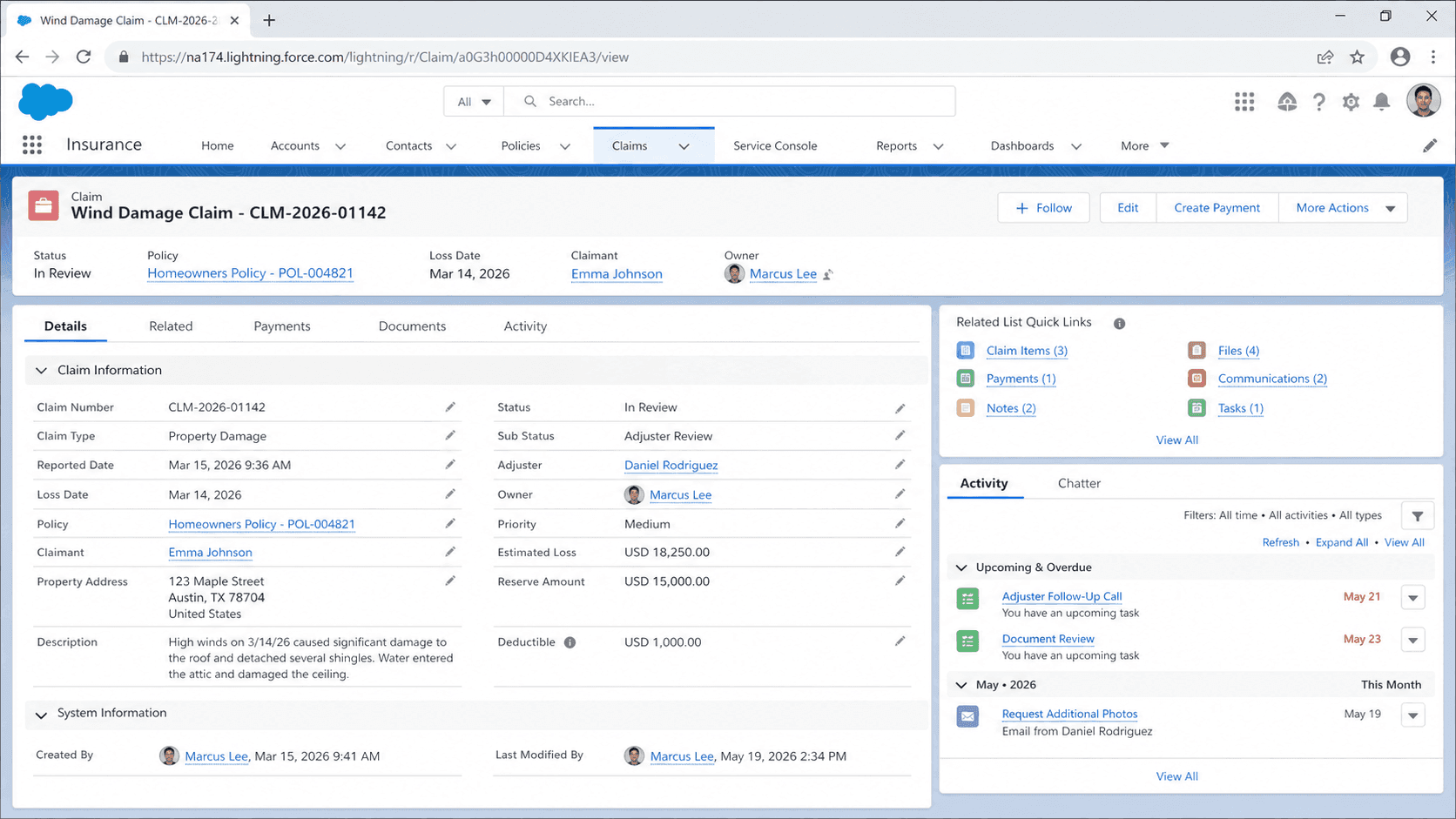
The Claim object is the parent of the whole file. Standard fields capture the claim number (the Name field), a link to the Insurance Policy the loss is filed against, the claim type (such as auto, home, or life), the loss date, a loss description, and a status that moves the claim through its lifecycle. Salesforce ships the object as part of Financial Services Cloud, so carriers get a defined schema instead of building one from scratch. The record does not try to hold every detail in its own fields. Instead, it relies on child objects for the messy parts of a claim: the items that were damaged, the people involved, and the coverages that apply. That keeps the parent record readable while letting one claim carry many damaged assets, many participants, and many coverage lines. An adjuster opening the claim sees the summary up top and drills into the related lists for the rest. This parent-and-children shape is what lets a simple fender bender and a multi-party liability case live in the same object without one design fighting the other.
First Notice of Loss and how a claim is created
First Notice of Loss, or FNOL, is the moment a customer reports that something went wrong. In Financial Services Cloud, claimants submit through guided FNOL OmniScripts that walk them through the loss step by step. The OmniScript collects the policy, the date, what was damaged, and who was hurt, then hands that to the platform to build the records. Behind the guided screen sits a service called createUpdateClaim. It takes a structured JSON payload (a top-level claimJson object holding the policy details, damaged property items, and injured party items) and creates the Claim plus its related records in one call. Solution architects shape that JSON so the right roles, assets, and attributes land on the claim. End users never touch it; they just answer questions in the OmniScript. The result is a fully formed claim file the instant the report is done, routed to the team that should work it. Capturing FNOL cleanly matters because a claim that starts with bad data drags rework through every later stage.
Claim Coverages, claimants, and involved items
A Claim Coverage record ties a specific part of the policy to the claim. When a loss is reported, the carrier decides which coverages apply, and each one is opened against the claim. You open a coverage from the Financials tab on the claim record by choosing Open Coverage and filling in a small set of fields. Those fields are the claimant (the person filing for that coverage), the involved item (the property tied to the loss), the insured item (the asset the policy actually covers), the coverage itself (the policy provision in play), and the loss reserve. One claim can carry several coverages, because a single incident often touches more than one part of the policy. A car accident, for example, might open separate coverages for vehicle damage, medical payments, and liability. Splitting the claim this way lets the carrier track exposure and payments per coverage rather than as one lump sum. It also keeps the financial picture honest when one coverage settles quickly and another stays open for months of investigation.
Reserves and how the system tracks them
A loss reserve is the money the carrier sets aside to settle a claim. It covers the expected payout plus related costs like investigation, legal fees, and administration. Reserves are not just a number an adjuster types once; they are tracked through their own records so every change is auditable. When you open a coverage and enter a loss reserve, the platform does three things automatically. It creates the Claim Coverage record that stores the reserve, it generates a Claim Coverage Reserve Adjustment record that logs the opening amount, and it updates the financial summary that shows estimated exposure. If the adjuster later revises the estimate, updating the loss item and saving creates another adjustment record capturing the change. Payments work in parallel through their own coverage payment detail and adjustment records. The carrier ends up with a running history of what was reserved, when it changed, and what was paid. That trail is not optional polish. Reserve estimates that drift without a record are a regulatory red flag, and the adjustment objects are what make the numbers defensible during an audit.
Participants, items, and the rest of the data model
Real claims involve more than the policyholder. The Claim Participant object captures everyone tied to the file: the claimant, the insured, adjusters, witnesses, and third parties like body shops or medical providers. Each participant carries a role, which is how the createUpdateClaim payload tags a person as Claimant or Insured when the claim is built. Around participants sit the rest of the model. Claim Item records describe each damaged thing or covered service. Insurance Claim Asset links the physical assets involved. Claim Case connects the claim to case management when service work is needed. Claim Recovery tracks money the carrier gets back, which is how subrogation against an at-fault party is recorded. Claim Attribute and Claim Item Attribute let a carrier extend the standard fields without custom objects. None of these stand alone; they all point back to the Claim, which is why the record works as a single source of truth. An adjuster, a finance analyst, and a compliance reviewer can each open the same claim and find the slice they care about.
Why the claim experience defines the carrier
For an insurance carrier, the claim is the promise coming due. A customer pays premiums for years and judges the whole relationship by how the one claim they file gets handled. Speed, accuracy, and a sense that someone is paying attention drive whether that customer renews and what they tell others. So the data model is not just plumbing; it shapes the experience. Putting the claim on one record connected to the policy and the person lets an adjuster see the full context without hunting across systems. Recent service interactions, policy history, and prior claims sit a click away, so the conversation with the customer is informed rather than cold. Routing the claim to the right team at FNOL means it lands with someone who can act. Tracking reserves and payments in structured records means finance and compliance are not chasing spreadsheets at quarter close. The carriers that treat the claim file as the center of the operation, rather than an afterthought bolted to a policy system, are the ones that turn a stressful moment into a reason to stay.
Create and open an insurance Claim in Financial Services Cloud
In Financial Services Cloud Insurance, most claims are created through a guided FNOL OmniScript that calls the createUpdateClaim service. You can also work the claim directly from its record. The flow below covers what an admin or adjuster touches to get a claim from first notice to an open coverage with a reserve.
- Capture the loss through FNOL
Have the claimant complete the First Notice of Loss OmniScript. It collects the policy, loss date, damaged property, and injured parties, then passes a claimJson payload to createUpdateClaim, which builds the Claim and its related records.
- Confirm the claim record
Open the resulting Claim. Check the claim number, linked Insurance Policy, claim type, loss date, loss description, and status. Fix anything the intake form got wrong before adjusters start working it.
- Add participants and items
Verify the Claim Participants carry the right roles (Claimant, Insured, and any third parties) and that Claim Item records describe each damaged asset or covered service.
- Open a claim coverage with a reserve
On the Financials tab, choose Open Coverage. Set the claimant, involved item, insured item, and coverage, then enter the loss reserve. The platform creates the Claim Coverage and a reserve adjustment record automatically.
The active policy the loss is filed against. The claim cannot validate coverage without it.
The kind of claim, such as auto, home, or life. It drives routing and which coverages apply.
When the loss occurred. Used to confirm the policy was in force and to start lifecycle timers.
The lifecycle stage, from submitted through closure, that tells everyone where the claim stands.
The estimated amount set aside on a coverage. Entering it creates the Claim Coverage and its first reserve adjustment record.
- Standardize Loss Type and Cause of Loss as picklists. Free text on these fields makes audit and reporting almost impossible.
- Deduplicate FNOL submissions across channels. The same loss reported by phone and by app can create two claims and operational chaos.
- Treat reserve changes as auditable events. The adjustment records are what make the numbers defensible, so do not bypass them with raw field edits.
Prefer this walkthrough as its own page? How to Claim in Salesforce, step by step
Trust & references
Cross-checked against the following references.
Straight from the source - Salesforce's reference material on Claim.
Hands-on resources to go deeper on Claim.
About the Author
Dipojjal Chakrabarti is a B2C Solution Architect with 29 Salesforce certifications and over 13 years in the Salesforce ecosystem. He writes and edits salesforcedictionary.com, published by KineticBit Inc., to help admins, developers, architects, and cert/interview candidates sharpen their fundamentals. More about Dipojjal.
Test your knowledge
+5 pts / dayQ1. What does the Claim object represent in Salesforce Insurance?
Q2. On the Claim record, what is the purpose of the Reserve Amount field?
Q3. Which sequence reflects how a Claim typically moves through its lifecycle?
Discussion
Loading discussion…