
Agentforce Contact Center: The Complete 2026 Guide to Salesforce's Native CCaaS
How the newly GA'd contact center unifies voice, routing, and Data Cloud, what TTEC Digital's six-week rollout proved, and the setup order that actually works.

Your agent has two windows open. On the left, a CCaaS softphone showing an inbound number and a call timer. On the right, Salesforce, where the screen pop was supposed to land and did not, because the middleware that maps the caller's number to a Contact silently dropped the record. So the agent asks the caller for an account number. The caller already typed that number into the IVR ninety seconds ago. Third time this week.
Nobody designed that experience. It accumulated. You bought a telephony platform, bought a CRM, bought a connector, wrote some Apex to reconcile the transcript store with the Case object, and then spent four years keeping the seams from splitting. The integration was never the product. It was rent you paid to have a phone system and a customer record in the same room.
Salesforce's answer, as of March 2026, is to stop renting. Agentforce Contact Center puts voice, digital routing, customer data, and AI agents inside one platform instead of three connected ones. This guide covers what the product actually is, how the architecture differs from a bolted-on CCaaS, what the first live deployment proves and does not prove, the setup order that works, and where the offering is still genuinely thin.
What Agentforce Contact Center Actually Is
Agentforce Contact Center is a CRM-native contact center product that went GA on March 10, 2026, and was announced at Enterprise Connect 2026 two days later. It is sold as an add-on to existing Agentforce Service customers, and availability at launch is limited to the United States and Canada.
The product bundles native voice telephony, digital channel routing, supervisor tooling, and a single agent console into one licensed tier. Salesforce is calling it the first truly agentic contact center, which is marketing, but the underlying claim is specific enough to test: voice, AI, and CRM are handled as one system rather than three products introduced to each other by a connector.
Kishan Chetan, EVP and GM of Agentforce Service, framed the pitch this way: "Contact centers patched together with legacy tools cannot bridge the gap between AI and CRM. By treating voice, AI, and CRM as a single service nervous system, we enable human and AI teams to turn every interaction into a resolution."
Strip the nervous system metaphor and the argument holds up. Every latency problem, every context loss, every "can you repeat your account number" moment in a traditional stack happens at a boundary between systems. Remove the boundary and you remove that class of failure. You do not remove all failures, which we will get to.
The Architecture: One System Instead of Three Bolted Together
The stack has four pieces, and none of them is new on its own. What changed is that they now share a runtime instead of an API contract.
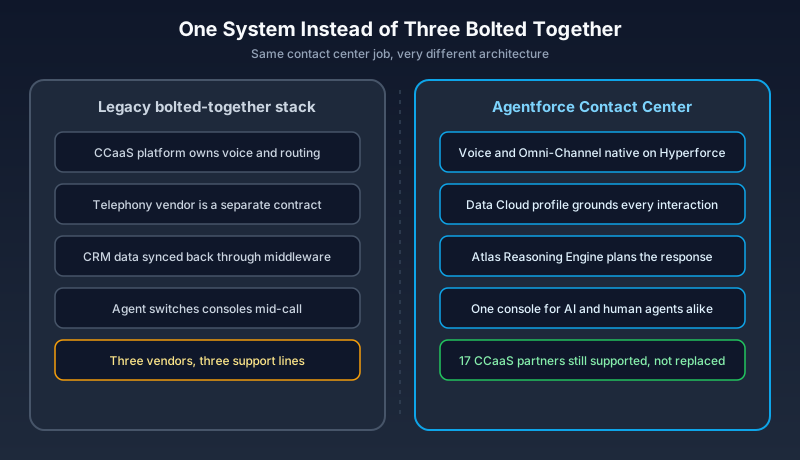
Voice is native. Calls terminate on Salesforce-provisioned numbers rather than arriving through a third-party carrier and a CTI adapter. Digital interactions route through Omni-Channel, the same routing engine you already use for cases and chats, so a voice call and a WhatsApp thread are queued by the same rules and counted against the same capacity model. Customer context comes from Data Cloud, which means the profile the AI agent reasons over is the unified one, not whatever fields the connector happened to map. Reasoning runs on the Atlas Reasoning Engine, the same engine behind the rest of Agentforce. All of it sits on Hyperforce, which matters mostly for data residency conversations with your security team.
Compare that to the integrated model. In a bolted stack, the transcript lives in the CCaaS vendor's cloud, the customer profile lives in Salesforce, and something in between decides which parts of each to show the agent. Reporting requires joining two datasets that disagree about what a "contact" is. An AI agent added to that stack reasons over whichever slice the integration exposed, which is usually less than you think.
The native version collapses those hops. The call, the transcript, the profile, and the agent's reasoning context are the same records in the same org. That is the entire architectural argument, and it is a good one.
How This Is Different From Agentforce Voice and Agentforce Service
Three product names, and Salesforce has done a poor job separating them.
Agentforce Voice is the phone channel itself: the AI agent that picks up, listens, acts on CRM data, and speaks back. It is a capability, not a contact center. Our Agentforce Voice guide covers the call pipeline and sentiment handling in detail, and this guide will not repeat that.
Agentforce Service is the rebrand of Service Cloud into the Agentforce naming scheme: cases, knowledge, entitlements, and service agents. Our Agentforce Service guide covers that surface.
Agentforce Contact Center is the tier that packages voice, digital routing, supervisor tooling, and the unified console together and sells it as an actual replacement for your CCaaS platform. If you have used Service Cloud Voice with a partner telephony provider, this is the version where Salesforce supplies the telephony instead of adapting to someone else's. Voice is a feature. Service is the application. Contact Center is the thing you would put on an RFP against Genesys.
The First Live Deployment: What TTEC Digital and Compass Working Capital Prove
On July 23, 2026, TTEC Digital announced the first live production customer on Agentforce Contact Center: Compass Working Capital, a non-profit financial services organization that helps low-income families build savings and assets. Compass has served more than 7,300 families since 2010 and helped build $35 million in savings through its programs.
The deployment took six weeks from kickoff to production, delivered by TTEC Digital as a Salesforce Forward Deployed Engineering Partner. What went live: an AI voice agent handling inbound inquiries and appointment scheduling, real-time call transcription with automated data capture and task creation, AI-to-human handoff that carries context across, and a single console with no separate CCaaS window. Estimated impact is around 6,000 staff hours saved annually.
George Reuter, Managing Director of Impact and Innovation at Compass, described the work plainly: "TTEC Digital implemented Agentforce Contact Center in a way that was designed around our needs, helping calls reach the right coach."
That last clause is the part worth reading twice. The value was not the AI answering questions. It was routing a caller to the correct human coach on the first attempt. Which is, historically, the hardest thing a contact center does and the thing your IVR is worst at.
What this case proves: the product runs in production, the console consolidation is real, and a focused scope can ship fast. What it does not prove: that six weeks generalizes to a 500-seat enterprise with fourteen queues, union scheduling rules, and a PCI-scoped payment flow. One reference customer is a signal, not a benchmark.
Setting It Up: The Order That Actually Works
Setup fails most often on sequence, not on any individual step. Build in the wrong order and you spend an afternoon staring at a Voice channel that will not save because the flow it needs does not exist yet. A hands-on setup walkthrough covers the click paths; here is the order that keeps you moving forward.
Phase 1: Agent and routing. Create and activate an Agentforce Service Agent. Build a routing configuration using Least Active or Most Available with capacity at 100%. Create a fallback queue that supports Voice Call objects and assign real human users to it. Then design two Omni-Channel flows: one that routes the initial interaction to the AI agent, one that routes escalations to the human queue.
Phase 2: User permissions. Assign three permission sets to your admins: Agentforce Contact Center Admin (Salesforce Voice), Agentforce Contact Center Rep (Salesforce Voice), and Agentforce Contact Center Supervisor (Salesforce Voice). Then refresh your browser. The Communication Channels options in Setup will not appear until you do, and a surprising number of people conclude the feature is missing rather than reloading the page.
Phase 3: Telephony. Claim a phone number, either a US or Canada 10-digit long code or a toll-free number. You request it from Setup and it moves through a provisioning queue until the status flips to Live, so start this early. Create a Voice channel using Omni-Flow as the routing type and link it to your initial routing flow. Set the claimed number as default caller ID for outbound. Enable call recording and transcription.
Phase 4: Activation. Activate the Voice channel. Configure telephony inside the Agentforce Service Agent by adding connections and linking the flows. Test end-to-end routing before anyone announces a go-live date.
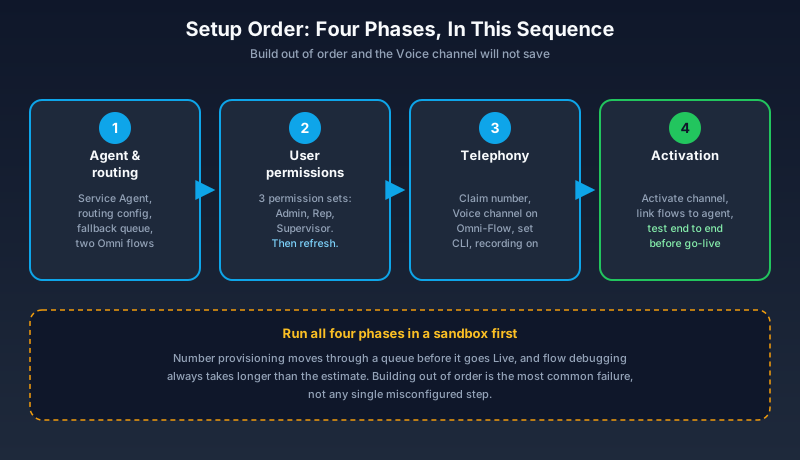
Do all of this in a sandbox first. Not because the steps are risky, but because number provisioning latency and flow debugging both take longer than the estimate you gave your project manager.
Routing and Escalation: Where Most Pilots Fail
Here is the path a call takes. The caller dials your claimed number. The Voice channel receives it and hands off to the initial Omni-Channel flow. That flow routes the interaction to your Agentforce Service Agent, which reasons over the caller's request using Data Cloud context and either resolves it or decides it cannot. On escalation, the second flow takes over and routes to the fallback queue, where a human picks it up with the transcript already attached.
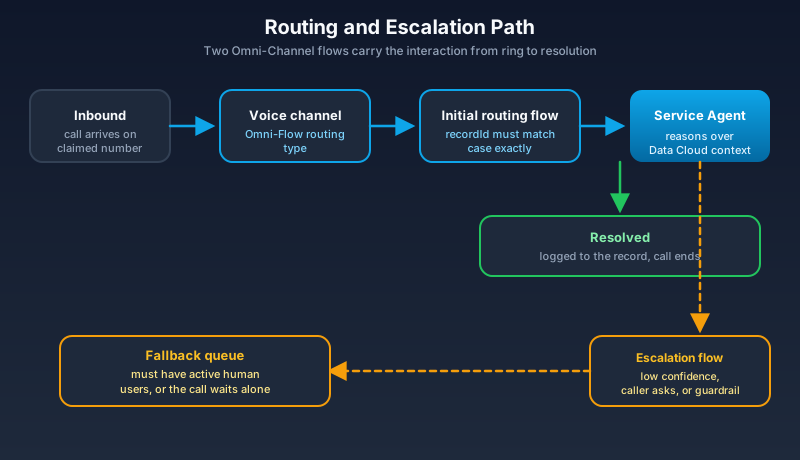
Two things break this, and both are unglamorous.
The first is the recordId variable inside your Omni-Channel routing flows. It is case-sensitive. A variable named RecordId or recordid will not throw an error you can see. The flow runs, the routing silently does nothing, and the call goes nowhere while you check the agent configuration for the fourth time. Check the casing before you check anything else.
The second is the fallback queue. A queue with a routing configuration and zero human members is a queue that accepts an escalated call and holds it. The AI agent did its job correctly, decided the situation needed a person, and handed the caller into an empty room. Staff the queue with real, active, licensed users before go-live, and verify their Omni-Channel presence status actually allows them to receive Voice Call work items.
Test both paths end to end. Not the happy path where the AI resolves the request. The escalation path, with a real human on the other side, in a sandbox, before production.
Pricing, Licensing, and the Early Adopter Program
Agentforce Contact Center is an add-on to Agentforce Service, available in the US and Canada. Salesforce has not published per-seat pricing, and I am not going to invent a number for you. Launch coverage has been similarly light on figures, which usually means pricing is still negotiated deal by deal.
So ask your account executive a question specific enough that a vague answer is obviously vague: is Agentforce Contact Center priced per seat on top of my existing Agentforce Service licenses, and are telephony minutes and AI consumption billed separately from that seat price or included in it? Get the answer in writing. The gap between "included" and "separately metered" is where contact center budgets go to die.
There is also an early adoption track. The Agentforce Contact Center 100 program gives the first 100 organizations direct engineering support, executive collaboration, and commercial incentives. Accenture, Deloitte, IBM Consulting, and PwC are named implementation partners. If you were going to pilot this in 2026 anyway, the commercial incentives are the cheapest they will ever be, and engineering access during a v1 rollout is worth more than the discount.
Should You Migrate, or Just Add It?
Salesforce is not forcing anyone off their current platform. The company still supports 17 existing telephony and CCaaS partner integrations, and those relationships are not being deprecated to make room for this. That framing is deliberate, and it should shape how you evaluate.
Pilot Agentforce Contact Center alongside your existing CCaaS if your contract has more than a year left, your current platform handles workforce management and quality monitoring competently, or your routing logic encodes years of operational rules nobody has documented. Stand up one queue, one number, one use case, and measure it against the equivalent flow in your incumbent.
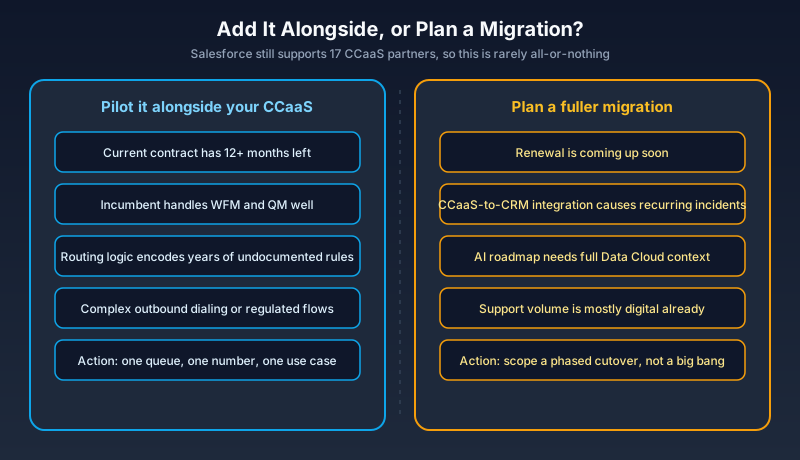
Consider a fuller move when your renewal is close, when the integration layer between CCaaS and CRM is itself a recurring source of incidents, or when your roadmap depends on AI agents having complete customer context that the connector cannot currently provide. If most of your support volume is already digital and your voice channel is a small, well-understood slice, the native path gets simpler and the migration risk drops. If you are running complex outbound dialing, strict workforce optimization, or regulated call flows, keep your incumbent and add this at the edges. For teams still sorting out which clouds own which processes, our Sales Cloud vs Service Cloud comparison is a useful sanity check before you redraw the contact center.
Where It Still Falls Short
US and Canada only. If you run a global support organization, this is not a platform decision yet, it is a regional pilot. Salesforce has not committed publicly to an expansion timeline, so plan around the two countries you can actually buy in.
Undisclosed pricing makes total cost of ownership modeling guesswork. You cannot build a credible business case against your Genesys or NICE renewal without knowing whether telephony minutes are metered separately, and right now that answer comes from a sales conversation rather than a price book.
The six-week deployment is a good story and a poor planning input. It was a focused non-profit use case, delivered by a Forward Deployed Engineering Partner, on a product Salesforce had every reason to make succeed publicly. Your timeline includes procurement, security review, and the queue nobody remembered until week five.
And the risk any agentic voice system carries: the agent can be confidently wrong. It can misread intent, take an action the caller did not ask for, or fail to escalate when it should. Native architecture reduces context loss. It does not make the reasoning correct. Instrument your escalation rate, review transcripts weekly for the first two months, and set a containment target you would be comfortable defending to a customer whose call went badly.
What to Do Next
Spin up a sandbox this week and run Phase 1 and Phase 2 end to end: one Agentforce Service Agent, one routing configuration, one fallback queue with your own user in it, two Omni-Channel flows, three permission sets. Do not claim a number yet. Just build the routing skeleton and confirm an interaction reaches the AI agent and then reaches you on escalation. That takes an afternoon, costs nothing, and tells you more about whether this fits your org than any demo will.
About the Author
Dipojjal Chakrabarti is a B2C Solution Architect with 29 Salesforce certifications and over 13 years in the Salesforce ecosystem. He writes and edits salesforcedictionary.com, published by KineticBit Inc., to help admins, developers, architects, and cert/interview candidates sharpen their fundamentals. More about Dipojjal.
Share this article
Sources
Related dictionary terms
Practise it
Five questions on Agentforce Specialist
Exam-style questions with an explanation after each one. No account needed, and your answers build a weak-topic map once you have one.
Keep reading

Agentforce Service: The Complete 2026 Guide (Formerly Service Cloud)
Service Cloud is now Agentforce Service. This 2026 guide cuts through the rebrand: the Service Agent, IT Service, Agentic Milestones, knowledge grounding, and the real deflection numbers.

Agentforce Voice: The Complete 2026 Guide to AI Phone Agents
Agentforce Voice puts an AI agent on your phone line: it listens, acts on CRM data, and escalates with context. Summer '26 added Mobile SDK GA and SIP routing. How it works, what it costs, where it falls short.

Salesforce Sales Cloud vs Service Cloud: Which Do You Need in 2026?
Sales Cloud and Service Cloud share a platform but solve different problems. Here is the 2026 comparison. Features, pricing, decision scenarios, and how Agentforce fits both.
Comments
No comments yet. Start the conversation.
Sign in to join the discussion. Your account works across every page.