
The New Agentforce Builder and Agent Script: What Changes July 13, 2026, and How to Upgrade
Salesforce moved agent building out of Setup into Agentforce Studio and shipped Agent Script. Here is what closes the week of July 13, what keeps working, and how to upgrade an agent you already built.

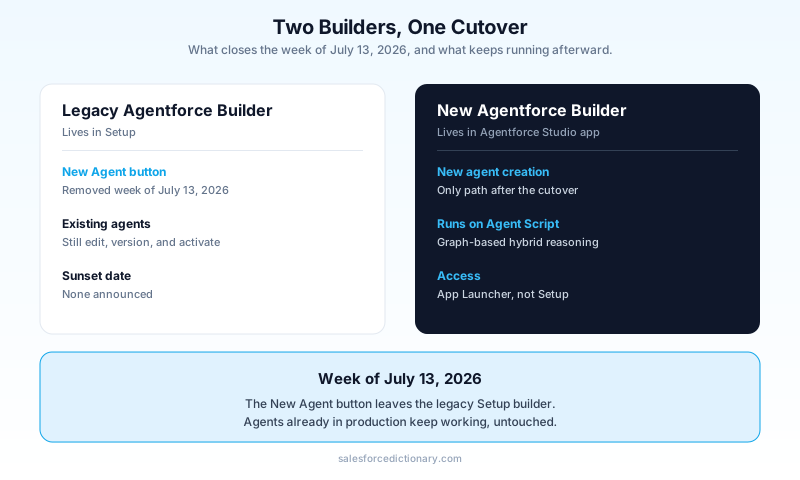
You search Setup for [Agentforce Agents](/terms/agentforce-agents), click the New Agent button you have used a dozen times this year, and starting the week of July 13, it is not there. The button did not move to a submenu. It was removed from the legacy builder on purpose, and the only place left to create an agent is a new app called Agentforce Studio that most admins have never opened.
That is the change nobody warned you about at standup. This guide walks through what Salesforce actually shipped in Summer '26, what Agent Script is and why it exists, exactly what closes on July 13 versus what keeps working, and the step by step to upgrade an agent you already have in production without breaking it.
What actually happened
Salesforce built a second agent builder from scratch and put it in a new home. The old builder lived in Setup, which meant only users with Setup access could touch it. The new Agentforce Builder lives in a standalone app called Agentforce Studio, reachable from the App Launcher (App Launcher, then Agentforce Studio, then Agents). Moving agent creation out of Setup is a deliberate call to open agent building beyond the Setup-authorized crowd.
The interesting part is under the hood. The new builder runs on an enhanced, graph-based version of the Atlas Reasoning Engine, and it introduces what Salesforce calls hybrid reasoning. In the old model, you wrote natural-language instructions and Atlas inferred the entire action flow from them probabilistically. It read your intent and guessed the path. That worked until it did not, and when it failed you had very little control over why.
Hybrid reasoning splits the difference. Some parts of an agent stay conversational, interpreted by the LLM at runtime. Other parts become deterministic and scripted, so they execute the same way every time. You decide which is which. That single change is the reason the rest of this release exists, and it is a genuine improvement, not marketing.
Why build a whole new tool instead of patching the old one? Because the old builder's mental model was baked into its UI. It assumed natural-language instructions all the way down. Bolting deterministic control onto that would have meant fighting the product's own assumptions. A clean build let Salesforce design around determinism from the first screen.
What Agent Script actually is
Agent Script is the new language you use to define an agent. It is a simple, high-level scripting language that mixes plain natural language with deterministic programming constructs. If you have written a Flow formula and read a paragraph of documentation, you already have the range to read it.
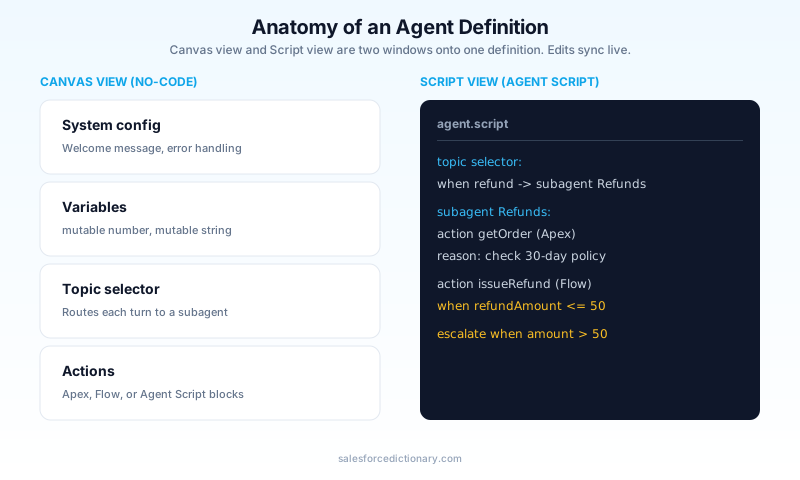
The building blocks are straightforward. You declare variables with explicit types, like mutable number or mutable string, and the agent tracks their values across a conversation. A topic selector routes the conversation by evaluating which topic or subagent should handle the current turn and handing off to it. Actions chain together and can be Apex, Flow, or blocks of Agent Script itself. Reasoning instructions tell the LLM how to think through a step. System-level config covers the housekeeping: welcome messages, error handling, fallback behavior.
The builder gives you two linked views of the same agent. Canvas view is the no-code, visual surface where you configure topics and actions by clicking. Script view is the full agent definition written out as Agent Script text. Edit in one and the other updates live. You are never locked into code or clicks; they are two windows onto one definition.
Here is the shape of an Agent Script block, simplified to show the structure rather than exact syntax:
variable mutable number refundAmount
variable mutable string orderStatus

topic selector:
  when the user asks about a delivered order that never arrived
    -> subagent "Order Investigation"
  when the user asks for a refund
    -> subagent "Refunds"

subagent "Refunds":
  action getOrder (Apex: OrderLookupController)
  reason: confirm the order is eligible under the 30-day policy
  action issueRefund (Flow: Process_Refund) when refundAmount <= 50
  escalate to human when refundAmount > 50
Read that top to bottom and you can see the point. The routing is explicit. The refund threshold is a hard rule, not a suggestion the model might round up on a bad day. The reasoning step is still there for the fuzzy judgment. Deterministic where it must be, conversational where it helps.
The deterministic-versus-conversational choice is not academic. Every step where you can name the exact rule, a dollar threshold, a status value, a record type, belongs in a deterministic construct, because the model has no business improvising there. Every step that needs judgment about messy human phrasing belongs in a reasoning instruction, because a hard rule cannot parse "my thing is broken and I am furious." The skill the new builder asks of you is drawing that line correctly, and Agent Script makes the line visible in a way the old instruction blob never did.
One terminology note that will trip you up in the docs. What the old model called agent "topics" is increasingly called "subagents" in the new one: narrower agents that a parent agent orchestrates. Salesforce's own documentation mixes both words right now during the transition, so when you read "topic" in one page and "subagent" in the next, they are pointing at the same idea.
What changes on July 13, and what doesn't
Here is the precise scope of the deadline, because the internet has already blurred it.
Starting the week of July 13, 2026, the New Agent button is removed from the legacy Agentforce Builder in Setup. After that date, you cannot create a new agent in Setup at all. Every new agent, from that point on, is born in the new Agentforce Builder inside Agentforce Studio. That is the whole change. One button, one creation path, closing.
Now the part that matters more for your blood pressure. Existing agents you already built in the legacy Setup builder are untouched. You can still open them in Setup, edit them, activate and deactivate them, create new versions, and manage them exactly as before. Nothing you have in production stops working on July 13. No agent gets converted against your will. No conversation drops.
And the part Salesforce has been quiet about: there is no announced sunset date for the legacy builder itself. Only the ability to create new agents in it is going away. The legacy builder keeps running for managing what already exists, indefinitely, with no published end date. So you are not being forced to migrate anything on the 13th. You are only being told where new work has to start.
That distinction is the whole ballgame for planning. The deadline is real but narrow. If your team has a backlog of agents to build, the 13th is a hard wall: build them in Studio or do not build them. If your team just maintains a few live agents, the 13th changes nothing about your Monday.
The upgrade path for an agent you already built
You do not have to upgrade. But the new determinism is worth having, and Salesforce built a conversion tool so you do not rebuild from scratch. The upgrade is available now, in Summer '26, and it is non-destructive.
The flow starts in a familiar place. Go to Setup, then Agentforce Agents. Find the agent you want to move. Open the dropdown next to it and choose Upgrade. That kicks off a conversion that creates a new version of the agent inside the new builder and Agent Script. Salesforce automatically carries over the pieces that used to take days to reproduce by hand: subagents, actions, system messages, settings, data, and connections. You are not retyping instructions or re-wiring Apex.
The word "version" is doing important work there. The upgrade does not overwrite your original. The agent you have in the legacy builder stays exactly where it is, still live, still yours to fall back to. The upgrade produces a parallel Agent Script version in the new builder. If the conversion looks wrong, you have lost nothing but the time it took to run.
After the upgrade, do not stop and call it done. Salesforce includes a built-in optimization tool that reviews the converted natural-language instructions and adds deterministic controls to raise reliability. This is the step that actually earns you the determinism the whole release is about. It is a manual step. The conversion gets your agent into the new world; the optimization tool is what makes it better than it was, by turning soft instructions into hard rules where it can. Run it. Then read what it changed, because it is showing you exactly which parts of your old agent were running on probability.
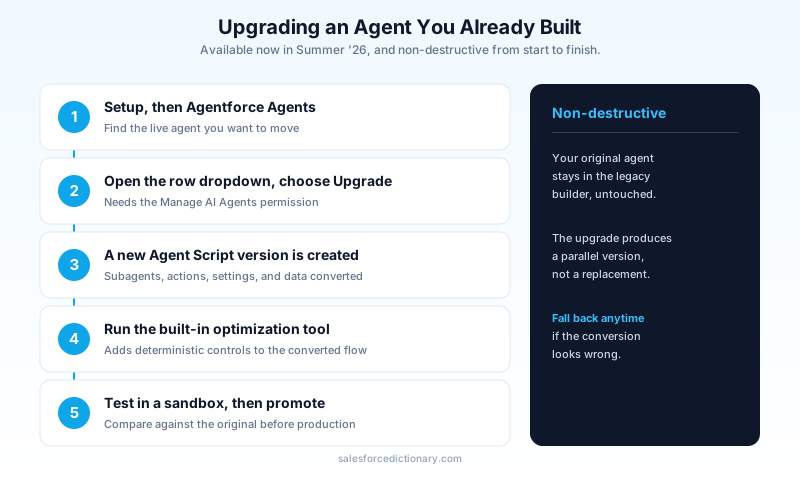
On permissions: to do any of this you need the Manage AI Agents permission, plus whatever standard permissions the agent type already required. If the Upgrade option is greyed out or missing, that permission is usually why.
What is genuinely better, and what still bugs me
The determinism gain is real, and I do not say that about most Salesforce rebrands. Being able to pin a refund threshold, a routing decision, or an eligibility check as a hard rule instead of a natural-language hope is a category improvement for anyone who has watched an agent confidently do the wrong thing in a demo. Testability comes with it: a deterministic step gives you something you can actually assert against. The unified Canvas and Script views are a good idea executed well, and letting non-Setup users build agents removes a real bottleneck.
The Salesforce Ben team, covering the beta, landed in the same place and pushed further on where it matters most. Their point: mission-critical and regulated use cases, healthcare, defense, finance, are exactly where deterministic Agent Script pays off, because in those flows "there is no room for misclassification or hallucination." That is the honest case for this release. If your agent decides who gets a controlled substance refilled or which claim gets paid, you want the decision scripted, not inferred.
Now the friction. Salesforce is running two builders in parallel with no announced sunset for the legacy one. That sounds generous, and in the short term it is. In practice, two live builders with no end date is an ambiguity, and ambiguity is what makes governance planning worse, not better. You cannot write a migration project plan around a deadline that does not exist. You cannot tell leadership when the old builder dies because Salesforce has not said. So the pragmatic move, migrate at your own pace, is also the move with no forcing function, which is how technical debt quietly accumulates for two years.
The terminology churn does not help. Topics becoming subagents mid-transition, with both words live in the official docs, is a small thing that adds real cost when you are training a team or writing internal runbooks. The beta was also flagged as immature at release, with bugs and no firm general-availability-versus-legacy timeline even announced then. None of this makes the new builder a bad bet. It makes it a bet you should place deliberately, with sandbox testing, rather than on a rushed Friday because a button vanished.
Next steps
Do this in a sandbox this week, before July 13 makes the point moot for any new agent work anyway.
Open Setup, go to Agentforce Agents, and list every legacy agent you actually have. Pick the one with the highest traffic, the one whose failures would hurt most. In a sandbox, run Upgrade on it from the dropdown. Then run the optimization tool on the converted version and read every change it proposes, because that list is a free audit of which decisions your production agent has been making probabilistically. Compare the upgraded agent's behavior against the original on your real test cases before you touch production. Only when it matches or beats the original do you promote it.
Confirm you hold the Manage AI Agents permission before you start, or the Upgrade option will not appear. And open Agentforce Studio from the App Launcher once, just to build one throwaway agent, so the day you have to create a real one under deadline is not also the day you learn where the buttons are.
About the Author
Dipojjal Chakrabarti is a B2C Solution Architect with 29 Salesforce certifications and over 13 years in the Salesforce ecosystem. He writes and edits salesforcedictionary.com, published by KineticBit Inc., to help admins, developers, architects, and cert/interview candidates sharpen their fundamentals. More about Dipojjal.
Share this article
Sources
- Access Agentforce Studio and the New Agentforce Builder
- Learn About New Agentforce Builder with Agent Script
- Agent Script Developer Guide
- New Agentforce Builder Released in Beta: Our First Thoughts (Salesforce Ben)
- Make Agentforce More Reliable With Salesforce Agent Script (Salesforce Ben)
- Build With Confidence Inside the New Agentforce Builder (Salesforce Admins)
Related dictionary terms
Practise it
Five questions on Agentforce Specialist
Exam-style questions with an explanation after each one. No account needed, and your answers build a weak-topic map once you have one.
Keep reading

Build Custom Agentforce Actions
Agentforce agents can call three types of custom actions: Apex invocable methods, autolaunched Flows, and External Service operations. Here is how to build each one correctly, what the Trust Layer enforces, and where governor limits bite.

Agentforce Help Agent: The Implementation Guide Before You Flip It Live
Agentforce Help Agent went GA in July 2026 with a setup wizard fast enough to finish before your coffee cools. Here is the architecture work that decides whether it resolves cases or embarrasses you in front of customers.

Salesforce Atlas Reasoning Engine: How Agentforce Agents Actually Make Decisions
Atlas is the reasoning engine behind Agentforce. Here is how it picks actions, loops through a problem, grounds on your data, and where its decisions go wrong.

Salesforce Multi-Agent Orchestration: The Complete 2026 Guide
In 2026, orgs run an average of 12 AI agents - half in isolated silos. Learn the primary-and-specialist architecture, Agent Fabric, and the A2A protocol that turn agent sprawl into coordinated enterprise AI.
Comments
No comments yet. Start the conversation.
Sign in to join the discussion. Your account works across every page.