
Agentforce Help Agent: The Implementation Guide Before You Flip It Live
Guided setup takes about ten clicks. The grounding architecture, guardrails, and escalation design underneath take real planning. Here is what the wizard does not do for you.

You finish the Agentforce Help Agent setup wizard in nine clicks, publish it to your web chat widget, and go refill your coffee. By the time you sit back down, it has already told a customer their late return qualifies for a full refund, a case your written policy explicitly excludes. Nobody configured the agent to lie. Nobody configured it not to, either.
Agentforce Help Agent reached general availability in July 2026, alongside the redesigned Agentforce Customer Service Portal and the pay-per-resolution pricing model that comes with both. The pitch is speed: guided setup, prepackaged actions, and a live agent across chat, web, voice, and messaging in minutes. That part of the pitch is true. What it leaves out is that "fast to configure" and "safe to deploy" are two different projects, and the wizard only does one of them for you.
This guide is the implementation side: what actually shipped, how the agent grounds its answers, where the real controls live, and the checklist to run before a customer ever talks to it.
What Actually Shipped
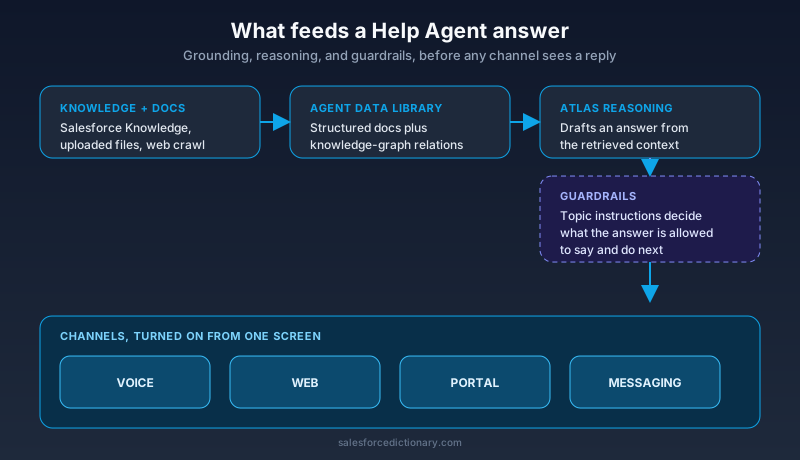
Help Agent is a prepackaged, autonomous service agent built on the Agentforce 360 platform, aimed at one job: resolving a customer issue start to finish without a human touching it. Setup connects your Salesforce Knowledge base, either by pointing at existing knowledge articles or by dragging in files and crawling web URLs, then turns on channels from a single screen. Voice, web, portal, and messaging all flip on from that one screen, and for voice the agent provisions its own phone numbers.
It ships with a library of prepackaged actions for case management, appointment scheduling, order updates, and account management, plus a preview pane inside setup so you can test responses before anything goes live. The Customer Service Portal that pairs with it drops the old ticket-and-tab layout for a single conversation bar that adapts as the customer talks, surfacing account cards and workflow steps inline instead of routing them to a separate screen.
Salesforce's own proof point is help.salesforce.com, which it says handled 4.3 million inquiries and resolved 70 percent of them autonomously. Keep that number in perspective. It comes from Salesforce's own help portal, tended by the people who built the product, not from an average Service Cloud org with a middling knowledge base and gnarlier cases. Treat it as a ceiling, not a baseline.
The Setup Wizard Has Three Audiences, Not One
The demo shows a business user dragging files into the wizard and publishing an agent in a handful of clicks, and that part is real. What the demo does not dwell on is that the same product has two other entry points sitting right behind it, and the audience you build for changes what "done" looks like.
A business user can drag files in, accept the defaults, and publish to channels in a short setup flow. An admin drops down into Agentforce Builder for direct control over topics, actions, and instructions. An engineer configures the agent through code, including through coding agents wired into your pipeline. Salesforce has described the whole thing as a stack of progressive disclosure: simple on the surface, with the real configuration surface still there underneath for the people who need it.
The trap is treating the fast path as the finished path. A business user publishing from the drag-and-drop flow can go live without ever opening Agentforce Builder, which means the guardrails, escalation instructions, and scope of prepackaged actions are running on defaults nobody reviewed. Ten clicks gets you a live agent. It does not get you an agent that reflects your return policy, your escalation tolerance, or your regulatory obligations. Decide up front which tier owns your rollout, and do not let the fast path be the only path someone checked.
In practice, this plays out as an ownership question your team probably has not answered yet. Who signs off before a Help Agent topic goes live: the support manager who knows the policy, the admin who knows the platform, or the architect who knows where the guardrails actually live? Pick one name, not a committee, and make that person the last click before publish, regardless of which tier built the agent. A rollout with three possible builders and no single approver is how a demo-quality agent ends up in front of paying customers by accident, because everyone assumed someone else had reviewed it.
The Grounding Architecture Behind the Ten Clicks
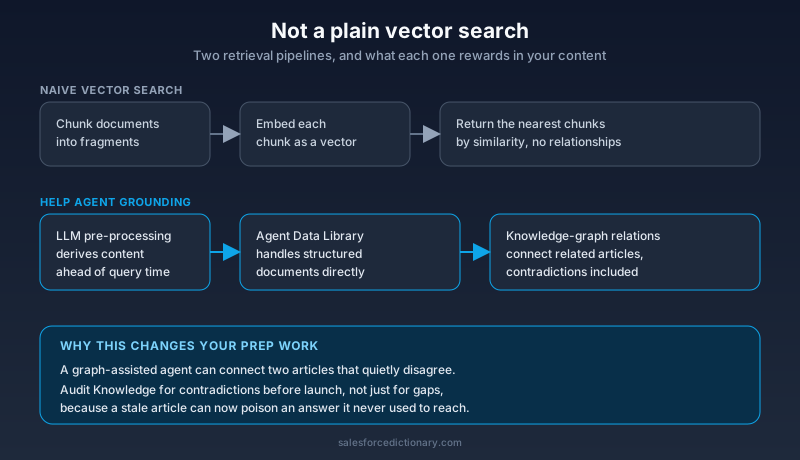
The setup screen makes grounding look like "point at your Knowledge base and go," which undersells what is actually happening. Independent technical analysis of the release describes a retrieval pipeline that goes well past a plain vector search: an Agent Data Library that handles structured documents directly, LLM pre-processing that generates derived content ahead of query time, and knowledge-graph style retrieval rather than naive similarity search over embeddings.
That distinction matters for how you prep your content before launch, not just what you connect. A vector-search-only agent rewards well-chunked, self-contained articles. A knowledge-graph-assisted agent can draw relationships between articles, which means a stale or contradictory article does more damage than it would in a simpler system, because the agent may connect it to content you thought was unrelated. Audit your Knowledge base for contradictions before you point Help Agent at it, not after a customer gets a confidently wrong answer built from two articles that used to disagree quietly in a corner nobody read.
This also explains why Help Agent leans on Data Cloud. Data 360 interactions during a Help Agent session are not metered separately from the resolution fee, which only makes financial sense if Salesforce expects the agent to be pulling structured customer and order context constantly, not occasionally. Plan your data model with that in mind. The agent is going to reach for account history and order status by default, so field-level access and sharing rules on that data are part of your Help Agent security review, not a separate project.
Guardrails: Where You Actually Control the Agent
If grounding decides what the agent knows, guardrails decide what it is allowed to do with that knowledge, and this is the layer most rollouts under-invest in because the wizard buries it under a preview pane that looks reassuring.
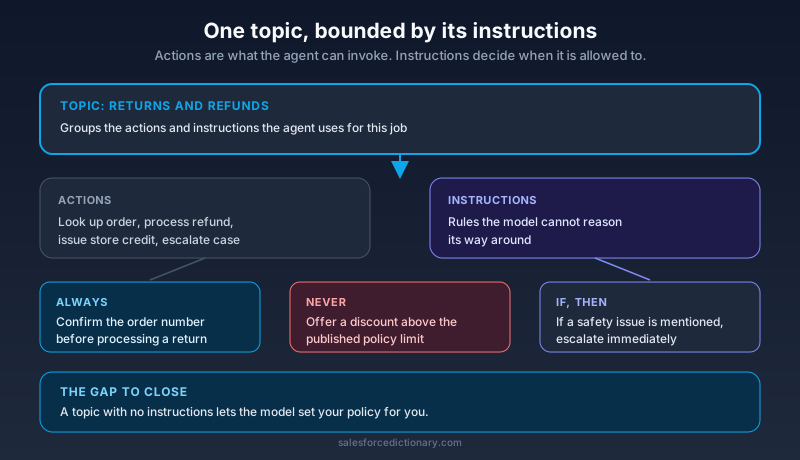
Guardrails live at the topic level. Each topic groups related actions together with instructions, and Salesforce's own guidance frames good instructions as short, direct rules: "Always confirm the order number before processing a return." "Never offer a discount above the published policy limit." "If the customer mentions a safety issue, escalate immediately regardless of resolution status." These are not suggestions the model weighs against other considerations. They are the boundary the agent operates inside, and a topic with vague or missing instructions is a topic where the model is filling in your policy from its own judgment.
The failure mode is not usually a dramatic jailbreak. It is a topic nobody wrote instructions for because the wizard's default got the business user to a working demo, and a working demo shipped straight to production. Before launch, walk every topic the agent can reach and ask the blunt question: if this topic had no instructions at all, what is the worst plausible thing the model could confidently say. Write the instruction that prevents that specific thing. Generic guardrails protect you from generic problems. Specific guardrails protect you from the case your team already knows is a landmine.
Escalation Design Is Governance, Not a Toggle
Escalation looks like a simple switch in the setup screen: turn it on, pick a queue, done. Treat it as a switch and you have built a governance gap, because escalation is also the only place a human sees what the agent was about to do before it did it.
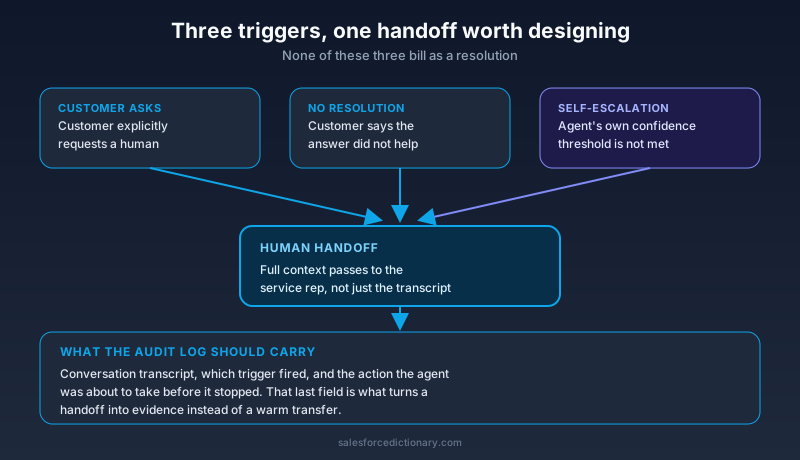
Three things do not bill as a resolution, and each one is an escalation trigger you need a real design for, not a default. A customer asking for a human. A customer saying outright that the agent did not answer their question. And, distinctly, a case the agent itself hands off because it could not complete the action with the confidence its own guardrails require. Only the first two are customer-initiated. The third is the one worth building deliberately, because it is where the agent polices its own limits, and a shallow implementation quietly narrows what counts as "could not complete" until almost nothing triggers it.
When a handoff happens, the agent passes full customer context to the human agent. Decide now what "full context" actually means for your org: the conversation transcript, yes, but also which guardrail or confidence threshold triggered the handoff, and what the agent was about to do before it stopped. That last piece is what turns escalation into an audit trail instead of just a warm transfer. If your industry needs to show a regulator what an autonomous system almost did, the escalation log is where that evidence lives, and it only exists if you designed it to capture it.
What the Pricing Model Changes About Your Rollout
Pay-per-resolution bills two dollars per issue the agent closes without escalation, sold in packets of at least a thousand, with no separate meter for the Data 360 and reasoning calls underneath. That is a real shift from paying for agent activity to paying for agent outcomes, and the incentive it creates cuts both ways for how you build.
On one hand, you are not penalized for a cautious agent that escalates often while your guardrails and Knowledge base mature. An agent that escalates a case it should have escalated costs you nothing that week. On the other hand, do not mistake "escalates for free" for "escalates correctly." A support org under cost pressure has a real incentive to loosen the self-escalation threshold discussed above so more cases resolve and bill, and that pressure runs directly against the case for building a strict one. Decide your escalation threshold on risk grounds first, and let the pricing model be a lens you check your decision against, not the thing that sets it.
There is a second, quieter effect worth planning around. Because escalations are free, they are invisible in the spend report your finance team sees. A rollout that escalates 80 percent of cases looks financially painless right up until leadership asks why the autonomous agent everyone approved is barely touching case volume. Track your escalation rate as its own metric from day one, reported alongside spend, not folded into it. A cheap agent that resolves almost nothing is not a governance win, it is a project that quietly failed while the invoice stayed small enough that nobody asked.
Read the Help Agent pay-per-resolution news coverage on this site for the full pricing mechanics and where the model gets uncomfortable at scale. This guide is about what you build before the meter starts running, not the billing math itself.
The Go-Live Checklist
Run these before Help Agent talks to a real customer, not after the first one complains.
1. Audit your Knowledge base for contradictions, not just gaps. A knowledge-graph-assisted agent can connect two articles that quietly disagree. Find those pairs before the agent does.
2. Write specific guardrail instructions per topic. For every topic, name the worst plausible wrong answer and write the instruction that blocks it. Do not settle for the wizard's generic defaults.
3. Define and test your self-escalation threshold deliberately. Decide what confidence level triggers a handoff, then run real transcripts through it and check whether it fires when it should, not just when it is convenient.
4. Confirm field-level access on everything the agent can reach. The agent leans on Data Cloud and order history by default. Your sharing model needs to have already answered what it is and is not allowed to see.
5. Run a shadow or limited-channel period before full publish. Turn it on for one channel or one topic, watch the transcripts, and expand once the guardrails hold up against real customers instead of your test script.
The Bottom Line
Agentforce Help Agent is genuinely fast to stand up, and that speed is not a trick. The setup wizard, the prepackaged actions, and the channel toggles all work as advertised. What they do not do is decide your return policy, write your guardrails, or design your escalation path for you. Those are the parts that determine whether the agent resolves cases or just embarrasses you in front of a customer at scale, and no wizard ships with your judgment built in.
Before you publish, open every topic the agent can reach and write the one guardrail instruction that stops its worst plausible mistake. That single pass will tell you more about whether you are ready to go live than any preview pane will.
About the Author
Dipojjal Chakrabarti is a B2C Solution Architect with 29 Salesforce certifications and over 13 years in the Salesforce ecosystem. He writes and edits salesforcedictionary.com, published by KineticBit Inc., to help admins, developers, architects, and cert/interview candidates sharpen their fundamentals. More about Dipojjal.
Share this article
Sources
- Salesforce Launches Agentforce Help Agent That Deploys in Minutes and Only Charges for Resolutions (Salesforce Newsroom)
- Agentforce Help Agent: Strong on Setup, Better on Pricing, Still Vague on Fin (SalesforceDevops.net)
- Explore Agentforce Guardrails and Trust Patterns (Trailhead)
- Define the Agent Guardrails (Trailhead)
- Salesforce Unveils AI Help Agent With Pay-Per-Resolution Pricing (CIO)
Related dictionary terms
Practise it
Five questions on Agentforce Specialist
Exam-style questions with an explanation after each one. No account needed, and your answers build a weak-topic map once you have one.
Keep reading

Salesforce Atlas Reasoning Engine: How Agentforce Agents Actually Make Decisions
Atlas is the reasoning engine behind Agentforce. Here is how it picks actions, loops through a problem, grounds on your data, and where its decisions go wrong.

Salesforce Einstein Trust Layer: The Complete 2026 Guide to Secure AI
Your security team asks where the customer data goes when Agentforce processes it. Here is the full answer: how the Einstein Trust Layer's prompt journey, data masking, zero-data retention, and toxicity detection actually work.

Salesforce Paid $3.6B for Fin. Here's What Every Service Cloud Customer Needs to Know.
Salesforce bought Fin for $3.6B to fill the AI gap in Service Cloud. Here is what the deal means for admins, architects, and every org running customer service today.

Salesforce Well-Architected for Agentforce
TDX 2026 unveiled the next chapter of Salesforce's Well-Architected Framework, evolving the Trusted, Easy, and Adaptable pillars specifically for Agentforce. Here's what changed and how to apply it to every agent you build.
Comments
No comments yet. Start the conversation.
Sign in to join the discussion. Your account works across every page.