
Revenue Intelligence
Revenue Intelligence is a paid Sales Cloud add-on that bundles CRM Analytics dashboards, forecasting tools, and Pipeline Inspection for sales leaders.
Definition
Revenue Intelligence is a paid Sales Cloud add-on that bundles CRM Analytics dashboards, forecasting tools, and Pipeline Inspection for sales leaders. Salesforce sells it for an additional cost on Enterprise, Performance, and Unlimited editions. It runs in Lightning Experience only.
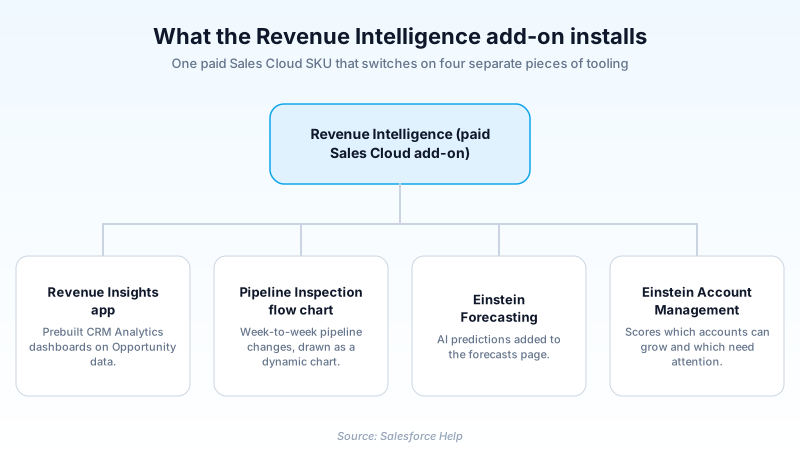
The centerpiece is Revenue Insights, a CRM Analytics app whose dashboards are generated from your Opportunity, Account, User, and activity records. The bundle also switches on the Pipeline Inspection flow chart, Einstein Forecasting, and Einstein Account Management.
None of it reads a new data source. Revenue Intelligence works off records your team already creates, so a messy pipeline produces confident-looking dashboards that are still wrong.
In plain English
“A big sales team can have hundreds of open deals. Nobody reads them all every week. Revenue Intelligence is the set of charts and scores that says which deals stalled, which slipped, and whether the quarter is on track. It builds all of it from records the reps already type in.”
Worked example
Northwind Instruments runs a 40-rep sales team on Enterprise Edition and buys Revenue Intelligence. Their admin opens Setup and types Revenue Insights in the Quick Find box. The prerequisite checklist wants a role hierarchy at least two layers deep, an active forecast type on Opportunity, one loaded quota, and historical trending on the Amount field. The app builds overnight. On Monday the VP opens Sales Stage Analysis and finds 62 opportunities parked in Negotiation past 45 days, worth $4.1M together. Forecast Insights shows Commit down $800K week over week. Three deals moved their Close Date from 09/30/2026 to 12/15/2026. She walks into the forecast call with that list instead of asking managers for verbal updates.
What the add-on installs, and what it costs to run
What the Revenue Insights app actually contains
Revenue Insights is the CRM Analytics app at the center of the bundle, and it arrives prebuilt. The main dashboard splits into tabs for overview, team, sales performance, and forecast historical trend. Sales Rep Command Center lines reps up against quota and surfaces stuck opportunities. Sales Stage Analysis shows movement between stages and where deals pile up. Forecast Insights tracks period over period change, pipe coverage, and velocity. Commit Calculator tests scenarios: move three deals, watch the number. Product Insights covers what customers bought and what they have not. Salesforce keeps adding and renaming tabs, so treat any dashboard count you read as a snapshot of one release.
Build it from Setup, never from Analytics Studio
Salesforce states this plainly, and it is the instruction people ignore most. Revenue Insights uses security predicates in its models, so you create it from the Setup menu rather than Analytics Studio. Analytics Studio will happily let an admin start an app from a template. You then risk something without the row-level filtering the supported path wires in. That is how one region ends up reading another region's pipeline. Catching it late is expensive, because the repair is deleting the app and building it again.
License, editions, and the two permission sets
Revenue Intelligence does not come with Sales Cloud. Salesforce Help lists it as an extra-cost feature on Enterprise, Performance, and Unlimited editions, and with Government Cloud Plus. How you buy it has changed, though. Salesforce now sells it standalone, includes it inside a higher-tier Agentforce sales edition, and offers a second version paired with Tableau. Check the current pricing page for the SKU before you budget. Part of what you pay for is CRM Analytics itself, since the first prerequisite step enables it so the dashboards have somewhere to live. Access then comes down to two permission sets. Revenue Intelligence Admin goes to whoever maintains the dashboards, and Revenue Intelligence User is the read-only assignment for managers and reps. Budget admin time alongside license spend, because someone owns that refresh schedule from then on.
Refreshed data, not live data
The dashboards are output from scheduled recipes, so what you read is as current as the last run. After install you go to App Launcher, then Data Manager, and set the sync and recipe schedules. Two failure modes show up. The Analytics Integration User needs object and field-level access to every source object, and without it rows quietly disappear instead of erroring. The second is arguments about numbers. When a dashboard disagrees with a manager's report, check that last run time before opening a support case.
When it is overkill, and the name it gets confused with
This is tooling for reading a whole pipeline at once. For a team of six with fifty open deals, two reports and a list view answer the same questions for free. Size the decision honestly. The other regular mix-up is the name. Revenue Cloud is the quote-to-cash line, covering pricing, quoting, and billing. Revenue Intelligence sits on the analytics side and touches none of that. If a stakeholder asks for this because they want configure-price-quote, you are about to buy the wrong product.
How to stand up Revenue Intelligence without stalling
The prerequisite checker runs before anything builds, so most of the work happens before you open the setup page. Clear these in order. The Key options listed further down are the separate Enable More Features toggles in Revenue Insights Setup, not the four tools the add-on installs on its own.
- Check the org-level prerequisites
Confirm the role hierarchy is at least two layers deep, and that one record exists on Account, Opportunity, User, UserRole, Task, and Event. A flat hierarchy is the usual blocker.
- Get forecasting working first
Activate a forecast type on Opportunity, Opportunity Splits, or the territory hierarchy. Assign forecast managers across two layers and load at least one quota value.
- Turn on historical trending
Enable it on the Opportunity measure field, either the standard Amount field or a custom Currency field, and on the Forecasting Item object. Do it early, since snapshots never backfill.
- Run the setup page
From Setup, in the Quick Find box, enter Revenue Insights, then select Revenue Insights Setup. Click Start on the Installation Prerequisites step and work down the list.
- Assign access and schedule the refresh
Give Revenue Intelligence Admin to whoever maintains the dashboards and Revenue Intelligence User to everyone else. Then set sync and recipe schedules in Data Manager.
Shows pipeline changes in a dynamic chart. An admin enables it from Pipeline Inspection Setup.
Adds AI predictions to the forecasts page, enabled through Assisted Setup.
Shows recent movement in Forecasting, once historical trending for forecasts is active.
Formula-driven columns on the forecasts page, created by an admin in Forecasts Settings.
- A territory-based forecast does not exempt you from the role hierarchy. Salesforce requires one either way, so a territory-only org fails the very first prerequisite check.
- An install that stalls reports its status and event log on the app management tab in Setup, not on the setup page you launched it from. Read the log before re-running anything.
- Since Summer '25, Activity Metrics and Activity 360 Reporting data is not available in Pipeline Inspection unless it was already set up.
Prefer this walkthrough as its own page? How to Revenue Intelligence in Salesforce, step by step
How organizations use Revenue Intelligence
Runs the weekly forecast call from Forecast Insights rather than manager spreadsheets, then checks each submitted commit against the system rollup over a quarter.
Uses Sales Stage Analysis to find the two stages where deals pile up, then rewrites the exit criteria for those stages.
Watches Product Insights for accounts buying one service line and never the second, and hands that list to account managers.
Trust & references
Cross-checked against the following references.
- Revenue Intelligence (opens in new tab)Salesforce
- Enable and Configure Revenue Insights (opens in new tab)Salesforce
- Considerations for Setting up Revenue Insights (opens in new tab)Salesforce
- Revenue Insights (opens in new tab)Salesforce
- Monitor, Update, and Delete Revenue Insights Apps (opens in new tab)Salesforce
Straight from the source - Salesforce's reference material on Revenue Intelligence.
Hands-on resources to go deeper on Revenue Intelligence.
About the Author
Dipojjal Chakrabarti is a B2C Solution Architect with 29 Salesforce certifications and over 13 years in the Salesforce ecosystem. He writes and edits salesforcedictionary.com, published by KineticBit Inc., to help admins, developers, architects, and cert/interview candidates sharpen their fundamentals. More about Dipojjal.
Test your knowledge
+5 pts / dayQ1. Why does Salesforce require you to create the Revenue Insights app from Setup rather than from Analytics Studio?
Q2. An admin finishes the Revenue Insights install and the forecast dashboards render with no data. Which prerequisite is the likely culprit?
Q3. Which of these ships as part of the Revenue Intelligence bundle?
Discussion
Loading discussion…