
Return Order Line Item
A Return Order Line Item is a child record on a Salesforce Return Order that represents one product (or one delivery charge) being sent back by a customer.
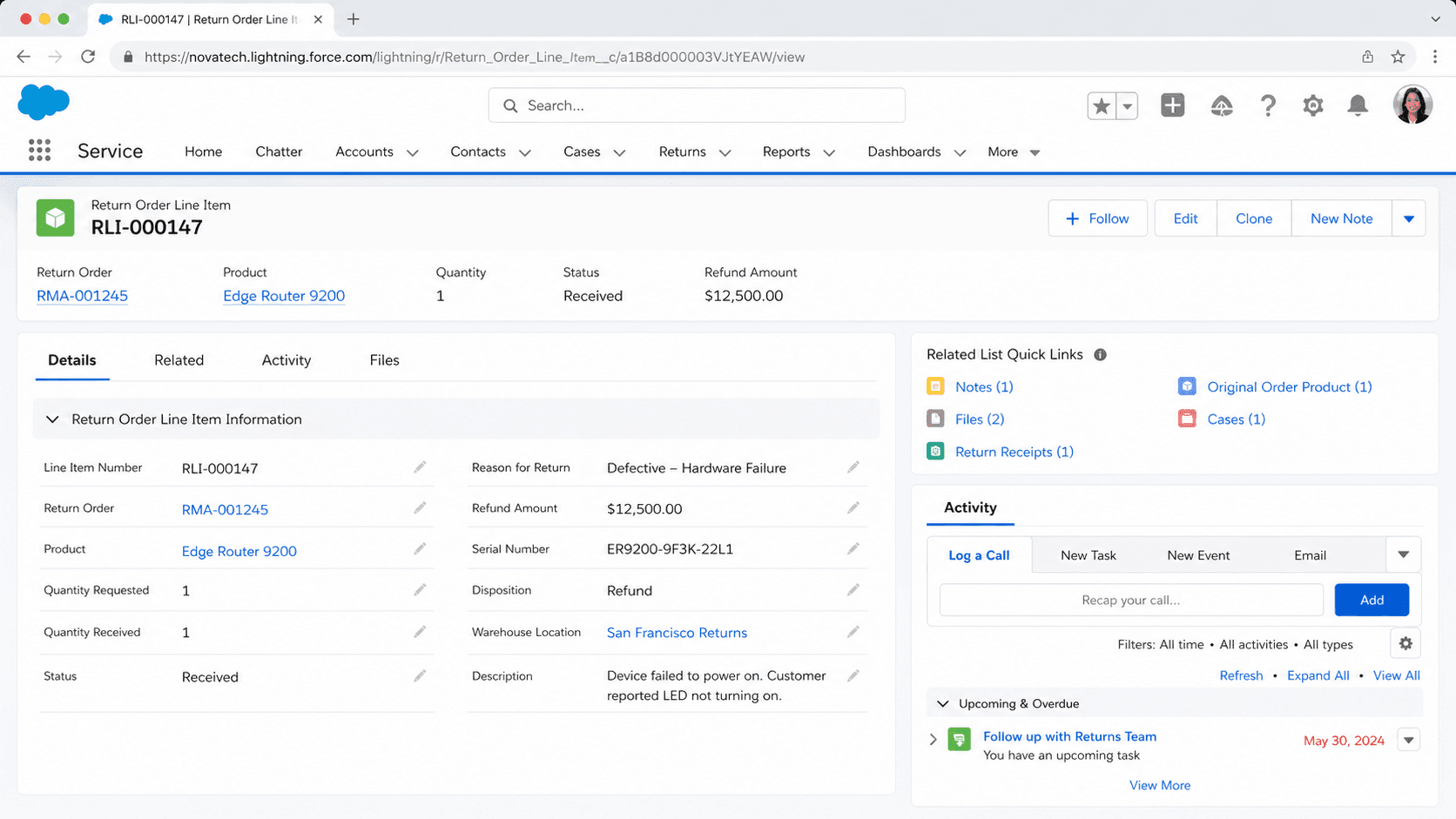
Definition
A Return Order Line Item is a child record on a Salesforce Return Order that represents one product (or one delivery charge) being sent back by a customer. Each line carries its own quantity, return reason, condition, financial amounts, and processing outcome, so a single return that covers several items can treat each one differently.
The object exists in both Salesforce Order Management and Field Service. In Order Management it ties back to an order summary and its order product summary, and it drives refunds, credits, and exchanges. In Field Service it tracks parts and products that move back to a warehouse for repair, restock, or scrap. The API name is ReturnOrderLineItem.
How return order line items model a single returned item
Where the record sits in the return data model
A Return Order is the header record for a return. It links to one order summary and one account, and it holds shipping and total fields. The Return Order Line Item is the detail under that header. Each line points back to the specific Order Product (or Order Product Summary) that the customer originally bought, so Salesforce always knows which sale the return came from. This parent and child split mirrors how Orders and Order Products work. The header answers who is returning and where the shipment goes. The lines answer what is coming back and in what state. A Return field on the line record stores the parent Return Order, and a Type field marks whether the line is an Order Product or a Delivery Charge. Type Code holds the matching short value, either Product or Charge. Because the structure is relational, you can report on returns at two levels. You can roll up totals on the Return Order, or you can slice by reason and product across thousands of individual lines. That second view is what most return analytics actually use, since it shows which SKUs come back most and why.
Quantity and reason fields that drive processing
The quantity fields are where a return is measured. Quantity Expected holds how many units the customer said they would send. Quantity Received records how many actually arrived at the warehouse. Quantity Returned is the count being accepted into the return, and Quantity Rejected is the count turned away. The gap between expected and received is a common signal that a return is incomplete or disputed. Reason for Return explains why the item came back. Standard picklist values include Damaged, Defective, Duplicate Order, Wrong Item, Wrong Quantity, Not Satisfied, Outdated, and Other. When a unit is refused, Reason for Rejection records why, with values like Damaged Item, Expired Warranty, Missing Item or Part, or Wrong Item. Processing Plan captures the preferred disposition once the item is back in hand. The options are Repair, Discard, Salvage, or Restock. Repayment Method records how the customer is made whole, with values Replace, Refund, Credit, or Return. Together these fields let one return contain a refunded item, a restocked item, and a rejected item, each handled correctly on its own line.
Money on the line: unit price, subtotals, and adjustments
A return line carries its own financial picture, separate from the original order. Unit Price holds the price of a single returned unit. Line Subtotal is the line total before any adjustments or tax. Adjustments stores the sum of price changes applied to the line, again before tax. These mirror the amount fields on the original Order Product, which keeps refunds aligned with what the customer actually paid. In Order Management this financial detail matters because the return can feed a refund or a store credit. When you process the line, Salesforce can calculate the amount owed from the line subtotal and adjustments rather than from a flat figure typed by an agent. That reduces refund errors and keeps the math auditable. Delivery charges are handled as their own line type. If a customer is owed shipping back, a line with Type set to Delivery Charge and Type Code set to Charge represents it. Splitting product value and shipping value onto separate lines means each can be refunded or withheld independently, which matters when a store refunds the item but keeps the original shipping fee.
Processing a line: change orders and read-only locking
Creating a return order line item does not move money or inventory on its own. The state change happens when you process the line. In Order Management, processing a Return Order Line Item generates a change order against the order summary and then makes that line item read-only. The change order is the audit record that says the return was actioned, and the read-only lock stops anyone from editing a line that has already been settled. This is an important guardrail. Once a refund or credit has been issued from a line, the quantities and amounts on that line should never shift, or the books would no longer match the payment. The read-only behavior enforces that automatically rather than relying on field-level security or a validation rule. Because processing is a discrete step, teams often stage returns in a Draft or Submitted status first, inspect the goods, then process only the lines that pass inspection. Lines that fail inspection can be rejected with a Reason for Rejection instead of processed, so the customer is not refunded for goods that arrived damaged or incomplete.
Split line items for partial returns
Customers do not always return everything they said they would. A shopper might keep two of five units and send back three. Salesforce handles this with split line items. When the Return Items API returns a partial quantity, it creates a new split Return Order Line Item to hold the remaining quantity still expected to come back. The original line is processed for the quantity actually received, while the split line carries the open balance. This keeps the accepted units cleanly separated from the units still in transit or never sent. Each piece can then follow its own path. The received units can be refunded and restocked, and the open split can be canceled later if the customer never ships the rest. Splitting also keeps reporting honest. Without it, a single line would mix settled and unsettled quantities, and a refund report could not tell how much was truly returned. With splits, every line represents one coherent batch of units in one state. This is most visible in high-volume retail returns processed through the API rather than entered by hand.
Order Management versus Field Service usage
The same object serves two different products, and the emphasis changes between them. In Salesforce Order Management, the focus is commerce. A return order line item connects to an order product summary, calculates refund or credit amounts, and drives change orders that adjust the order summary. Returns, exchanges, and RMA flows all read and write these lines. In Field Service, the focus is logistics and parts. A return order moves a product or part from a technician, a work order, or a customer site back to a warehouse so it can be repaired, restocked, or scrapped. Here the line item is more about which product is moving, how many units, and where it ends up than about issuing a refund. Fields for source and destination location and the linked asset matter more in this context. Knowing which product is in play tells you how to read the record. A return line in a commerce org is usually about money owed. A return line in a field service org is usually about inventory movement. The shared schema is convenient, but the surrounding process decides what the line actually means.
How to create a Return Order Line Item
Most return order line items are created programmatically by the Return Items API or by a return flow, but you can create one directly under a Return Order to model a returned product. The Return Order must exist first, and Order Management or Field Service returns must be enabled in the org.
- Open or create the parent Return Order
Returns roll up to a header record. Open an existing Return Order tied to the right order summary or account, or create one first. A line item cannot exist without its parent Return Order.
- Add a Return Order Line Item
From the Return Order, add a related Return Order Line Item. Choose whether the line is an Order Product being returned or a Delivery Charge, which sets the Type and Type Code.
- Link the original order product
Point the line at the Order Product or Order Product Summary the customer originally bought. This connects the return to the sale and lets Salesforce pull the matching unit price and product.
- Set quantity, reason, and disposition
Enter Quantity Expected, pick a Reason for Return, and choose a Processing Plan and Repayment Method so the team knows how to settle the line once goods arrive.
- Process the line when goods are received
After the product is inspected, process the line to generate the change order and issue the refund or credit. Processing locks the line read-only, so confirm the quantities first.
The parent return header the line belongs to. Required, since a line item cannot exist on its own.
Whether the line represents an Order Product or a Delivery Charge. Drives how the amount is treated.
How many units the customer is returning on this line. Anchors the received, returned, and rejected counts.
The original purchased line the return maps back to, so refunds align with what was paid.
- Processing a line generates a change order and makes the line read-only, so you cannot edit quantities or amounts afterward.
- A partial return through the Return Items API creates a split line for the remaining quantity instead of editing the original line.
- Reason for Return, Processing Plan, and Repayment Method are picklists with fixed values, so map custom return reasons to the closest standard option.
- The same object behaves differently in Order Management (refunds and credits) and Field Service (parts movement), so confirm which feature your org uses before building automation.
Prefer this walkthrough as its own page? How to Return Order Line Item in Salesforce, step by step
Trust & references
Cross-checked against the following references.
Straight from the source - Salesforce's reference material on Return Order Line Item.
Hands-on resources to go deeper on Return Order Line Item.
About the Author
Dipojjal Chakrabarti is a B2C Solution Architect with 29 Salesforce certifications and over 13 years in the Salesforce ecosystem. He writes and edits salesforcedictionary.com, published by KineticBit Inc., to help admins, developers, architects, and cert/interview candidates sharpen their fundamentals. More about Dipojjal.
Test your knowledge
+5 pts / dayQ1. What does a single Return Order Line Item represent on a return record?
Q2. Which fields commonly appear on a Return Order Line Item?
Q3. Why track Return Order detail at the line-item level rather than only on the header?
Discussion
Loading discussion…