
Return Order
A Return Order is a Salesforce object that records a customer's request to send purchased products back, either for a refund, a replacement, or a credit.
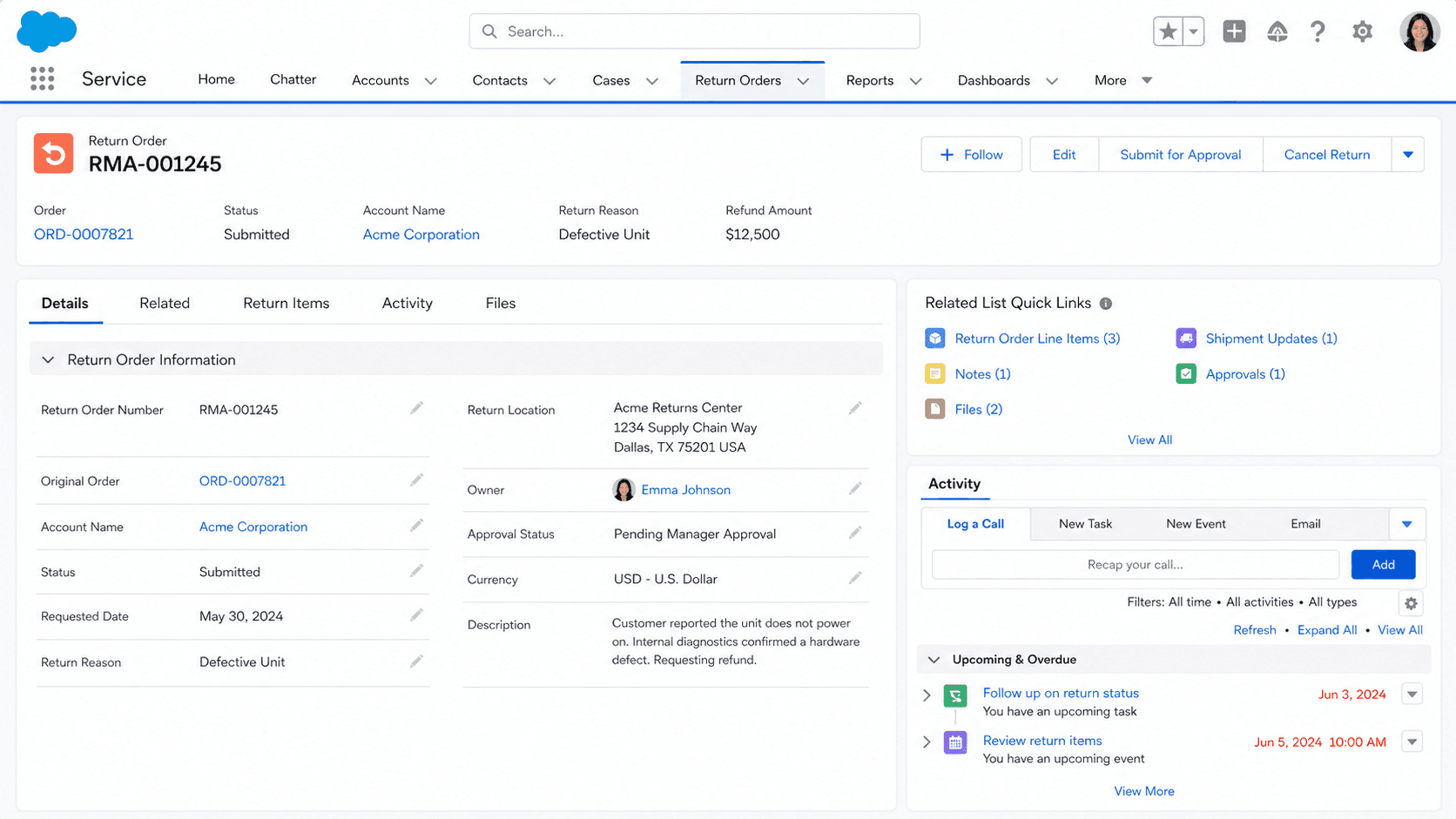
Definition
A Return Order is a Salesforce object that records a customer's request to send purchased products back, either for a refund, a replacement, or a credit. In Salesforce Order Management it captures which items are coming back, in what quantity, the reason for the return, and where the goods are being shipped from and to. The same object also appears in Field Service, where it tracks the return or repair of inventory and products.
Each Return Order ties back to an Order Summary and an Account, and it holds one or more Return Order Line Items that point at the specific products being returned. The object has existed in the API since version 42.0, so it is a long-standing part of the platform rather than a recent addition.
How a Return Order moves a return from request to refund
What the Return Order object actually stores
A Return Order is the header record for a single return request. It carries the fields a fulfillment team needs to act on the return without guessing. The Return Order Number is auto-generated, so every return has a stable reference. The Account and Order Summary fields connect the return to the customer and to the original purchase, which keeps the audit trail intact. The Status field tracks where the return sits, with values such as Draft, Submitted, Approved, Canceled, and Closed, and a matching Status Category groups those values for reporting. Shipping fields describe the physical movement of goods. Ship From Address records where the items start, while Source Location and Destination Location track the warehouse or site the products leave and return to. The Shipment Type field flags how the goods travel, for example Standard, Rush, Overnight, or Pick Up. Financial roll-up fields summarize the money involved: Pretax Total, Product Subtotal, Shipping Subtotal, Tax, and Total With Tax. Date fields like Expected Arrival Date and Expiration Date help teams chase late returns and close out authorizations that lapse. Together these fields turn a vague customer request into a structured, trackable record.
Return Order Line Items carry the product detail
A Return Order on its own does not say which products are coming back. That detail lives in the Return Order Line Item object, where each row represents one order product tied to the return. A single Return Order can hold many line items, one per product being sent back. Each line item references an Order Product Summary, so it links cleanly to the original purchased item. Quantity fields do a lot of work here: Quantity Expected, Quantity Received, Quantity Rejected, and Quantity Returned let a team track a return from the moment it is logged through to inspection at the dock. The Reason for Return field captures why the item is coming back, with options like Damaged, Defective, or Wrong Item, and a Reason for Rejection field records why an item failed inspection. A Processing Plan field describes what happens to the goods next, such as Repair, Discard, Salvage, or Restock. The Repayment Method field sets how the customer is made whole: Replace, Refund, Credit, or Return. Line items also carry their own money fields, including Unit Price and Line Subtotal, so each returned product can be valued on its own.
Processing a line item creates a change order
The Return Order is where returns are tracked, but the financial reversal happens when you process a Return Order Line Item. When a line item is processed, Order Management generates a change order, and that line item then becomes read-only. The change order for a returned product or delivery charge carries a positive amount. That amount is the basis for the next step, because you use the change order to create a credit memo. The credit memo is the document that reduces what the customer owes or sets up the money to be returned. In a standard refund flow, Order Management strings these steps together: it creates the change order, generates the credit memo, and refunds the customer's payment. This chain matters because it keeps inventory, accounting, and payment in agreement. Marking a line item read-only after processing prevents accidental double handling of the same return. If a return is only partial, the Return Items behavior splits the line. It creates a new split Return Order Line Item to hold the remaining quantity still expected, so the rest of the return can be processed later without losing track of it.
Managed and unmanaged life cycles
The Life Cycle Type field decides who is in charge of moving a return forward. When the value is MANAGED, Salesforce Order Management runs the process. The platform handles the state changes, the change order, the credit memo, and the refund based on its built-in logic. When the value is UNMANAGED, an external system owns the workflow. In that case Salesforce stores the return data and keeps it in sync, but a third-party order or warehouse system drives the actual steps. This split matters for integration design. Teams that run their fulfillment entirely inside Salesforce lean on the managed path and let the platform do the heavy lifting. Teams with an existing enterprise resource planning system or a separate returns engine often keep that system in control and use the unmanaged setting so Salesforce reflects reality rather than dictating it. Knowing which mode a Return Order uses tells you where to look when something stalls. A managed return that is stuck points you at Salesforce flows and processing actions. An unmanaged return that looks wrong usually points at the integration feeding the record from outside.
Creating returns with flows and APIs
You rarely hand-build a Return Order field by field in production. Salesforce gives you tools that assemble the header and its line items together. The Create Return Order flow core action lets admins build returns inside a screen flow or an automated flow, passing in the order summary, the items being returned, the quantities, and the reasons. This keeps return creation consistent and lets service agents trigger it from a button or a guided screen. On the API side, the Connect REST API exposes Submit Return and Return Items resources. These let developers create returns and process them programmatically, which suits high-volume retail where returns arrive through a storefront or a portal rather than a Salesforce screen. There are also preview actions, such as Return Order Item Summaries Preview, that calculate what a return would look like before you commit it. Previewing first lets an agent confirm the refund amount with a customer before anything is written. Choosing between a flow and the API comes down to volume and source. Agent-driven returns favor flows, while self-service and integration-driven returns favor the Connect REST API.
Where Return Orders fit in Order Management
A Return Order does not stand alone. It is one piece of the Order Management data model that begins when an order is placed and an Order Summary is created. The Order Summary is the customer-facing record of the purchase, and returns hang off it so the full history of a transaction stays connected. Fulfillment objects move goods out to the customer, and the Return Order handles the reverse trip when goods come back. The change order produced during return processing feeds the invoice and credit side of the model, which is where the credit memo and refund live. Seeing the Return Order in this wider picture helps you reason about reporting and reconciliation. A finance team can trace a refund back through the credit memo, to the change order, to the processed Return Order Line Item, to the Return Order, and finally to the original Order Summary. That unbroken thread is the practical payoff of using the standard object instead of a custom return field on the order. It also means returns participate in the same security, sharing, and automation patterns as the rest of Order Management.
How to create a Return Order in Order Management
The cleanest way to create a Return Order in Salesforce Order Management is with the Create Return Order flow core action, which builds the header and its line items together from an order summary. These steps outline that approach for an admin building a return flow.
- Confirm Order Management is set up
Make sure Salesforce Order Management is provisioned and the order has an Order Summary. Returns attach to the Order Summary, so without one there is nothing to return against.
- Add the Create Return Order action to a flow
In a screen flow or autolaunched flow, add the Create Return Order core action. This action assembles the Return Order header and the Return Order Line Items in one call.
- Pass the order summary and items
Feed the action the Order Summary, the order item summaries being returned, the quantities, and the reason for each item. These inputs decide what the return covers.
- Set fulfillment and repayment details
Provide the shipment type and the repayment method (Replace, Refund, Credit, or Return) so the downstream change order and credit memo behave the way you expect.
- Process the line items
Once the goods are inspected, process the Return Order Line Items. Processing creates a change order, marks each line read-only, and sets up the credit memo and refund.
The order summary the return is filed against. It links the return to the original purchase and the account.
The customer associated with the return, carried from the order summary so the return ties to the right party.
At least one line item pointing at an order product summary, with the quantity expected and a reason for return.
The state of the return, such as Draft or Submitted, which controls where the record sits in the process.
How the customer is made whole on each line: Replace, Refund, Credit, or Return.
- Processing a Return Order Line Item makes it read-only, so confirm quantities and reasons before you process rather than after.
- A partial return splits the line: a new Return Order Line Item is created for the remaining quantity, which can surprise teams expecting a single row.
- Life Cycle Type matters. An UNMANAGED return is driven by an external system, so Salesforce automation will not move it forward on its own.
- The change order created during processing carries a positive amount and is meant to drive a credit memo, not to be treated as a new sale.
Prefer this walkthrough as its own page? How to Return Order in Salesforce, step by step
Trust & references
Cross-checked against the following references.
Straight from the source - Salesforce's reference material on Return Order.
Hands-on resources to go deeper on Return Order.
About the Author
Dipojjal Chakrabarti is a B2C Solution Architect with 29 Salesforce certifications and over 13 years in the Salesforce ecosystem. He writes and edits salesforcedictionary.com, published by KineticBit Inc., to help admins, developers, architects, and cert/interview candidates sharpen their fundamentals. More about Dipojjal.
Test your knowledge
+5 pts / dayQ1. What does a Return Order represent in the Salesforce Order Management object model?
Q2. Which details typically live on a Return Order header record?
Q3. Why centralize Return Order processing on structured Salesforce records?
Discussion
Loading discussion…