
Service Contract
A Service Contract is a Salesforce Service Cloud object that represents a customer support agreement between your company and a customer.
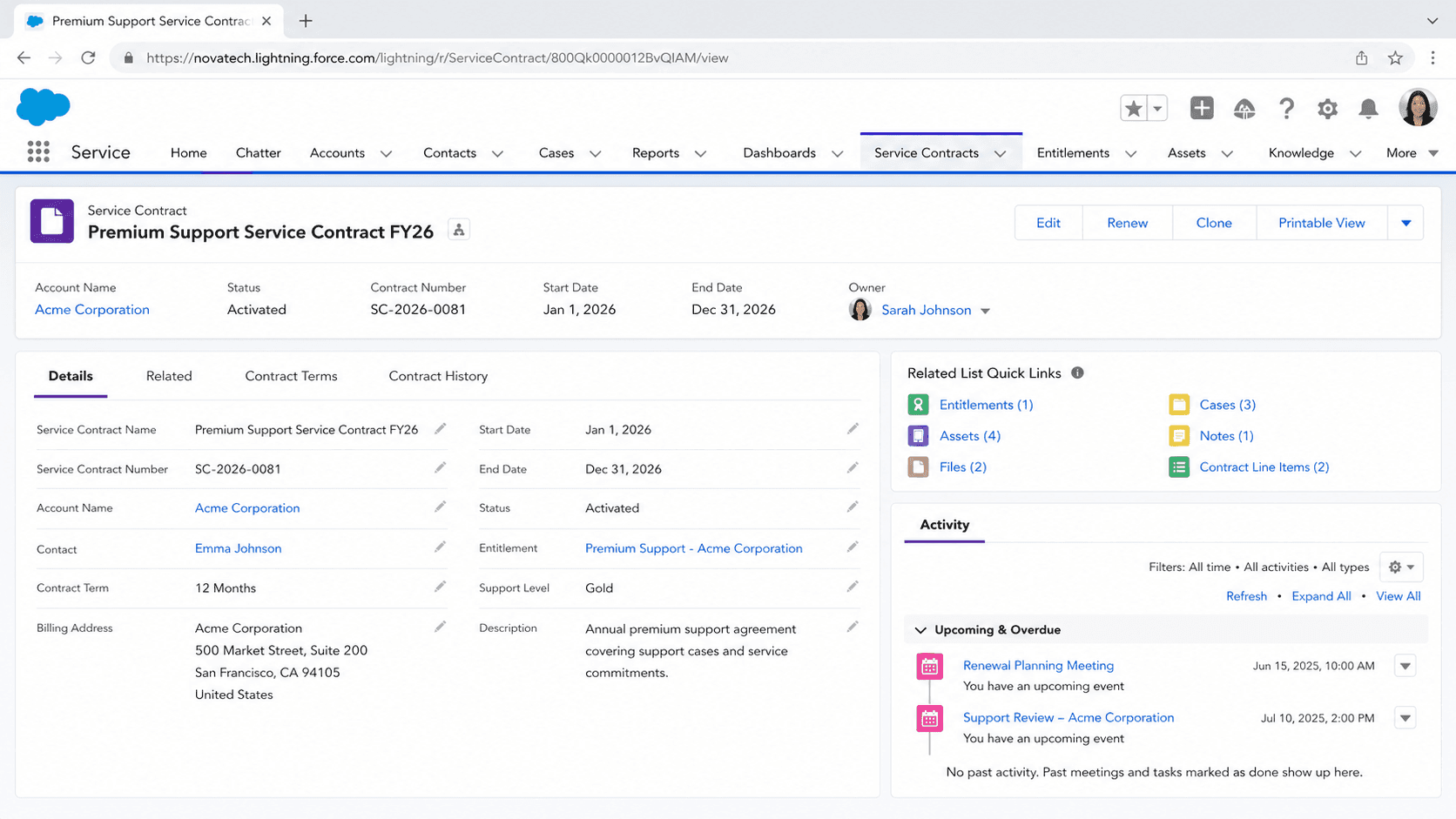
Definition
A Service Contract is a Salesforce Service Cloud object that represents a customer support agreement between your company and a customer. It records the terms of that agreement, such as the coverage period, the products or assets included, and the support a customer has paid for. The object has been part of the API since version 18.0.
Service contracts sit at the top of Salesforce entitlement management. They hold contract line items for covered products and connect to entitlements that define the actual service-level rules agents follow. When a contract is in place, support reps can see what each customer is owed instead of guessing.
How service contracts anchor entitlement management
What the object stores and tracks
A Service Contract record captures the commercial and time-bound details of a support agreement. Standard fields include StartDate and EndDate, which set the coverage window, and Term, which holds the duration in months. The Status field reflects where the contract sits in its lifecycle, and ActivationDate marks when it went live. Each record also carries an auto-generated ContractNumber so the agreement is easy to reference. Financial roll-up fields summarise the covered items. GrandTotal holds the total value of the contract line items, and LineItemCount tracks how many products are attached. The AccountId field ties the contract to the customer account it covers, and you can optionally relate it to a Contact. Because these fields are standard, you can report on expiring contracts, total contract value by account, or coverage gaps without building custom objects. Most teams put the start date, end date, and status on the page layout so agents and renewal owners can read the state of an agreement at a glance.
Service contracts, entitlements, and assets
Entitlement management has three building blocks that work together, and the service contract is the agreement layer. An Entitlement record defines the specific support a customer can receive, and it can be based on an asset, a product, or a service contract. Entitlements reflect the terms written into a service contract, so one contract can be associated with several entitlements. You link them through the Entitlements related list on the service contract, or through the Service Contract lookup field on the entitlement. Assets enter the picture when support is tied to a purchased product the customer owns. A service contract groups the covered products as contract line items, and those line items can point to assets. This lets an agent confirm that the exact unit a customer is calling about is still under coverage. The result is a clear chain: the contract states the agreement, line items list what is covered, and entitlements carry the rules an agent enforces on a case. That separation is what lets large support operations treat a premium customer differently from a free one.
Contract line items and price books
A contract line item represents a single product covered by a service contract. The ContractLineItem object has also existed since API version 18.0, and it behaves much like an opportunity or order line. Each line references a Product2 record, a Quantity, and pricing fields such as UnitPrice and ListPrice. Because line items price real products, you need an active price book and price book entries before you can add them. Contract line items can also be arranged in a hierarchy using parent and child relationships, which is useful when a covered product is itself made up of components. To create line items, the Service Contracts feature and the line item related list must be enabled in setup, and the right page layouts have to expose the related list. A practical reason to use line items is precision. Rather than saying a customer has a contract, you can say which specific products are covered, for how long, and at what value. Entitlements and assets can then attach to individual line items so coverage is tracked at the product level, not just the account level.
The contract hierarchy
Service contracts support a parent and child structure, which matters for customers with layered agreements. The ParentServiceContractId field points to the contract directly above a record, and RootServiceContractId points to the top of the tree. This lets you model a master agreement with subordinate contracts beneath it, for example a global account with separate regional support terms. The hierarchy keeps related agreements organised without forcing everything into one flat record. A renewal manager can look at the root contract to understand the overall relationship, then drill into child contracts for the specifics. Reporting can roll up across the tree because the root reference is stored on every record. Keep the hierarchy shallow and meaningful. A two or three level structure that mirrors how the customer actually buys support is easier to maintain than a deep tree built for its own sake. If your agreements are simple, a single flat contract per account is perfectly fine, and you can add hierarchy later if the relationship grows.
Connecting to SLAs through milestones
A service contract on its own does not enforce response times. The enforcement happens through entitlement processes and milestones, which the contract feeds into. An entitlement process is a timeline of milestones, such as First Response or Resolution Time, that a case must meet. When a case is linked to an entitlement that traces back to a service contract, those milestones start tracking against the case. Agents see this on the case through the Milestones component, which shows countdown timers for each target. If a milestone is at risk or violated, that visibility prompts action and can trigger automated escalations. This is where the value of the contract becomes real for day-to-day support. The contract says a customer bought a certain support tier, the entitlement carries the rules, and the milestone puts a clock on the agent's screen. Together they turn a written agreement into something the support team can actually measure and act on, case by case, rather than a document filed away and forgotten.
When to use service contracts
Service contracts make sense once support is differentiated by what a customer has paid for. If every customer gets identical service, the overhead may not be worth it. The feature earns its place when you sell tiered support, maintenance plans, or agreements tied to specific products, and you need agents and renewal owners to see those terms inside Salesforce. Common patterns include warranty and maintenance tracking, where contract line items and assets confirm what is covered and until when. Another is renewal management, where the standard date fields let you build reports and reminders for agreements approaching expiry. A third is SLA enforcement, where contracts connect through entitlements and milestones to hold support to promised response times. The setup does require enabling entitlement management and adding the right tabs, layouts, and related lists. That is a one-time effort. Once it is in place, a service contract gives support teams a single, reportable record of what each customer is owed, which is hard to reconstruct from notes and emails after the fact.
How to create a service contract
Before you can create service contracts, an admin must enable entitlement management and add the Service Contracts tab. After that, creating a contract is a quick record entry. These steps assume entitlement management is already enabled in Setup.
- Open the Service Contracts tab
From the App Launcher, open the Service app, then go to the Service Contracts tab. If you do not see it, an admin needs to add it through the App Manager and confirm entitlement management is enabled in Entitlement Settings.
- Create the contract
Click New. Enter a contract name, choose the Account, and set the Start Date and End Date or the Term in months. Save the record to generate the contract number.
- Add contract line items
On the saved contract, use the Contract Line Items related list to add covered products. Each line needs a product from an active price book, so confirm price book entries exist first.
- Link entitlements
Use the Entitlements related list on the contract to create or attach entitlements. Assign the right SLA or entitlement process so cases tied to this customer pick up the correct milestones.
A label for the agreement so agents and renewal owners can identify it quickly.
The customer account the contract covers; ties the agreement to the right company.
The coverage window. You can set these directly or enter a Term in months and let the end date calculate.
- Contract line items require an active price book and price book entries, so set up products and pricing before adding lines.
- A service contract alone does not enforce SLAs; you still need entitlements and an entitlement process with milestones for response times to track.
- The Service Contracts and Contract Line Items tabs and related lists are not visible until an admin enables entitlement management and updates page layouts.
Prefer this walkthrough as its own page? How to Service Contract in Salesforce, step by step
Trust & references
Cross-checked against the following references.
Straight from the source - Salesforce's reference material on Service Contract.
Hands-on resources to go deeper on Service Contract.
About the Author
Dipojjal Chakrabarti is a B2C Solution Architect with 29 Salesforce certifications and over 13 years in the Salesforce ecosystem. He writes and edits salesforcedictionary.com, published by KineticBit Inc., to help admins, developers, architects, and cert/interview candidates sharpen their fundamentals. More about Dipojjal.
Test your knowledge
+5 pts / dayQ1. What does a Service Contract represent in Salesforce Service Cloud?
Q2. Which details typically live on a single Service Contract record?
Q3. How does a Service Contract connect to ongoing SLA enforcement on cases?
Discussion
Loading discussion…