
Entitlement
An Entitlement in Salesforce is a record that defines the level of customer support a person or account is allowed to receive, typically tied to a service contract, product warranty, or subscription tier.
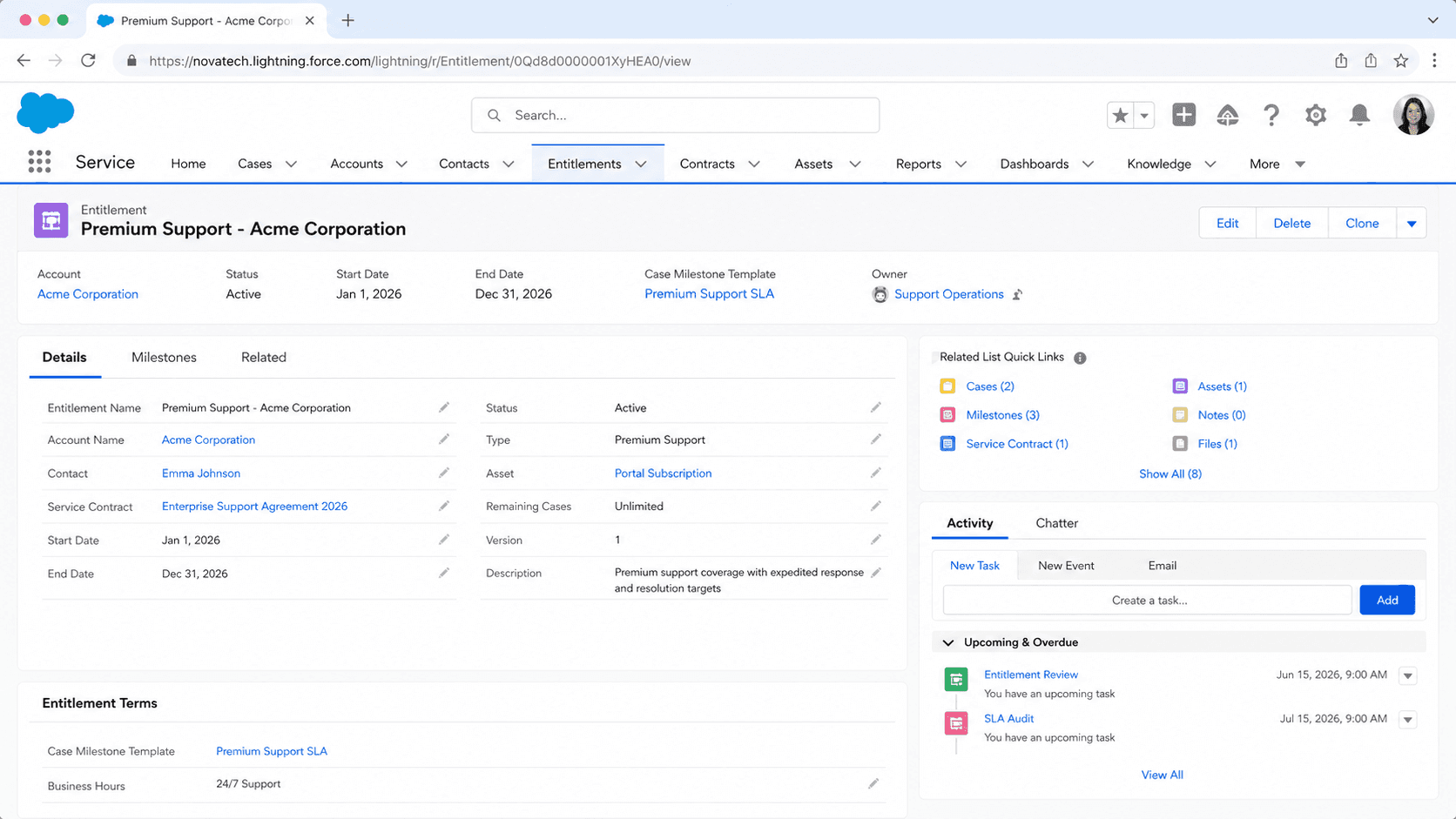
Definition
An Entitlement in Salesforce is a record that defines the level of customer support a person or account is allowed to receive, typically tied to a service contract, product warranty, or subscription tier. Entitlements drive case routing, milestone enforcement (response time, resolution time), and the visible "what service do you owe this customer" answer that service agents need at the moment a case opens. The Entitlement object is the backbone of Service Cloud's contract-aware support workflows.
Each Entitlement record links to an Account (or Contact, or Asset), defines a Start Date and End Date for service eligibility, references an Entitlement Process that controls milestones, and counts cases consumed against any per-period or lifetime case allowance. When a service agent opens a case, the Entitlement field on the case tells the agent whether the customer has 4-hour response SLAs, 24-hour business-day support, or no contract entitlement at all. Without entitlements, every customer gets best-effort handling; with entitlements, the case routing engine knows exactly what was promised.
How Entitlements turn service contracts into operational SLAs on individual cases
The Entitlement object and its parent relationships
Entitlements live on the Entitlement standard object. Each record points to one Account (required) and optionally a Service Contract, a Contact, or an Asset (when the contract covers specific equipment). The relationships drive case linking: an agent creating a case on an Account picks from active Entitlements tied to that Account. The combination of Account, Contact, and Asset on the Case has to match the Entitlement's relationships, or the picklist filters the Entitlement out. This is the most common "why does the entitlement not show up on this case?" question.
Entitlement Process and Milestones
An Entitlement Process is the rule engine that fires Milestones at predefined points in a case's lifecycle. Milestones are time-bound checkpoints (First Response within 1 hour, Resolution within 24 hours) that trigger time-based actions: emails, escalations, owner reassignments, automated case-status updates. The process is defined once under Setup, Service, Entitlement Processes, then referenced from every Entitlement that should follow that SLA. Different customer tiers (Bronze, Silver, Gold, Platinum) usually each have their own process with progressively tighter milestone thresholds.
Per-case and lifetime case allowances
An Entitlement can include a Case Allowance: a cap on how many cases the customer can open in a period (5 cases per month, 100 cases per year) or in the contract lifetime. Cases Used and Cases Remaining fields update automatically. When the customer hits zero remaining cases, the Entitlement picklist on new cases shows a warning. Agents can override to log the case anyway, but the warning is the cue to upsell the customer to a higher tier or charge overage. Allowance enforcement is informational, not blocking; Salesforce will not auto-reject the case.
Asset-based entitlements
For product manufacturers, entitlements often link to Assets (Asset 17F-Compressor-Serial-12345 has a 3-year warranty entitlement). When a customer reports an issue on that Asset, the Case is created with the Asset link, and the Entitlement picklist auto-filters to active warranties on that specific Asset. This is how Service Cloud handles "the customer bought a refrigerator in 2024 and it broke" without requiring agents to manually look up serial number coverage.
Auto-Assigning Entitlements via flow or Apex
When a case is created, the Entitlement does not auto-populate by default. Either build a flow that runs on case create, looks at the case Account or Contact, queries active Entitlements, and stamps the Entitlement field, or use Salesforce's standard Entitlement Auto-Assign rules (configured per profile and per record type). The auto-assign rule picks the highest-tier active Entitlement matching the case's parent relationships. Custom logic in a flow gives more control: pick by Contract priority, by case Type, or by a custom field on the Entitlement.
Entitlement reporting and SLA compliance
Standard reports show Entitlement consumption (Cases per Entitlement, Milestones Met versus Missed, Average Time to Milestone). Service leaders run these monthly to track which contracts are profitable (low case volume) versus money-losers (high case volume against a flat-fee contract). Missed Milestone reports identify SLA breaches that may trigger contractual credits owed back to the customer. These reports are how the service-contract business runs at scale; without them, contract profitability is guesswork.
Communities and customer-facing entitlement display
On Experience Cloud sites where customers self-serve cases, Entitlement information can be surfaced on the case form so the customer sees "You have 4-hour response on this contract." This is both a transparency improvement (the customer knows the deal) and a deflection tool (lower-tier customers see they will wait longer, encouraging an upgrade). The Customer Service Lightning Component bundles Entitlement display by default; Aura-based community pages need a custom component.
Configuring Entitlements and wiring them to cases
Setting up entitlements is a multi-step configuration: enable the feature, define the Entitlement Process with Milestones, create Entitlement records linked to Accounts and Contracts, then wire case auto-assignment. Most production rollouts take two to four weeks of admin time.
- Enable Entitlement Management
Setup, Service Setup, Entitlement Management, Entitlement Settings. Check Enable Entitlement Management. Choose whether to track Milestones on Cases, Work Orders, or both. This activates the Entitlement object and exposes the related-list on Account and Case page layouts.
- Define one or more Entitlement Processes
Setup, Service Setup, Entitlement Processes. New Entitlement Process. Add Milestones (First Response in 1 hour, Resolution in 24 hours), define entry and exit criteria, and configure time-based workflow actions for each milestone (email, escalation, owner reassignment).
- Create the Entitlement records
On each customer Account, create one or more Entitlement records. Set the Entitlement Process, Start Date, End Date, and optional Case Allowance. Link to a Service Contract for contract-driven entitlements or to an Asset for warranty-driven ones.
- Wire case auto-assignment
Either turn on Entitlement Auto-Assign rules (Setup, Entitlement Settings, Auto-Assign on Case Create) or build a flow on Case before-save that looks up active Entitlements for the Account and stamps the Entitlement field.
- Surface SLA progress on the case page
Add the Case Milestones related list and the Milestone Tracker component to the Case Lightning record page. Service agents see the countdown to each milestone in real time, with visual indicators when a milestone is approaching breach.
Required link to the customer Account record that the entitlement covers. Cannot be changed after creation; reparenting requires delete and recreate.
When the entitlement becomes active. Cases created before this date do not match this entitlement in the picklist.
When the entitlement expires. After this date the entitlement is inactive and filtered out of the case picklist; existing cases referencing it keep their milestones running.
Reference to the Entitlement Process that controls milestone firing. Optional but typical; an entitlement without a process tracks eligibility only, not SLAs.
- Entitlements do not auto-populate on Case create. Build a flow or enable Auto-Assign rules or every case has a blank Entitlement field.
- Asset-based entitlements only match cases that have the same Asset link. Agents who forget to set the Asset on the case lose the entitlement match.
- Case Allowance overruns are warnings, not blocks. The case still creates; the warning is operational signal for upsell.
- Milestones continue to count down on existing cases even after the parent Entitlement ends. End-date is for new case eligibility, not running SLA enforcement.
- Entitlement Processes cannot be edited once they are referenced by an active case. To change the SLA, clone the process, point future entitlements at the new version, and let in-flight cases finish on the old version.
Prefer this walkthrough as its own page? How to Entitlement in Salesforce, step by step
Trust & references
Cross-checked against the following references.
- Entitlement Management Overview (opens in new tab)Salesforce Help
- Entitlement Object Reference (opens in new tab)Salesforce Developer Docs
Straight from the source - Salesforce's reference material on Entitlement.
- Set Up Entitlement Management (opens in new tab)Salesforce Help
- Create an Entitlement Process (opens in new tab)Salesforce Help
About the Author
Dipojjal Chakrabarti is a B2C Solution Architect with 29 Salesforce certifications and over 13 years in the Salesforce ecosystem. He writes and edits salesforcedictionary.com, published by KineticBit Inc., to help admins, developers, architects, and cert/interview candidates sharpen their fundamentals. More about Dipojjal.
Test your knowledge
+5 pts / dayQ1. What does an Entitlement record define for a customer?
Q2. What does an Entitlement Process attached to an Entitlement enforce?
Q3. How does a Case Allowance on an Entitlement behave when the customer hits zero remaining cases?
Discussion
Loading discussion…