
Person Account
A Person Account is the Salesforce data model adaptation for business-to-consumer orgs whose customers are individual people, not companies.
Definition
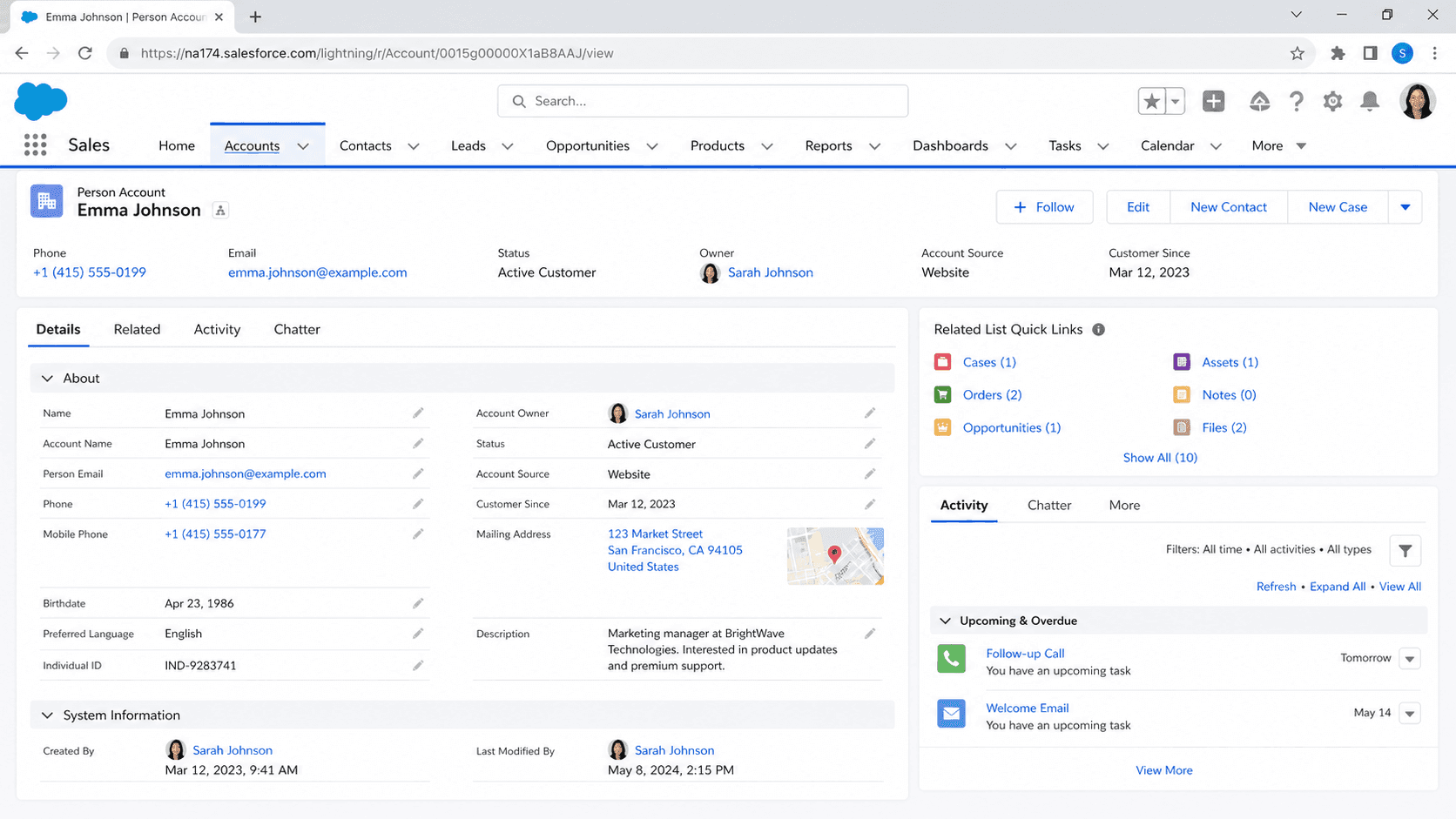
A Person Account is the Salesforce data model adaptation for business-to-consumer orgs whose customers are individual people, not companies. Under the default Business Account model, a customer is a company (the Account) with one or more people who work there (the Contacts). Under Person Accounts, the customer is the individual, and the platform fuses an Account row and a Contact row into something that looks like one record on the page but is technically two linked rows underneath. The Account has IsPersonAccount=true. The Contact has IsPersonAccount=true. Both share an Id that the platform threads through every related lookup.
Person Accounts exist because the standard Account-Contact split does not fit any B2C industry cleanly. Retail banking, consumer insurance, healthcare, wealth management, residential utilities, and every business whose customer is one human being were shoehorning person data into "Company = Smith Household, Contact = John Smith" before Person Accounts shipped. The result was Account reporting that double-counted, Contact reporting that missed the household context, and sharing rules that needed to know which one was "the customer." Person Accounts collapsed the redundancy. The feature now sits behind a setup toggle that almost every B2C-licensed org turns on, but the toggle has consequences that survive long after the org forgets it flipped one.
Why enabling Person Accounts is a decision you live with forever
The one-way enablement decision
Person Account enablement is the most consequential one-way switch in Salesforce. You request enablement through a case to Salesforce Support, they enable it in your org, and once on it cannot be turned off. The official explanation is technical (data structures change in ways that cannot be cleanly reverted), but the operational explanation is sharper: once any record gets created with IsPersonAccount=true, undoing the change would require deleting that record's Account half, its Contact half, every Activity that referenced it, every Case attached, and every Opportunity sourced from it. Salesforce will not do that, and neither will any sane migration partner. Treat Person Account enablement like a database engine swap on a production system. Sandbox-test for a full release cycle. Walk through every validation rule, sharing rule, page layout, and trigger that touches Account or Contact. Then file the case.
The fused data model
The data model split under Person Accounts is more elegant than the legacy workaround but still has rough edges. A Person Account has both Business-Account fields (Name, Industry, AnnualRevenue) and Contact-style fields (FirstName, LastName, Email, Phone, Birthdate) on the same page layout. The platform exposes the Contact-side fields with a Person prefix in the API (PersonEmail, PersonHomePhone, PersonBirthdate) and surfaces them in formulas through the same prefix pattern. Validation rules that referenced AccountName on a Business Account need to reference Name on Person Account because Person Accounts use the synced FirstName + LastName combination to drive Name. Triggers that fire on Contact also fire on Person Account changes, because every Person Account update writes to both the Account and Contact rows. Most "this trigger fires twice" support cases on Person-Account-enabled orgs trace to this duality.
Sharing behavior
Sharing on Person Accounts behaves differently from Business Accounts in three specific ways. First, the Owner field on the Account drives sharing for both the Account and its linked Contact, so Account-team and role-hierarchy rules cover both halves automatically. Second, Contact sharing rules do not apply to Person Account Contacts; you write Account sharing rules instead and they cover the Contact side by inheritance. Third, Account-Contact Relationship behaves differently: a Person Account can be the Account in an ACR or the Contact in an ACR, but not both at the same time, which constrains how you model relationships between Person Accounts and Business Accounts (think a household member who also works at a corporate customer). Document these patterns explicitly in any architecture decision record, because new admins will trip over them every quarter.
Reporting considerations
Reporting on Person-Account-enabled orgs requires care. Reports that filter on RecordType.IsPersonType need to specify whether to include Person Accounts, Business Accounts, or both. Most standard report types include both by default, which means an Account count report shows the union, which is fine until somebody mistakes it for "number of companies." Build dedicated report types or use the IsPersonAccount flag in every filter that needs to distinguish the two. Forecast reports, Activity reports, and Marketing Cloud sync all have Person-Account-specific gotchas that are easier to design around than to fix retroactively.
Marketing automation sync
Marketing automation tools handle Person Accounts variably. Pardot syncs them as Prospects keyed off PersonEmail. Marketing Cloud sends to Person Accounts through the Contact side (PersonEmail again). HubSpot and Eloqua require specific connector configuration to map Person Account into their own native person/company hybrid models. If your B2C motion depends on marketing automation, test the sync in a sandbox before the platform team commits to a tool. Field-level mismatches between Salesforce Person Account fields and the marketing tool's contact schema cause silent sync failures that surface as "the campaign did not send" the morning of a launch.
Industry-specific products
Industry-specific Salesforce products lean heavily on Person Accounts. Health Cloud uses Person Accounts to represent patients, with HealthCloudGA-prefixed fields layered on top. Financial Services Cloud uses Person Accounts to represent retail clients, with custom record types and additional household-modeling objects (Household, IndividualHousehold). Salesforce Loyalty Management, Salesforce Industries CPQ for B2C, and the Education Cloud variants all assume Person Accounts. If you are implementing any of these and have not enabled Person Accounts yet, the implementation has to start there.
How to enable Person Accounts
Enabling Person Accounts is not a click-path you do on a Tuesday afternoon. The actual day-of steps are short, but every step in the preparation matters more than the toggle itself.
- Audit your org for Account-touching customizations
List every validation rule, sharing rule, trigger, Flow, and Apex class that references Account or Contact. Each one needs a sandbox test against a Person Account record before production enablement.
- Build a sandbox with Person Accounts enabled
Salesforce can enable Person Accounts in a sandbox before production. Use a full or partial-copy sandbox refreshed from production so the test data resembles real records.
- Map field equivalents
Decide which Account-side fields (Industry, AnnualRevenue, Type) still make sense on Person Accounts and which should be hidden from page layouts. Document the mapping for every record type you plan to support.
- Test every automation path
Triggers fire on both the Account and Contact halves of a Person Account write. Walk through every trigger and confirm it does not double-process the same record. Walk through every Flow and confirm it picks the right object to act on.
- File the case to enable in production
With sandbox validation complete, file a Salesforce Support case requesting Person Account enablement in production. Salesforce typically requires a specific request format; check the current Help documentation before filing.
- Roll out in waves
Enable a specific record type or business unit first, audit for a full week, then expand. Mass-enabling across an entire B2C org on day one obscures which downstream system is breaking when something does break.
Every validation rule, sharing rule, trigger, and Flow that references Account or Contact needs explicit consideration. Skipping the audit creates production incidents that look like "the trigger broke" but are actually "the trigger never knew Person Accounts existed."
At least one full release cycle of sandbox testing. The toggle is a one-way change; the cost of catching a problem in sandbox is far less than the cost of catching it after enablement in production.
- Person Accounts cannot be disabled after enablement. The toggle is one-way. Sandbox-test for a full release cycle and roll out in waves before flipping the switch in production.
- Triggers fire on both the Account and Contact halves of a Person Account write. Triggers that were written for Business Accounts often double-process Person Accounts; audit every trigger before enablement.
- Person Accounts complicate Account-Contact Relationship modeling. A Person Account can be the Account in an ACR or the Contact in an ACR, but not both. Document the constraint before architects design relationships into the schema.
Prefer this walkthrough as its own page? How to Person Account in Salesforce, step by step
Trust & references
Cross-checked against the following references.
- Person Accounts (opens in new tab)Salesforce Help
- Considerations Before Enabling Person Accounts (opens in new tab)Salesforce Help
Straight from the source - Salesforce's reference material on Person Account.
- Person Accounts (opens in new tab)Salesforce Help
- Account (Object Reference) (opens in new tab)Salesforce Developers
About the Author
Dipojjal Chakrabarti is a B2C Solution Architect with 29 Salesforce certifications and over 13 years in the Salesforce ecosystem. He writes and edits salesforcedictionary.com, published by KineticBit Inc., to help admins, developers, architects, and cert/interview candidates sharpen their fundamentals. More about Dipojjal.
Test your knowledge
+5 pts / dayQ1. What does a Person Account represent in the Salesforce data model?
Q2. When is a Person Account the right data-model choice over the standard Account-plus-Contact pattern?
Q3. What is the key consideration before enabling Person Accounts in a production org?
Discussion
Loading discussion…