
The Developer Console Went Missing
Admins opening Winter '27 preview sandboxes this week found Developer Console gone from the gear menu. Nothing was deleted. Web Console reached general availability, became the default in-org IDE, and the old tool was switched off behind a Setup toggle most people did not know existed. The tool is one click away. The four things it still cannot do are the part worth reading.
Open the gear menu in a Winter '27 preview sandbox, look for Developer Console, and it is not there. No banner, no deprecation notice, no entry in the setup audit trail explaining where it went.
That is the thread that ran through admin and developer channels across Monday and into Tuesday, and the answer turned out to be simpler than the panic suggested. Nothing was deleted. Web Console reached general availability in Winter '27, Salesforce made it the default in-org IDE, and the same change switched the old console off by default. One Setup toggle brings it back.
The tooling question underneath is the one to spend twenty minutes on, because the replacement does not cover everything the original did.
What Actually Changed Under The Gear Icon
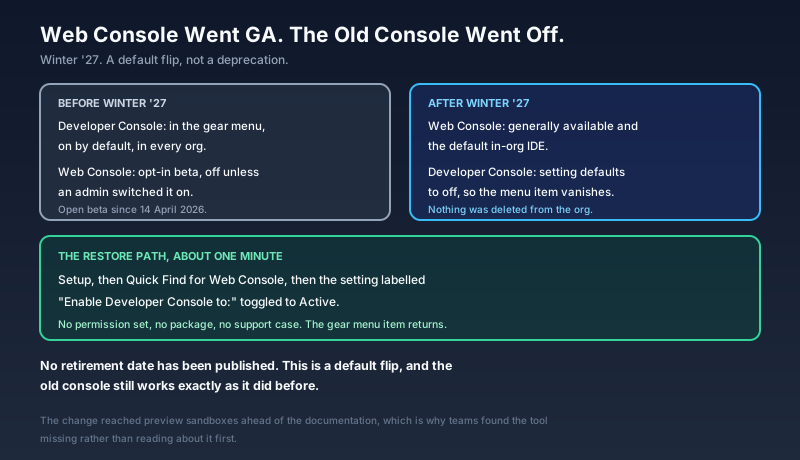
Web Console opened as a beta on 14 April 2026, alongside Summer '26. It was off by default, admins had to switch it on, and most orgs never did. Winter '27 flipped the arrangement. Web Console is generally available and on, and the Developer Console setting now defaults to off.
The result for anyone whose muscle memory ends at the gear icon is that a tool they used yesterday is absent today. That is a defensible product decision executed with poor sequencing, and Salesforce's own product team has said as much: the rollout reached preview sandboxes before the documentation explaining it did. Teams found out by looking for the tool, not by reading about the change.
Two things are true at once here. The default flip is not a retirement, and no retirement date has been published. It is also the clearest signal yet about where in-org tooling is going.
The Toggle That Brings It Back
If you need the old console today, the path is short:
- Open Setup.
- Search Web Console in Quick Find.
- Find the setting labelled Enable Developer Console to: and set it to Active.
No [permission set](/terms/permission-set), no package, no support case. The gear menu item returns for the users you scope it to, and it behaves exactly as it did before.
Do this in the sandbox where your team found the gap, not across every org reflexively. The point of the next four weeks is to find out whether your developers actually still need it, and leaving the toggle off in one sandbox is the cheapest way to answer that question honestly.
What The Replacement Does Well
Web Console runs the same web editor engine that powers VS Code in the browser, loaded inside the org from a link in the top right. Nothing to install, no local Java runtime, no CLI, no authenticated project folder. You are already logged in, so the tool is already scoped to your user and to the permissions that user holds.
What that buys you is the modern editor behaviour the old console never had: autocomplete that keeps up with Apex classes and SObject fields, go-to-definition, inline error markers before you save, and a dark theme. Debug logs render as a collapsible tree of DML, SOQL, callouts and debug statements with a timeline, rather than a wall of pipe-delimited text. SOQL and Query Plan run in the same surface. Anonymous Apex still executes.
It also covers ground the original never did. Lightning Web Component bundles and Visualforce pages are browsable and editable, which for a modern codebase is the difference between a usable tool and a museum piece. In production orgs, Apex is read-only: you can read a class, read the log, run a query, and you cannot save an edit. That is the right call, and it is a real behaviour change for anyone who used the old console to hotfix production.
The Four Gaps That Matter
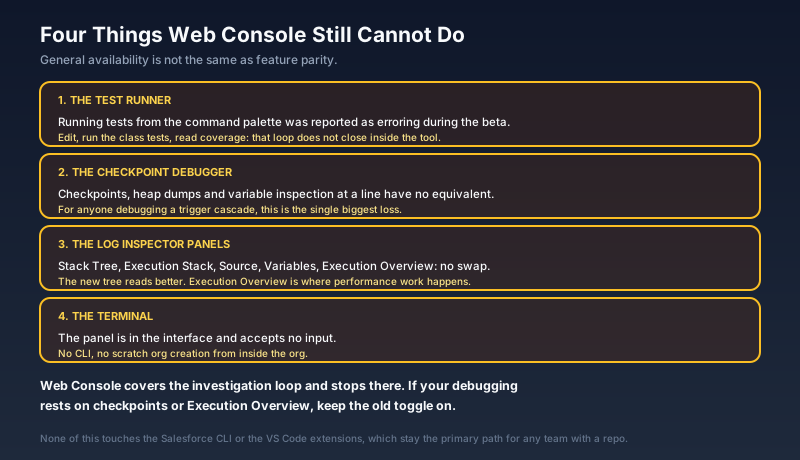
Read the general availability label as "finished" and you will hit the edges within a week.
The test runner. Running tests from the command palette was reported as erroring during the beta. If your loop is edit, run the class's tests, check code coverage, that loop does not close inside Web Console today.
The checkpoint debugger. Developer Console checkpoints, with heap dumps and variable inspection at a chosen line, have no equivalent. For anyone debugging a complex trigger cascade, that is the single biggest loss.
The Log Inspector panels. Stack Tree, Execution Stack, Execution Log, Source, Variables, Execution Overview. The new tree view is better for ordinary reading, but Execution Overview is where performance work happens, and there is no one-for-one replacement for it.
The terminal. The panel is in the interface and accepts no input. No CLI, no scratch org creation.
None of that touches the Salesforce CLI or the VS Code extensions, which remain the primary path for any team with a source-controlled repo. The gap lands on the people who work in the browser because that is what the situation allows: an admin triaging a failed batch job on a borrowed laptop, a consultant in a client org with no local setup, a developer answering a page at 4:50 on a Friday.
Who Sees This And When
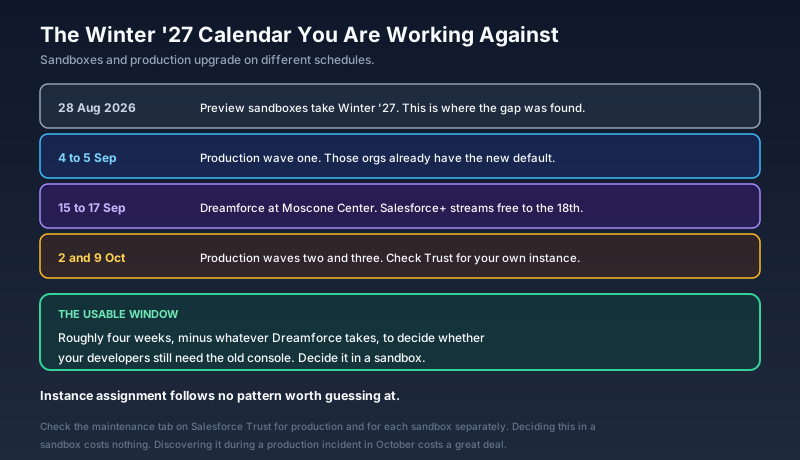
Preview sandboxes took Winter '27 from 28 August, which is why this surfaced now. The first production wave ran over the weekend of 4 and 5 September. The two remaining waves land on 2 October and 9 October. Instance assignment follows no pattern worth guessing at, so the date that governs you is the one on the Trust maintenance tab for your instance, checked separately for production and for each sandbox.
The rest of the Winter '27 developer list is more generous than this one change suggests. Apex heap limits rise from 6 MB to 10 MB synchronous and from 12 MB to 25 MB asynchronous. The Apex Symbol API arrives as a Tooling API resource returning type details, aimed squarely at code completion and at grounding AI agents that read Apex. Test classes gain real HTTP callouts for genuine integration tests. FORMULA() in SOQL enters beta. Selective Apex compilation means you can compile only the invalid classes.
Set against that list, hiding a menu item is small. It just happened to be the one every developer opens.
Elsewhere On Tuesday
Salesforce unveiled Proactive Intelligence for Life Sciences, three pieces aimed at pharma and medtech operations. Regulated Content Management moves compliance upstream, connecting claims, evidence and obligations to content as living data so assets enter Medical, Legal and Regulatory review closer to ready. A Command Center consolidates operational signals with anomaly detection and root cause analysis. A Life Sciences MCP server extends governed workflows to Slack, Teams, WhatsApp and Claude without dropping the compliance controls. Regulated Content Management goes to early adopters in October with general availability in 2027; the other two are 2027 items. The framing statistic Salesforce leads with is blunt: half of 2023 drug launches came in under their pre-launch forecasts.
Slack's September update landed in the same window, and two items in it matter outside Slack. Salesforce approvals now route into Slack driven by Flow Orchestration, which makes the approval surface a channel rather than a record page. And Slack's MCP server gained tools for Lists, so a connected agent can search, create and update them. Both sit alongside Slack Code, the code-channel product that opened to all Slack plans in late August and puts coding agents from Anthropic, Cognition, GitHub, OpenAI and Vercel into shared channels with tabs for the conversation, the plan, the diff and a live preview.
Dreamforce is one week out, 15 to 17 September at Moscone Center, with free virtual sessions on Salesforce+ running through the 18th. CRM traded in the mid 250s on Tuesday after a month that added roughly a third to the share price, with a consensus Buy rating and an average target near $270 across the analysts polled by S&P Global. Expect the agent announcements next week to arrive against that backdrop.
What To Do This Week
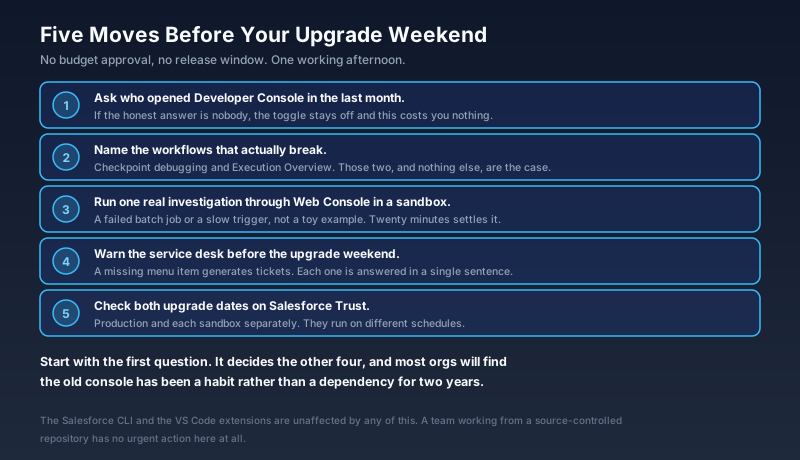
Ask who opened Developer Console in the last month. If the honest answer is nobody, this change costs you nothing and the toggle stays off.
Name the workflows that break. Checkpoint debugging and Execution Overview are the two with no replacement. If neither appears in how your team actually works, the case for switching the setting back on is weak.
Run one real investigation through Web Console in a sandbox. A failed batch job or a slow trigger, not a toy example. Twenty minutes tells you more than any release note.
Warn the service desk before your upgrade weekend. A missing gear menu item generates tickets, and every one of them is answered in a sentence by somebody who knew it was coming.
Check both upgrade dates on Trust. Production and each sandbox separately, because they run on different schedules and assuming otherwise is the standard version of this mistake.
Start with the first question, because it is the one that decides the rest. Most orgs will find that Developer Console has been a habit rather than a dependency for a couple of years now, and the ones that find a genuine dependency will have named it precisely enough to argue for it. Either answer is useful. Finding out during a production incident in October is not.
About the Author
Dipojjal Chakrabarti is a B2C Solution Architect with 29 Salesforce certifications and over 13 years in the Salesforce ecosystem. He writes and edits salesforcedictionary.com, published by KineticBit Inc., to help admins, developers, architects, and cert/interview candidates sharpen their fundamentals. More about Dipojjal.
Share this article
Sources
- Salesforce Developer Console Just Disappeared: Here's What's Actually Happening (Salesforce Ben)
- Introducing Web Console (Beta): Code Where You Build on Salesforce (Salesforce Developers)
- Enable Web Console (Salesforce Developer Docs)
- Top 10 Salesforce Winter '27 Features for Developers (Salesforce Ben)
- Top 5 Salesforce Winter '27 Features for Developers (Apex Hours)
- Salesforce Winter '27 Release Notes (Salesforce Help)
- Salesforce Unveils Proactive Intelligence for Life Sciences (Salesforce)
- Salesforce Launches Slack Code to Make AI Software Development Multiplayer (Salesforce)
- Salesforce Trust (instance maintenance schedule)
- Dreamforce 2026 (Salesforce)
Related dictionary terms
Practise it
Five questions on Platform Developer I
Exam-style questions with an explanation after each one. No account needed, and your answers build a weak-topic map once you have one.
More news
The Winter '27 Enforcement Shuffle
Winter '27 started landing in production this weekend with a shorter enforcement list than the one published on August 19. Three release updates moved out, two still bite, and the checklists disagree. Here is the current state.

Flow Debt Gets A Native Filter
Winter '27 adds an unused-resources filter and flow tags to Flow Builder. Here is what the filter finds, the four kinds of flow debt it cannot see, and how to use the weeks before your upgrade weekend.
Comments
No comments yet. Start the conversation.
Sign in to share your take on this article. Your account works across every page.