
The Apex Symbol API: Winter '27 Finally Gives Your Coding Agent a Real Map of the Platform
Salesforce shipped a Tooling API resource for Apex type information and said out loud that one of its jobs is feeding AI agents. Here is what it returns and what it does not fix.
Your coding agent writes thirty lines of Apex in about eight seconds. It bulkifies. It adds a null check. It even writes a comment explaining why the null check is there. You deploy to a [scratch org](/terms/scratch-org) and the compiler answers with one line: Method does not exist or incorrect signature.
The method it invented sounds exactly like a method Salesforce would ship. That is the whole problem in one sentence. Apex carries a standard library of thousands of types across dozens of namespaces, and a model trained on public code has seen enough of it to produce a convincing forgery of the parts it never actually learned.
Winter '27 ships something aimed straight at this. It is called the Apex Symbol API, it is in beta, and it is a Tooling API REST resource that returns detailed type information for built-in, custom, and dynamic Apex types: classes, interfaces, methods, triggers. Salesforce's own framing lists three uses. Code completion in IDEs. Context for AI agents that generate Apex. Grounding for setup agents answering questions about code.
Read the middle one again. Salesforce is shipping developer plumbing and naming an AI as a first-class consumer of it.
The context your agent is actually working from
Sit with what a coding agent knows when it writes Apex for you.
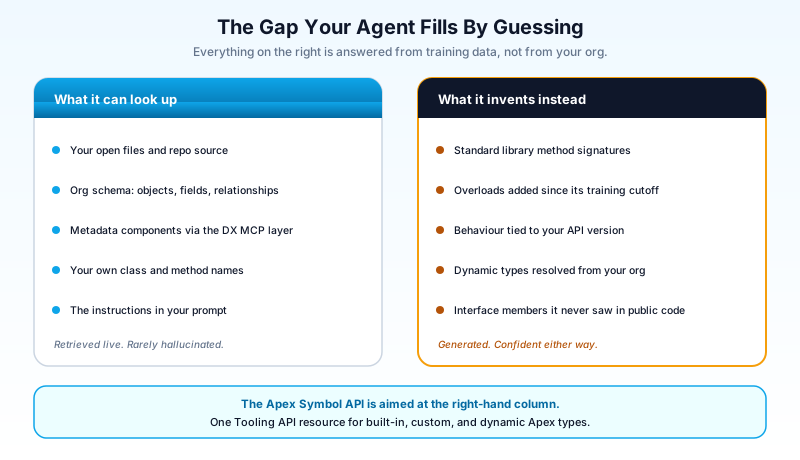
It knows its training data, which froze on a date, and which contains a sampling of public Salesforce code weighted toward whatever people posted on Stack Exchange and GitHub. It knows the files you have open, or whatever your MCP server retrieved from your org this session. It knows the instructions in your prompt.
Here is what it does not have. A resolved list of every method on Database, Schema, Messaging, EventBus, ConnectApi, Auth, and the rest, at the API version your class is actually compiled against. That list changes three times a year. Methods get added. Signatures get overloaded. Some things that existed in v52 behave differently in v66.
So the agent does the thing models do when a fact is missing and the shape of the answer is obvious. It generates a plausible token sequence. Database.getQueryLocatorWithBinds is real. Something that sounds equally reasonable might not be. Both come out of the model with the same confidence, because confidence in a language model is not a measure of whether the method exists.
You catch it at compile time, so the blast radius is small. What it costs you is the loop. Generate, deploy, read the error, paste the error back, regenerate. Four minutes per hallucination, several times a day, on work that was supposed to be faster than typing it yourself.
Three partial answers, and what each one missed
The Symbol API is not the first attempt at this. It is the first one designed for a consumer that is not a human sitting in an IDE.
The completions resource
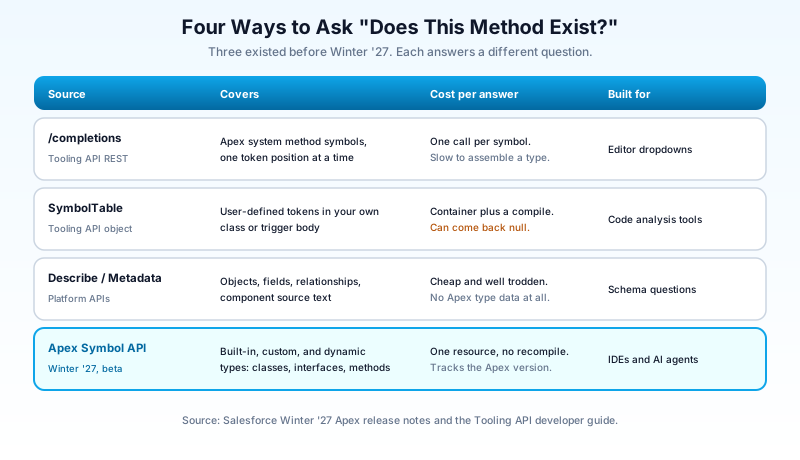
The Tooling API has had /completions?type=apex for years. Point it at a symbol and it returns the available code completions for Apex system method symbols. That is a real answer to a real question, and it was built to populate the dropdown in the Developer Console when you type a dot.
The shape gives it away. Completions are optimised for "what can follow this token," which is what an editor needs at a cursor position. An agent generating a whole class wants something different: the full signature set for a type, all at once, before it writes a line. You can approximate that by calling completions repeatedly, and the approximation is slow and awkward.
The SymbolTable object
SymbolTable is the Tooling API's structured view of Apex source. It is a complex type representing the user-defined tokens in the body of an ApexClass, ApexClassMember, or ApexTriggerMember, along with their line and column positions.
Two limits matter here.
The first is the word "user-defined." SymbolTable describes your code. It does not describe the standard library your code calls into, and the standard library is where most hallucinations live. Nobody invents a method on your own AccountService class, because the agent can read that file. It invents methods on Messaging because it cannot.
The second is compilation. The field is not populated until the code has been compiled, which in practice means creating a MetadataContainer, adding an ApexClassMember, and firing an AsyncContainerRequest to force the compile. That is three API calls and a wait, to read metadata about a class that is already sitting in your org. Salesforce also carries a published known issue that ApexClass.SymbolTable can be intermittently null, which is exactly the failure mode you do not want in a tool that is supposed to be the source of truth.
Describe calls and the Metadata API
Schema describe gives you objects and fields. The Metadata API gives you source text and component definitions. Both are genuinely useful, and both are the reason your MCP tooling can already tell an agent that Account.Industry__c exists.
Neither one describes Apex types. A describe call will happily confirm your custom field. It has nothing to say about whether Database.rollback takes a Savepoint or a String.
What the Symbol API adds
One resource. Built-in types, custom types, dynamic types. Classes, interfaces, methods, triggers. No metadata container, no forced recompile, no stitching two APIs together and hoping the seams line up.
The line in the release notes that should get your attention is the one about currency: the API stays up to date with the latest Apex version as it evolves. That sounds like housekeeping. It is the actual product.
Think about what breaks a grounding source. Not being wrong on day one. Drifting. If Spring '27 adds four methods to a namespace and your context source still reflects Winter '27, your agent goes back to guessing on exactly the newest surface area, which is the surface area it was already worst at. A grounding source that Salesforce updates with the platform is worth more than a more detailed one you have to maintain yourself.
The other quiet win is uniformity. Right now, an agent that wants Apex type information has to know which of four mechanisms answers which question, and each returns a different shape. One resource with one response format is a much smaller thing to teach a tool, and a much smaller thing to keep working when the tool changes.
Dynamic types are the part worth caring about
The phrase "built-in, custom, and dynamic Apex types" reads like a completeness checkbox. The third one is doing real work.
A large amount of Apex touches types that nobody wrote and nobody deployed. Schema.SObjectType resolves against objects that exist in your org. Database.QueryLocator behaves differently depending on what you queried. Generated wrapper types, platform event types, and the Schema namespace as a whole reflect your specific org's configuration rather than a fixed library.
This is the category where a model trained on public code is least equipped to help you, because the correct answer is not in any public code. It is in your org. A source of truth that resolves those types from the org you are actually connected to is answering a question that no amount of training data can answer.
It is also the category where a wrong answer costs the most. A hallucinated standard-library method fails at compile time. A wrong assumption about a dynamically resolved type frequently compiles fine and then throws at runtime, in production, on a record shape the developer never tested.
Where this lands in your toolchain
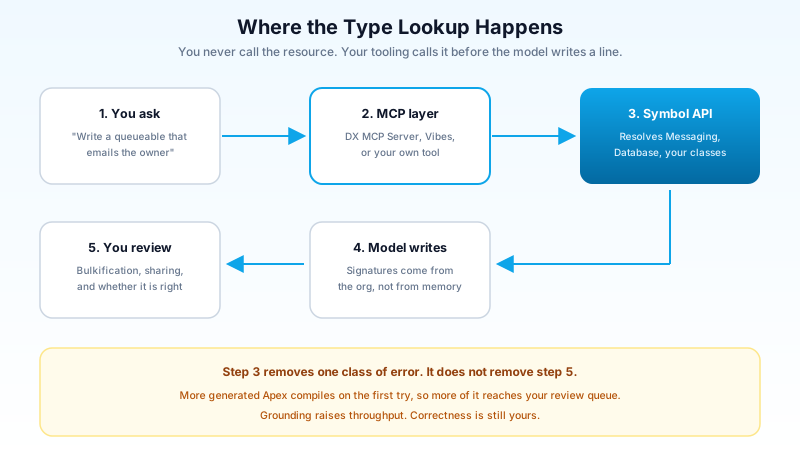
You are not going to call this resource by hand. Something in your stack will call it for you, and the interesting question is which layer.
The Salesforce DX MCP Server is the obvious first consumer. It is already in beta, it already ships toolsets grouped as orgs, metadata, data, and users, and it already puts ApexGuru insights in front of your coding agent by pulling your org's runtime metrics into the conversation. A tool that returns Apex type signatures fits that shelf exactly. If you have not wired up the MCP layer at all yet, the complete Salesforce MCP guide covers the setup before you worry about which tools sit behind it.
The Agentforce Vibes IDE is the second. Vibes already queries org schema and metadata in real time rather than working from a stale local snapshot, which is the correct architecture and the reason it outperforms a generic assistant on org-specific work. Apex type resolution is the gap in that picture, and it is a gap Salesforce controls both ends of.
The third consumer is the one nobody talks about: your own internal tooling. Plenty of teams have built a code-review bot, a deployment checker, or a documentation generator that parses Apex source with a regex and prays. A real type resource replaces a large amount of fragile parsing with a call.
What none of this gives you is automatic. Beta APIs do not appear inside third-party tools the week they ship. Expect a lag between Winter '27 reaching your instance and any tool you did not write consuming the resource.
Beta means beta
Salesforce shipped this as a beta feature and that word carries weight in the release notes, so treat it accordingly.
Beta APIs can change shape between releases. The response format you build against in Winter '27 is not contractually the response format in Spring '27. Beta features are typically excluded from the usual support commitments, and the reference documentation tends to lag the release notes by weeks, which means early adopters work partly from experiment.
The practical reading: this is a good week to test it in a sandbox and a bad quarter to put it on the critical path of a production deployment pipeline. If your build fails when an undocumented beta resource changes a field name, you have built a fragile thing on purpose.
There is a middle path that most teams should take. Use it where a wrong answer degrades gracefully. Grounding a code suggestion is a good fit, because the worst case is the suggestion is no better than it was before. Gating a release is a bad fit, because the worst case is nobody ships.
What grounding does not fix
This is where I want to be blunt, because the framing around AI code grounding tends to promise more than the mechanism delivers.
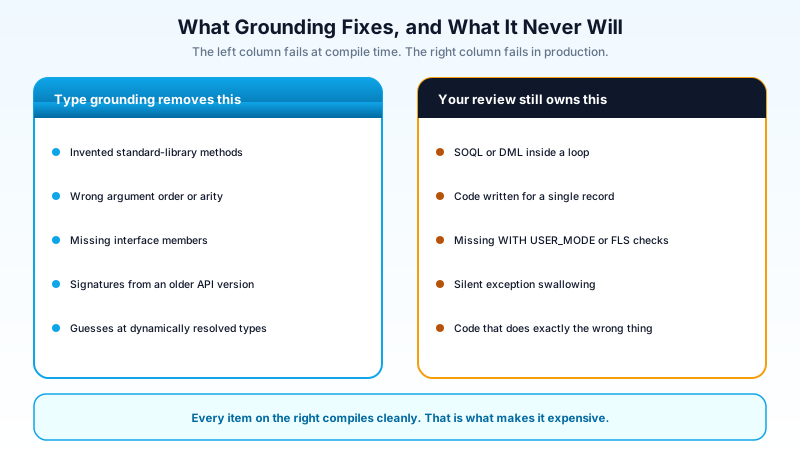
Type information makes generated Apex compile. It does nothing about whether the code is correct.
The failure modes that actually hurt in Salesforce are not signature errors. They are the ones that pass every automated check and then fall over at scale.
Bulkification is the classic. A model writes for one record by default because most code examples it learned from operate on one record. A SOQL query inside a for loop compiles perfectly. It fails on the 101st iteration in production, on the day someone runs a data load. Type grounding does not see this.
Sharing and field-level security is the second. WITH USER_MODE and Security.stripInaccessible exist, and generated code omits them constantly, because the training data predates the guidance and because omitting them is never a compile error. A grounded agent will write the same insecure query with correctly spelled method names.
Business logic is the third and it is the one no API will ever solve. The code does what you asked. What you asked was subtly wrong. That is a design review, not a type check.
I have watched teams treat "the AI has org context now" as a reason to review less carefully, and the pattern that produces is a specific kind of debt: a lot of code that is locally correct, deployed fast, with no coherent architecture behind it. The vibe-coding cleanup playbook exists because that debt is already showing up in real orgs. Better grounding makes the generated code compile more often, which means more of it gets deployed, which means the review bottleneck matters more rather than less.
The window you have this week
Winter '27 sandbox preview lands over the weekend of August 28 and 29, 2026. To land on a preview instance, a sandbox refresh has to complete before 6:00 PM PT on August 27. Production instances upgrade across waves assigned by instance, running from late August into October, so confirm your own date on Salesforce Trust rather than assuming.
That gives you a preview org to test in before any of this reaches production. Here is what I would actually do with it, in order.
Refresh a Developer or Developer Pro sandbox against a preview instance before the deadline. This is the cheap step and the one people miss, because a sandbox that refreshes on August 28 does not get the preview.
Call the resource by hand once, from your terminal, against the preview org. Look at the response for a standard namespace and a custom class of your own. You want to know the response shape before you decide what it is good for, and the release notes will not tell you as much as one call will.
Point it at your ugliest generated type. Find something in your org where you already know the agent gets it wrong. A platform event, a dynamically resolved SObject type, an interface with three implementations. Check whether the resource returns what the agent needed.
Then check whether your MCP layer picks it up. If you are running the DX MCP Server, watch its release notes over the next two releases. If you have built internal tooling that parses Apex, this is the resource you eventually rewrite it against.
The one thing not to do is wire it into anything that has to work on Monday morning. Beta means the shape can move.
If you only take one action from this: refresh a sandbox onto a preview instance before 6:00 PM PT on August 27 and spend twenty minutes calling the Symbol API against a type you already know your coding agent gets wrong. That single test tells you more about whether this changes your workflow than any release-notes summary, including this one. If you need the wider Winter '27 picture first, the Winter '27 release and sandbox preview guide has the dates and the release updates that will break things.
About the Author
Dipojjal Chakrabarti is a B2C Solution Architect with 29 Salesforce certifications and over 13 years in the Salesforce ecosystem. He writes and edits salesforcedictionary.com, published by KineticBit Inc., to help admins, developers, architects, and cert/interview candidates sharpen their fundamentals. More about Dipojjal.
Share this article
Sources
Related dictionary terms
Practise it
Five questions on Platform Developer I
Exam-style questions with an explanation after each one. No account needed, and your answers build a weak-topic map once you have one.
Keep reading

Salesforce MCP: The Complete 2026 Guide
MCP is the open standard that lets Agentforce agents, Claude Desktop, and Cursor read records, run SOQL, and invoke Flows directly in your org. Here's what every Salesforce developer needs to know in 2026.

Salesforce Technical Debt in the Vibe-Coding Era: The 2026 Cleanup Playbook
AI builders ship Salesforce automation in seconds, and Agentforce acts on it autonomously. Here is where 2026 technical debt hides and the concrete playbook to fix it first.

Salesforce Winter '27 Release: Dates, Sandbox Preview, and the Updates That Will Break Things
Winter '27 hits sandboxes around August 29, 2026, and it retires the OAuth Username-Password flow for good. The dates, the preview mechanics, and a one-week prep plan.
Comments
No comments yet. Start the conversation.
Sign in to join the discussion. Your account works across every page.