
What Is Salesforce? A Beginner's Guide to CRM, Clouds, and Agentforce 360
A plain-English starter guide to Salesforce in 2026: what it is, how the parts fit together, the cloud lineup after the Agentforce 360 rebrand, and how to spin up a free Developer Edition org.
If you've spent thirty seconds on a Salesforce homepage, you've seen the vocabulary problem. In one paragraph you might meet "CRM," "Customer 360," "Sales Cloud," "Data 360," "Trailhead," "Flow," "Apex," "sandbox," and "Agentforce," and you're expected to keep up.
This guide unpacks all of it. By the end you'll have a clear mental model of what Salesforce is in 2026, how the parts fit together, what the cloud lineup looks like after the Agentforce 360 rebrand, and how to spin up your own free practice org so you can learn by clicking instead of reading.
What Salesforce actually is
Salesforce is a cloud platform for managing the people and organizations a company does business with. It started in 1999 as software for sales teams. Today it's the world's #1 CRM, holds the largest share of the CRM market according to IDC, and runs inside more than 150,000 customers including most of the Fortune 500.
That's the company answer. The useful answer for a beginner is that Salesforce is three things at once.
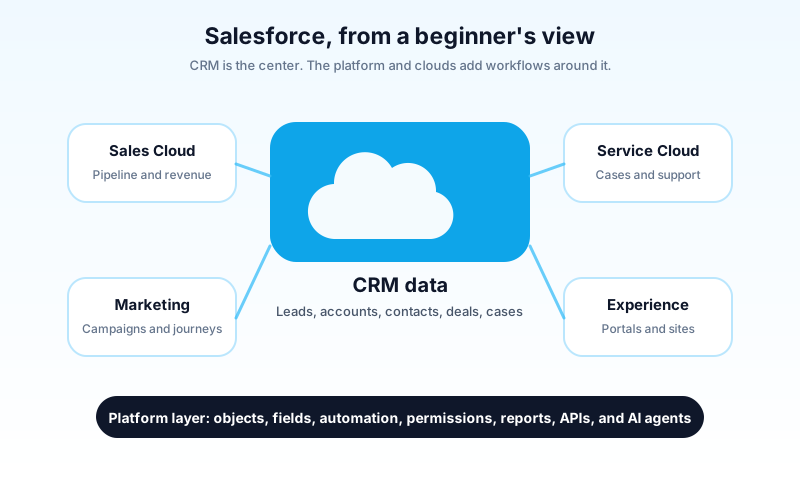
It's a CRM, which means it keeps a single shared record of every prospect, customer, deal, support case, and conversation a business has.
It's a platform, which means admins and developers can shape that CRM into something that fits their business. They add fields, change layouts, build automations, write code, and even create whole new apps without standing up servers.
And as of October 2025, Salesforce officially calls that platform Agentforce 360, because the third layer is now AI agents. An agent reads context from your data, takes actions on your behalf, and sits inside the same records sales reps and support agents work in. The platform you may have heard called "Lightning Platform" is now positioned as agentic. The CRM and the platform are still there. The agents are the new floor on top.
Hold those three layers in your head and most of the product names start sorting themselves out.
CRM, but actually
CRM stands for customer relationship management. The phrase sounds corporate. The idea is simple. A business needs reliable memory.
Picture a small company without one. A salesperson knows a prospect asked for a demo last week. A support rep knows the same company filed a billing complaint two months ago. A marketer knows the prospect downloaded an ebook in March. The information exists. It just lives across inboxes, spreadsheets, sticky notes, and chat threads, and nobody can see all of it at once.
A CRM pulls that scattered story into one place so a single human, or a single agent, can answer:
- Who are we selling to, and what did they buy?
- What conversations have we had, and what did we promise?
- Which deals are likely to close, and how much are they worth?
- What problems are open, and who owns the next step?
That's what Salesforce sells. The dashboards and screens are the visible part. The real product is shared memory. Once a company has it, every other tool gets more useful, because every other tool can plug into the same source of truth.
The simplest mental model
Before you memorize a single product name, picture Salesforce as four layers stacked on top of each other.
- Data. Salesforce stores business information as records inside objects. Think tables and rows.
- Experience. Users see and update those records through apps, tabs, and pages. Think the screens you click.
- Automation. Rules and flows move work forward when something changes. Think "if this, then that," but for an entire business.
- Intelligence. Einstein adds predictions and analytics. Agentforce adds AI agents that can reason and take action.
Wrapping all four is permissions, which decide who is allowed to see, change, or trigger anything.
Almost every Salesforce concept is a deeper version of one of those five ideas. When you read about Flow or Apex, you're in layer three. When you read about profiles and permission sets, you're in the wrapper. When you read about Data 360 or Agentforce, layers one and four are getting more powerful.
The building blocks
Salesforce gets a lot easier once these terms click into place.
Org
An org is a single Salesforce environment. When a company buys Salesforce, it gets a production org. When you sign up for a free Developer Edition, you get your own personal org. Each org has its own users, data, settings, and customizations. Beginners often say "my Salesforce" when they really mean "my org."
App
An app is a workspace inside an org. The Sales app shows tabs tuned for sellers. The Service app shows tabs tuned for support reps. You can also build custom apps for use cases like recruiting or asset tracking. An app in Salesforce is rarely a separate program. It's a curated view into the same underlying data.
Object
An object is a type of information. Think of it as a table. Standard objects ship with Salesforce: Account, Contact, Lead, Opportunity, Case, Campaign, User, and dozens more. Custom objects are ones you build, with API names that end in __c like Project__c. Use a standard object if your business has a clean analog. Build a custom one if it doesn't.
Record
A record is a single row inside an object. If Account is the object, "Acme Corporation" is a record. Every record has its own URL, history, and access rules.
Field
A field is one piece of information on a record. An Account has fields like Industry, Website, Phone, and Annual Revenue. A custom Subscription object might have Start Date, Plan Tier, and Monthly Recurring Revenue. Good field design makes reporting and automation easy. Bad field design makes them painful.
Page Layout and Lightning record page
A page layout controls which fields and related lists users see when they open a record. A Lightning record page controls the wider page experience: components, tabs, highlights, and conditional sections. To change what someone sees on a record, you usually open Page Layouts or Lightning App Builder.
Flow
Flow is the main automation tool for admins. With Flow you can update records, send emails, walk a user through a screen, create related records, or call out to other systems. Flow is one of the highest-leverage skills a new admin can build, because it removes a huge amount of repetitive work without any code.
Apex
Apex is Salesforce's programming language. It looks a lot like Java. Developers reach for Apex when Flow runs out of room or when logic needs careful transaction control. You don't need Apex on day one. You just need to know where it sits: declarative tools first, code when those aren't enough.
Reports and dashboards
Reports turn records into rows, groups, summaries, and charts. Dashboards combine report charts into a single view. Reporting is where clean data design pays off, because if your fields are messy, your charts will be too.
Profiles, permission sets, and roles
Salesforce has a deep security model. The starter version:
- A profile sets a user's baseline access.
- A permission set grants extra access on top.
- A role sits in a hierarchy that controls record visibility.
- Sharing settings decide which records are private and which are shared.
You don't need to master this to ship something. You just need to remember that Salesforce is built for teams where different people see different slices of the data.
The Salesforce family in 2026
Salesforce uses the word "Cloud" for product families. A Cloud is a bundle of features aimed at a particular team or use case. The lineup looks like this in 2026.
Sales Cloud
Sales Cloud is the original product. It helps sales teams manage leads, accounts, contacts, opportunities, forecasts, and pipeline. If someone calls Salesforce a "sales CRM," this is what they mean.
Service Cloud
Service Cloud is for support teams. Its core object is the Case. It handles queues, routing, escalations, knowledge articles, the service console, chat, voice, and SLA tracking.
Marketing Cloud
Marketing Cloud is for journeys, emails, ads, messaging, and personalization. As of June 2025, Salesforce ships a new generation called Marketing Cloud Next, with editions named Growth and Advanced, built on the core platform instead of a separate stack. Older Marketing Cloud products are still in the wild, so the right tool depends on the company.
Commerce Cloud
Commerce Cloud powers ecommerce storefronts, both B2C and B2B. Cart, catalog, checkout, headless APIs, and merchant tooling all live here.
Experience Cloud
Experience Cloud is for portals and sites. A customer portal lets people open and track their own cases. A partner portal lets resellers register deals. An employee site can host an internal help center.
Data 360
Data 360, formerly Data Cloud, is Salesforce's big data layer. It unifies customer data from many systems into a single profile the rest of the platform can act on. Salesforce rebranded it Data 360 at Dreamforce 2025 alongside the Agentforce 360 launch. In larger companies, Data 360 is what feeds the AI layer with context.
Tableau, Slack, and MuleSoft
Three more products round out the family. Tableau is the visual analytics product Salesforce acquired in 2019, used for richer dashboards and BI-style charts. Slack, bought in 2021, is increasingly the conversational front door to the rest of the platform and ships free with the Starter Suite as of 2025. MuleSoft is the integration product that bridges Salesforce to ERPs, warehouses, and homegrown services.
Agentforce 360
Agentforce is the newest and most strategic part of the family. Launched in September 2024 and rebranded as the Agentforce 360 platform at Dreamforce 2025, it lets you build and run AI agents that work inside Salesforce. An agent reads context from Data 360, takes actions through CRM records and other systems, and can be deployed to employees or customers. When people say "agentic CRM," this is what they mean.
A practical example: from stranger to customer
Suppose a software company sells to other businesses, and watch how the building blocks line up.
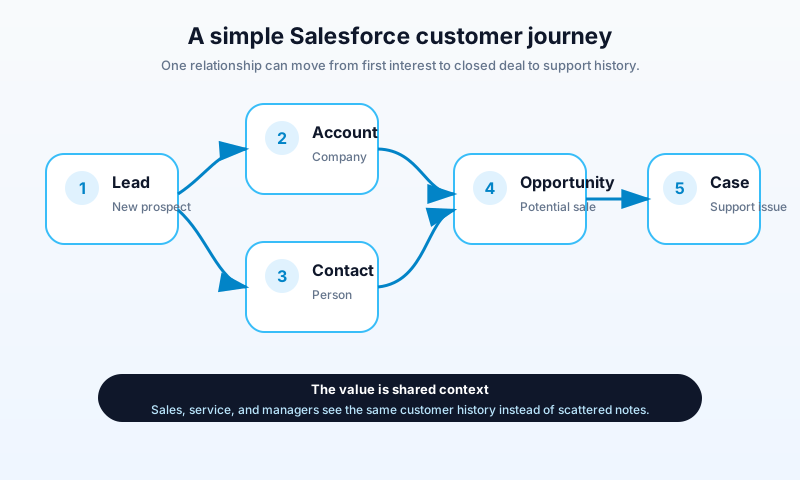
A stranger fills out a website form asking for a demo. Salesforce creates a Lead with the person's name, company, email, and area of interest.
A sales rep calls and confirms the company is a fit. The rep converts the Lead. Salesforce creates or links an Account for the company, a Contact for the person, and an Opportunity for the deal.
The Opportunity moves through stages: Qualification, Proposal, Negotiation, Closed Won. The rep logs calls, creates tasks, and adjusts the amount as the deal sharpens.
The customer signs. A few weeks later they hit a login issue and email support. A service rep opens a Case under the same Account. Now sales and support both see one history. The customer is no longer a name in someone's inbox. They're a record with a story.
The 2026 twist is what happens above all of that. Renewal is approaching, so an Agentforce agent watches the Opportunity, drafts a renewal email, surfaces the open Case as a risk, and asks the rep to review before sending. Same data model, with an agent reading and acting on it.
Why companies actually pay for it
Companies buy Salesforce for some mix of these reasons.
Visibility. Leaders can see what's happening without chasing updates. Reports and dashboards run on live records, not Friday afternoon spreadsheets.
Consistency. Stages, required fields, approvals, and handoffs are standardized in the system. New hires inherit the process.
Automation. Routine work moves through Flow, assignment rules, approval processes, and integrations instead of human hands.
Scale. A team can start with basic sales tracking and later add service, marketing, partner portals, analytics, custom apps, and integrations on the same platform.
An ecosystem. Trailhead gives anyone free training. AppExchange offers thousands of pre-built apps. A large community of admins, developers, consultants, and architects publishes content, answers questions, and hires each other.
AI that already knows the business. Because Agentforce reads from the same records reps and customers already use, agents start with real context. There's no separate "AI database" to populate first.
The shorthand is that companies pay Salesforce because the alternative is rebuilding all of this themselves. IDC has named Salesforce the #1 CRM for over a decade, with market share larger than the next four CRM vendors combined.
What is a Developer Edition org?
A Developer Edition org is a free Salesforce environment for learning, building, and experimenting. It is not a trial of a paid edition. It's its own permanent free tier, made specifically for developers, admins-in-training, students, and anyone who wants to practice.
A Developer Edition is generous enough for almost any tutorial. It comes with multiple users, about 10 MB of data storage, 200 MB of file storage, and the full Salesforce toolset for customization. It's small in capacity but full in features. You can build custom objects, write Apex, publish Flows, and try Agentforce features as they roll out.
A Developer Edition is similar to a Trailhead Playground, which Trailhead spins up for hands-on challenges, but a developer org is something you create directly and can keep as long as you keep using it. For long-term personal practice, a developer org is the better choice.
How to create a free Developer Edition org
You only need an email address and about five minutes.
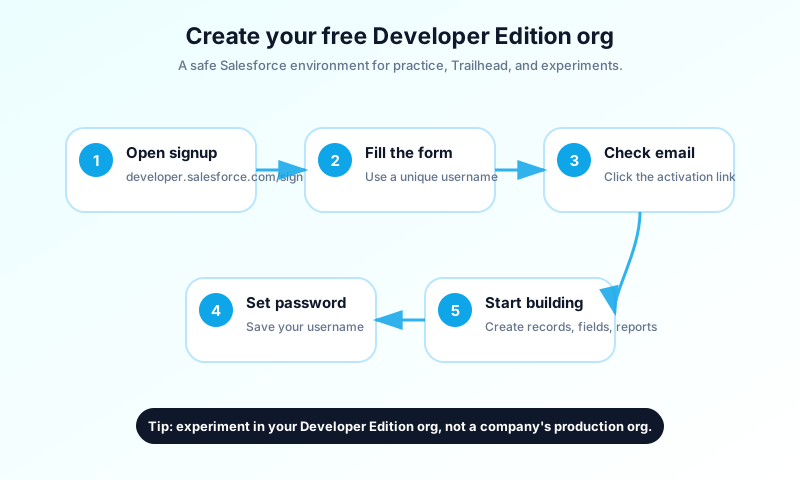
1. Open the official signup page
Go to developer.salesforce.com/signup. Always start from the official Salesforce page so you know you're getting a real Developer Edition.
2. Fill in your details
Salesforce asks for your name, email, role, country, and company. Use your real email so you can get the activation message. If you're learning on your own, you can put your own name or a personal project as the company.
The username field is the one beginners trip on. It must look like an email address, but it doesn't have to match your real inbox. Many people use something like yourname.dev@example.com. The only rule is that the username must be unique across all of Salesforce. If yours is taken, add a number or year.
3. Submit and check your email
After you submit, Salesforce sends an activation email. Click the link inside. If it doesn't arrive, check spam, promotions, or quarantine.
4. Set your password and security answer
The link walks you through password setup and a security question. Pick a strong password and write down your username somewhere safe. You'll need it the next time you log in.
5. Log in
You'll land inside Salesforce after activation. To log in later, go to login.salesforce.com and use the username you created.
6. Confirm you're in a practice environment
Look around before changing anything. The header should make it clear this is your own Developer Edition, not an employer's production org. You're now safe to experiment.
Your first hour in the org
Salesforce is huge. Trying to learn it in one session is the fastest way to bounce off. Pick small wins instead.
Open the App Launcher. Click the grid icon in the top corner and switch between Sales and Service. Notice how the tabs change. That single click teaches you that Salesforce shows different workspaces for different teams using the same underlying data.
Create a few records. Make a Lead, then an Account, then a Contact, then an Opportunity, then a Case. Use sample names. The point is to feel how records relate.
Visit Setup. Click the gear icon and pick Setup. This is the admin control center. Use Quick Find to jump to Object Manager, Users, Flows, and Reports. You don't need to change anything, just notice where things live.
Add a custom field. Open Object Manager, choose Account, and add a picklist field called Customer Tier with values Starter, Growth, and Enterprise. Add it to the page layout if asked, then open an Account and fill it in. You just changed the data model without writing a line of code, which is the moment Salesforce makes sense for most beginners.
Build a small report. Go to Reports and create one for Accounts or Opportunities. Add columns, group by Customer Tier, and save it. Then drop the report onto a dashboard. The whole loop, from fields to records to reports to dashboards, takes about ten minutes once you've done it once.
Common beginner mistakes
The first mistake is trying to memorize every product name. Start with platform basics. Product names keep changing. Objects, records, fields, permissions, reports, and automation will not.
The second mistake is building without a use case. Random fields lead to a confused org. Pick a story like "I run a fitness studio and want to track members and classes" and build around it.
The third mistake is ignoring security. Beginners often grant everyone access to everything because it's easier. Even in practice, ask yourself who should see this record and who should be able to edit it.
The fourth mistake is skipping reports. If users can't understand the data later, the work was wasted. Whenever you add a field, ask how someone would report on it.
The fifth mistake is learning only by watching. Videos help, but Salesforce snaps into focus when you build, break things, and fix them yourself. That's what your developer org is for.
Careers in 2026
A few hours of Salesforce can lead to a real career path.
A Salesforce Admin configures the platform, manages users, builds reports, creates flows, watches data quality, and translates business needs into changes in the org. Admins live closer to the business than to code.
A Salesforce Developer writes Apex, Lightning Web Components, tests, and integrations. Developers need to understand the platform deeply, because Salesforce is a structured environment with limits, metadata, and deployment patterns instead of a blank coding canvas.
A Salesforce Consultant helps companies design and roll out Salesforce. Consultants run requirements sessions, recommend solutions, and often work across several Clouds.
A Salesforce Architect designs the bigger picture: data model, integrations, security, identity, performance, and governance. Architects usually grow out of years of admin, developer, or consulting work.
The biggest 2026 shift is on certifications. The AI Associate cert is being retired in early 2026 and replaced by Agentblazer Status at Champion and Innovator levels. The new strategic certification is Agentforce Specialist, which signals you can design and ship AI agents on the platform. The Administrator cert remains the foundation, and Platform Developer I is still the natural next step on the developer track.
Where to go from here
You don't need a long roadmap. You need a few hours of clicking, then a tutorial, then more clicking.
A clean next path looks like this. Spend an evening in your developer org doing the exercises above. Read Salesforce Data Model Explained to lock in objects and relationships. Read Sales Cloud vs Service Cloud when you want to understand which Cloud to learn first. Then pick a Trailhead module on whichever area felt the most fun.
The trick to learning Salesforce isn't to read more definitions. It's to build something small, watch it work, and then build something slightly bigger.
About the Author
Dipojjal Chakrabarti is a B2C Solution Architect with 29 Salesforce certifications and over 13 years in the Salesforce ecosystem. He writes and edits salesforcedictionary.com, published by KineticBit Inc., to help admins, developers, architects, and cert/interview candidates sharpen their fundamentals. More about Dipojjal.
Share this article
Sources
Related dictionary terms
Agentforce
AI
Lightning App Builder
Platform
Standard Object
Core CRM
Tableau
Analytics
Salesforce
Platform
Record
Core CRM
Lead
Sales
Commerce Cloud
Platform
Permission Set
Administration
Flow
Automation
App Launcher
Platform
Contact
Core CRM
Developer Edition
Administration
Slack
Platform
MuleSoft
Platform
Apex
Development
Case
Service
Profile
Administration
LWC
Development
App
Platform
Field
Core CRM
Object Manager
Analytics
Setup
Administration
Opportunity
Core CRM
Sales Cloud
Sales
Service Cloud
Service
Account
Core CRM
Custom Object
Core CRM
Object
Core CRM
Dashboard
Analytics
Experience Cloud
Platform
Report
Analytics
Trailhead
Platform
Einstein
AI
Data Cloud
Platform
 Our appAdWake up sharp. Not just awake.The alarm that rings through Silent and DND — free on iOS & Android.Get WakeSharp →
Keep reading
Salesforce Sales Cloud vs Service Cloud: Which Do You Need in 2026?
Sales Cloud and Service Cloud share a platform but solve different problems. Here is the 2026 comparison. Features, pricing, decision scenarios, and how Agentforce fits both.
Salesforce Data Model Explained: Objects, Records, Fields & Relationships (Beginner's Guide)
The complete beginner's guide to the Salesforce data model - objects, fields, all six relationship types, junction objects, record types, and Schema Builder. Worked examples included.
Salesforce Sandbox Types Explained: Developer, Developer Pro, Partial Copy & Full
Four sandbox types, four use cases. Here is the 2026 reference: storage, refresh, cost, license. Plus the templates, masking, and refresh strategies that keep environments healthy.


Comments
No comments yet. Start the conversation.
Sign in to join the discussion. Your account works across every page.