
Setup with Agentforce: What It Actually Does in Your Org (and Where It Still Gets It Wrong)
The enablement order that breaks if you rush it, the three permission sets nobody documents together, the six things it refuses to build, and a 30-day rollout.

It is 4:50 on a Friday and someone in Sales needs edit access to a [custom object](/terms/custom-object) before Monday. You already know the answer: a [permission set](/terms/permission-set), three checkboxes, one assignment. You also know it is twenty-something clicks and four page loads away, and that you will spend most of them waiting for Setup to render.
So you type the request into the chat panel instead. The agent reads your org, proposes the exact permission set it plans to create, lists the object permissions it will grant, and waits. You type "confirm." Ninety seconds, done, and the change lands in the Setup Audit Trail with your name on it.
That panel is Setup with Agentforce. It went generally available on May 26, 2026 alongside Summer '26, and it is the first Agentforce feature built for the person who has to configure Agentforce rather than for a customer, a rep, or a service agent. It is also the first one Salesforce decided not to charge you per action to run. Both of those things matter, and neither of them means you should turn it loose on production this afternoon.
What Salesforce actually shipped
Setup with Agentforce is not a chat wrapper around Salesforce Help. It reads your org's metadata and it writes to it.
The official action coverage spans user management and access troubleshooting, permission sets and permission set groups, org-wide defaults and sharing rules, custom objects and fields and relationships, flows, custom report types, Lightning pages, formulas, org health and license usage, Setup Audit Trail queries, and plain navigation to the right Setup page. Salesforce mobile app creation is in pilot. That is a wider surface than most admins expect from a Setup assistant, and it is the reason the guardrails below are the interesting part of the product rather than a footnote.
Two design decisions define how it behaves. First, it never changes anything without your explicit approval. It states what it intends to do, and nothing happens until you reply with a confirmation. Second, it runs entirely inside your own permissions. If you cannot edit a permission set by hand, the agent will tell you it cannot do it for you either.
There is also a quiet third decision that I like more than either of those: the Setup agent does not appear in Agentforce Builder. You cannot open it, edit its topics, add actions, or fork it. All supported functionality is on automatically, and there is nothing to configure. Salesforce shipped an agent that admins cannot break, which is an unusual amount of restraint from a company that has spent two years telling everyone to build their own.
Turn it on in the right order or it will misbehave
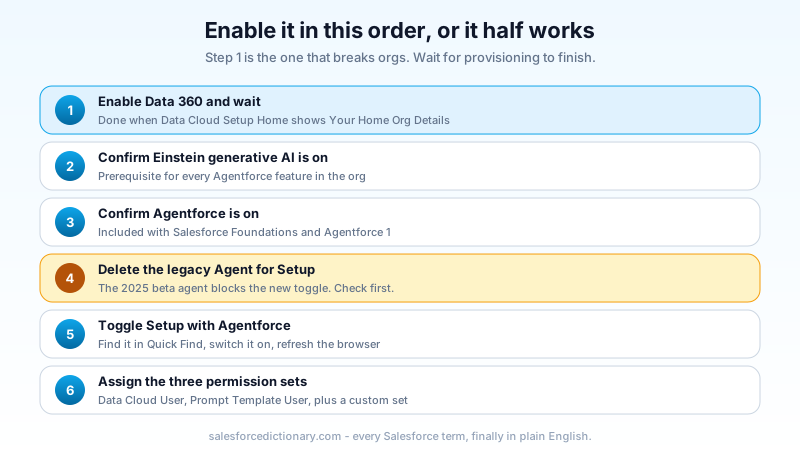
The enablement sequence has a trap in it, and it is the first step.
Data 360 has to be on and fully provisioned before you toggle Setup with Agentforce. Not "started." Finished. You know provisioning is done when the Data Cloud Setup Home page shows the "Your Home Org Details" heading. Flip the Setup with Agentforce toggle before that point and the agent comes up in a half-working state where some actions resolve and others fail with errors that describe nothing useful.
The full order:
- Enable Data 360 and wait for provisioning to complete.
- Confirm Einstein generative AI is enabled.
- Confirm Agentforce is enabled.
- Delete any existing "Agent for Setup" agent left over from the 2025 beta. The new feature will not enable while the old agent exists.
- Search "Setup with Agentforce" in Quick Find and toggle it on.
- Refresh the browser.
- Assign permissions (next section).
Step 4 catches a lot of orgs that piloted the beta after TDX 2025 and never cleaned up. The error message when you skip it is not obvious, so check for the old agent before you start rather than after.
Availability is Lightning Experience in Enterprise, Performance, Unlimited, and Developer editions, with either Salesforce Foundations or an Agentforce 1 edition. Foundations includes both Agentforce and Data 360, so most orgs on a modern contract already have the entitlement even if nobody has switched it on.
The permission stack nobody documents in one place
Enabling the feature needs Customize Application. Using it needs three separate assignments per admin, and every guide I have read documents them in a different order across three pages.
Each user who will use Setup with Agentforce needs:
- A custom permission set containing the Use Setup with Agentforce system permission. Create it with no license selected.
- The standard Data Cloud User permission set.
- The standard Prompt Template User permission set.
If you also want Enhanced Conversation Recommendations, which personalizes suggestions from Setup Audit Trail history and past agent conversations, add the Collect User Engagement Data for Insight Calculation permission.
Bundle those into a permission set group called something like Admin - Setup with Agentforce and assign the group. Three separate assignments per admin is exactly the kind of thing that gets half-done during onboarding and then produces a support ticket six weeks later when someone's agent panel loads but every action fails.
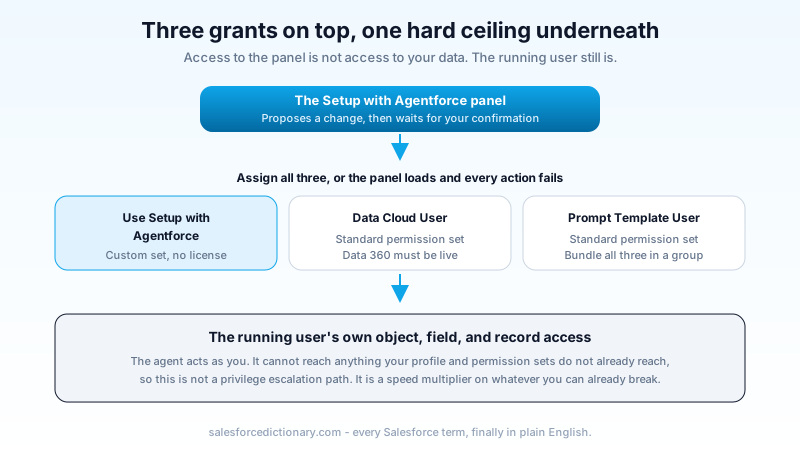
Now the part that matters for your security review. The agent inherits the running user's access and cannot exceed it, which means Setup with Agentforce is not a privilege escalation path. Somebody will ask you that question in the change advisory board meeting, and the answer is a clean no.
The answer to the follow-up question is less clean. The agent is a speed multiplier on whatever the running user can already do, and the people you will hand it to are System Administrators with Modify All Data. Nothing new is reachable, but a bad instruction now reaches it in one sentence instead of twenty clicks. Your control is not the permission model. Your control is the confirmation prompt and whoever is reading it.
What it is genuinely good at
Six months of admin feedback has sorted the capability list into things that save real time and things that look good in a keynote. The first group:
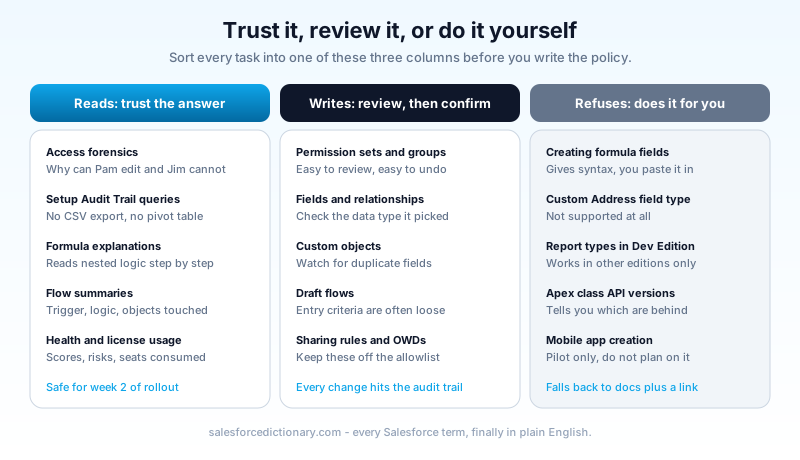
Access forensics. "Compare object-level and record-level access for Pam and Jim on the Opportunity object and explain why Pam can edit records and Jim cannot." This is the single best use of the feature. Answering it by hand means walking profiles, permission sets, permission set groups, the role hierarchy, sharing rules, and public groups, and holding all six in your head at once. The agent walks them in one pass and names the specific grant that causes the difference.
Setup Audit Trail queries. Ask what changed on the Case object in the last fourteen days and who did it, and get an answer, without exporting a CSV and building a pivot table. This one quietly ends the worst part of every "who broke this" investigation.
Formula archaeology. Paste a nested formula field that somebody wrote in 2019 and ask what it does. You get a step-by-step reading of the conditional logic in plain English. Paste one with a missing parenthesis and ask why it will not save, and you get the corrected syntax and an explanation of which argument was short. Same for validation rules.
Flow summaries. "Summarize the flow Update the Customer Review Comments with Sanitized Comments." You get the flow type, the trigger conditions, a logic summary, and the objects and fields it touches. Inheriting an org with 140 flows and no documentation is a solved problem now, at least for the reading half.
Org health questions. Security health check scores, high-risk settings, Apex class API versions running behind, license consumption. Conversational access to the numbers you would otherwise collect from five different Setup pages.
Draft data models. "I need a custom object called Equipment Asset to track company hardware, with fields for serial number, purchase date, and a lookup to Account." It proposes a schema with data types chosen for you, and creates the custom object once you confirm.
Where it stops
The limitation list is short, specific, and mostly not documented where you would look for it.
It generates formulas but cannot create or modify formula fields directly. It hands you correct syntax and you paste it in yourself. The Custom Address field type is unsupported. Custom report type creation does not work in Developer Edition. It cannot change Apex class API versions, only tell you which classes are behind. Mobile app creation is pilot-only, so do not plan around it.
For anything outside its action coverage, it degrades politely: you get a relevant excerpt from Salesforce Help plus a link to the Setup page where you can do the thing yourself. That is the correct failure mode. It beats a confident wrong answer, and it is more than most AI assistants manage.
The failure mode is confident mediocrity, not errors
Here is the thing the release blogs will not tell you. The agent rarely produces something broken. It regularly produces something merely acceptable, and it produces it with total composure.
Ask it to design an object for tracking physical locations and you will get a schema back in four seconds. It will work. It will also contain two fields that duplicate each other, a text field where a picklist belongs, and no thought at all about the reporting you will need in eight months. An admin with three years of experience spots all of that in one read. An admin in their first quarter confirms it, and now it is in your metadata.
That is a governance problem, not a product defect, and it is the same problem AI-assisted development created for Salesforce dev teams last year. Generation is cheap now. Review is the expensive step, and it is the one everybody skips when the output looks tidy.
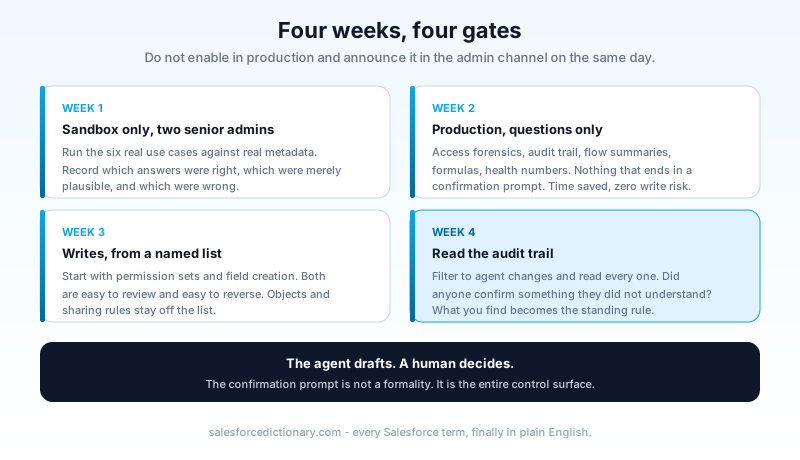
So the rule for your team is simple: the agent drafts, a human decides. Read the proposal before you type "confirm," and read it the same way you would read a junior admin's change request. The confirmation prompt is not a formality that Salesforce added for legal reasons. It is the entire control surface.
The credit question, and why Salesforce got this one right
Setup actions are non-billable. They consume zero Agentforce credits.
That is not how this feature started. The version demoed through 2025 metered Setup actions like any other agent, and admins said so loudly at TDX 2026: nobody is going to experiment with a configuration assistant when every experiment has a price tag and no budget line. Salesforce changed it. Setup actions are free to run, and the only remaining consumption is a small amount of Data 360 credits for the Help and Navigation action, which Salesforce has said it plans to move to a different framework around Dreamforce 2026 so that it stops consuming credits entirely.
Credit that decision properly. Salesforce has spent two years attaching a meter to everything with the word Agentforce on it, and metering the tool admins use to configure the platform would have killed adoption in the first month. This is the right call, publicly reversed in response to community pushback, and it is worth saying so out loud when the pricing criticism is otherwise deserved.
How it differs from the other AI in your Setup menu
Four Agentforce-branded things can now write to your org, and admins keep confusing them.
| Tool | What it touches | Who runs it | Configurable |
|---|---|---|---|
| Setup with Agentforce | Org configuration and metadata | Admins, inside Setup | No, fixed action set |
| Agents you build in Agentforce Builder | Business processes, customer and employee conversations | End users and customers | Yes, fully |
| Flow Builder AI assistance (beta) | Flow elements, error diagnosis | Admins, inside Flow Builder | No |
| Agentforce Vibes | Apex, LWC, project source code | Developers, in the IDE | Partly |
The line that matters: Setup with Agentforce changes how your org is configured, and agents built in Agentforce Builder change what your org does for a user. Different blast radius, different approval path, different people on the review.
A 30-day rollout that keeps it out of your production metadata
Do not enable this in production and announce it in the admin channel on the same day. Four weeks, four gates.
Week 1, sandbox only. Enable in a full or partial copy sandbox. Give it to your two most experienced admins. Have them run the six use cases above against real metadata and record which answers were right, which were merely plausible, and which were wrong. You need that list before anybody argues about policy.
Week 2, read-only in production. Enable in production, but publish a task allowlist that covers only questions: access forensics, audit trail queries, flow summaries, formula explanations, health check numbers. Nothing that ends in a confirmation prompt. Your admins get the time savings with zero write risk while you build confidence in the answers.
Week 3, writes with a named list. Add specific write tasks to the allowlist. Start with permission sets and field creation, which are easy to review and easy to reverse. Keep object creation, sharing rules, and org-wide defaults off the list until week 4 at the earliest. Org-wide defaults in particular should probably stay off it permanently.
Week 4, audit the trail. Filter the Setup Audit Trail to changes made through the agent and read every one. You are checking two things: did anybody confirm something they did not understand, and did the agent propose anything that a reviewer should have caught. Whatever you find becomes the standing review rule.
Frequently asked questions
Does Setup with Agentforce cost Agentforce credits? No. Setup actions are non-billable. Only the Help and Navigation action consumes a small amount of Data 360 credits today, and Salesforce plans to remove that around Dreamforce 2026.
Can it do something I do not have permission to do? No. It runs as you. If you lack the permission, it says so and stops.
Is every change it makes logged? Yes. Agent changes appear in the Setup Audit Trail like any other configuration change, attributed to the user who confirmed them.
Can I restrict which actions it offers? Not through configuration. The action set is fixed and the agent is not editable in Agentforce Builder. Your controls are who gets the permission set and what your written policy allows.
Do I need Data Cloud licenses for this? You need Data 360 enabled, which is included in Salesforce Foundations. You do not need a separate Data Cloud purchase to use the feature.
What happens to the old Agent for Setup from the beta? Delete it. The new feature will not enable while it exists in the org.
Your next step
Open a sandbox, enable Data 360, and wait for provisioning to actually finish before you touch anything else. Then run one query against real metadata: pick the two users in your org whose access nobody has ever been able to explain, and ask the agent why they differ. If the answer is right, you have found the use case that justifies the rollout, and you can start writing the week 2 allowlist tomorrow.
About the Author
Dipojjal Chakrabarti is a B2C Solution Architect with 29 Salesforce certifications and over 13 years in the Salesforce ecosystem. He writes and edits salesforcedictionary.com, published by KineticBit Inc., to help admins, developers, architects, and cert/interview candidates sharpen their fundamentals. More about Dipojjal.
Share this article
Sources
- Salesforce Admins: Setup with Agentforce Is Now Generally Available
- Salesforce Help: Setup with Agentforce
- Trailhead: Enhance Admin Efficiency with Agentforce Setup Features
- Salesforce Admins: 5 Use Cases To Get Started With Setup with Agentforce
- Salesforce Ben: Setup With Agentforce Generally Available, How Admins Can Get Started
Related dictionary terms
Practise it
Five questions on Agentforce Specialist
Exam-style questions with an explanation after each one. No account needed, and your answers build a weak-topic map once you have one.
Keep reading

The New Agentforce Builder and Agent Script: What Changes July 13, 2026, and How to Upgrade
Starting the week of July 13, 2026, the New Agent button disappears from the legacy Setup builder. Here is what the new Agentforce Builder and Agent Script change, what still works, and how to upgrade an existing agent without breaking it.

Profile vs Permission Set vs Permission Set Group: The Complete Salesforce Access Guide
Profiles, Permission Sets, and Permission Set Groups all grant 'access' but in different layers. Here is the canonical 2026 guide with a mnemonic that finally makes it stick.

Salesforce Technical Debt in the Vibe-Coding Era: The 2026 Cleanup Playbook
AI builders ship Salesforce automation in seconds, and Agentforce acts on it autonomously. Here is where 2026 technical debt hides and the concrete playbook to fix it first.
Comments
No comments yet. Start the conversation.
Sign in to join the discussion. Your account works across every page.