
Salesforce Is Retiring Password-Based Integration Auth: The Three Deadlines Between Now and Summer '27
Winter '27 already changed SOAP login(), February 20 kills the username-password flow, and Summer '27 retires login() outright. The audit query, the stopgap permission set, and the flow that replaces each one.
The nightly order sync has run at 2:00 a.m. for four years. This morning the file never landed, the middleware log says INSUFFICIENT_ACCESS, and Salesforce shows you nothing. No error banner. No failed-job email. Setup looks exactly like it did yesterday, because the request never got far enough to become a Salesforce problem. It died at the front door.
That is what the next twelve months of Salesforce integration work feels like if you do not go looking for it first. Three separate retirements are converging on the same thing: the practice of handing Salesforce a username and a password to get a session. One already enforced. One lands on a fixed calendar date. One takes the endpoint away entirely.
None of them will page you. All three fail server to server, quietly, in a system you probably do not monitor as closely as you monitor the org.
Three deadlines, one pattern
Here is the whole picture before we take it apart.
Winter '27 (your org's upgrade weekend, between August 29 and October 10, 2026). Any user authenticating through the SOAP API login() call now needs the Use Any API Auth permission. Without it, the login is refused. This one is already live in most orgs.
February 20, 2027. Salesforce stops supporting the OAuth 2.0 username-password flow for connected apps. Every integration posting grant_type=password with a username, password, and security token breaks.
Summer '27. The SOAP login() call is retired in SOAP API versions 31.0 through 64.0. The endpoints /services/Soap/c/<v>/ and /services/Soap/u/<v>/ stop accepting logins and return a deactivated-endpoint error.
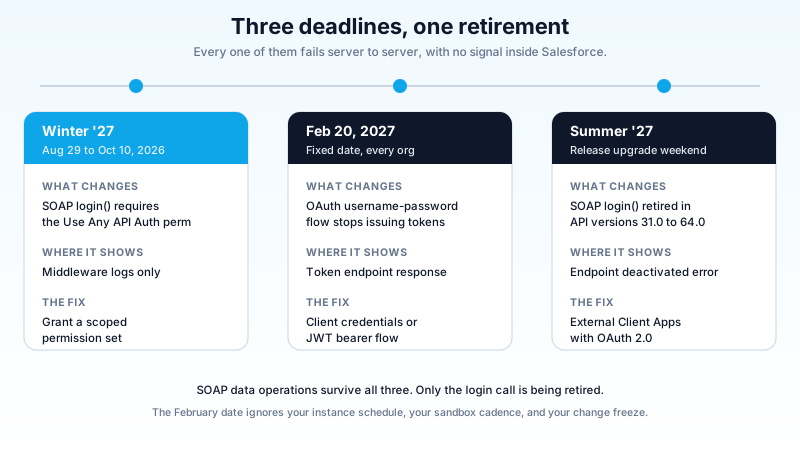
Read that sequence again and the design intent is obvious. Salesforce is not deprecating SOAP. SOAP query, create, update, and delete all keep working after Summer '27. What is going away is the idea that a password, sent in a request body, is an acceptable way to prove who you are.
That is the correct call, and it is overdue. The username-password flow puts a live production credential in a config file, a CI variable, or worse, a scheduled script somebody wrote in 2019 and left running. Killing it removes an entire category of breach.
The problem is not the direction. The problem is that all three failures are invisible from inside Salesforce.
The one that already bit: Use Any API Auth
Start here, because for most orgs this is not a future risk. It has already happened or it happens on your next upgrade weekend.
The permission is PermissionsUseAnyApiAuth, labelled Use Any API Auth in the UI, and it exists on both Profile and Permission Set. Before Winter '27 it did nothing for SOAP login(). Now it gates it.
Two details make this worse than it looks.
It is not Use Any API Client. The names are one word apart and they control unrelated things. Use Any API Client relates to API Access Control and connected app self-authorization. Use Any API Auth gates the SOAP login call. Granting the wrong one fixes nothing and widens your permission surface for no reason. I have watched a team grant both because they could not tell which was which, then spend a security review explaining it.
Well-run orgs get hit hardest. If your integration user was provisioned with a minimum permission set, built deliberately, reviewed by someone who cared, that user does not have Use Any API Auth. Nobody had a reason to grant a permission that did nothing. Meanwhile the org that gave its middleware System Administrator in 2018 sails straight through the upgrade, because System Administrator carries everything.
That is the shape of this whole release update. The teams who did permission hygiene properly are the ones whose jobs stop.
The failure mode is the part that costs you. There is no UI signal. Salesforce refuses the login and the refusal is only visible in the calling system, which for most orgs means a middleware log nobody reads until someone downstream asks where the data went. A nightly load simply stops arriving.
This landed late, too. It was published in the Winter '27 release notes in August as a release update, and moved into the enforced-with-this-release list in the September 2 revision. If your team built its Winter '27 checklist in mid-August, this item is not on it.
Find your exposure before your users do
You cannot fix what you cannot see, and the only place SOAP logins are recorded is Login History. Run this in the Developer Console or your query tool of choice:
SELECT UserId, Application, Status, ApiType, COUNT(Id) logins
FROM LoginHistory
WHERE LoginTime = LAST_N_DAYS:90
GROUP BY UserId, Application, Status, ApiType
One gotcha will cost you twenty minutes if nobody warns you: Application, Status, and ApiType are groupable but not filterable. Put any of them in a WHERE clause and the query fails. Group first, filter the result set yourself, and look for rows where ApiType or Application names SOAP.
Ninety days is a deliberate window. A monthly reconciliation job and a quarterly finance extract both hide inside a thirty-day sample, and those are exactly the integrations nobody remembers until they fail. Login History holds roughly six months, so widen it if your calendar has annual jobs.
Then find out who already holds the permission, so you know which of those users are actually at risk:
SELECT Id, Name, Profile.Name
FROM User
WHERE IsActive = true
AND (Profile.PermissionsUseAnyApiAuth = true
     OR Id IN (SELECT AssigneeId FROM PermissionSetAssignment
               WHERE PermissionSet.PermissionsUseAnyApiAuth = true))
Subtract the second list from the first. What remains is your break list, ranked by login volume.
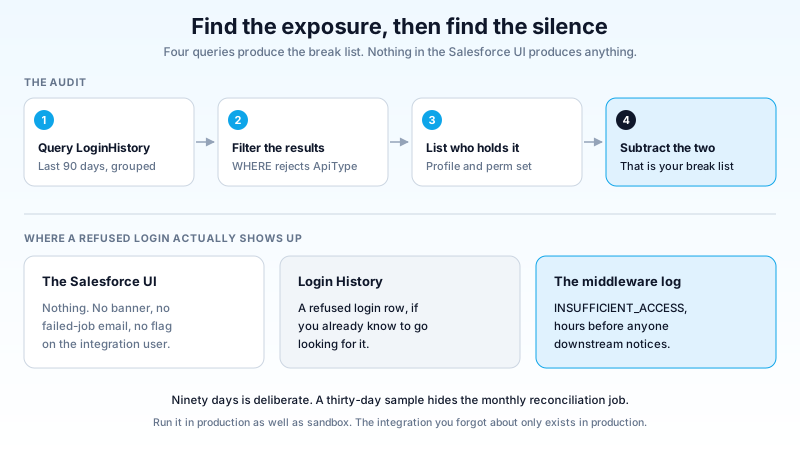
Do this in a sandbox on the preview instance first if you still can, but do not skip production. Sandbox login history is not your production login history, and the integration you forgot about only exists in production.
The permission set that buys you time
The fix for the Winter '27 item is small, and that is the trap.
Create a dedicated permission set. Name it something a future admin can search for, like Integration_SOAP_Login. Enable Use Any API Auth under System Permissions. Assign it only to the users your audit turned up.
Three rules on that permission set.
Do not put it on a profile. Profiles get cloned, inherited, and assigned to humans by accident. A permission set with a self-explanatory name and a description field that says temporary, retire by Summer '27 is a note to the person who inherits your org.
Do not grant it broadly. Every user holding it is a user who can start a session with a password. That is the pattern being retired, and expanding it in 2026 to unbreak a job is a debt you are choosing to take on.
Write the expiry into the description. This permission set has a shelf life. When the SOAP login() call is gone in Summer '27, the permission it gates is gone with it, and the permission set becomes org clutter that a security audit will ask you about.
That last point is the one teams miss. Assigning Use Any API Auth does not solve your integration problem. It restores service for about nine months. The real deadline is still coming.
February 20, 2027: the fixed date that ignores your instance
The OAuth 2.0 username-password flow retirement is the second deadline and the most dangerous, because it does not behave like a normal release update.
It has a calendar date. Not "with Winter '27", not "on your instance upgrade weekend". February 20, 2027, for every org on the platform. Your instance schedule, your sandbox refresh cadence, and your change freeze have no effect on it.
It also already moved once. This retirement was on the Winter '27 enforcement list through most of August 2026, then shifted out to February. If your team treated the reprieve as cancellation, the calendar entry is gone and the work is not.
The flow being retired is the one where an integration posts grant_type=password along with a username, a password, and a security token, and gets an access token back. It is the flow every quick-start tutorial used for a decade because it works in five lines of code. It passes a real user's live password over the wire on every single request, which is precisely the pattern modern authentication exists to eliminate.
When it enforces, connected apps using that flow stop issuing tokens. Same silent failure. Same log nobody reads.
Choosing the replacement flow
This is where most migrations stall, because "move to OAuth" is not one decision. It is a choice among three, and picking wrong means rebuilding in six months. If you have not touched app configuration in a while, the connected app security model changed underneath you as well.
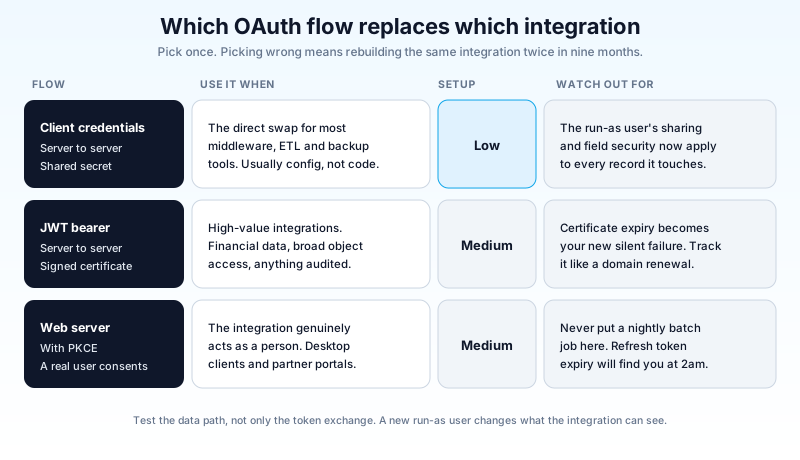
Client credentials flow. Server to server, no user in the loop. The connected app or External Client App is configured with a designated run-as user, and the integration exchanges a client ID and secret for a token. This is the direct replacement for username-password in most middleware, ETL, and backup tools. Migration is usually a config change on both sides rather than a code rewrite.
JWT bearer flow. Server to server, signed with a certificate instead of a shared secret. No password anywhere, and no secret to rotate on a schedule, because the trust lives in a key pair you control. This is the right answer for high-value integrations: anything touching financial data, anything with broad object access, anything a regulator will ask about. It costs more to set up. Certificate expiry becomes something you have to track, and a certificate that quietly expires produces the same silent failure you are trying to escape.
Web server flow with PKCE. A real human authorizes the app and the integration acts as them. Use it when the integration genuinely represents a person, such as a desktop client or a partner portal. Do not use it for a nightly batch job. Refresh token expiry and session policies will find you at 2:00 a.m.
Two practical notes that cost real teams real weekends.
The client credentials flow needs a designated run-as user, and everything the integration does happens with that user's permissions, sharing, and field-level security. If your old integration ran as a System Administrator and your new run-as user is a properly scoped integration user, behavior changes. Records that used to be visible are not. Test the data path, not only the token exchange.
JWT bearer needs the connecting user pre-authorized for the app, and the certificate has to be uploaded before the first call. A JWT integration that authenticates in sandbox and fails in production is almost always a pre-authorization difference, not a code difference.
Summer '27: login() itself goes away
The third deadline closes the loop. In Summer '27, the SOAP login() call is retired in SOAP API versions 31.0 through 64.0. After that, requests to /services/Soap/c/<v>/ and /services/Soap/u/<v>/ for those versions fail with an error stating the endpoint has been deactivated.
The scope is narrower than the panic suggests. SOAP data operations survive. If your integration authenticates with OAuth and then calls SOAP query() or upsert(), nothing changes for you. Only the login operation is retired. Resist the urge to rewrite everything onto the REST API in the same change window. Swapping the auth layer and the data layer at once doubles your test surface and halves your ability to tell which half broke.
The migration target Salesforce names is External Client Apps, the successor to connected apps, with OAuth 2.0 doing the authentication. That is two changes at once for many teams, which is why starting in Q4 2026 rather than Q2 2027 matters. External Client Apps are packageable and versioned in a way connected apps never were, so the migration is worth doing on its own merits, but it is not a fifteen-minute job in an org with forty integrations.
While you are in there, check API versions too. Winter '27 ships API version 68.0, and platform API versions 21.0 through 40.0 are on retirement tracks of their own. Apex classes still pinned at versions 9.0 through 19.0 now raise compiler warnings, which is the polite phase before something stops compiling. An integration on API v34 that you fix for authentication and leave on v34 is a second outage with a different date.
A ninety-day plan that actually fits
You have roughly five months to the February date and about nine to Summer '27. Here is how that divides.
Weeks 1 to 2: inventory. Run the Login History query in production. Pull the list of connected apps and check which use the username-password flow. Add every integration you find to a single sheet with owner, system, auth method, API version, and business criticality. Most orgs discover two or three integrations nobody in the room can name. Those are the ones that break.
Weeks 3 to 4: stop the bleeding. Create the Integration_SOAP_Login permission set and assign it to the users your audit flagged. This is the stopgap for the Winter '27 item, nothing more. Note the expiry in the description.
Weeks 5 to 8: migrate the top third. Take your highest-criticality integrations first, not the easiest ones. Pick the flow using the decision matrix above. Build in a full-copy sandbox, run one complete cycle including the failure path, and confirm the data the integration reads and writes is identical to what it saw before.
Weeks 9 to 12: migrate the rest and prove it. Work down the list. Then trigger every long-interval job by hand, the monthlies and the quarterlies, because those are the ones a four-week test window never exercises.
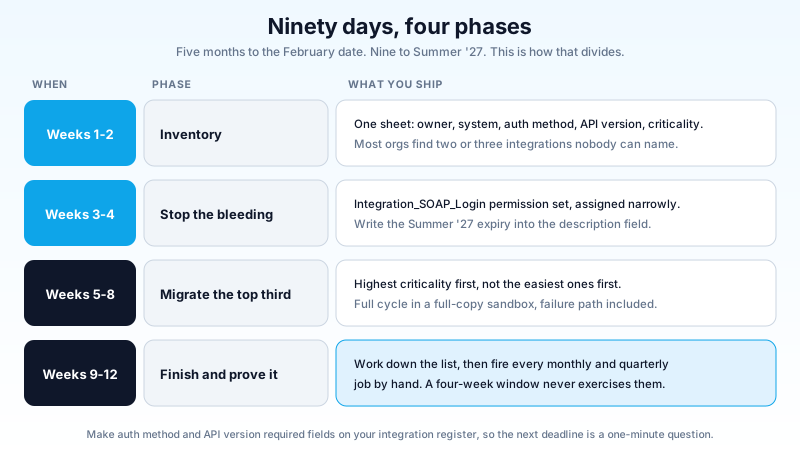
One process change is worth making permanent. Add authentication method and API version as required fields on whatever you use to track integrations. Every one of these deadlines has been survivable for teams who could answer "which of our integrations use passwords" in under a minute, and expensive for teams who could not.
Start with the query
Open Login History, run the ninety-day grouped query, and count how many distinct users show up with a SOAP login. That number is your exposure, and you can have it before lunch. If it is above zero and any of those users lack Use Any API Auth, build the permission set this week and put February 20 in your calendar with a reminder set for January 6, so the migration starts with six weeks of room instead of six days.
About the Author
Dipojjal Chakrabarti is a B2C Solution Architect with 29 Salesforce certifications and over 13 years in the Salesforce ecosystem. He writes and edits salesforcedictionary.com, published by KineticBit Inc., to help admins, developers, architects, and cert/interview candidates sharpen their fundamentals. More about Dipojjal.
Share this article
Sources
- Salesforce Help: SOAP API login() Call in SOAP API Versions 31.0 Through 64.0 Is Being Retired
- Salesforce Help: Retirement of OAuth 2.0 Username-Password Flow for Connected Apps
- Salesforce Help: OAuth Authorization Flows
- Software Insights: Winter '27 Requires Use Any API Auth for SOAP login()
- Apex Hours: Salesforce SOAP API Retirement Before Summer '27
Related dictionary terms
Practise it
Five questions on Platform Developer I
Exam-style questions with an explanation after each one. No account needed, and your answers build a weak-topic map once you have one.
Keep reading

Salesforce Connected App OAuth Security: Find and Kill the Dormant Grants Before Someone Else Uses Them
Forgotten OAuth grants from Connected Apps you stopped using are one of the highest-value attack surfaces in Salesforce. Here is how to find them, revoke them, and stop them from coming back.

Salesforce External Client Apps: Migrating Off Connected Apps Before Winter '27
You click New Connected App and the button is greyed out. Salesforce did that to every org in Spring '26. Here is what an External Client App actually is, how the migration runs, and the traps in the order you hit them.

Salesforce Winter '27 Release: Dates, Sandbox Preview, and the Updates That Will Break Things
Winter '27 hits sandboxes around August 29, 2026, and it retires the OAuth Username-Password flow for good. The dates, the preview mechanics, and a one-week prep plan.
Comments
No comments yet. Start the conversation.
Sign in to join the discussion. Your account works across every page.