
Salesforce External Client Apps: Migrating Off Connected Apps Before Winter '27
New Connected App creation is off by default since Spring '26, and Winter '27 retires the Username-Password flow. The ECA model, the migration order, and the traps.

A vendor emails you at 4 p.m. asking for a consumer key so their integration can go live Thursday. You open Setup, type [App Manager](/terms/app-manager), click New Connected App, and the button does nothing. There is no error, no banner, no release note pinned to the page. The option is simply gone.
Nobody in your org turned it off. Salesforce did, in Spring '26, across every org that existed.
What Salesforce actually switched off, and when
The rollout was quiet and staged, which is why so many teams meet it mid-task instead of during release prep.
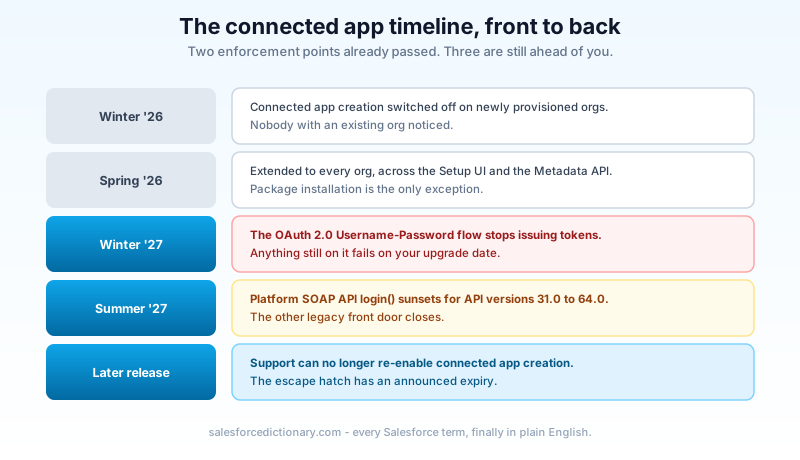
Winter '26 disabled connected app creation on newly provisioned orgs. Spring '26 extended that restriction to every org, existing ones included, and it applies across both the Setup UI and the Metadata API. The one exception is package installation: a managed package that ships a connected app still installs one.
You can ask Salesforce Support to re-enable creation in your org. Salesforce has also said plainly that in a later release, Support will no longer be able to do that. Treat the exception as a bridge with a posted demolition date, not as a policy you can plan around.
Existing connected apps keep working. They are not deprecated, they did not stop authenticating, and nothing in your org broke on the Spring '26 upgrade weekend. What changed is the direction of travel: every new inbound integration now has to be an External Client App, and the feature work is happening on the ECA side.
Three dates put a clock on the rest of it.
Winter '27 enforces the release update that retires the OAuth 2.0 Username-Password flow. Any integration still logging in with a username, a password, and a security token stops getting an access token on your org's upgrade date. Production waves run through early October 2026, with sandbox preview around the end of August. The Winter '27 release and sandbox preview guide has the instance-by-instance dates.
Summer '27 sunsets the Platform SOAP API login() call for API versions 31.0 through 64.0. That is the other legacy front door, and it is on the same demolition schedule.
February 2026 already happened: session IDs can no longer be sent in outbound messages. If you were affected by that one, you have met this pattern before.
What an External Client App actually is
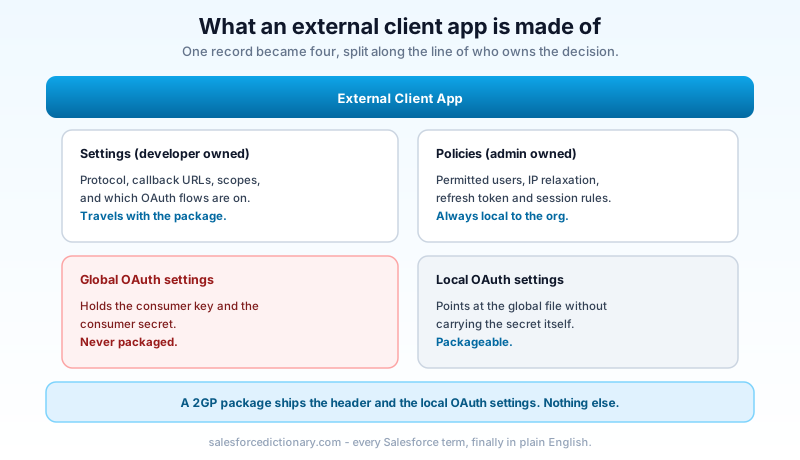
The name suggests a rename. It is not one. The ECA takes everything a connected app crammed into a single record and splits it along the line that always mattered: who owns the decision.
Settings are the developer's. Protocol choice, callback URLs, which OAuth flows are enabled, which scopes the app requests. These describe what the application is capable of. When an app is packaged, these travel with it.
Policies are the admin's. Permitted users, IP relaxation, refresh token lifetime, session policy, whether the app is pre-approved. These describe how and when access is actually granted, and they are always local to the org. A vendor cannot push a policy change into your org through a package upgrade, which is the whole point.
Underneath that split, the OAuth configuration itself lives in two files rather than one. The global settings file holds the sensitive consumer key and secret and is never packaged. The local settings file references the global one without carrying the secret. That separation is what makes an ECA safe to distribute at all.
You also pick a distribution state when you create the app, and you pick it once. Local means the app lives and works in a single org. Packaged means it is built for distribution and ships as a second-generation managed package. A local app cannot be promoted to a packaged one later, so if there is any chance the integration becomes a product, decide before you click Create.
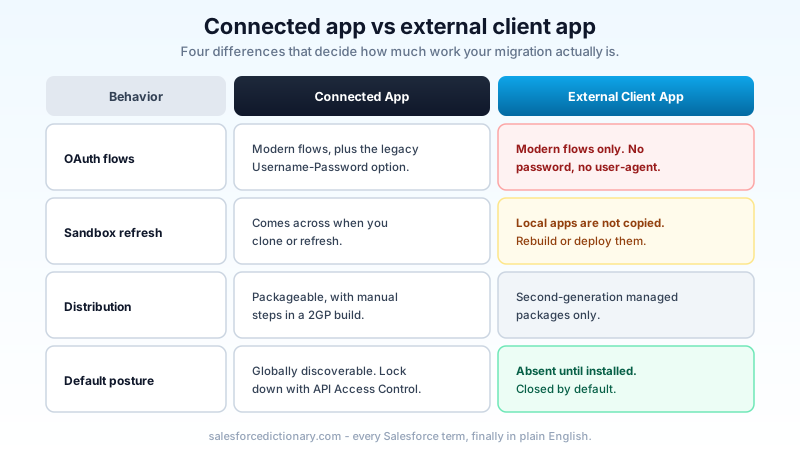
The last structural difference is the security posture. A connected app was globally discoverable by default, which is why API Access Control exists as a separate lever you had to know about and turn on. An ECA does not exist in a target org until it is installed there. Closed by default, opened deliberately.
One consequence of that layering is worth planning for: the ECA is fully metadata-compliant, and it is four metadata types rather than one. ExternalClientApplication is the header. ExtlClntAppGlobalOauthSettings carries the consumer key and secret. ExtlClntAppOauthSettings is the packageable OAuth configuration that points at the global file. ExtlClntAppOauthConfigurablePolicies holds the admin-owned policy layer. Only the first and third are packageable in a 2GP build, which is the schema enforcing the same developer-versus-admin split you see in the UI. If your team runs source-driven deployments, this is the point where ECAs become easier to manage than connected apps ever were, because the whole definition is retrievable and diffable.
What carries over, and what refuses to
Salesforce ships a migration path in Setup that converts an existing connected app into an ECA and preserves the configuration. For a well-behaved app on a modern flow, it is close to a formality.
Two things about that tool set expectations correctly. It is aimed at production orgs, so your sandboxes are not carried along with the conversion and have to be handled as fresh builds. And it converts configuration, not clients: whatever was calling the old app is still calling the old app until someone updates it.
The refusals are where the project lives.
Username-Password flow is not supported and will not be. ECAs support only modern flows: web server (authorization code with PKCE), JWT bearer, client credentials, device, and token exchange. If a connected app uses Username-Password today, there is no migration that keeps it working, because the destination does not implement the flow. The integration has to change its authentication method first, and that change happens in the client, not in Salesforce.
User-Agent flow is gone too. Same reasoning, same answer.
Local ECAs are not copied to a cloned or refreshed sandbox. Only packaged ones are. This one catches people hardest because it inverts a habit twenty years old: you build in the sandbox, you refresh, and your work is there. Not here. Every local ECA in every sandbox is created by someone, deliberately, every time. Plan the sandbox story as its own line item.
Distribution is 2GP only. There is no unmanaged path and no first-generation path. If your ISV pipeline still runs on 1GP, the ECA conversation is also a packaging conversation.
Feature parity has moved fast. The first ECA releases had visible gaps around Canvas, mobile, and push notifications; those plugins now appear in the External Client App Manager alongside OAuth and SAML 2.0. Check the specific plugin you depend on rather than reading a comparison table written a year ago, because the year-old table is wrong in both directions.
The migration order that survives a real org
Teams that treat this as a Setup task finish it twice. The order below front-loads the parts that depend on other people.
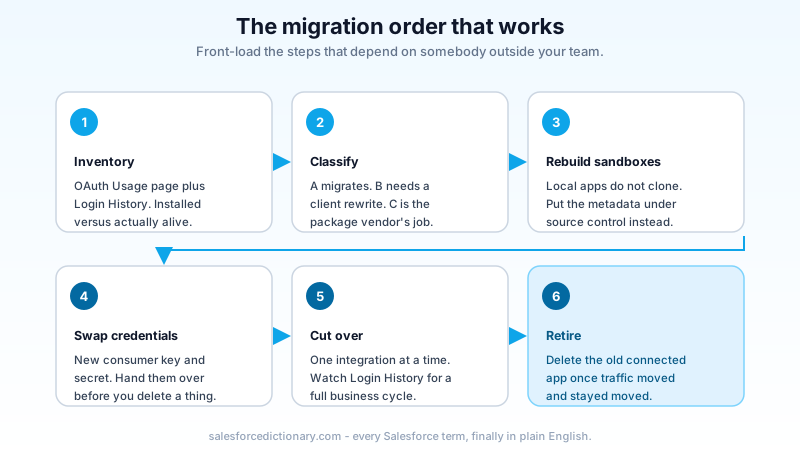
Inventory first, in two passes. Open the connected apps OAuth usage page in Setup and list every app that has actually been used, along with its current user count. Then pull Login History filtered to API logins and group by user. The first pass tells you what is installed. The second tells you what is alive. The gap between those two lists is dead weight, and deleting it is the cheapest work in this whole project. If that gap looks large, the dormant OAuth grant hunt is the right companion read before you migrate anything.
Classify every surviving app into three buckets.
Bucket A: already on JWT bearer, client credentials, or web server. These migrate. Schedule them, do them, move on.
Bucket B: on Username-Password or User-Agent. These do not migrate. The client has to be rewritten to use a supported flow, and that work sits with whoever owns the middleware, the script, or the vendor product. This is the bucket with a Winter '27 deadline attached and the longest lead time, so it goes on someone's backlog on day one, not after bucket A is done.
Bucket C: installed by a managed package. You do not migrate these. The publisher does, on their release schedule. Your job is to ask them, in writing, what their timeline is. Ask this quarter, because "we are looking into it" in October is a different answer than "we are looking into it" in July.
Build the sandbox versions by hand. Since local ECAs do not survive a refresh, decide now whether the sandbox definitions live in source control as metadata (ExternalClientApplication, ExtlClntAppGlobalOauthSettings, ExtlClntAppOauthSettings, and ExtlClntAppOauthConfigurablePolicies) and get deployed like everything else, or whether someone rebuilds them by clicking. Source control is the right answer, and it is also the thing nobody sets up under time pressure, so set it up now.
Coordinate the credential swap. A migrated app gets its own consumer key and secret. Every client holding the old pair needs the new one, and there is a window where the old app and the new one both exist. Sequence it: create the ECA, hand the credentials to the client team, let them deploy, confirm traffic on the new app in Login History, then retire the old connected app. Do not delete first and coordinate second.
Cut over one integration at a time. Watch Login History for the integration user after each one. A failed inbound authentication is invisible from inside Salesforce until someone downstream notices missing data, so the log is your only early signal. Give each cutover a full business cycle before you call it done, because plenty of integrations only run nightly or weekly and a Tuesday afternoon of clean logs proves nothing about the Sunday batch.
Retire the old app on a schedule, not on a feeling. Once traffic has moved and stayed moved, delete the connected app rather than leaving it disabled. A disabled app is still an object somebody can re-enable, and the point of this exercise is to end up with an inventory you can explain to an auditor in one screen.
Five things that bite
The sandbox gap, again. It is worth repeating because it breaks the muscle memory of every admin who has done a full copy refresh. Refresh a Full sandbox the week before a release test and the local ECAs are gone. Nothing warns you.
Bucket B is not your ticket. The most common way this migration slips is a Salesforce team that finishes its own work in three weeks, then spends four months waiting on an integration owner who was never told there was a deadline. Send that message before you touch Setup.
Policies are per-org and invisible from the outside. If you publish a packaged ECA, a subscriber admin can tighten permitted users or IP relaxation in their org and your metadata will look identical. When a customer reports that your app stopped working after nobody changed anything, the policy tab is where to look first.
Outbound is a separate problem. ECAs govern inbound access, applications calling into Salesforce. Anything Salesforce calls out to still runs through named credentials and external credentials. Two different mechanisms, two different Setup pages, frequently conflated in the same meeting. The named credentials guide covers the other half.
The Support escape hatch is closing. Asking Support to re-enable connected app creation works today. Building a plan that assumes it works next year is building on a feature Salesforce has already announced it will remove.
The thing worth internalizing
Salesforce did not replace connected apps because the old object was ugly. It replaced them because a single record that mixed vendor capability with customer policy made it impossible to answer a basic governance question: who decided this app could read our data, and when. The ECA answers that structurally, in the External Client App Manager, by making the two halves separate objects with separate owners.
Every other change follows from that. Password flows are gone because a flow that hands a credential to the client cannot express consent. Packaging is 2GP-only because 2GP is where versioned, upgradeable settings live. Local apps do not clone into sandboxes because they are org-scoped by design rather than by accident.
Once you read the model that way, the migration stops being a chore and starts being an inventory you should have had anyway.
Open Setup this week, go to the Connected Apps OAuth Usage page, and export the list. Sort it by last use, mark every row A, B, or C, and send the B rows to whoever owns those clients today. That single email is the difference between a Winter '27 upgrade weekend you sleep through and one you spend on a bridge call.
About the Author
Dipojjal Chakrabarti is a B2C Solution Architect with 29 Salesforce certifications and over 13 years in the Salesforce ecosystem. He writes and edits salesforcedictionary.com, published by KineticBit Inc., to help admins, developers, architects, and cert/interview candidates sharpen their fundamentals. More about Dipojjal.
Share this article
Sources
Related dictionary terms
Practise it
Five questions on Platform Developer I
Exam-style questions with an explanation after each one. No account needed, and your answers build a weak-topic map once you have one.
Keep reading

Salesforce Connected App OAuth Security: Find and Kill the Dormant Grants Before Someone Else Uses Them
Forgotten OAuth grants from Connected Apps you stopped using are one of the highest-value attack surfaces in Salesforce. Here is how to find them, revoke them, and stop them from coming back.

Salesforce Named Credentials and External Credentials: The Complete 2026 Guide
Legacy Named Credentials are retiring. The new split between Named Credentials and External Credentials is how Salesforce expects every integration to authenticate in 2026. Here is what changed and how to migrate.

Salesforce Winter '27 Release: Dates, Sandbox Preview, and the Updates That Will Break Things
Winter '27 hits sandboxes around August 29, 2026, and it retires the OAuth Username-Password flow for good. The dates, the preview mechanics, and a one-week prep plan.
Comments
No comments yet. Start the conversation.
Sign in to join the discussion. Your account works across every page.