
Salesforce Flow Testing in 2026: Why Your Flow Tests Don't Count and What Winter '27 Changes
The 75 percent gate only counts Apex, declarative Flow Tests earn zero credit toward it, and Winter '27 finally ships mock outputs and a data silo. Here is what to build now.

The deploy goes green. Coverage reads 84 percent, the change set lands, and the record-triggered flow you rewrote on Thursday is live on Opportunity. Two days later a rep mentions that renewals stopped generating the discount approval task. You open the flow, trace the decision, and find the renewal branch. It has never executed inside a test. Not once. And nothing in that 84 percent was ever going to tell you.
That is not a gap in your discipline. Salesforce ships two separate things called testing for Flow, they measure different objects, and neither one talks to the other. Winter '27 is the first release in four years that seriously moves the line. Before you plan for it, you need to know exactly what the current number means, because most orgs are reading it wrong.
The 84 percent is not measuring your flow
The coverage percentage in your deploy comes from Apex. Specifically, it comes from a setting most admins have never opened: Process Automation Settings, "Deploy processes and flows as active." Turn that on and Salesforce enforces a rule at deploy time. At least 75 percent of the total number of active processes and active autolaunched flows in the org must be covered by Apex tests, or the deployment rolls back.
Salesforce tracks this in a Tooling API object called FlowTestCoverage, available since API version 44.0. Read its fields and the design becomes obvious. It carries ApexTestClassId, TestMethodName, FlowVersionId, NumElementsCovered, and NumElementsNotCovered. Every row is an Apex method on one side and a flow version on the other. Coverage is counted at the element level, and the rows are deleted whenever the flow version changes.
Three consequences fall out of that, and each one has bitten a real org.
It is an org-wide total, not a per-flow score. The math divides covered flows by the count of all active processes and autolaunched flows. A single flow with zero coverage sails through as long as the org total clears 75 percent. Your new flow can be completely untested and the gate still opens.
Only Apex produces it. The declarative Flow Tests you built in Flow Builder generate exactly none of this number. They are a different feature with a different storage model and no relationship to the gate.
Screen flows are exempt entirely. The rule names processes and autolaunched flows. Everything a user actually clicks through is outside it. The automation with the most surface area for human error is the automation with no coverage requirement at all.
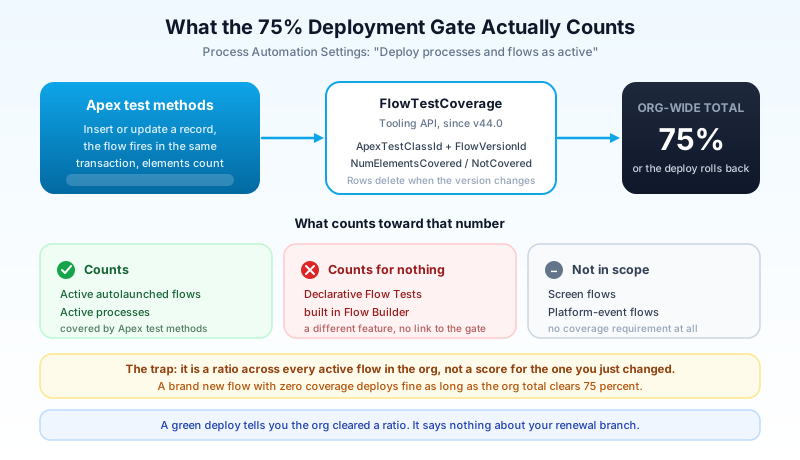
I have watched a team spend a sprint writing Apex test classes whose only purpose was to insert records so a flow would fire, purely to clear the gate. Those tests asserted nothing about flow behavior. They inserted an Opportunity, the flow ran, the element count went up, the percentage moved. That is coverage theater, and the platform rewards it.
What Flow Tests do well, and the six walls
Flow Tests went generally available in Winter '23 after a Summer '22 beta. The idea was right: let an admin build a unit test without Apex. You pick a triggering record, choose the path, define what the record looks like before and after, add assertions, and run. The result is a saved, repeatable check that you can run again after the next change. For regression testing a decision tree you keep editing, it genuinely works.
Then you hit the walls. There are six, and they arrive in roughly this order.
Record-triggered and Data Cloud-triggered flows only. Screen flows cannot be tested this way. Neither can platform-event-triggered flows. If your org's riskiest automation is a nine-screen quoting wizard, Flow Tests have nothing for you.
No delete triggers. Flows that run on record deletion are unsupported. The path most likely to destroy data is the path you cannot cover.
No asynchronous paths. Scheduled paths were added, which helped. The async path that runs after the transaction commits, the one you added specifically because a callout could not run in the trigger context, is still out of scope.
Test data is literal values only. No formulas, no variables, no resources. If your assertion depends on a date being TODAY, you set a fixed date at creation time and hand-edit it later. A test that needs manual maintenance to stay true is a test people stop running by March.
The triggering object only. You cannot build a test that involves a parent or child record. Any flow whose logic depends on related records, which is most of the interesting ones, cannot be fully exercised.
Two hundred tests per flow. Rarely a real limit, but worth knowing before you generate scenarios in bulk.
Wall five is the one that ends most attempts, so it is worth seeing concretely. Take a common Opportunity flow: when Stage moves to Closed Won, check whether the Account has an active contract, and if it does, create a renewal task instead of an onboarding task. Two branches, both business-critical, both trivial to describe. Neither is testable declaratively, because the branch condition reads a field on the parent Account and the test can only set fields on the Opportunity. You can build a test that fires the flow. You cannot build one that controls which way it goes. So the test you end up saving asserts the happy path you were never worried about, and the branch that actually breaks stays uncovered while the flow shows a saved test next to its name. That is worse than no test, because the next admin sees the green check and moves on.
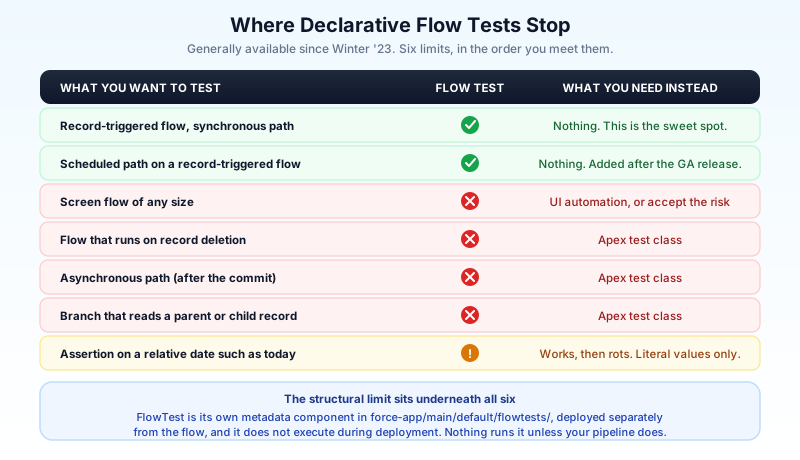
The structural problem is worse than any single wall. FlowTest is its own metadata component. It lives in force-app/main/default/flowtests/ with a .flowtest suffix, it deploys separately from the flow it tests, and per the Metadata API guide it does not execute during deployment. Nothing runs your flow tests. Not the deploy, not the gate, not the org. They run when a human opens Flow Builder and clicks, or when your pipeline explicitly invokes them through the Tooling API.
So the honest summary of Flow Tests before Winter '27: a real testing feature, wired to nothing. You can build a careful suite of forty scenarios across your Opportunity automation and a colleague can deploy a breaking change on Tuesday without a single one of them firing.
What Winter '27 actually changes
Flow Test Mode arrives as a beta in Winter '27, enabled in Process Automation Settings. Once it is on, Flow Builder splits into two modes. Build is the canvas you already know. Test is new, and it carries four things that matter.
Reusable test scenarios with assertions. Same conceptual model as today's Flow Tests, but saved, versioned, and managed inside the builder rather than behind a menu most people forget exists.
Mock outputs. This is the one to care about. Today, testing a flow that calls an Apex action or an external service means the dependency runs or the test does not. Mocks let you stub the output and exercise the branch that depends on it. Every flow you gave up on testing because it hit an integration is back in scope. Think about what that does to the credit-check pattern: a flow calls an external scoring service, branches on the returned score, and today you can only test it by calling the real service with real data and hoping the sandbox endpoint is up. With a mocked output you assert the approved path and the declined path in two scenarios that run in a second and never touch the network.
Isolated test data from a data silo. Instead of pointing a test at a record ID that survives exactly until the next sandbox refresh, you build the data inside the test. Anyone who has watched a suite of flow tests die because someone cleaned up test Accounts will recognize the value immediately.
Test coverage displayed against flow paths. Run the scenarios and see which paths executed and which stayed dark. Path-level, visible in the builder, at the moment you are looking at the branch.
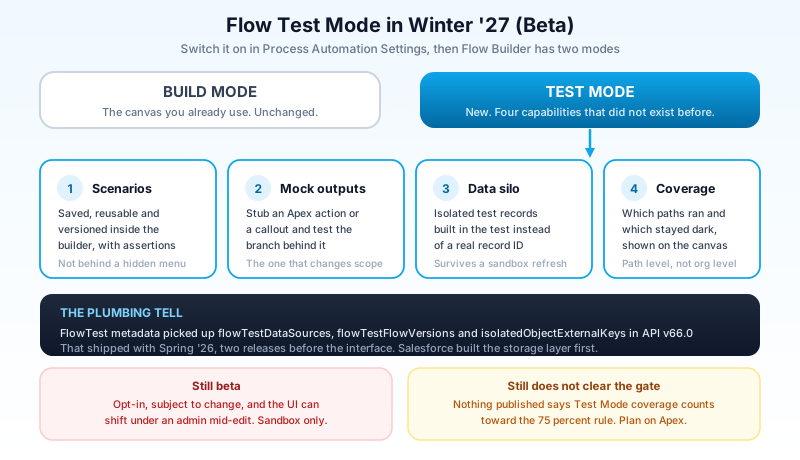
There is a tell in the metadata that this has been coming for a while. The FlowTest metadata type picked up three new fields in API version 66.0, which shipped with Spring '26: flowTestDataSources, flowTestFlowVersions, and isolatedObjectExternalKeys. Isolated test data, version binding, and external key resolution landed in the storage layer two releases before the interface showed up. Salesforce built the plumbing first, which is usually a sign the feature is a real investment rather than a demo.
Two cautions. It is beta, so it is opt-in, subject to change, and not something to put on a production timeline. And nothing published so far says Test Mode coverage counts toward the 75 percent deployment gate. Beta features do not usually change deployment gates. Plan on Apex still being the only currency for that number and treat it as a bonus if it changes.
A tiering plan that fits one sprint
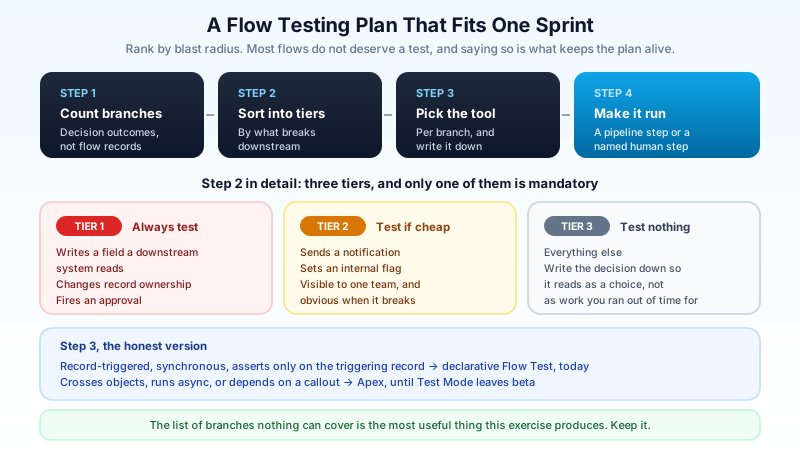
The mistake teams make here is deciding to test everything, discovering it will take a quarter, and testing nothing. Rank by blast radius instead and accept that most flows do not deserve a test.
Step one: count branches, not flows. Open your top ten most-modified record-triggered flows and count decision outcomes, not flows. A flow with one decision and two outcomes is two paths. A flow with three decisions is closer to eight. That branch count is the real size of your testing debt, and it is usually concentrated in two or three flows that everyone is scared to touch.
Step two: sort those branches into three tiers. Tier one is anything that writes to a field a downstream system reads, changes record ownership, or fires an approval. Tier two is anything that only sends a notification or sets an internal flag. Tier three is everything else. Tier one gets a test. Tier two gets one if it is cheap. Tier three gets nothing, and writing that down is what makes the plan survive contact with the sprint.
Step three: pick the tool per branch, honestly. If the branch is record-triggered, synchronous, and its assertions only touch the triggering record, a declarative Flow Test covers it today. If it crosses objects, runs async, or depends on a callout, you need Apex until Test Mode is out of beta. If it is a screen flow, neither one applies and you are writing UI automation or accepting the risk on purpose. Write the choice next to each branch. The list of branches nothing can cover is the most useful artifact this exercise produces.
Step four: make something actually run them. Flow tests that no pipeline invokes are documentation. If you use a DevOps tool, check whether it can trigger flow tests through the Tooling API as a pipeline step. If it cannot, the fallback is a named human step in your release checklist: open the flow, run the saved scenarios, screenshot the result. Unglamorous, and considerably better than a suite nobody executes.
When Winter '27 reaches your sandbox around August 29, the tier-one list you built in step two is exactly the input for evaluating Test Mode. Rebuild three of those tests with mocks and isolated data, see whether the beta holds up, and you will know by October whether it belongs in your process.
What I would not do
I would not write Apex tests whose only job is to move the coverage percentage. They cost real sprint time, they assert nothing, and they leave the org with a number that lies to the next person who reads it. If you need to clear the gate, clear it, but do not tell yourself the flows are tested.
I would not build declarative Flow Tests for screen flows by proxy, meaning wrapping the logic in a subflow purely so a test can reach it. Restructuring automation to fit a testing tool produces automation shaped by the tool, and you will still be maintaining that shape in three years when the tool has changed.
I would not turn on the Test Mode beta in a production org. Beta in Flow Builder means the UI can change under an admin mid-edit, and Flow Builder is not a place where surprises are cheap.
And I would not read a green deploy as a tested deploy. The gate checks a ratio across the org. It has no opinion about the flow you just changed, and treating it as a safety net is how the renewal branch stays dark for two days while a rep works out that something is wrong. Pair it with real fault path handling so the failures you did not catch at least surface loudly instead of silently.
Start with one flow and one branch count
Open the record-triggered flow on your busiest object. Count the decision outcomes and write the number down. Then open the flow's test list and count the saved tests. The gap between those two numbers is the honest state of your automation coverage, and it takes about four minutes to produce.
If the gap is large, pick the single branch with the worst downstream consequence and build one Flow Test for it this week. One test that runs beats forty that are planned, and it gives you something concrete to rebuild in Test Mode the day Winter '27 lands in your sandbox. For the wider picture on how these flows behave in production, the complete guide to record-triggered flows covers the execution order that determines what your test is actually asserting against, and the Apex test class patterns guide has the factory patterns worth reusing when Apex is the only tool that reaches the branch.
About the Author
Dipojjal Chakrabarti is a B2C Solution Architect with 29 Salesforce certifications and over 13 years in the Salesforce ecosystem. He writes and edits salesforcedictionary.com, published by KineticBit Inc., to help admins, developers, architects, and cert/interview candidates sharpen their fundamentals. More about Dipojjal.
Share this article
Sources
- FlowTest | Metadata API Developer Guide | Salesforce Developers
- FlowTestCoverage | Tooling API | Salesforce Developers
- Test One, Two, Three, Flow (Generally Available) | Salesforce Help
- New Flow Features of Winter '27 Release | Salesforce Time
- Salesforce Winter '27 Release Date + Preview Information | Salesforce Ben
Related dictionary terms
Practise it
Five questions on Administrator
Exam-style questions with an explanation after each one. No account needed, and your answers build a weak-topic map once you have one.
Keep reading

The Complete 2026 Guide to Record-Triggered Flows in Salesforce
Record-triggered flows are the Salesforce automation default in 2026. This is the complete tutorial: before-save, after-save, scheduled paths, gotchas, and 5 worked examples.

Salesforce Apex Test Classes: Best Practices, Test Factories, and Real-World Patterns (2026)
Write Apex tests that actually catch bugs. Test factories, bulk patterns with 200 records, callout mocks, negative testing, and why coverage percentage lies to you.

Salesforce Flow Fault Paths and Error Handling: The Complete 2026 Guide
Most flows fail silently when something goes wrong. Here is how to wire fault paths, write rollback logic, and surface errors your users can actually act on.
Comments
No comments yet. Start the conversation.
Sign in to join the discussion. Your account works across every page.