
Salesforce Flow Fault Paths and Error Handling: The Complete 2026 Guide
Fault connectors, rollback logic, custom error messages, and the patterns that keep your flows from silently failing in production.

A screen flow updates a Contact, then calls an Apex action to sync the record to an external billing system. The callout times out. The user sees a wall of red text referencing a fault at element "Sync_Billing_Account," a [flow interview](/terms/flow-interview) ID, and nothing they can do about it. They file a ticket. You open the flow and realize there is not a single fault connector anywhere in it. The flow did exactly what you built: nothing, badly.
This is the most common way flows fail in production. Not because the logic is wrong, but because nobody decided what should happen when a step breaks. Let me fix that.
What a fault connector actually is
A fault connector is a second outbound path from an element. The normal connector runs when the element succeeds. The fault connector runs when it throws an error. Think of it as a try/catch built into a single node.
Not every element can fail in a way that triggers a fault path. The ones that can are the elements that touch the database or external systems: Create Records, Update Records, Delete Records, Get Records, and Action elements (including Apex-defined and external service calls). Assignment, Decision, and Loop elements do not have fault connectors, because they do not perform operations that can throw a recoverable error.
When you drag a connector from a fault-capable element, Flow Builder asks which path you are drawing. The first one becomes the normal path. The next becomes the fault path, drawn as a red line. That red line is the entire difference between a flow that recovers gracefully and one that dumps a stack trace on a sales rep.
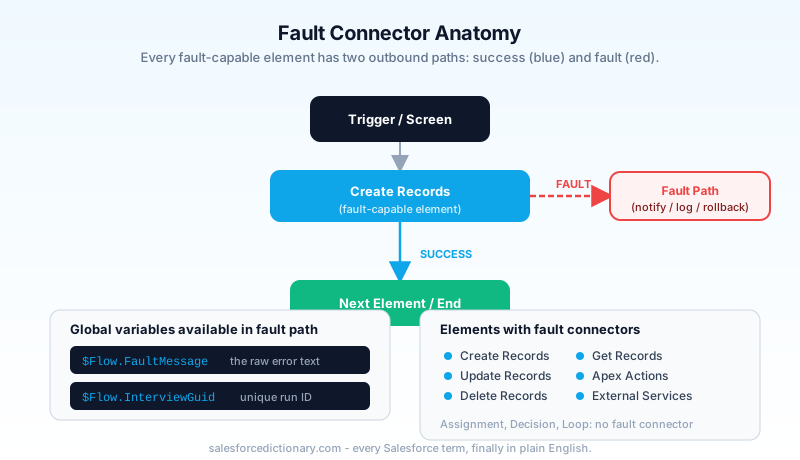
Here is the part people miss. If a fault-capable element has no fault connector, the behavior depends on context. In a screen flow, the running user gets the default error screen and the interview stops. In an autolaunched or record-triggered flow with no fault path, the entire transaction rolls back and the triggering operation fails. Same missing connector, very different blast radius.
Two global variables exist specifically for fault paths. $Flow.FaultMessage holds the error text from the failed element. $Flow.CurrentDateTime you already know. The fault message is your raw material for everything that follows: logging, emailing, and writing something a human can read.
The three error-handling patterns in production
Across real orgs, fault handling collapses into three patterns. Pick based on who is watching when the flow runs and whether the operation can be retried.
Pattern one: notify and stop. The fault path routes to a screen (for screen flows) or sends an email/posts a record (for background flows), then ends. You are not trying to recover. You are making sure a human finds out before the customer does. This is the right default for most flows. It is cheap to build and turns silent failures into visible ones.
Pattern two: log and continue. The fault path creates an error log record, then reconnects to the main path so the flow keeps going. Use this when one failed step should not kill the rest of the run. A common case is a loop that processes records where one bad record should not block the other ninety-nine. You log the failure and move on.
Pattern three: retry then escalate. The fault path loops back to attempt the operation again, often after a Decision element checks a retry counter. After N attempts, it escalates to a log or notification. This is heavier and only worth it for transient failures like callout timeouts. Do not retry a validation rule error. It will fail identically every time and waste your loop iterations.
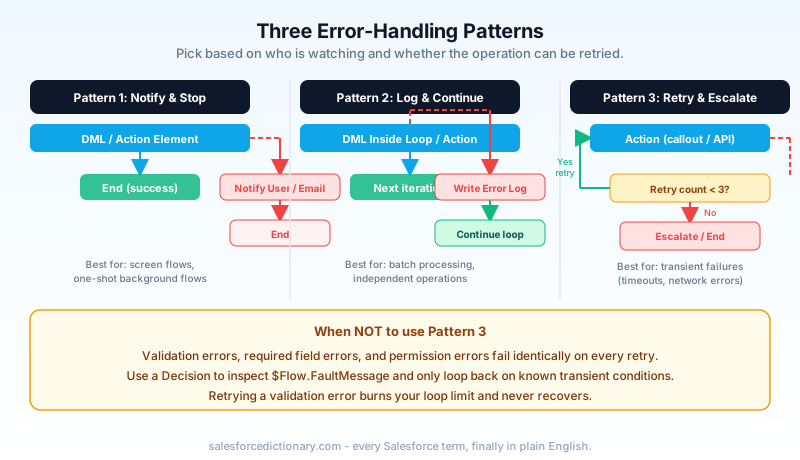
The mistake I see most often is treating every flow like it needs pattern three. It does not. A nightly batch flow that updates accounts needs logging. A screen flow that creates a case needs a friendly message. Reserve retry logic for the small set of operations that actually fail intermittently.
Fault path vs no fault path: what actually happens
This is where rollback behavior matters, and it is widely misunderstood. Salesforce flows run inside a single database transaction. Every DML operation in the flow is part of that transaction until something commits it or the transaction ends.
When an element fails and there is no fault connector, the unhandled error rolls back the entire transaction. Every record the flow created or updated before the failure is reverted. The triggering DML (if it is a record-triggered flow) also fails. This is the database protecting you from half-finished work.
When an element fails and you do have a fault connector, the error is considered handled. The transaction is not automatically rolled back. The flow continues down the fault path. Whatever you committed before the failure stays committed, unless you explicitly roll it back.
That distinction creates a trap. Say your flow creates an Order, then creates three Order Line Items, and the third line item fails. With a fault connector that just sends an email and ends, you now have an Order with two line items and no third one. The flow "handled" the error, so nothing rolled back. You have committed partial, broken data.
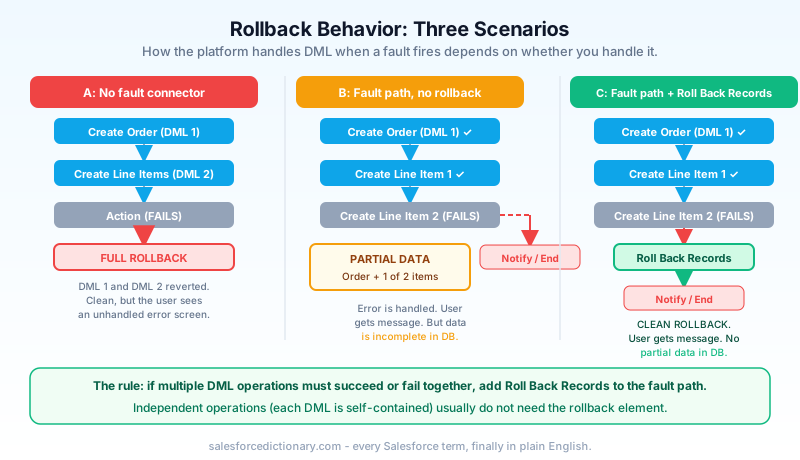
This is what the Roll Back Records element is for. Added to Flow Builder for exactly this scenario, it lets you explicitly revert all uncommitted DML in the current transaction from inside a fault path. The pattern is: fault connector routes to a Roll Back Records element, then to your logging or notification, then ends. Now the failure is both handled (the user gets a clean message) and clean (no partial data survives).
The rule of thumb: if your flow performs multiple related DML operations that must succeed or fail together, your fault path needs a Roll Back Records element. If your flow performs one DML operation, or each operation is independent, you usually do not.
Custom error messages that humans can read
$Flow.FaultMessage is honest but brutal. A raw fault message looks like this:
The flow tried to update these records: null. This error
occurred: FIELD_CUSTOM_VALIDATION_EXCEPTION: Close Date
cannot be in the past. You can look up ExceptionCode values
in Salesforce Help.
No customer should ever see that. The fix is a formula that wraps the raw message in something readable, while preserving the technical detail for whoever debugs it.
In a screen flow, build a text template or a formula resource and display it on a fault screen:
"Something went wrong while saving your changes. " &
"Our team has been notified. If you need this resolved now, " &
"contact support and quote reference: " &
{!$Flow.InterviewGuid} &
BR() & BR() &
"Technical detail (for support): " &
{!$Flow.FaultMessage}
For background flows, you do not have a screen, so the fault message goes into an email alert or a log record. Capture $Flow.FaultMessage into a text field on a custom Error Log object. Stamp it with the flow API name, the element label, the user ID, and the current time. Now you have a queryable error history instead of relying on the org's built-in flow error emails, which go to the flow owner or admin and are easy to drown in.
A simple Error Log record write inside the fault path beats every other approach for production observability. Build the object once, reuse it across every flow, and report on it. When someone says "the flow is broken," you query the log instead of guessing.
Common mistakes and the fixes
No fault connector on the last element only. Admins add fault paths to early elements and forget the final DML. The last operation is often the most important one. Audit every fault-capable element, not the first few.
Fault path that swallows the error. A fault connector that routes straight to an End element with no logging and no notification is worse than no fault path at all. It converts a loud failure into a silent one. You think the flow works. It quietly drops records for weeks. If a fault path does not notify or log, it should not exist.
Reusing one fault path for everything via connector merge. Routing every element's fault to a single shared subflow is fine for logging. It becomes a problem when you need element-specific recovery. Decide whether your fault handling is generic (log it) or specific (retry this exact callout) before you wire it.
Forgetting bulk context. A fault that fires for one record in a bulk-triggered flow can affect how the whole batch behaves. Test with multiple records, not one. A flow that handles a single failure beautifully can still blow a governor limit when fifty records hit the fault path at once and each one writes a log and sends an email.
Using retry loops on permanent errors. Validation errors, required field errors, and permission errors will fail identically on every retry. Retry only transient failures. Add a Decision that inspects $Flow.FaultMessage and only loops back on known retryable conditions.
Testing your fault paths
You cannot trust a fault path you have never seen fire. The hard part is forcing the error on purpose.
The cleanest way is the flow debugger. Open the flow, click Debug, and run it with inputs designed to fail. To trigger a validation error, feed a value that violates a validation rule. To trigger a required-field error, leave a required field blank in your Create Records assignment. The debugger shows you exactly which path executed, including the fault path, and prints the fault message it captured.
For callout and Apex action failures, the reliable trick is a temporary validation rule or a deliberately broken test endpoint. Some teams keep a "force fail" custom permission or a checkbox that, when set, routes the flow into a path that throws. Ugly, but it proves the fault handling works end to end.
Always test in bulk. Run the flow against a batch of records where some will fail and some will succeed. Confirm three things: the good records committed, the bad records did not leave partial data, and every failure produced a log or notification. If you only ever test the happy path, you have tested the half of the flow that was never going to be the problem.
Check the flow debug logs too. When a fault fires, the debug log shows the element, the error, and whether the transaction rolled back. This is the fastest way to confirm your Roll Back Records element actually ran.
FAQ
Do record-triggered flows need fault connectors? Yes, especially before-save and after-save flows that do DML or call actions. Without a fault path, a failure rolls back the entire triggering transaction, so the user's original save fails with a flow error. A fault path lets you fail gracefully or roll back deliberately.
What is the difference between a fault path and the Roll Back Records element? A fault path catches the error and routes execution somewhere. The Roll Back Records element reverts uncommitted DML. They work together: the fault path is where you put the rollback element. One without the other leaves you with either an unhandled error or handled-but-dirty data.
Will a fault connector stop the transaction from rolling back? It stops the automatic rollback. Once an error is handled by a fault path, Salesforce assumes you know what you are doing and keeps your committed records. If you want the rollback, you have to add a Roll Back Records element yourself.
Can I see the failed element name in my error message?
The raw $Flow.FaultMessage usually includes the element context. For cleaner reporting, hardcode the element label into the log record you write on each specific fault path, since a single shared fault path cannot always tell you which element failed.
Where do flow error emails go by default? To the flow's last modifier or the Apex exception email recipients, depending on org settings. These are easy to miss. A custom Error Log object that you can query and report on is far more reliable than depending on email.
Your next step
Open the flow that matters most in your org right now. Find every Create, Update, Delete, Get, and Action element. Count how many have a fault connector. For the ones that do not, decide which of the three patterns fits, and wire it. Start with notify-and-stop on your most critical DML. That single change turns your worst silent failure into a visible one, which is the entire point.
Then build one reusable Error Log object and a subflow that writes to it. Every flow you touch after that gets real observability for the cost of one connector.
About the Author
Dipojjal Chakrabarti is a B2C Solution Architect with 29 Salesforce certifications and over 13 years in the Salesforce ecosystem. He writes and edits salesforcedictionary.com, published by KineticBit Inc., to help admins, developers, architects, and cert/interview candidates sharpen their fundamentals. More about Dipojjal.
Share this article
Sources
Related dictionary terms
 Our appAdWake up sharp. Not just awake.The alarm that rings through Silent and DND — free on iOS & Android.Get WakeSharp →
Keep reading

The Complete 2026 Guide to Record-Triggered Flows in Salesforce
Record-triggered flows are the Salesforce automation default in 2026. This is the complete tutorial: before-save, after-save, scheduled paths, gotchas, and 5 worked examples.

Salesforce Flow vs Apex in 2026: A Decision Matrix for Admins, Developers & Consultants
Flow vs Apex is not a religious war anymore. Here is the 2026 decision matrix. Capability gaps, governor limits, the 70/30 rule, and 12 worked scenarios with the right answer for each.


Comments
No comments yet. Start the conversation.
Sign in to join the discussion. Your account works across every page.