
Note
A Note is a Salesforce record that holds written commentary attached to another record, so a rep can capture what was said on a call without forcing it into a standard field.
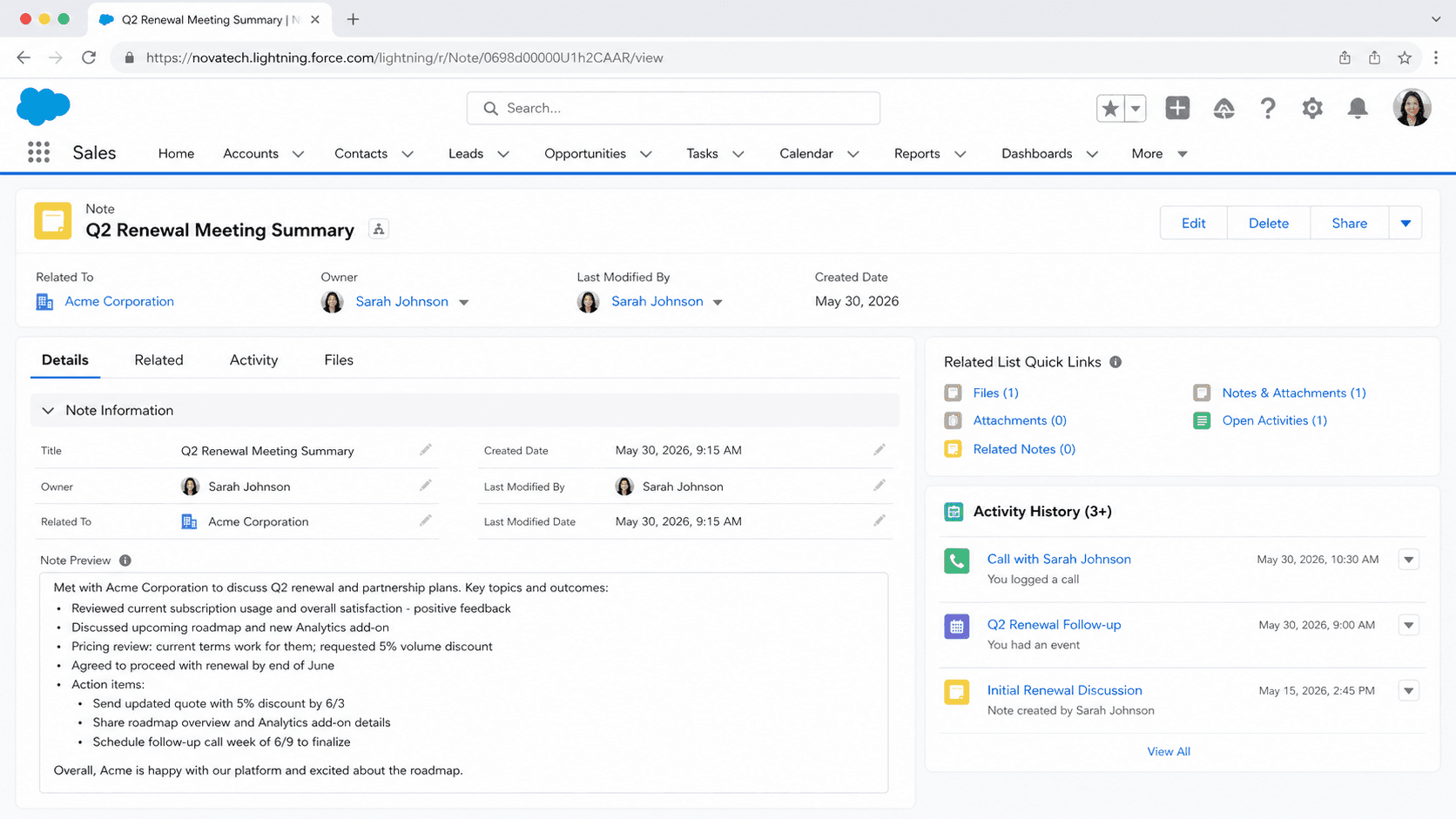
Definition
A Note is a Salesforce record that holds written commentary attached to another record, so a rep can capture what was said on a call without forcing it into a standard field. Two different objects carry the name.
The legacy Note object stores plain text against a single parent. Title caps at 80 characters, Body at 32 KB, and a polymorphic ParentId ties the note to exactly one record. It surfaces in the Notes and Attachments related list.
ContentNote, the object behind enhanced Notes, is available from API version 32.0 onward. It stores rich text on the Files framework, keeps versions, and links to several records at once through ContentDocumentLink. Salesforce treats the combined list as superseded by the separate Notes and Files lists, so new notes belong in ContentNote.
In plain English
“Think of a sticky note you press onto a customer's file so the next person who opens it knows what happened. Salesforce keeps two kinds. The old kind is plain writing stuck to one file. The new kind takes bold text, pictures and lists, and sits on several files.”
Worked example
A rep at a regional HVAC distributor finishes a renewal call and opens the Account record. The Notes related list shows two recent items; Notes and Attachments below it shows four from 2019. She clicks New on the Notes list, titles it Q3 renewal call, pricing pushback, and pastes the three SKUs the customer wants repriced. She links that one note to the Opportunity and the Contact as well. The 2019 items stay put: legacy Note records, and nothing converts them.
How Salesforce ended up with two Note objects
The legacy Note object, field by field
Title caps at 80 characters and Body at 32 KB of plain text. Both come from the Fields for the Old Note-Taking Tool table in Salesforce Help, not the Fields for Notes table above it, which reads 200 characters and 50 MB for enhanced Notes. Body takes no markup and no images, and links arrive as raw URLs. ParentId is a required polymorphic lookup accepting around a hundred object types, but exactly one record at a time. Supported calls cover create, update, upsert, delete, query, retrieve and undelete, so Apex, SOQL and Data Loader all work against it today. What you cannot do is extend it. There are no custom fields and no version history, and two people saving the same note overwrite each other.
ContentNote and the enhanced Notes editor
ContentNote represents a note created with the enhanced note taking tool. The object reference dates it twice and the two disagree: released in Winter '16, available from API version 32.0. Winter '16 shipped as API 35.0, and 32.0 was Winter '15. Trust the API number. Its Content field is base64 and accepts formatted HTML, which is where bold text, headings, lists and inline images come from. Titles stretch to 200 characters, and TextPreview, added in API 35.0, exposes a filterable excerpt. Attaching a note to a record works differently here. There is no ParentId. You insert a ContentDocumentLink with LinkedEntityId set to the record, which is how one note appears on an Opportunity, its Account and a Contact at once. After creation only Content and Title are updatable, and SharingPrivacy, from API 41.0, can set a note to Private on Records.
What the Private checkbox actually does
Setting IsPrivate to true does not hide a legacy note from everyone but its owner. That assumption catches orgs out during audits. Salesforce documents private notes as accessible to the owner and to users with View All Data, with Modify All Data required to edit or delete one. An administrator pulling an export still sees them. Normal access follows the parent record and the org's sharing settings. There is no separate share table here, so you cannot widen access to one note without widening access to whatever it hangs off. When commentary has to stay restricted, a custom long text area field with field-level security audits far better than the checkbox.
Two related lists that look almost identical
Notes and Attachments is the old combined list, rendering legacy Note and legacy Attachment records side by side. Notes and Files are the newer separate lists, reading ContentNote and ContentDocument. The naming does real damage. A note written in the Lightning editor lands in the Notes list and never appears in Notes and Attachments, and the reverse holds too. In Salesforce Classic the New Note button on the combined list still writes a legacy record even when enhanced Notes is switched on. In Lightning Experience that button is gone and only Upload Files remains. Salesforce says the combined list will eventually be phased out, but has named no release and no date.
Loading and migrating without picking the wrong object
Loading against Note produces plain-text legacy records. Loading against ContentNote produces enhanced notes, with Content base64 encoded and an upload ceiling of 50 MB before encoding overhead. A script aimed at the wrong object succeeds quietly, and you find out weeks later when users say their notes look wrong. Salesforce converts nothing for you. Moving history means an extract, a transform, a load, then a second pass creating ContentDocumentLink rows so each new note attaches to its record. Notes with embedded images do not import cleanly between orgs through Data Loader, and no standard report type spans the two objects.
When the legacy object still earns its place
Older managed packages and long-lived integrations read and write Note directly, and you cannot rewrite someone else's package on your timetable. Orgs with a decade of history often need those records queryable for compliance long after nobody adds new ones. Treat the legacy object as a read-and-preserve store, and stop pointing new automation at it. Anything built today should create ContentNote instead. The failure worth avoiding is keeping both alive as create targets. Half the team writes in one list, half in the other.
Turn on enhanced Notes and show both lists
Enhanced Notes is still off in some older orgs, and the Notes related list will not appear until you switch it on.
- Open Notes Settings
In Lightning Experience, go to Setup, then Feature Settings, then Sales, then Notes Settings. In Salesforce Classic the path is Setup, Customize, Notes, Notes Settings.
- Enable Notes and save
Select Enable Notes and save. Until this is on, the Notes and Attachments related list in Lightning Experience carries attachments only.
- Add the Notes related list
Edit the page layout for each object that matters and drag the Notes related list on. It reads different data from Notes and Attachments.
- Keep the old list in place
Leave Notes and Attachments on the layout while legacy records still matter, then retire it.
Switches on the enhanced editor and the Notes related list.
Decides whether ContentNote records appear on that object.
Keep it while legacy records still matter.
- Orgs on profile-based Chatter rollout must grant Chatter permissions before anyone sees enhanced Notes.
- Notes has no simultaneous editing. Sharing grants viewer access only, and two people editing at once overwrite each other.
- Enabling Notes converts nothing. Legacy records stay where they are.
Prefer this walkthrough as its own page? How to Note in Salesforce, step by step
How organizations use Note
Reps log call summaries as enhanced notes linked to both the Account and the open Opportunity, so a handover keeps its context.
Ten years of legacy Note records stay on donor Accounts for audit purposes, while every new note is created as a ContentNote.
An older billing package still writes Note records through the API, so the team keeps both related lists on the layout.
Trust & references
Cross-checked against the following references.
- Salesforce Notes and Files: Considerations and Transition from Notes & Attachments (opens in new tab)Salesforce
- Changes to the Notes and Attachments Related List, New Note and Upload Files Buttons (opens in new tab)Salesforce
- Notes Related List in Salesforce Lightning Experience (opens in new tab)Salesforce
Straight from the source - Salesforce's reference material on Note.
Hands-on resources to go deeper on Note.
About the Author
Dipojjal Chakrabarti is a B2C Solution Architect with 29 Salesforce certifications and over 13 years in the Salesforce ecosystem. He writes and edits salesforcedictionary.com, published by KineticBit Inc., to help admins, developers, architects, and cert/interview candidates sharpen their fundamentals. More about Dipojjal.
Test your knowledge
+5 pts / dayQ1. What happens when IsPrivate is set to true on a legacy Note record?
Q2. How do you relate a single enhanced note to an Opportunity, its Account and a Contact?
Q3. An admin enables Notes in Setup and expects old plain-text notes to show up in the new Notes related list. What actually happens?
Discussion
Loading discussion…