
Dashboard Builder
Dashboard Builder is the drag-and-drop editor in Lightning Experience where you assemble a Salesforce dashboard out of reports that already exist.
Definition
Dashboard Builder is the drag-and-drop editor in Lightning Experience where you assemble a Salesforce dashboard out of reports that already exist. You add widgets, point each one at a source report, size it on a grid, and save.
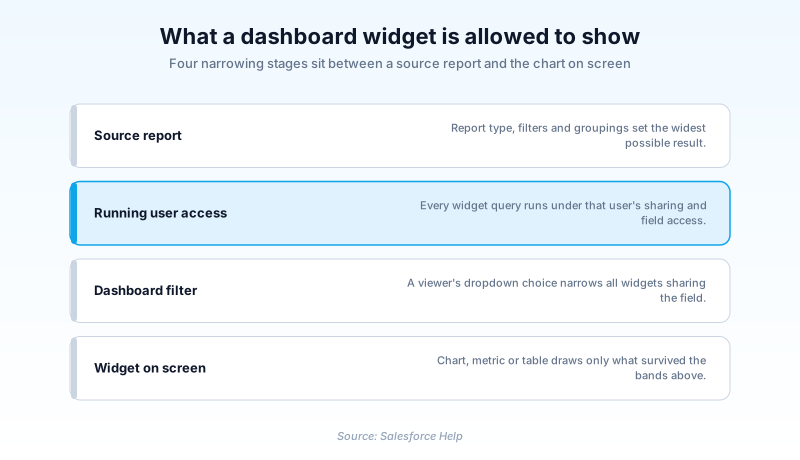
The builder never queries records on its own. Every chart, metric and table renders a report, so what a widget can show is capped by what its source report already returns.
Salesforce Classic has a screen of the same name, and Salesforce Help calls both of them the dashboard builder. They are different editors with different buttons, different layouts and different limits, so a walkthrough written for one will not match the other.
In plain English
“A report is a list of answers to one question. A dashboard is a wall of pictures made from those lists. Dashboard Builder is the screen where you hang the pictures, decide how big each one is, and pick whose numbers they show. If a list does not hold a number, no picture on that wall can show it.”
Worked example
A sales operations lead at a mid-market software company builds a quarterly pipeline dashboard for eight account executives. She starts with two reports: Opportunities grouped by Stage with Amount summed, and Opportunities grouped by Opportunity Owner with record count. On the Dashboards tab she clicks New Dashboard, names it Q3 Pipeline Health, then clicks + Widget and turns the first report into a horizontal bar chart with Amount on the x axis. A second widget shows the same report as a single metric. A third points at the owner report as a table. She clicks + Filter, picks Type with the values New Business and Existing Business, then opens Properties with the gear icon and sets the dashboard to run as a specified user, so all eight reps see identical regional numbers.
How the builder turns saved reports into a working dashboard
Widgets are the unit of work, and you get 25
Everything you place is a widget. Charts, gauges, metrics, tables, images and rich text blocks all draw on one ceiling: 25 widgets per dashboard, of which at most 20 can be charts and tables, 3 can be images, and 25 can be rich text. Reach the chart limit and the fix is usually a second dashboard, not a smaller tile. Summer '26 added another kind of tile, because custom Lightning Web Components embedded in a Lightning dashboard went generally available.
A widget can only show what its report returns
Pick the source report first, then pick the visualization. The widget editor reads the groupings and summary fields already saved on that report, which is why a bar chart offers nothing on the x axis when the report has no grouping. Leave Use chart settings from report selected and the widget mirrors the report's own chart. Deselect it and you take over axes, sort order, display units, decimal places and titles. A single widget calculates up to 1,000 groupings, so a report grouped by a high cardinality field stops short of the full picture without warning you.
The gear icon holds the settings people forget
Properties sits behind the gear, and it carries three decisions that hurt to change later. It sets who the dashboard runs as, along with the theme and color palette applied to every widget at once. The third is the grid: switching between 12 columns and 9 columns reflows everything already on the canvas. Re-placing twenty tiles because someone wanted wider charts is an afternoon nobody planned for.
Filters cross widgets, but not every report type
Click + Filter, choose a field, and viewers get a dropdown that narrows every widget sharing that field. One filter holds up to 50 values, and where a widget stores an equivalent field you choose which one the filter uses. The restrictions are specific enough to check before promising anything. Put a Cases or Leads widget beside a widget on a different report type and Case Owner and Lead Owner stop being filterable. Combine an activity report type with anything else and the Assigned field goes the same way.
The viewer's own access is not the default
The builder does not default to the viewer's own access, and it will not pick for you. In Properties you choose between one named person and the viewer themselves. Name a person and every viewer reads totals through that person's record access, including figures they could never open as records. Choose the viewer and you have built a dynamic dashboard, which needs the Manage Dynamic Dashboards permission and gives up subscriptions in return.
The Classic builder is a different screen
Salesforce Classic keeps its own drag-and-drop editor, capped at three columns, with a palette of component types down the side. Labels differ in small ways that break copied instructions: Classic says Add Filter where Lightning says + Filter, and Classic says OK where Lightning says Add. New work belongs in the Lightning builder, which is where grid layouts wider than three columns and every recent feature landed. Treat the Classic screen as maintenance, not as a second supported way to do the same job.
Build a dashboard in the Lightning builder
You need Run Reports plus Create and Customize Dashboards, and the source reports have to exist first. The builder cannot create or edit a report for you.
- Open a new dashboard
From the Dashboards tab click New Dashboard, or from the Analytics tab choose Create, then Lightning, then Dashboard. Give it a name and a folder.
- Add the first widget
Click + Widget, choose the source report, then the visualization. Set the properties in the editor and click Add.
- Size the grid
Drag tiles to reposition them and pull a corner to resize. Pick 12 or 9 columns in Properties before the layout grows.
- Add a filter
Click + Filter, choose a field the widgets share, give it a display label, add up to 50 values, then click Add.
- Choose the running user
Open Properties with the gear icon and decide whether viewers read the data as one specified user or as themselves.
- Save and verify
Click Save, then Done. Open the dashboard as someone in the intended audience and confirm the totals match their access.
A specified user for one shared view of the numbers, or the logged-in user for per-viewer data, which requires Manage Dynamic Dashboards.
12 columns for dense tiles, 9 columns for wider ones. Switching after the fact reflows every widget already placed.
A saved report for charts, metrics and tables, or an image or rich text block for framing and commentary.
- Editing a source report changes every widget pointing at it. Drop a grouping to tidy one chart and the others lose their axis.
- A dashboard sitting in a private folder is invisible to everyone else no matter how the running user is set. Folder sharing and running user are separate controls.
- Deselect Use chart settings from report and the widget stops tracking later changes to the report chart. You maintain two chart definitions from then on.
Prefer this walkthrough as its own page? How to Dashboard Builder in Salesforce, step by step
How organizations use Dashboard Builder
Runs one pipeline dashboard per region, each set to a specified user so every rep on that team reads identical numbers in stand-up.
Puts a single donations dashboard on the home page with a filter on Campaign, so program managers narrow it themselves instead of requesting private copies.
Keeps one dispatch dashboard running as the logged-in user, so each supervisor sees only the work orders inside their own territory.
Trust & references
Cross-checked against the following references.
- Build a Lightning Experience Dashboard (opens in new tab)Salesforce
- Edit and Customize Lightning Experience Dashboard Widgets (opens in new tab)Salesforce
- Reports and Dashboards Limits and Allocations (opens in new tab)Salesforce
- Add a Dashboard Filter (opens in new tab)Salesforce
- Embed Custom Lightning Web Components in Dashboards (Generally Available) (opens in new tab)Salesforce
- Dashboard (Metadata API Developer Guide) (opens in new tab)Salesforce
Straight from the source - Salesforce's reference material on Dashboard Builder.
Hands-on resources to go deeper on Dashboard Builder.
About the Author
Dipojjal Chakrabarti is a B2C Solution Architect with 29 Salesforce certifications and over 13 years in the Salesforce ecosystem. He writes and edits salesforcedictionary.com, published by KineticBit Inc., to help admins, developers, architects, and cert/interview candidates sharpen their fundamentals. More about Dipojjal.
Test your knowledge
+5 pts / dayQ1. A dashboard already holds 20 chart and table widgets and 2 images. Which documented limit stands in the way of a 21st chart?
Q2. Every viewer of a dashboard sees the same amounts, including deals on records they cannot open. Why?
Q3. Each sales manager should open the same dashboard and see only their own team's opportunities. What delivers that?
Discussion
Loading discussion…