
Einstein Discovery
Einstein Discovery is a no-code machine learning feature inside CRM Analytics.
Definition
Einstein Discovery is a no-code machine learning feature inside CRM Analytics. It trains a predictive model on a dataset you prepared, then puts the score on a Salesforce record along with the factors behind it.
It only works on history. One column has to hold a result that already happened. You mark that column as the outcome and say whether more of it is good or bad. The model sorts out which of the remaining columns predict it. Its data type decides which of three model types you get.
The feature name has held still while everything around it changed. The host platform went from Wave Analytics to Einstein Analytics to Tableau CRM and now CRM Analytics, but Summer '26 documentation still says Einstein Discovery.
In plain English
“Imagine you kept a note about every deal your company ever tried to close, and whether it was won or lost. Einstein Discovery reads all of those old notes and works out what the wins tended to have in common. Then, when a new deal shows up, it tells you how likely that one is to go your way, and which few things would improve the odds.”
Worked example
A regional HVAC distributor trains a model on a CRM Analytics dataset of 40,000 closed opportunities. The outcome column is IsWon and the goal is set to maximize IsWon: TRUE. The finished model scores 0.78 AUC, and Top Predictors lists Amount, LeadSource, and Account Industry. The team deploys it to the Opportunity object, maps Industry to Opportunity > Account > Industry, and marks Amount as an actionable variable. On a live $85,000 opportunity, the Einstein Predictions component now reads Predicted to Win at 34 percent, names a long-stalled Stage as the biggest drag, and points out that deals under $60,000 in that industry close far more often. The rep splits the deal into two phases.
How a model gets built, judged, and put in front of a rep
It starts with a dataset, not an object
Einstein Discovery never reads your Opportunity records directly. It trains on a CRM Analytics dataset, a prepared and indexed snapshot you assembled with a recipe or a connector. Two things follow. Training data can mix Salesforce fields with anything else you loaded, so billing history or product usage columns are fair game. And the grain of the dataset decides what a prediction is about. Opportunity rows give opportunity scores; account rows give a different model entirely.
One outcome column, and a direction
The outcome is the one call the tool cannot make for you. Pick a column that merely stands in for what the business cares about and the model is technically sound and commercially useless. Direction matters too: a model told to minimize days to close behaves differently from one told to maximize revenue. After that, Configure Model Columns defaults to Automated, which lets Einstein choose the relevant fields. Take that default the first time through. Hand-picking columns before the automated pass has shown you anything mostly encodes assumptions you already held.
Insights arrive before any prediction does
Under Data Insights the model talks about your history rather than your future. Descriptive insights report what happened. The diagnostic ones go after why, isolating the patterns that separate good results from bad. The comparative view puts the gap between two subgroups into a waterfall chart, which is what ends up in the quarterly review deck. This half pays for itself even if you never deploy anything.
Read the scorecard honestly
Model Performance Overview decides whether this thing is fit to ship. Binary models lead with AUC, which runs from 0.5, no better than a coin flip, up to 1.0. Numeric models lead with R-squared, the share of variation the model accounts for. The same screen carries Assess Deployment Readiness, data alerts, the outcome distribution, and Top Predictors. A strong headline metric sitting on a lopsided outcome distribution is a trap. Predict FALSE every time on data that is 97 percent FALSE and you look accurate while saying nothing.
Prediction definitions and segments
Deployment produces a prediction definition: a container on the target object, listed in Model Manager, holding one or more models. Segmentation is why it holds more than one. Give each slice its own filter condition, one model per region say, and the platform picks the matching one per record. That beats a single blended model whenever the drivers genuinely differ by slice. The cost is history: split five ways and each model learns from a fifth as many rows. Thin segments make weak models.
Where the score actually lands
The usual destination is the Einstein Predictions component on a Lightning record page: the score, the top predictors behind it, and suggested improvements. You can relabel both ends, so a binary result reads Predicted to Win instead of TRUE. None of it is a stored overnight batch, since the prediction is calculated in real time as the page is viewed. The same models feed Experience Cloud pages, Flow Builder, Tableau dashboards, and datasets scored in bulk by a Data Prep recipe. Developers reach the scores through the Einstein Prediction Service and the Insights API.
Build and deploy your first Einstein Discovery model
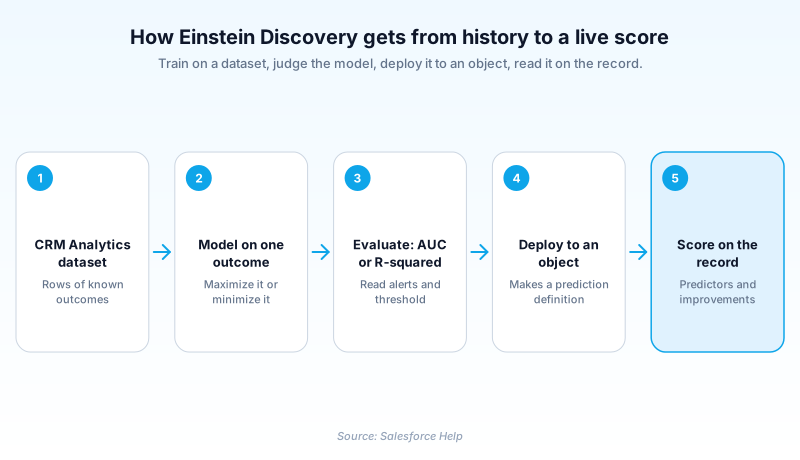
The path runs from dataset to deployed component in six steps. Skipping the scorecard is how bad models reach production.
- Start a model from Analytics Studio
On the Analytics Studio home page click Create, then Model. Choose Create from Dataset and click Continue.
- Choose the dataset holding your history
Select the CRM Analytics dataset of past events where the result is already known, then click Next.
- Name the outcome and the direction
Under I Want to Predict, pick the outcome column. Set whether you want it maximized or minimized, then click Next.
- Let Einstein pick the columns
On Configure Model Columns leave the setting on Automated so the relevant fields get chosen for you, then click Create Model.
- Check the numbers before you ship
On Model Performance Overview, work through Assess Deployment Readiness and clear every data alert. Binary models get their threshold set on this screen too.
- Deploy it to an object
Click Deploy Model and pick the target object. Einstein maps most variables to fields itself; map the stragglers by hand, across relationships if needed. Choose whether to segment, mark actionable variables, then review and Deploy.
For a numeric outcome such as Amount or days to close. Judged on R-squared. The record shows a number in the column's own unit.
For a true or false outcome such as IsWon. Judged on AUC. The raw output is a probability until your threshold turns it into a verdict.
For a picklist-shaped outcome of three to ten distinct values, such as a tier or reason code. Bucket a wider column down in the recipe first.
- The model knows only the columns present when it trained. Adding a field later means building the model again.
- A near-perfect score should worry you, not please you. Salesforce's own training says a perfect model raises suspicion, so check Top Predictors before you believe it.
- Mapped fields that sit blank on a record degrade that record's prediction quietly, with no warning on the page.
Prefer this walkthrough as its own page? How to Einstein Discovery in Salesforce, step by step
How organizations use Einstein Discovery
Trains on five years of closed opportunities to score open pipeline, then rewrites its qualification checklist around the top predictors.
Predicts which inbound cases will breach a milestone and shows the score on the Case page, so triage runs on risk rather than on age.
Blends core banking columns with Salesforce activity in one dataset to predict member attrition, with a separate segment model per branch.
Trust & references
Cross-checked against the following references.
Straight from the source - Salesforce's reference material on Einstein Discovery.
Hands-on resources to go deeper on Einstein Discovery.
About the Author
Dipojjal Chakrabarti is a B2C Solution Architect with 29 Salesforce certifications and over 13 years in the Salesforce ecosystem. He writes and edits salesforcedictionary.com, published by KineticBit Inc., to help admins, developers, architects, and cert/interview candidates sharpen their fundamentals. More about Dipojjal.
Test your knowledge
+5 pts / dayQ1. What does an Einstein Discovery model train on?
Q2. A team wants to predict a value using only fields that already sit on one Salesforce object, with no dataset work. Which tool fits?
Q3. What is a prediction definition?
Discussion
Loading discussion…