
Salesforce AgentExchange: The Complete 2026 Guide to the Marketplace That Replaced AppExchange
AppExchange, the Slack Marketplace, and the Agentforce agent catalog are now one storefront. Here is what changed, what it means for admins and ISVs, and the governance checklist to run before you install anything from it.

You go to install an e-signature integration you have used a dozen times, click the bookmarked AppExchange link from a client's runbook, and land somewhere unfamiliar. The URL redirected. The tab says AgentExchange. Your listing is still there, still installs the same way, but the page around it is full of things labeled "agent" and "sub-agent" with install counts already in the thousands. Nobody on your team remembers approving a budget line for any of that.
That disorientation is the point of this post. Salesforce folded AppExchange, the Slack Marketplace, and the standalone Agentforce agent directory into one catalog called AgentExchange, and finished the consolidation at TrailblazerDX 2026 in April. The AppExchange brand name is retired after two decades. If your job involves installing packages, approving vendor tools, or building on the platform, the merge changes what you are actually looking at when you browse the marketplace, and it changes what you need to check before you click install. This guide covers what moved, what is new, and the checklist to run before any third-party agent gets anywhere near your org's data.
What actually happened
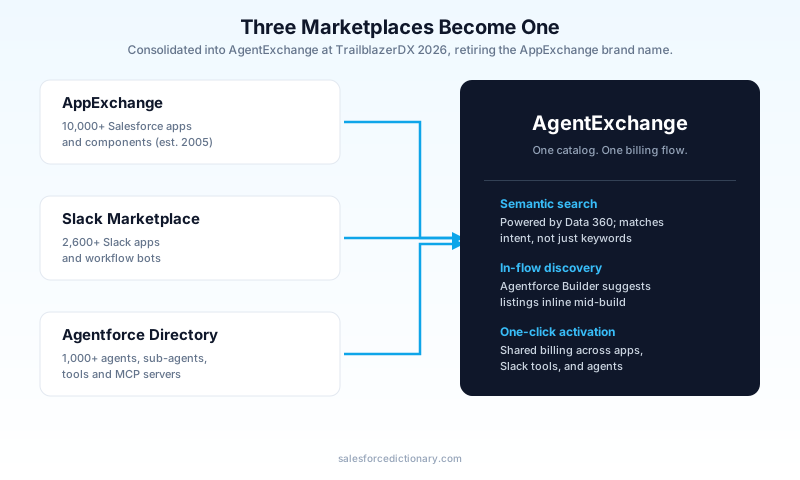
AgentExchange did not appear out of nowhere. Salesforce launched it in March 2025 as a standalone site sitting next to the existing AppExchange, aimed specifically at discovering AI agents. For a year, admins had two marketplaces to check: AppExchange for apps and components, AgentExchange for agents. At TrailblazerDX 2026, Salesforce closed that gap by merging all three catalogs, AppExchange, the Slack Marketplace, and the original AgentExchange, into a single storefront and keeping the AgentExchange name for the combined result. appexchange.salesforce.com now redirects there.
The scale of what got merged is worth sitting with: over 10,000 Salesforce apps, more than 2,600 Slack apps and agents, and upward of 1,000 Agentforce agents, sub-agents, tools, and MCP servers, all pulled into one searchable catalog with shared billing and one-click activation. You are no longer choosing which marketplace to search based on what kind of thing you need. You search once, and the platform decides whether the answer is an app, a Slack bot, or an autonomous agent.
Why merge three storefronts instead of running them in parallel
The official framing is discovery friction: a customer looking to solve "I need contract approvals to move faster" should not have to know in advance whether the fix is a Flow-based app, a Slack workflow, or an autonomous agent. Salesforce's answer is semantic search built on Data 360, which reads the intent behind a query instead of matching literal keywords. Search for "contract optimization" and you get e-signature tools back, because the engine understands what you are trying to accomplish, not just what words you typed.
There is a second, less advertised reason. Salesforce's own numbers on Digital Labor Units and agent consumption make it clear the company wants agent adoption to look like the next AppExchange curve: broad, partner-driven, revenue-sharing. Folding agents into the marketplace with the deepest install base on the platform is a distribution decision as much as a UX one. I do not think that is a bad instinct. I do think it means every admin now has to treat "install this agent" with the same scrutiny they already apply to "install this managed package," and most teams are not there yet.
The new content types you will see in the catalog
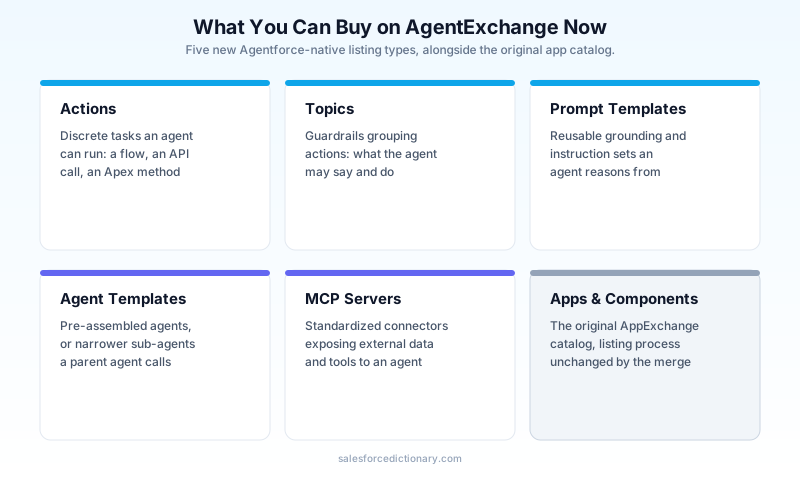
Before the merge, a listing was an app, a component, or a bolt-on. Now the catalog carries several Agentforce-native categories that did not exist as marketplace items before:
- Actions: the discrete tasks an agent can perform, calling a flow, hitting an API, running an Apex invocable method. These are the building blocks, and a single vendor listing might bundle a dozen of them.
- Topics: the guardrails around a group of actions, defining what the agent is allowed to talk about, which actions it can reach for, and under what conditions.
- Prompt templates: reusable grounding and instruction sets an agent uses when it reasons about a task.
- Agent templates and sub-agents: pre-assembled agents, or narrower agents meant to be orchestrated by a parent agent rather than used standalone.
- MCP servers: Model Context Protocol connectors that expose an external system's data and tools to an agent in a standardized way, now a first-class listing type instead of something you had to configure by hand.
Agentforce Builder surfaces trusted agents, sub-agents, and MCP servers in context now too, so a builder assembling an agent gets marketplace suggestions inline instead of having to leave the canvas and search separately. That is a genuine productivity win. It is also exactly the kind of frictionless install path that makes governance easy to skip, because the marketplace item is one click away from being wired into a live agent's action list.
What changed for admins
If you are the person who approves what gets installed, three things are different from the AppExchange era.
You are now approving data access for something that acts, not just something that displays. A traditional AppExchange app mostly reads and writes records through a UI a human clicks through. An installed agent can call actions on its own, chained across multiple steps, without a human confirming each one. The blast radius of a misconfigured permission set is bigger when the thing exercising it is autonomous.
Security Review still gates every listing, and it is the control that matters most. Every solution on AgentExchange, agent or otherwise, has to pass Salesforce's Security Review before it is listed, and getting a spot requires a valid managed package plus a passed review. That review is necessary, but it is not sufficient on its own: it certifies the vendor's code is not doing something malicious, not that the specific permission footprint you are about to grant it is appropriate for your org. Those are two different questions, and only you can answer the second one.
The Einstein Trust Layer covers the model-level risk, not the permission-level risk. Zero data retention, toxicity detection, secure data retrieval, and dynamic grounding all apply to what an agent does with a prompt and a response. None of that tells you whether the agent's connected app is asking for API scopes wider than the task needs, which is precisely the failure mode I covered in the connected-app OAuth security piece linked below. Trust Layer and Security Review are both real controls. Treat them as a floor, not a ceiling.
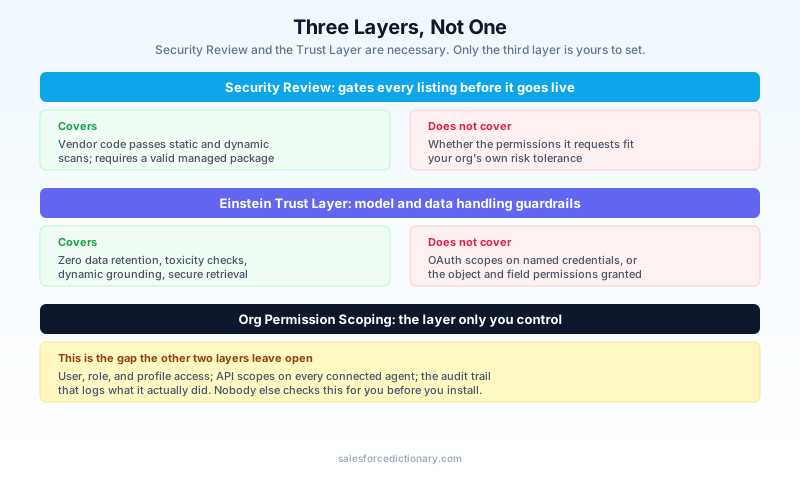
Admins do retain the controls that matter most for closing that gap: data permissions, API scopes, and integration boundaries at the user, role, and profile level, plus an audit trail that logs agent actions and outputs for compliance review. Those controls existed before AgentExchange. What changed is how often you need to reach for them, because "install an agent" is now a one-click action available from inside the builder canvas instead of a considered procurement decision.
The checklist to run before you install a third-party agent
This is the part most recaps of the AgentExchange launch skip, and it is the part that actually matters day to day. Before you approve installing any agent, sub-agent, or MCP server from AgentExchange into a production org, walk through this:
- Read the permission set it ships with, field by field. Do not assume "it needs Account access" means read-only. Check create, edit, and delete separately, and check whether it is scoped to specific record types or the whole object.
- Check whether it defaults to user mode or a service account. An agent running as a dedicated integration user with a narrow profile is easier to reason about than one that inherits the permissions of whoever triggered it. Ask the vendor which model they use before you install, not after something goes wrong.
- Confirm the zero-data-retention setting is actually on for this specific agent, not just true of the platform in general. Some third-party grounding sources sit outside the Trust Layer's default guarantees.
- Look at its named credentials and external credentials. If the agent calls out to a system outside Salesforce, that external connection is where OAuth scope creep hides. A named credential requesting broader scopes than the listing's stated purpose is a red flag worth a follow-up question to the vendor.
- Test it with a low-privilege persona in a sandbox first, the same way you would test an Apex class after an API version bump. An admin-level test tells you the agent can technically do its job. It tells you nothing about what it can see when run as a standard user.
- Check the Digital Labor Unit cost model before you scale beyond a pilot. A per-conversation or per-resolution pricing structure that looks cheap for ten users can behave very differently at a thousand. Run the math against realistic volume before committing.
- Review the audit trail after the first week of real use, not just at install time. Agent behavior in production frequently diverges from what a demo showed, because real user inputs are messier than a sales call script.
None of these steps are new ideas. They are the same discipline you already apply to a risky managed package or an OAuth connected app. What is new is the volume: a marketplace with 1,000-plus agents, sub-agents, and MCP servers, surfaced inline while someone is mid-build in Agentforce Builder, will produce far more install requests per quarter than AppExchange ever did for traditional apps. The checklist has to become a five-minute habit, not a quarterly audit, or it will not survive contact with how fast people actually install things now.
What changed for ISV partners and builders
If you build and sell on the platform rather than just consuming from it, the merge reshapes the on-ramp. Existing AppExchange listings carried over; you did not lose your install base or your reviews. But new agent-native listing types come with their own review path, and Salesforce backed the transition with a $50 million AgentExchange Builders Initiative aimed squarely at small shops and early-stage startups that have historically struggled to clear an enterprise security bar alone. The initiative pairs capital with engineering support through Salesforce's Forward Deployed Engineering Partner Network, plus new go-to-market programs for solutions built specifically for what Salesforce calls the Virtual Employee economy, meaning agents doing work rather than software that helps a human do it.
Practically, that means a two-person team building a single well-scoped agent action now has a plausible path to a marketplace listing that did not exist a year ago, provided the code passes Security Review and the permission model is defensible under scrutiny. If you are weighing whether to build for AgentExchange versus staying internal-only, the deciding factor is usually whether you can pass that review cleanly on the first attempt. Vague, over-broad permission requests are the most common reason submissions bounce, and that is true whether you are a five-person startup or an enterprise ISV.
What did not change
Three things worth anchoring on so this does not feel bigger than it is. Your existing installed packages are unaffected; nothing about the merge un-installs or re-permissions anything already in your org. Bookmarked AppExchange listing URLs redirect and keep working, so old runbooks and documentation do not break outright, even though the surrounding page looks different. And the fundamentals of vetting a marketplace install, checking the permission set, testing as a real user, reviewing what data leaves your org, have not changed at all. They just apply to a wider range of listing types now, and they need to run more often given how much easier discovery has become.
Next steps
Open your org's Installed Packages page this week and cross-reference it against the checklist above, starting with anything installed in the last two release cycles under time pressure. For the next agent your team wants to pull from AgentExchange, do not let "it passed Security Review" be the end of the conversation. Ask for the permission set, ask about the execution mode, and test it in a sandbox with a persona that has exactly the access a real end user would have, before it ever touches production data.
About the Author
Dipojjal Chakrabarti is a B2C Solution Architect with 29 Salesforce certifications and over 13 years in the Salesforce ecosystem. He writes and edits salesforcedictionary.com, published by KineticBit Inc., to help admins, developers, architects, and cert/interview candidates sharpen their fundamentals. More about Dipojjal.
Share this article
Sources
- AgentExchange: One Unified Marketplace for the Agentic Enterprise
- Salesforce Relaunches AgentExchange, Marking a New Phase In Its AI Agent Marketplace Strategy
- AgentExchange: Salesforce's Bet That Trust Can Scale With Agentic Speed
- Top 5 Salesforce Developer Announcements at TrailblazerDX 2026
- AgentExchange Security Review (Trailhead)
Related dictionary terms
Practise it
Five questions on Agentforce Specialist
Exam-style questions with an explanation after each one. No account needed, and your answers build a weak-topic map once you have one.
Keep reading

Agentforce Digital Labor Units Explained: What You're Actually Buying in 2026
Agentforce switched from per-conversation pricing to Digital Labor Units. Here is how DLU consumption works, what counts as a billable interaction, and how to estimate costs before you commit.

Salesforce Connected App OAuth Security: Find and Kill the Dormant Grants Before Someone Else Uses Them
Forgotten OAuth grants from Connected Apps you stopped using are one of the highest-value attack surfaces in Salesforce. Here is how to find them, revoke them, and stop them from coming back.

Salesforce Einstein Trust Layer: The Complete 2026 Guide to Secure AI
Your security team asks where the customer data goes when Agentforce processes it. Here is the full answer: how the Einstein Trust Layer's prompt journey, data masking, zero-data retention, and toxicity detection actually work.

Slack as the Agentforce Front Door: The Complete 2026 Guide
Slack is now the conversational front door to Salesforce. This 2026 guide covers Slackbot GA, Salesforce Channels, Slack-First Sales, and the productivity shift for admins to plan for.
Comments
No comments yet. Start the conversation.
Sign in to join the discussion. Your account works across every page.