
Migrating to Dynamic Forms in 2026: The Playbook for Orgs Carrying Forty Page Layouts
Page layouts do not disappear when you upgrade a record page. Here is what they still own, the assignment model that sets your migration order, and where visibility rules stop.

Open [Object Manager](/terms/object-manager) on Account in an org that has been live for ten years and count the page layouts. If the number is over eight, you already know the story. Someone needed one field hidden from one team, cloned a layout, renamed it, and moved on. Nobody ever merged two back together.
Then you open Lightning App Builder, click the Record Detail component, see the Upgrade Now button, and think you have found the exit.
You have found part of it. Dynamic Forms does collapse most of that sprawl, and in 2026 the old objection is gone: it went GA for custom objects in Winter '21, it now covers hundreds of LWC-enabled standard objects, and the mobile toggle that used to leave phone users on the old layout shipped in Winter '25. The reason to wait has expired.
What has not changed is that the upgrade button does less than the name suggests. It migrates fields. It does not migrate ownership. Understanding exactly which half of your record page moves and which half stays behind is the difference between a migration that retires layouts and one that leaves you maintaining two systems that disagree.
What the upgrade button actually does
Select the Record Detail component on a Lightning record page, open the properties pane, and click Upgrade Now. The wizard asks which page layout to read from, then replaces that single Record Detail component with individual field and field section components on the canvas.
Three details matter more than the click path.
Only fields and sections come across. Custom links and blank spaces on the source layout are dropped. If your layout used empty cells for spacing, that spacing is gone and the fields reflow. Check any layout where someone built a two-column visual rhythm by hand.
The source layout is untouched. The wizard reads it. It does not modify it, deprecate it, or mark it as migrated. It is still assigned, still active, and still doing several jobs described in the next section.
There is no undo. Once the Record Detail component is replaced, you cannot convert the page back through the UI. Cloning the record page before you upgrade takes ten seconds and gives you a rollback that does not involve rebuilding by hand.
That last point argues for doing the first few of these in a sandbox, not because the upgrade is risky in itself, but because the first pass on any object teaches you things about your own layouts that you will want to apply before the version users see.
One behavior to check on the way through: each migrated field gets its own UI behavior setting on the page, offering read-only, required, or the object default. When that setting is greyed out, the behavior is coming from the field definition in Object Manager and the page cannot override it. Admins who expect the page to win here spend an afternoon toggling a control that was never going to apply.
Page layouts do not go away, they get demoted
This is the part that surprises teams three weeks in, when someone prints a record and gets a field set nobody has looked at since 2019.
After you migrate, the page layout still owns:
Related lists. Unless you replace them with Dynamic Related Lists components, related lists render from the layout.
Buttons and actions. The highlights panel and action bar read from the layout until you adopt Dynamic Actions.
The printable view. A record's print output is built from the fields on its default page layout, not from what you assembled on the Lightning page. Migrate a page, remove six fields from view, and the printable view still shows all of them.
Salesforce Classic. Dynamic Forms is a Lightning feature. Any user still in Classic sees the layout.
Record type mechanics. Picklist value availability by record type and sales processes stay on the layout side of the line.
Some record creation experiences. Certain create flows render fields from the underlying layout rather than your Dynamic Forms configuration, which is why "the new field shows on the record but not when I create one" is the single most common post-migration ticket.
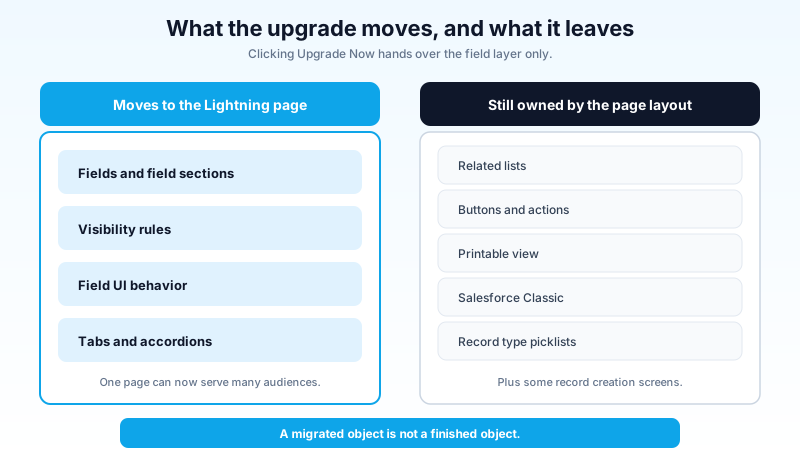
None of that is a defect. It is a staged handover that Salesforce has been running for several years, and the parts that moved moved cleanly. But it means a migrated object is not a finished object. You have shifted the field layer onto the Lightning page and left five other layers where they were. Finishing the object means adopting Dynamic Actions and Dynamic Related Lists as well, and then confirming the print and Classic paths still produce something defensible.
Write that down as a checklist per object rather than trusting memory. Teams that treat "clicked Upgrade Now" as done are the ones who discover eight months later that they still have forty layouts, all still assigned, all still edited occasionally by someone who does not know the page exists.
The assignment model is the real migration
Here is why eleven layouts do not collapse into one page automatically.
Page layout assignment is a grid: profile crossed with record type. Every cell gets exactly one layout. That grid is the reason layouts multiply, because the only way to vary the form by profile is to add another layout.
Lightning page assignment works differently. A record page can be the org default, the default for an app, or assigned to a combination of app, record type, and profile, and Salesforce resolves those in order of specificity: the app plus record type plus profile assignment wins, then the app default, then the org default. The grid still exists, but you now have a second lever that page layouts never had: visibility rules on individual fields and sections inside a single page.
That second lever is where the consolidation comes from. Six layouts that differ only by which fields the service team can see collapse into one Lightning page with visibility rules on three sections. Six layouts that differ because three record types have genuinely different data models do not collapse, and should not.
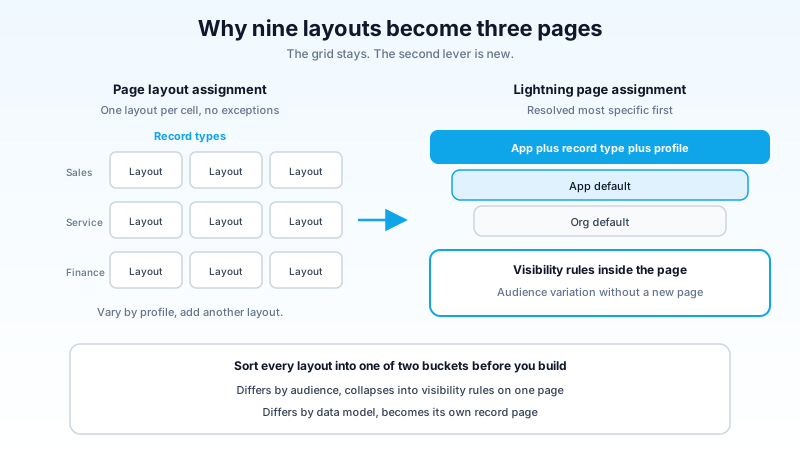
So the first real task of the migration is not building anything. It is opening the page layout assignment grid on your largest object and classifying every layout into one of two buckets: differs by audience, or differs by data model. The audience bucket collapses. The data model bucket becomes one record page each.
On a mature Account object I would expect that split to run about seventy-thirty in favor of audience. That is a nine-layout object becoming three record pages, which is a real result, and it is a number you can put in front of whoever has to approve the work.
One caution on visibility rules for sections: fields inside a section evaluate live as a user edits the record, but section-level rules evaluate on save. A section that should appear when Stage changes will not appear until the record is saved. If your consolidation depends on sections appearing mid-edit, test it before you commit to the design, because the fix is usually to move the rule down to the field level.
Visibility rules are a UI feature, not a security control
Salesforce documents this plainly and it still gets misused, so it is worth being blunt: hiding a field with a visibility rule does not restrict access to the value.
The value stays in the record. It appears in reports, in list views, in the API, in exports, and on any other page that displays the field. A user who cannot see the Discount field on the Opportunity page because a rule hides it for their profile can build a report that includes Discount and read every value in it.
Field-level security is the control. Visibility rules are presentation. When you consolidate six layouts into one page, be precise about which of those six differences existed for tidiness and which existed because someone believed the layout was protecting data. The tidiness cases become visibility rules. The protection cases become FLS, and if they were only ever enforced by layout assignment, they were never actually enforced.
That distinction is easy to lose during a consolidation, because both look identical in the requirement: "sales should not see these three fields." Ask the follow-up question every time. If the answer involves compliance, contracts, or compensation, it belongs in field-level security, and the migration is a good moment to fix an assumption that has been wrong for years.
While you are in there, the same logic applies to how you grant the access in the first place. If the org still leans on profiles to carry field permissions, the permission set model will make the next consolidation far less painful than this one.
Where the migration stalls
Four things stop this work, and knowing them in advance keeps them from becoming surprises halfway through.
Objects that are not LWC-enabled. If the Fields tab does not appear in the App Builder component pane, the object does not support Dynamic Forms. Campaign, Task, and Product are the ones most likely to appear on your list. Those layouts stay.
Experience Cloud. Dynamic Forms is not supported on Experience Cloud record pages. Portal and community record views continue to render from layouts, so an object used on both internal and external surfaces needs its layout maintained regardless of what you do internally.
Component limits. A field section column holds up to 100 fields, and a region holds up to 100 sections. These are generous, but sections count toward the overall component limit on the page, and a heavily consolidated page with many conditional sections gets there faster than expected.
Tooling that has not caught up. Dynamic Forms field components are not supported inside Macro Builder, so a migrated record page opened there shows no fields at all. Support teams that build macros against case pages will notice this on day one, and the workaround is keeping a Record Detail based page available for that context rather than abandoning the migration.
Page performance. Every field and section is a component now. A page that renders eighty fields across twelve sections has more to evaluate than a single Record Detail component did. Put low-frequency sections inside tabs or accordions, which only load their contents when a user opens them, keep visibility rule criteria simple, and run the App Builder Analyze tool on any page you consolidated aggressively. If the page got slower after the migration, that is the cause about ninety percent of the time.
A migration order that survives contact with a real org
Do not start with your biggest object. Start with the one that teaches you the most for the least risk.
1. Inventory. Export page layouts and their assignments for every object. Add two columns: layout count and record type count. Sort by layout count descending. That is your work queue and your business case in one file.
2. Pilot on a mid-size custom object. Something with three or four layouts and real users, not a lookup table nobody opens. Run the full sequence on it, including Dynamic Actions, Dynamic Related Lists, print, and the Salesforce mobile app. Time it. That number is what you multiply.
3. Classify layouts before building. Audience or data model, per the previous section. Build one record page per data model variant, not per layout.
4. Build in Lightning App Builder with the clone-first habit. Clone the existing record page, upgrade the clone, activate the clone. The original stays as a rollback until you are satisfied.
5. Verify the five leftovers. Print output, Classic users if you still have any, record creation, mobile rendering, and any Experience Cloud surface for the same object.
6. Then retire. Delete a layout only after it is unassigned everywhere and nothing has referenced it for a full release cycle. A layout that still holds an assignment cell is still live for somebody.
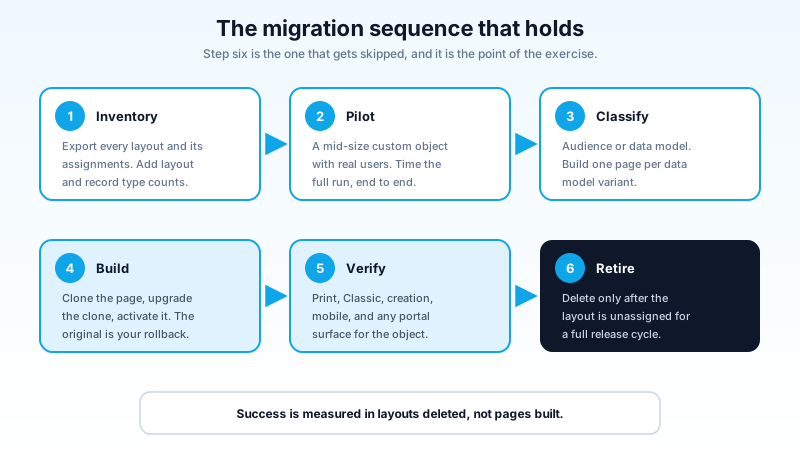
Step six is the one that gets skipped, and skipping it is how orgs end up with the worst possible state: Lightning pages that look consolidated and a layout inventory that never shrank. The point of the exercise is the deletion. Everything before it is setup.
The layouts you should not migrate
Some layouts have earned their place, and a migration plan that pretends otherwise loses credibility in the first review meeting.
Keep the layout as-is when the object is not LWC-enabled, when the object's primary consumer is an Experience Cloud site, when the object is read-only reference data that nobody edits, or when the layout belongs to a managed package you do not control. Delay when a record type consolidation is already planned, because migrating first means doing the work twice.
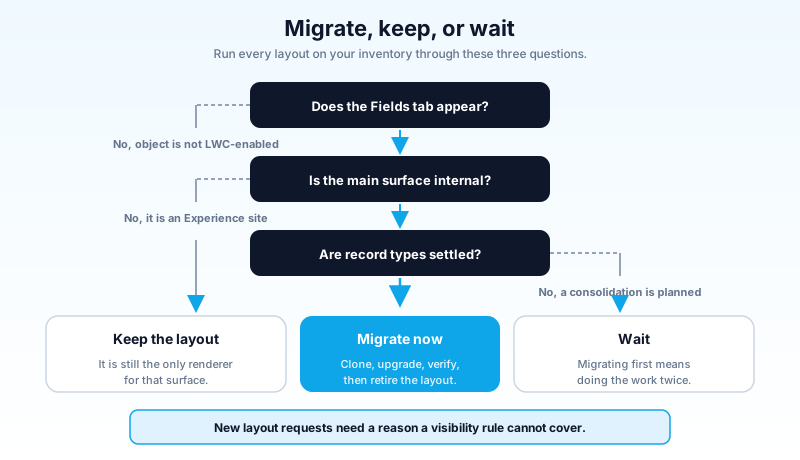
The governance question is what stops the sprawl from growing back, and it is a one-line rule: a new page layout requires a written reason that explains why a visibility rule cannot do the job. Put it in your change process. Most requests that used to produce a cloned layout now produce a rule on an existing page, and the org stops accumulating forms nobody remembers approving.
What to do this week
Open Setup, go to Object Manager, and pull the page layout count for your ten most-used objects into a spreadsheet. Next to each, write how many record types the object has. The objects where layout count is more than double the record type count are carrying pure audience variation, and those are the ones where Dynamic Forms deletes the most work. Pick the smallest of them and run the pilot. One object, start to deletion, is a better argument for the next twenty than any slide you could build.
About the Author
Dipojjal Chakrabarti is a B2C Solution Architect with 29 Salesforce certifications and over 13 years in the Salesforce ecosystem. He writes and edits salesforcedictionary.com, published by KineticBit Inc., to help admins, developers, architects, and cert/interview candidates sharpen their fundamentals. More about Dipojjal.
Share this article
Sources
- Dynamic Forms Tips and Considerations (Salesforce Help)
- Dynamic Forms Limitations (Salesforce Help)
- Migrate a Record Page to Dynamic Forms (Salesforce Help)
- Use Dynamic Forms on LWC-Enabled Standard Objects (Salesforce Release Notes)
- Deciding When to Use Lightning App Builder or the Page Layout Editor (Salesforce Help)
Related dictionary terms
Practise it
Five questions on Administrator
Exam-style questions with an explanation after each one. No account needed, and your answers build a weak-topic map once you have one.
Keep reading

Profile vs Permission Set vs Permission Set Group: The Complete Salesforce Access Guide
Profiles, Permission Sets, and Permission Set Groups all grant 'access' but in different layers. Here is the canonical 2026 guide with a mnemonic that finally makes it stick.

Salesforce Field-Level Security in 2026: The Field Access Tab, the Layout Trap, and an Audit You Can Actually Finish
A user can see a field you never granted her. Summer '26 added a Field Access tab that names every profile, permission set, and group behind that access. Here is how to read it and audit the rest.

Salesforce Sandbox Types Explained: Developer, Developer Pro, Partial Copy & Full
Four sandbox types, four use cases. Here is the 2026 reference: storage, refresh, cost, license. Plus the templates, masking, and refresh strategies that keep environments healthy.
Comments
No comments yet. Start the conversation.
Sign in to join the discussion. Your account works across every page.