
Data 360 Flex Credits: Where the Credits Actually Go, and the Five Levers That Cut the Bill
The official rate card multipliers, why unification costs 25,000 times a query, how the monthly tier reset works, and the audit loop that finds the spend.

Your finance partner forwards a screenshot from the Digital Wallet card and asks one question: why did four months burn most of the year's credits. You open the consumption breakdown and there it is, one usage type sitting on top of everything else, quietly reprocessing the same identity graph every night since March.
Nobody signed off on that. Somebody just accepted a default refresh schedule during implementation, and the default was daily.
This is the most common way Data 360 bills surprise people, and it is entirely preventable once you read the actual rate card instead of the summary slide. Here it is.
There are three rate cards, and you are probably on two of them
Before the arithmetic, the contract shape. Salesforce has published Data 360 consumption against three separate documents, and which one applies to you depends on when you signed.
The Salesforce Customer Data Cloud Rate Card (last updated July 2025) covers the platform operations: pipelines, transforms, unification, queries, real-time events. The Segments and Activations Rate Card (June 2025) is a separate document with its own credit pool for segment rows processed and activation. Two cards, two wallets, one bill.
The Flex Credits Rate Card collapses both into a single currency shared with Agentforce and Speech Foundations. Look at the versions and you can date the change: the February 3, 2026 card carries Agentforce and a single Speech line and no Data 360 section at all. The April 21, 2026 card has a full Data 360 page with eleven usage types and four volume tiers.
That matters practically. Under Flex Credits, one Agentforce agent conversation and one nightly identity resolution run draw from the same balance. A spike in agent adoption and a spike in data processing now compete for the same number. If the agent side of that balance is the part you are trying to model, the Agentforce Digital Labor Units breakdown covers the consumption side of agent pricing in detail.
You cannot mix models. Check your Order Form for the usage type names before you trust any calculator, including the ones in this post.
The formula is trivial. The multipliers are not.
Credits consumed for a usage type work out as:
credits = (units processed / 1,000,000) x multiplier
For almost every Data 360 usage type the unit is one million rows processed. Unstructured and intelligent processing are billed per megabyte, and code extensions per compute unit.
Here is the Data 360 section of the Flex Credits rate card, base tier, production, as of April 21, 2026:
| Usage type | Unit | Base multiplier |
|---|---|---|
| Data 360 Queries | Per 1M rows processed | 3 |
| Data 360 Prep | Per 1M rows processed | 40 |
| Data 360 Code Extension | Per compute unit | 40 |
| Data 360 Segmentation | Per 1M rows processed | 50 |
| Data 360 Activation | Per 1M rows processed | 60 |
| Data 360 Zero-Copy Sharing-Out | Per 1M rows shared | 60 |
| Data 360 Unstructured Processing | Per 1MB processed | 150 |
| Data 360 Intelligent Processing | Per 1MB processed | 600 |
| Data 360 Streaming Pipeline | Per 1M rows processed | 3,500 |
| Data 360 Unification | Per 1M rows processed | 75,000 |
| Data 360 Real-Time Pipeline | Per 1M combined events, API and actions | 250,000 |
Read the spread rather than the rows. Queries cost 3. Unification costs 75,000. That is a factor of 25,000 between the cheapest and the second most expensive line, and a factor of 83,000 up to the real-time pipeline.
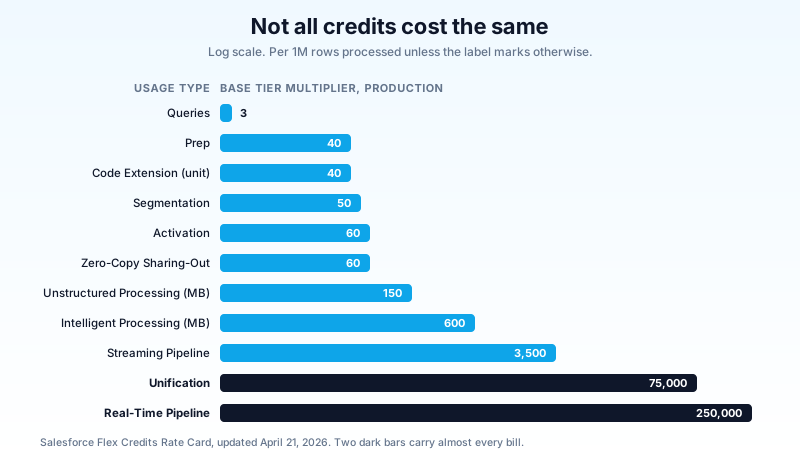
Every optimization conversation I have sat in that started with query tuning was aimed at the wrong end of that chart. You can halve your query volume and move the bill by a rounding error. Move one unification run from daily to weekly and you change the quarter.
What got cheaper, what got more expensive
Comparing the July 2025 platform card against the April 2026 Flex card is directional, not contractual, because several usage types were renamed and rescoped. With that caveat, the shape of the repricing is clear.
Cheaper under Flex Credits:
- Batch transforms went from 400 to 40 for the equivalent prep work, and the separate "external data pipeline" charge of 2,000 per million batch rows has no counterpart on the Flex card.
- Streaming pipeline dropped from 5,000 to 3,500.
- Unification dropped from 100,000 to 75,000.
- Data share out, at 800 per million rows shared, became zero-copy sharing-out at 60. That is a 13 times reduction on the exact pattern the zero-copy architecture guide argues for, which makes federation a cheaper answer than it was a year ago.
More expensive under Flex Credits:
- Segment rows processed went from 20 to 50.
- Batch activation went from 10 to 60, a six times increase.
- Unstructured processing went from 60 per megabyte to 150.
- Sub-second real-time events went from 70,000 per million combined events to 250,000 under the real-time pipeline line.
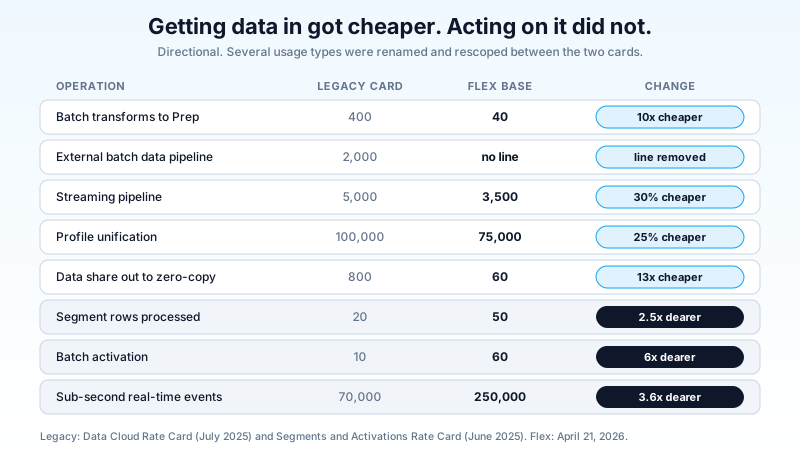
The pattern is consistent with where the platform is going. Getting data in got cheaper. Acting on it, in real time and at high frequency, got considerably more expensive. If your architecture assumed the old shape, where ingestion was the expensive part and activation was nearly free, the Flex card inverts your cost model.
I think that repricing is defensible. Ingestion is commodity plumbing and the market priced it down; real-time identity-resolved activation is the part that actually costs Salesforce money to run. But defensible is not the same as budgeted, and I have seen exactly zero orgs re-run their cost model after moving to Flex Credits.
The tier reset almost nobody reads
The Flex card applies four volume tiers to Data 360 in production:
- Base tier: up to 300,000 credits
- Tier 2: 300,000 to 1.5 million credits, at 80 percent of base
- Tier 3: 1.5 million to 12.5 million credits, at 40 percent of base
- Tier 4: after 12.5 million credits, at 20 percent of base
Two details in the footnotes do the real work. Tiers are per usage type, so unification and segmentation each climb their own ladder. And tiers reset on the first day of each calendar month.
Work through what that means for unification at 75,000 base. Your first 300,000 credits of unification each month buy you 4 million rows. Once you cross into Tier 2 at 60,000, the next 1.2 million credits buy 20 million rows. In Tier 3 at 30,000, a credit buys two and a half times the rows it bought on day one of the month, and in Tier 4 at 15,000 it buys five times.
So a single unification pass over 10 million source rows costs 660,000 credits, not the 750,000 you get from flat base-tier math. The first 4 million rows consume 300,000 credits; the remaining 6 million run at the Tier 2 rate for 360,000.
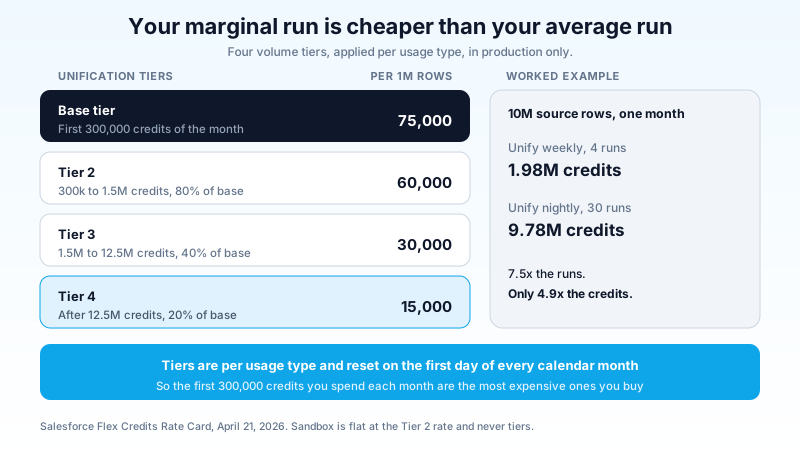
Now the counter-intuitive part. Take the same 10 million rows and compare unifying weekly against unifying nightly, in one month:
- Weekly, 4 runs, 40 million rows: about 1.98 million credits.
- Nightly, 30 runs, 300 million rows: about 9.78 million credits.
Seven and a half times the runs, but under five times the credits, because the nightly org spends most of the month deep in Tier 3 where each row costs 30,000 per million instead of 75,000. Your marginal run is far cheaper than your average run.
Read that carefully, because it cuts both ways. High-volume orgs get real relief on the tail. Small and mid-sized orgs never leave the base tier and Tier 2, which means they pay the worst rate on the card for every single credit, all year. An org burning 900,000 unification credits a month never gets past Tier 2. An org burning 15 million buys its last credits of the month at a fifth of the base rate.
One more consequence: sandbox does not use tiered multipliers at all. Sandbox consumption is flat, at the Tier 2 equivalent, and it does not count toward your production tier progression. Load-testing a unification config against 50 million rows in a full sandbox is charged at a flat 60,000 per million rows, with no discount for volume, ever. Size your test data accordingly.
Five levers, in the order they pay
1. Cut unification frequency before you cut anything else
Unification is 75,000. Everything else except the real-time pipeline is 3,500 or less. If your bill is a problem, the answer is in the unification schedule roughly nine times out of ten.
The question to ask is not "how fresh do we want the identity graph" but "what breaks if the graph is one day old". For most B2C activation use cases, nothing does. Consent changes and suppression lists need same-day handling, and they can be handled with a targeted rule rather than a full graph rebuild.
Match the run cadence to the decision cadence. If the downstream segment publishes weekly, unifying nightly buys nothing except credits.
2. Keep real-time for what is genuinely real-time
Real-time pipeline is 250,000 per million combined events, API calls and actions. Streaming pipeline is 3,500. That is a 71 times difference for what teams often describe with the same word in a requirements doc.
Real time means sub-second, and sub-second matters for a checkout abandonment trigger or a fraud signal. It does not matter for a nightly loyalty tier recalculation that somebody put on the real-time path because the demo did.
Audit every real-time data stream against a single question: does a human or a system act on this within a minute? If not, move it to streaming or batch.
3. Filter upstream, not in Data 360
Rows processed is the billing unit, and it counts rows you ingest and then discard. Every column of clickstream you bring in and never map to a data model object is billed on the way in and stored on the way through.
Push the filter to the source system. Ingest the events you model, the fields you activate on, and the history window you actually query. A 40 percent reduction in ingested rows is a 40 percent reduction in prep, unification and segmentation volume downstream, which compounds across four usage types.
This is the cheapest lever to pull during a build and the most expensive one to retrofit, because the mapping decisions harden fast once segments depend on them. If you are still in the implementation window, the Data 360 implementation sequence is the place to make these calls, not the quarter after go-live.
4. Match refresh cadence to read cadence
Salesforce's own guidance on building a credit feedback loop puts a number on this. Moving five calculated insights from hourly to daily refresh cut their refresh cost to a twenty-fourth of what hourly cost, with no loss of value to the business.
That is the least glamorous lever on this list and the easiest to pull. Open every calculated insight, find the last time anything read it, and set the schedule to match. Insights nobody has queried in ninety days should be deactivated, not rescheduled.
5. Instrument it so the next surprise is a week old, not a quarter old
The Digital Wallet card is the top of the funnel and it is not enough on its own. Add the "View Consumption" permission to the people who need it, then open Consumption Cards from the App Launcher for the trend view broken down by usage type.
For attribution you need the underlying objects. Salesforce documents four: TenantDailyEntitlementConsumption and TenantHourlyEntitlementConsumption for credit metrics, TenantBillingUsageEvent for individual operations with timestamps, and TenantEntitlementTransaction for what you purchased.
One trap that will hand you a wrong number: the hourly object must be filtered to rowdetail__c = 'PROCESSED'. Skip that filter and in-flight rows inflate your totals, and you will spend a day chasing consumption that never happened.
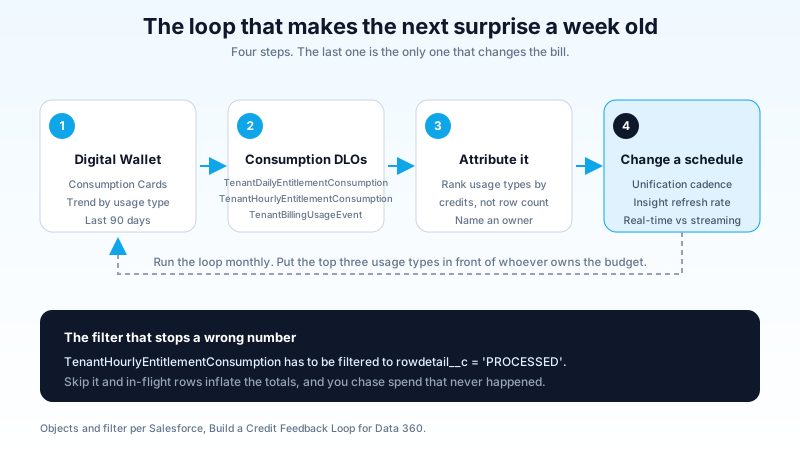
Build the report once, schedule it monthly, and put the top three usage types by credit spend in front of whoever owns the budget. A cost model that only finance sees is a cost model nobody acts on.
What I would not do
I would not chase query optimization for cost reasons. At a multiplier of 3, queries are your cheapest line by an order of magnitude, and query performance is a user experience problem with its own justification. Optimize it for latency, not for the bill.
I would not shift heavy preparation work to a hyperscaler purely to dodge credits without pricing the alternative end to end. External compute, egress, orchestration and the engineering time to maintain it are real, and a pipeline that saves 200,000 credits a year while consuming a quarter of an engineer is not a saving.
I would not treat the rate card as stable. The April 21, 2026 card explicitly says usage types, tiers and multipliers may be updated, and that tier changes count as multiplier changes. The Data 360 section did not exist on the February 3, 2026 version. Anything you build on top of these numbers needs a date stamp and a review reminder.
And I would not let a single person own this quietly. Consumption pricing turns every architecture decision into a finance decision, and the teams that handle it well are the ones where the person choosing a refresh schedule can see the credit cost of that choice in the same sprint.
Start with one query and one schedule
Open Consumption Cards in your production org, sort the last 90 days by usage type, and look at the top line. If it is unification, open the identity resolution ruleset and find its schedule. If that schedule is daily and your downstream segments publish weekly, you have found several hundred thousand credits in about ten minutes, and the change is one dropdown.
Do that this week, before the next invoice makes the case for you.
About the Author
Dipojjal Chakrabarti is a B2C Solution Architect with 29 Salesforce certifications and over 13 years in the Salesforce ecosystem. He writes and edits salesforcedictionary.com, published by KineticBit Inc., to help admins, developers, architects, and cert/interview candidates sharpen their fundamentals. More about Dipojjal.
Share this article
Sources
- Flex Credits Rate Card (Updated April 21, 2026)
- Salesforce Customer Data Cloud Rate Card (July 2025)
- Salesforce Customer Data Cloud Segments and Activations Rate Card (June 2025)
- Data Services Billable Usage Types for Data 360 | Salesforce Help
- Build a Credit Feedback Loop for Data 360 | Salesforce Blog
Related dictionary terms
Practise it
Five questions on Data Cloud Consultant
Exam-style questions with an explanation after each one. No account needed, and your answers build a weak-topic map once you have one.
Keep reading

Agentforce Digital Labor Units Explained: What You're Actually Buying in 2026
Agentforce switched from per-conversation pricing to Digital Labor Units. Here is how DLU consumption works, what counts as a billable interaction, and how to estimate costs before you commit.

Salesforce Data 360: The Complete 2026 Implementation Guide
Data 360 is Salesforce's unified data platform for the agent era. This 2026 implementation guide walks data streams, identity resolution, segmentation, activations, and zero-copy federation.

Salesforce Data Cloud Zero Copy: The Complete 2026 Architecture Guide
Zero Copy lets Data Cloud query Snowflake, Databricks, BigQuery, and Redshift in place. No ETL, no data duplication, 28.5x cheaper per million rows than traditional ingestion. Here is how it works and when not to use it.
Comments
No comments yet. Start the conversation.
Sign in to join the discussion. Your account works across every page.