
Salesforce Data Cloud Zero Copy: The Complete 2026 Architecture Guide
What zero-copy federation actually is, how Apache Iceberg makes it work, the 28.5x cost advantage over ETL ingestion, supported partners, and when not to use it.
Your data engineer points at Snowflake and says "the customer data already lives here, all of it." Your architect wants to copy it into Data Cloud. And you are running the mental math on storage costs, pipeline maintenance, and the inevitable sync drift between two copies of the same truth.
This is the exact problem Zero Copy was built to kill. Instead of duplicating your warehouse into Salesforce, Data Cloud reaches into the warehouse and reads what is already there. No ETL job. No second copy. No 2 a.m. pipeline failure that leaves your segments stale.
Here is what zero-copy federation actually is, how Apache Iceberg makes it possible, the cost numbers that matter, and the cases where you should ignore all of it and just ingest the data the old way.
What Zero Copy Actually Is
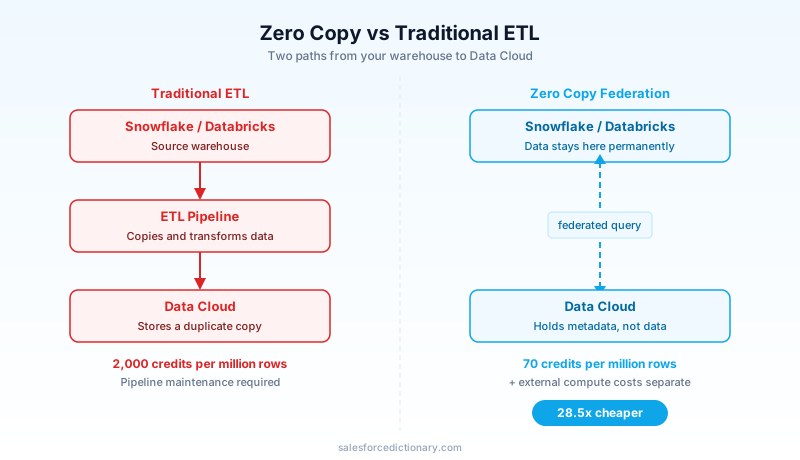
Zero Copy is a federation layer. Data Cloud registers external tables (in Snowflake, Databricks, BigQuery, Redshift, or an S3 lake) as if they were native Data Cloud objects, then queries them in place. The bytes stay in the source system. Data Cloud holds the metadata and the query path, not the data itself.
Strip away the marketing and it comes down to one trade. You give up the speed of having data sitting locally inside Data Cloud. In return, you skip the storage cost, the pipeline engineering, and the duplication that turns one customer record into two records that slowly disagree with each other.
The scale tells you people are taking the trade. In Q3 FY2026, Data Cloud ingested 32 trillion records in a single quarter. Of those, 15 trillion flowed through Zero Copy connectors, a 341% year-over-year surge according to Salesforce Engineering. Nearly half of all enterprise data entering Data Cloud now never physically moves. It is read where it sits and left there.
File Federation vs Query Federation
Zero Copy is not one mechanism. It is two, and the difference decides your latency and your cost.
File Federation
File Federation points Data Cloud directly at Apache Iceberg tables sitting in the customer's lake. Data Cloud reads the Iceberg files itself, using its own engines. There is no round trip to an external query service, and crucially, none of the customer's warehouse compute gets billed for the read.
Because Data Cloud is reading raw Iceberg, you get the Iceberg features that come with the format. Time travel lets you query a table as it looked at a past snapshot. Schema evolution means a column added upstream does not break your registered table. Latency here is near-native, close to what you would get if the data lived inside Data Cloud.
Query Federation
Query Federation works differently. Data Cloud sends a live SQL query to the remote source. Snowflake or Databricks runs the query on its own compute, then returns only the result set.
The mechanism that makes this efficient is query pushdown. When you filter, aggregate, or join, Data Cloud pushes those predicates down to the source. Snowflake does the heavy computation and ships back a small answer instead of a full table scan. That keeps the data transfer small, but it means the external system is doing real work and billing you for it.
The short version: File Federation reads files with Data Cloud's own engines and uses no customer compute. Query Federation asks the remote system to compute and return an answer, and that system charges for the compute. Live Query Federation runs at 70 Data Cloud credits per million rows. Hold onto that number for the cost section.
The Apache Iceberg Foundation
None of this works without an open table format underneath it. The entire Data Cloud architecture is built around Apache Iceberg, the open-source standard for large analytic tables. This is the design decision that makes everything else possible.
Iceberg matters because it is open. A table written by Snowflake can be read by Data Cloud, by Spark, by Trino, by anything that speaks Iceberg, without a proprietary lock holding the data hostage. That shared format is what lets Data Cloud read another vendor's tables without copying them first.
The numbers behind this are not small. Data Cloud manages 4 million Apache Iceberg tables spanning 50 petabytes of data. Under the hood, queries run across three engines depending on the workload: Spark, Hyper, and Trino. You do not pick the engine. Data Cloud routes the query to whichever one fits.
The practical payoff is that your data lake stops being a place data goes to die. Tables written by your data engineering team in their own format become directly queryable from Data Cloud, with no separate ingestion project to fund and maintain.
Supported Partners and How to Connect Them
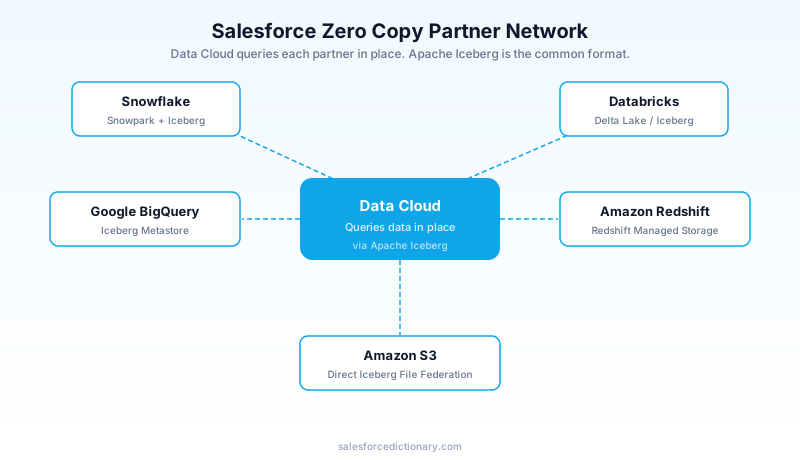
The Zero Copy Partner Network, announced in April 2024, covers the major cloud warehouses. Each connects through Iceberg or an Iceberg-compatible bridge.
- Snowflake connects via Snowpark Container Services plus Iceberg tables. If your warehouse already runs on Snowflake, this is the fastest path to a working federation.
- Databricks connects through the Delta Lake to Iceberg bridge, so Delta tables become readable without conversion.
- Google BigQuery connects via the BigQuery Iceberg Metastore.
- Amazon Redshift connects through Redshift Managed Storage.
- Amazon S3 connects via direct Iceberg File Federation, pointing Data Cloud straight at the files in your bucket.
The pattern is consistent. Wherever your data already lives, the connector exposes its tables to Data Cloud through Iceberg, and you register them as external objects. You are not standing up new infrastructure. You are pointing Data Cloud at infrastructure you already pay for.
The Cost Math
Here is the headline number, and it is genuinely large. Live Query Federation costs 70 Data Cloud credits per million rows. Traditional batch ingestion, also called Cached Acceleration, costs 2,000 Data Cloud credits per million rows. That is a 28.5x reduction in per-row credit cost.
For a workload moving hundreds of millions of rows, that gap is the difference between a line item nobody questions and a renewal conversation you do not want to have.
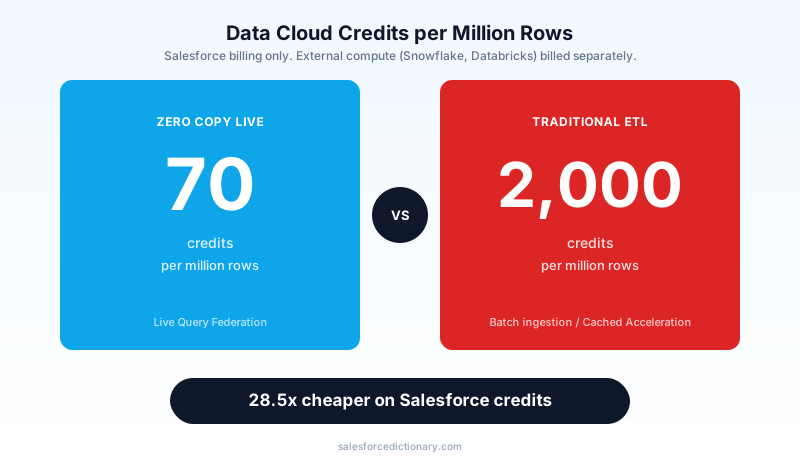
Now the part the headline number hides. Those 70 credits cover the Salesforce side. They do not cover Snowflake or Databricks. When Data Cloud sends a Query Federation request, the remote system spins up its own compute and bills you for it on a separate invoice. You can run a query that looks cheap in Data Cloud credits and quietly burns Snowflake warehouse time every time someone refreshes a segment.
So the real comparison is not 70 versus 2,000. It is 70 plus your external compute versus 2,000 with no external compute. For an occasional query against a large external table, federation wins easily. For a query that runs constantly against the same data, you may pay more in external compute than you ever would have in ingestion credits.
Build a total cost of ownership model that counts both sides before you commit an architecture. Count the Data Cloud credits, count the warehouse compute the federated queries will trigger, and count how often those queries actually run. A federation pattern that is cheap at ten queries a day can be expensive at ten thousand.
The 15 Trillion Record Milestone in Context
That 15 trillion figure is worth sitting with for a second. In one quarter, 15 trillion records reached Data Cloud without ever leaving their source system. The 341% year-over-year jump says this is not a pilot feature a few teams are testing. It is how a large share of enterprises now connect their data.
The signal for an architect is simple. Federation has moved from interesting option to default consideration. When you start a Data Cloud design, the first question is no longer "how do we ingest this." It is "do we need to ingest this at all, or can we read it where it lives." Roughly half the data flowing into Data Cloud now answers that second question with "read it in place."
When NOT to Use Zero Copy
This is the section that saves you from a bad architecture, so read it before you fall in love with the cost number.
When latency matters. Live query federation is slower than data already sitting in Data Cloud. Every federated query pays a round trip to the external system. For interactive use cases where a user is waiting, or for any workload with a tight latency budget, that round trip will hurt.
When the same query runs constantly. A federated query that runs thousands of times a day triggers external compute thousands of times a day. The per-row credit savings can be wiped out, and then some, by the warehouse bill on the other side. High-frequency, low-latency scoring workloads belong inside Data Cloud. Ingest first, do not federate.
When data residency is strict. Data with hard residency rules may not be federatable, depending on how your Hyperforce region is configured. Check this early, because finding out late means redesigning.
The honest framing: Zero Copy is excellent for large datasets you query occasionally and terrible for small datasets you query constantly. Match the pattern to the access frequency, not to the cost-per-row headline.
Frequently Asked Questions
Does Zero Copy work with Salesforce Shield encryption?
You can use Zero Copy with Shield-encrypted Data Cloud tables, but the external source operates under its own encryption and access controls. The federated connection authenticates through Data Cloud, and the external system's sharing rules apply on the source side. Shield Platform Encryption on the Data Cloud side does not extend into the external warehouse.
How does Zero Copy handle schema changes in the source warehouse?
File Federation supports Apache Iceberg's schema evolution. A column added upstream gets picked up without breaking the registered table. Query Federation is more sensitive because the live query hits the current schema of the remote table. Add a column in Snowflake and it appears in the query result. Remove one and any Data Cloud segment that referenced it will fail. Treat your Iceberg table schemas as contracts that downstream consumers depend on.
Can Zero Copy data feed into identity resolution and unified profiles?
Yes. You register the external table as a data stream in Data Cloud, map it to a Data Model Object (DMO), and the identity resolution graph treats it like any other input. The difference is timing. Identity resolution runs on the data at query time, which adds federation latency to what is already a compute-intensive process. For warm data used in historical analysis, this is fine. For fresh data that needs to be in a unified profile within seconds of creation, ingest it instead.
Is there a row limit on federated queries?
No hard platform limit, but there is a practical one. Federated queries that return very large result sets hit memory and timeout constraints. The recommended pattern for high-volume analytics is File Federation against partitioned Iceberg tables, letting predicate pushdown reduce the result set before it crosses the network. Pulling a full unfiltered table with tens of billions of rows through Query Federation will fail or time out.
Agentforce and Zero Copy
This pairing trips people up, so be precise about it.
Agentforce retrieval-augmented actions need fast responses, often under 200 milliseconds, to feel responsive to a user mid-conversation. Zero Copy Query Federation cannot reliably hit that. The round trip to Snowflake or Databricks, plus the remote compute, plus the return, blows past a 200ms budget more often than not.
So if your agent needs real-time grounding data at conversational latency, Zero Copy is the wrong tool. Ingest that data into Data Cloud where it can be retrieved fast. Federation is fine for an agent that pulls a large historical dataset where a slower response is acceptable. It is not fine for the hot path of a live conversation.
The rule for Agentforce grounding data: evaluate latency requirements first, cost second. The cheapest query that arrives too late to use is not a saving.
Where to Start Today
Start with what you already have. Check whether your data warehouse runs on Snowflake or Databricks. If it does, Zero Copy setup is fastest there, and you can have a federated table registered and queryable without standing up anything new.
Before you architect, run your numbers through the Zero Copy use case pricing calculator on the Salesforce site. Model both sides of the cost: the Data Cloud credits and the external compute your federated queries will trigger. That two-sided model is the single most useful thing you can build before committing.
If any of this data is destined to ground an Agentforce agent, evaluate the latency requirement before anything else. If the agent needs sub-200ms grounding, plan to ingest. If it can tolerate a slower pull, federation may be the cheaper and cleaner choice.
Zero Copy is one of the genuinely good ideas in the current Data Cloud stack. It earns its place when you use it for the right shape of workload: large, external, queried occasionally. Use it there and it pays for itself. Use it for the hot path and you will spend the savings and then some on the other side of the invoice.
About the Author
Dipojjal Chakrabarti is a B2C Solution Architect with 29 Salesforce certifications and over 13 years in the Salesforce ecosystem. He writes and edits salesforcedictionary.com, published by KineticBit Inc., to help admins, developers, architects, and cert/interview candidates sharpen their fundamentals. More about Dipojjal.
Share this article
Sources
- Salesforce Engineering: Zero Copy Revolutionizes Data Cloud with Real-Time Analysis
- Salesforce: Zero Copy Partner Network Press Release
- Salesforce: Data Cloud Zero Copy Connectivity
- Salesforce Trailhead: Zero Copy Data Federation Overview
- Salesforce Developers: Apache Iceberg Connector Documentation
- Salesforce Ben: Salesforce Data Cloud Zero Copy: When (and When Not) to Use It
- Xillentech: Salesforce Zero-Copy Data Cloud Architecture Guide
Comments
No comments yet. Start the conversation.
Sign in to join the discussion. Your account works across every page.