
Salesforce Renamed Your Approval Processes 'Classic': The 2026 Migration to Flow Approvals
Every approval capability Salesforce shipped since Spring '25 landed in Flow, not in the classic builder. Here is the mapping, the triage rule, and the six things that break.

The deal desk pings you at 4:52 on a Friday. A 42 percent discount is parked with a VP who started two weeks of leave on Monday, the Opportunity is locked, and the only lever in the building is you opening the approval history and reassigning the request by hand.
You have done this before. You will do it again in October, because the approval process routing that discount was configured in 2019, its step assignee is one named user, and nothing in it knows what a queue is.
Now open the Salesforce help docs and look at the page titles. "Activate a Classic Approval Process." "Approval Requests from Classic Approval Processes for Users." "Classic Approval Process Considerations for the Salesforce Mobile App." Somewhere between Spring '25 and now, the thing you have been calling "the approval process" got a new first name.
The rename is the announcement
Be clear about what has and has not happened. Salesforce has not published an end-of-life date for classic approval processes. There is no enforced release update, no countdown banner in Setup, no migration tool. Your 2019 discount approval will fire on Monday morning exactly as it did last week.
What happened is smaller and more useful to plan against: the word "Classic" appeared in the documentation, and every approval capability Salesforce has shipped since Spring '25 landed somewhere else.
We have watched this pattern run before. Workflow Rules did not die on the day support ended. It died over four years of nothing shipping into it while Flow got a new element every release, and by the time the end-of-support date arrived most of the argument was over. The same thing played out with Process Builder to Flow migration, where the teams that started early spent afternoons on it and the teams that waited spent quarters. The rename is that signal at an earlier stage. If you want to know where a Salesforce feature is going, look at where the release notes are landing, not at the retirement page.
Since Spring '25, they have all landed in Flow.
Five releases of build-out, in order
Flow approval processes arrived in Spring '25 as a new flow type, an approval orchestration, and the first version was thin enough that most teams looked once and went back to what they had. That version is four releases behind what is in your org today.
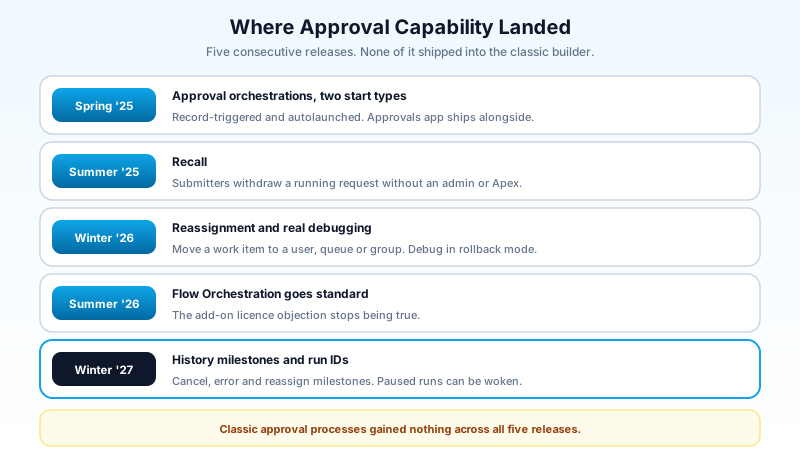
Spring '25 shipped the approval orchestration itself, in two start flavours. A record-triggered approval orchestration submits a record when it is created or updated and meets your entry conditions. An autolaunched approval orchestration with no trigger waits to be called by a button, an Apex class, or the REST API. The Approvals Lightning App shipped alongside it as the place approvers and admins actually work.
Summer '25 added recall. A submitter opens Manage My Approval Submissions in the Approvals app and withdraws a request that is still running, without an admin touching it and without a custom Apex class doing the withdrawal.
Winter '26 added reassignment and real debugging. A work item that is sitting with the wrong person, or with a person on leave, can be moved to another user, a queue, or a group. On the build side, the flows behind an approval can be debugged in Flow Builder, and debug runs execute in rollback mode, so you can exercise a five-stage sign-off against production-shaped data without leaving a trail of approved records behind you.
Summer '26 removed the commercial objection. Flow Orchestration became a standard feature, which means the orchestration runs underneath your approvals no longer sit behind an add-on. The reason most teams gave for not looking at this in 2025 stopped being true.
Winter '27, hitting production across the weekends of 29 August, 3 October, and 10 October 2026 (the sandbox preview and release dates matter here if you plan to test in a preview instance), is mostly a testing and operations release for orchestration. New history milestones record when an orchestration is cancelled, when a stage or step is discontinued, when any of the three hits an error, and when a work item is reassigned. A new $Orchestration.Instance system variable exposes the run ID, which lets a paused orchestration be woken by a Flow Orchestration Event platform event. And you can open an evaluation, screen, or autolaunched flow in Flow Builder from inside the orchestration that calls it, which sounds like a small thing until you have clicked back and forth between six browser tabs to trace one rejection.
Read that list as a whole and the shape is obvious. Spring '25 was the skeleton. Winter '27 is the tooling you need to run this in an org that gets audited.
What a flow approval actually is
The mental model people bring from the classic builder does not transfer cleanly, and that mismatch is where most first attempts go wrong.
A classic approval process is a single configured object: entry criteria at the top, an ordered list of steps in the middle, three buckets of actions hanging off the sides. It is one thing you edit in one screen.
A flow approval is an orchestration: a Flow Orchestration of the approval type, made of stages, with steps inside each stage. If the stage-and-step model is new to you, the complete Flow Orchestration guide covers the general case; approvals are that model with a decision attached. The steps come in three kinds, and the difference matters more than the naming suggests.
An approval step puts a work item in front of a human. It carries the assignee, the notification email you can customise, a setting for whether the record locks while the step is open, and a setting for whether the approver is allowed to edit the record they are approving.
A background step runs an autolaunched flow with nobody watching. This is where your field updates, your outbound emails, your Apex calls, and your chatter posts go. Everything a classic process called an "approval action" is a background step here.
An interactive step runs a screen flow for a named user, which is the escape hatch for the cases that are not a straight approve or reject: a pricing analyst who has to enter a negotiated figure before the VP sees it, a compliance reviewer who has to attach a document.
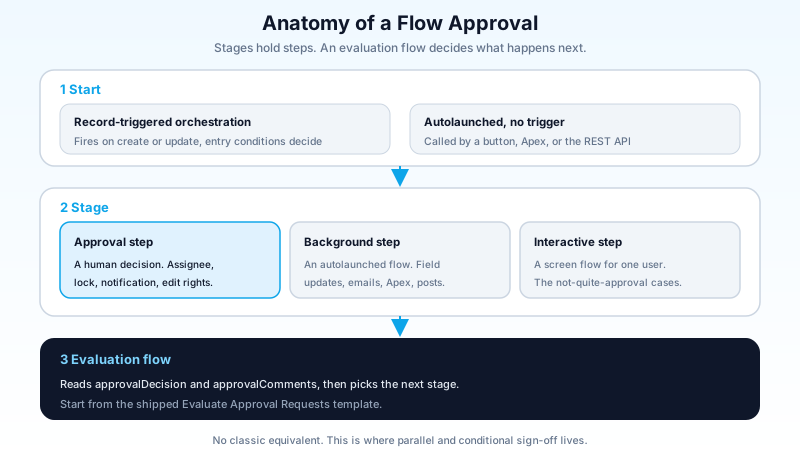
Stages hold the steps and decide the sequencing. By default a stage completes when every step inside it is done, and you move to the next one. Override that and you can complete a stage on a condition, or hand the decision to an evaluation flow, which is the piece with no classic equivalent at all.
An evaluation flow is an autolaunched flow that reads the approval outcome and tells the orchestration what to do next. Salesforce ships a template called "Approvals Workflow: Evaluate Approval Requests" that already has the two variables the runtime expects, approvalDecision and approvalComments. Start from that template. The variable names are not suggestions, and a hand-built flow with decision instead of approvalDecision fails in a way the error message does not explain.
This is the actual upgrade in the model. In a classic process, "two of these three regional directors must approve, unless the amount is under 50,000, in which case one is enough" is either impossible or three parallel approval processes with mutually exclusive entry criteria. In an orchestration, it is a stage with three approval steps and an evaluation flow that counts.
The mapping, field by field
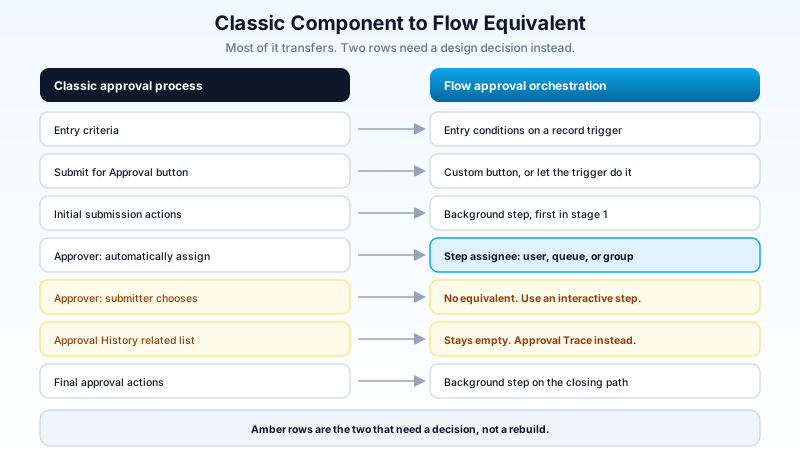
If you are rebuilding an existing approval, work down this table rather than starting from a blank canvas. Most of the configuration transfers; the parts that do not are the parts worth an afternoon of thought.
| Classic approval process | Flow approval equivalent | Watch for |
|---|---|---|
| Entry criteria | Entry conditions on a record-triggered approval orchestration | Autolaunched orchestrations have no entry criteria; the caller decides |
| Submit for approval button | Custom button calling an autolaunched orchestration, or a record trigger | There is no drop-in standard button, and this is the most common blocker |
| Initial submission actions | Background step, first position in stage 1 | Runs after submission, not as part of it |
| Record lock on submission | "Lock the record" setting on the approval step | With parallel stages, lock on the first stage only |
| Approver: automatically assign | Approval step assignee: user, queue, or group | Queues as approvers is the reason many teams migrate |
| Approver: let submitter choose | Not supported | Every approver is resolved inside the step |
| Steps with filter criteria | Separate stages, or branching in the evaluation flow | Cleaner in the evaluation flow once you are past two conditions |
| Final approval and rejection actions | Background steps at the end of the relevant path | You can now put different actions behind different rejection reasons |
| Approval History related list | Approval Trace component on the record page | The old related list stays empty forever |
| Recall by submitter | Manage My Approval Submissions in the Approvals app | Different place, so it needs saying out loud to users |
| Admin reassignment | Work item reassignment to user, queue, or group | Shipped Winter '26 |
The line that catches teams out is the second one. In a classic process, Submit for Approval is a standard button you drag onto a layout. There is no equivalent for orchestrations. You either build a custom button that launches an autolaunched approval orchestration, or you make submission implicit by putting entry conditions on a record-triggered orchestration and having a status field change do the work. The second option is usually better and almost nobody picks it first, because everyone is trying to reproduce the button they already had.
The reporting story is the actual upgrade
Ask any admin who has been asked for approval cycle times what they did about it. The honest answer usually involves a nightly batch class that copies ProcessInstanceStep records onto a custom object, because reporting directly on the classic approval objects is close to unusable. You cannot add custom fields to them. The relationships do not support the joins you want. Building "average days from submission to final approval, by region, for Q3" out of ProcessInstance, ProcessInstanceStep, and ProcessInstanceWorkitem is a development project, not a report.
Flow approvals write to three standard objects that behave like normal Salesforce objects.
ApprovalSubmission, available since API version 62.0, is one row per submission against a record. ApprovalWorkItem, available since API version 61.0, sits in a master-detail relationship under it and carries one row per step, with the assignee and their decision. ApprovalSubmissionDetail, also API 62.0, holds the lifecycle information that does not belong on either of the other two.
Three objects, a real relationship, list views shipped in the Approvals app, and SOQL that reads the way you would expect:
SELECT ApprovalSubmission.SubmittedById,
       ApprovalSubmission.TargetObjectId,
       AssignedToId, Status, CreatedDate, LastModifiedDate
FROM ApprovalWorkItem
WHERE ApprovalSubmission.CreatedDate = LAST_N_DAYS:90
  AND Status = 'Pending'
ORDER BY CreatedDate ASC
That query answers "what is stuck and who is sitting on it," which is the question the deal desk was really asking at 4:52 on that Friday. On classic objects, the same answer costs you a custom object and a scheduled job.
If your org has ever paid a consultant to build approval SLA reporting, this section alone probably justifies migrating the processes those reports cover.
What to migrate, and in what order
There is no equivalent of the Migrate to Flow tool here, so every rebuild is a rebuild. That makes the sequencing the whole game. The wrong move is a project called "Approval Modernisation" that rebuilds all 34 of your approval processes over two quarters. Most of those 34 work fine, nobody complains about them, and rebuilding them buys you a regression risk and a change management conversation in exchange for nothing.
The triage rule is simple. Migrate an approval when the classic version is already costing you something.
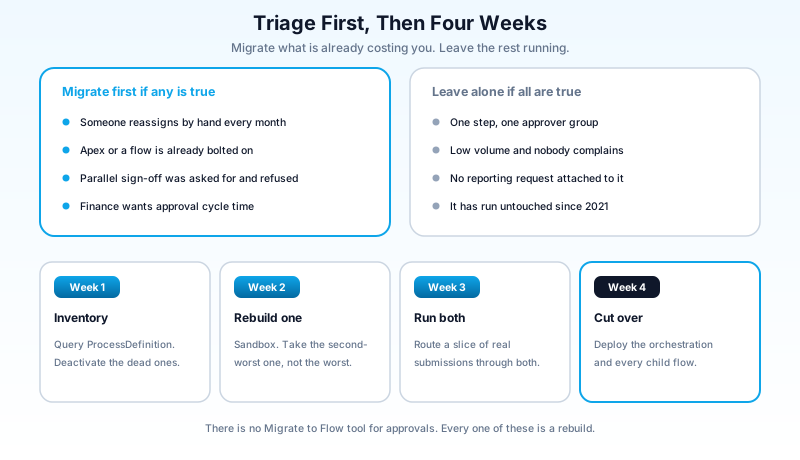
Migrate first if any of these are true:
- Somebody reassigns requests by hand more than once a month. That is a routing gap, and queues as approvers close it.
- The process already has Apex or a flow bolted onto it to do something the builder could not. You are maintaining two things; make it one.
- The business has asked for parallel or conditional sign-off and been told no.
- Someone is asking for approval cycle time reporting.
- The approval spans more than one object or more than one department, which is the case orchestrations were built for.
Leave alone if all of these are true: one step, one approver group, low volume, no complaints, no reporting ask. A single-step expense approval that has run untouched since 2021 is not technical debt. It is a thing that works.
For the ones that make the cut, a four-week sequence keeps the risk low:
Week 1, inventory. Pull every active approval process out of Setup, or query ProcessDefinition and ProcessInstance to see which ones have actually fired in the last 90 days. You will find at least one active process with zero submissions in two years. Deactivate that one instead of migrating it.
Week 2, rebuild one in a sandbox. Pick the second-most-painful process, not the worst one. The worst one has the most edge cases and you want your first build to teach you the model rather than the exceptions. Build the orchestration, the evaluation flow, and the background steps. Debug it in Flow Builder, where rollback mode lets you run the whole thing without leaving approved records behind.
Week 3, run both. Leave the classic process active and route a slice of real submissions through the new orchestration. Compare the Approval Trace against the old approval history on matched records. This is also when you find out whether your approvers can find the Approvals app without being told twice.
Week 4, cut over and deploy. Deactivate the classic process, ship the orchestration and every flow it calls. Deployment is the step people underestimate: an orchestration is not one piece of metadata. It is the orchestration plus its evaluation flows plus its screen flows plus its background flows, and a change set that includes the orchestration but misses a child flow fails on the far side.
Six things that will bite you
The Approval History related list goes empty. It is not a bug and there is no setting. The related list is wired to classic approval processes, and a flow approval is not one. Salesforce ships an Approval Trace component you add to the record page instead, and it is not customisable. If your sales ops team lives in that related list, tell them before cutover, not after.
Nobody picks their own approver any more. The classic option to let a submitter choose the next approver has no equivalent. Every approver is resolved inside the approval step. Where the business genuinely needs a human choice, the pattern is an interactive step that collects the selection into a variable, then an approval step that assigns from it. Two steps instead of a checkbox, and it works.
Record locking behaves differently under parallel stages. Locking the record on more than one concurrent stage produces errors. Set the lock on the first stage and leave the rest clear. This is the single most common runtime failure in a first orchestration build.
Submission is your problem now. No standard button. Decide early between a custom button on an autolaunched orchestration and entry conditions on a record-triggered one, because the choice shapes the whole build.
Your existing approval reports do not follow. Anything built on ProcessInstance keeps working for classic processes and returns nothing for flow approvals. Budget the rebuild against the new objects as part of the migration, not as a follow-up nobody schedules.
Permissions are a separate task. Approvers need access to the Approvals app and the Approval Trace component, and the assignee model runs through users, queues, and groups rather than the classic approver hierarchy. Sort out a queue membership audit before cutover rather than during it, and check where your delegated approver assumptions land.
Where this leaves you
There is no deadline here, and anyone telling you there is has invented it. Classic approval processes will run in your org through Winter '27 and well past it. But the gap between the two builders widens every release, and it has widened five times in a row now. The recall your users have asked for twice, the queue-based routing that ends the Friday reassignment, the cycle time report finance keeps requesting: all three exist, and none of them are coming to the classic builder.
Open Setup, go to Approval Processes, and sort by last modified date. Find the one process where you personally have reassigned a request in the last month, and rebuild that one in a sandbox this week. One process, one sandbox, one afternoon. That is the whole first commitment, and by the end of it you will know whether the other 33 are worth the calendar.
About the Author
Dipojjal Chakrabarti is a B2C Solution Architect with 29 Salesforce certifications and over 13 years in the Salesforce ecosystem. He writes and edits salesforcedictionary.com, published by KineticBit Inc., to help admins, developers, architects, and cert/interview candidates sharpen their fundamentals. More about Dipojjal.
Share this article
Sources
Related dictionary terms
Practise it
Five questions on Administrator
Exam-style questions with an explanation after each one. No account needed, and your answers build a weak-topic map once you have one.
Keep reading

Process Builder to Flow Migration: The Complete 2026 Playbook
Salesforce retired Process Builder and Workflow Rules. Here is the 2026 migration playbook: audit your processes, map them to the right flow type, handle every gotcha, and test before the cutover.

Salesforce Winter '27 Release: Dates, Sandbox Preview, and the Updates That Will Break Things
Winter '27 hits sandboxes around August 29, 2026, and it retires the OAuth Username-Password flow for good. The dates, the preview mechanics, and a one-week prep plan.
Comments
No comments yet. Start the conversation.
Sign in to join the discussion. Your account works across every page.