
Agentforce for Flow: How AI Drafts, Edits, and Debugs Your Automation in 2026
Draft with Agentforce turns a prompt into a working flow. How it works, what its own benchmark says about trusting the output, and how to review it safely.

You type "when a Case is escalated and the account is on a Gold support plan, notify the account owner and create a follow-up task in two days" into a blank [Flow Builder](/terms/flow-builder) canvas, hit enter, and a real flow appears. A record-triggered element, a decision, a Create Records action, a scheduled path. You did not drag a single element onto the canvas. That is Draft with Agentforce, and if you have not tried it yet, you are about to spend the next ten minutes deciding whether to trust it.
You should not trust it blindly, and Salesforce's own numbers tell you why.
What Draft with Agentforce actually is
Draft with Agentforce (still labeled Beta in Salesforce Help as of Summer '26) is a panel inside Flow Builder that turns a natural-language instruction into a working flow. It is not a chatbot bolted onto the side of the canvas. It generates real flow metadata, drops it into the builder, and lets you inspect every element before you activate anything.
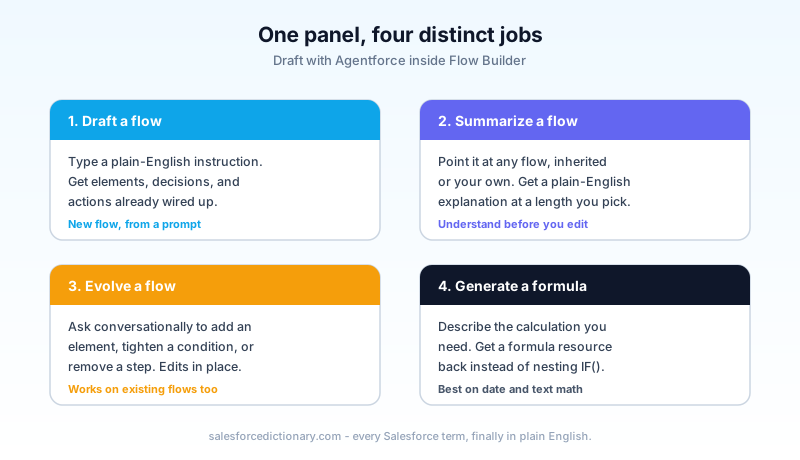
The panel does four distinct jobs, and it helps to keep them separate because each has its own reliability profile:
- Draft a flow. Type an instruction, get a new flow with elements, conditions, and actions already wired up.
- Summarize a flow. Point it at an existing flow, yours or one you inherited, and get a plain-English explanation at a length you choose.
- Evolve a flow. Ask it to add an element, change a condition, or remove a step on a flow that already exists, through conversational prompts in the same panel.
- Generate a formula. Describe the calculation you want and get a formula resource back, instead of hand-writing nested
IF()statements.
A fifth capability, troubleshooting flow errors with Agentforce, reads your fault details and suggests a fix. Useful, but treat its suggestion the same way you'd treat a stack-trace guess from a colleague who has not opened the org: a hypothesis worth checking, not a patch worth merging on sight.
Turning it on
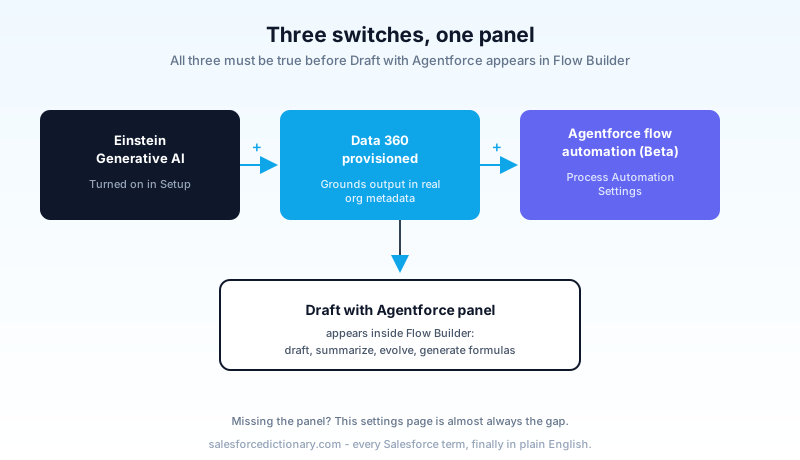
Three things have to be true before the panel shows up:
- Einstein Generative AI is turned on in Setup.
- Data 360 is provisioned and enabled for the org. This is not optional scaffolding. The drafting model uses your org's actual object and field metadata to ground its output, which is a large part of why it can reference your custom objects correctly instead of hallucinating a plausible-looking field that doesn't exist.
- Agentforce flow automation (Beta) is switched on under Process Automation Settings.
If you've enabled Agentforce elsewhere in your org and still don't see the panel, this settings page is almost always where the gap is. Check it before you file a support case.
What is actually generating the flow
This is the part most admins skip past, and it's the part that should change how you use the feature.
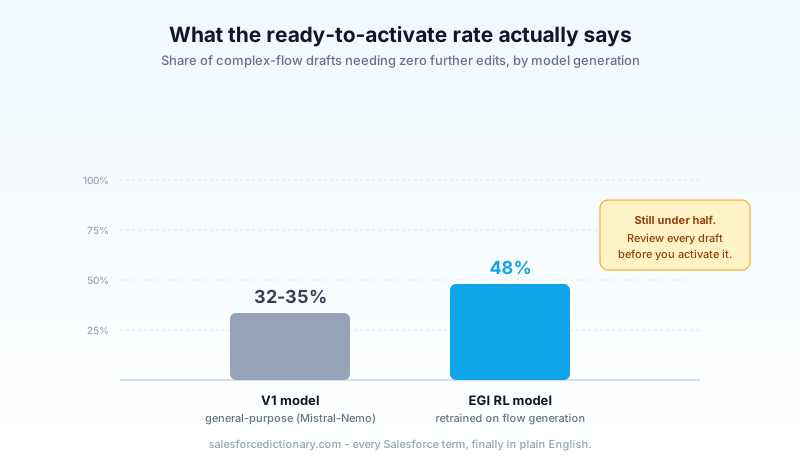
Early versions of Draft with Agentforce ran on a general-purpose model (Mistral-Nemo) and produced flows that were ready to activate without edits on roughly 32 to 35 percent of complex requests. Salesforce then retrained the model specifically on flow generation using reinforcement learning, an approach the team calls EGI RL as part of its broader Enterprise General Intelligence effort. The retrained model pushed the ready-to-activate rate to 48 percent on the same complex benchmark, a roughly 50 percent relative improvement, and it did that with 88 percent less training data than a comparable general model would need. Salesforce also reports the retrained model outperforms larger frontier closed-source models specifically on flows involving custom objects, which is the exact case where a general-purpose model has the least to go on.
Read those numbers straight: on Salesforce's own complex-flow benchmark, the current model gets you a flow that needs zero further edits under half the time. On the other half, you get a flow that is close, wrong in a specific and fixable way, or wrong in a way you need to catch before it touches production data. That is not a knock on the feature. A tool that gets you 50 percent of the way to a finished flow in ten seconds is still a large time save over building from a blank canvas, provided the person using it treats every output as a draft, not a delivery.
There's also a mechanical reason the output is inspectable rather than mysterious: the model targets flow metadata directly rather than freeform JSON, which is closer to a code-generation problem than a text-generation one. That's why what lands on your canvas looks like a flow a human built, with real elements you can click into, not a wall of unreadable configuration you have to trust wholesale.
Writing a prompt that actually works
The single biggest lever you control is how specific your instruction is, and the specificity that matters most is field-level, not sentence-level.
Weak instruction: "When the account is a healthcare account, notify the owner."
Strong instruction: "When Account.Industry equals Healthcare and Account.Type equals Customer, create a Task assigned to Account.OwnerId with Subject 'Review healthcare account' and ActivityDate three business days from CreatedDate."
The difference isn't politeness or length. It's that the second version gives the model exact API names, exact field values, and an exact relationship to wire the action to. "The account is a healthcare account" is a sentence a human colleague would understand instantly and a model has to guess at, because "healthcare account" could map to an Industry picklist value, a custom checkbox, a record type, or a related Account Segment field, and the model has no way to know which one you mean without you telling it. Write your instructions the way you'd write a ticket for a very literal junior admin: object, field API name, operator, value, and the exact action you want, in that order.
This also explains a pattern you'll notice quickly: prompts describing standard objects with common field names draft closer to ready-to-activate than prompts touching custom objects with ambiguous naming. That tracks directly with the benchmark gap above. Give the model less to guess, and it guesses less.
Editing and troubleshooting flows you already have
The evolve capability is where Draft with Agentforce earns its keep on existing orgs, not just new builds. Open any flow, active or not, and you can ask the panel to add a decision element, tighten an entry condition, or remove a step you no longer need, in the same conversational style as drafting a new one. It edits the flow in place, and every change still shows up as a normal, inspectable diff in the canvas before you save.
Summarization pairs well with this. Before you touch a flow you inherited from someone who left the team eighteen months ago, ask Agentforce to summarize it. You'll get a plain-English pass at what the flow does, at a length you pick, before you spend twenty minutes clicking through elements to reconstruct the same understanding manually. It's a genuinely good first move on unfamiliar automation, and it costs you thirty seconds to try.
Formula generation follows the same pattern as drafting: describe the calculation, review the output, keep what's right. It's particularly good at nested date math and multi-condition text formulas, the kind of formula that's easy to describe in a sentence and tedious to nest correctly by hand. Check the field types it references and the edge cases (null values, blank strings) before you trust it on anything customer-facing.
Troubleshooting errors works by reading your fault details and proposing a cause. It's a reasonable first opinion when a flow throws an error you don't immediately recognize. It is not a substitute for opening the fault path and looking at what data actually triggered the failure, and you should still know how to read a fault path without the AI's help. The suggestion is a shortcut to a hypothesis, not a replacement for verifying it.
What Summer '26 actually changed
Two things shipped that are worth knowing about even if you're not using them yet.
First, natural-language editing, which used to work only on record-triggered and scheduled-triggered flows, now extends to screen flows too. If you maintain a lot of guided-selling or case-intake screen flows, you can now ask Agentforce to add a field or tighten a validation condition instead of opening the builder and clicking through the screen's component tree by hand.
Second, and separately from everything above: Flow Builder shipped a Create Agent element that lets you deploy an actual Agentforce agent as a step inside a flow, either an existing agent or a small purpose-built one defined on the spot. That's a different capability from anything described in this guide. Drafting, evolving, summarizing, and troubleshooting are about AI helping you build a flow faster. The Create Agent element is about putting an AI agent inside the flow as a runtime participant. Worth knowing the two exist side by side in the same release so you don't conflate them when you're reading release notes or talking to a teammate about "the new Agentforce flow thing."
The review workflow this actually requires
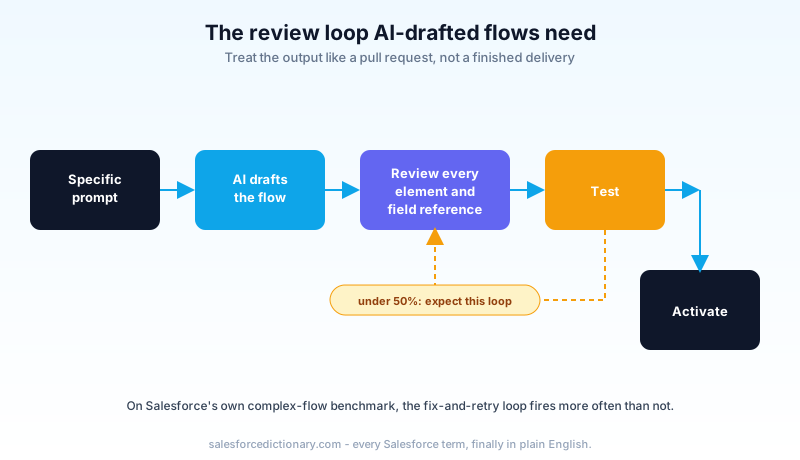
Given a sub-50-percent ready-to-activate rate on complex flows, treating AI-drafted automation like a pull request from a contractor you trust but still review is the only responsible default. A workflow that holds up:
- Draft with a specific prompt. Field API names, exact values, exact actions. Vague prompts produce flows that need more fixing, not less.
- Read every element before you touch Save. Click into each action and decision the same way you would in a flow a coworker handed you. The point of generating real flow metadata instead of a black box is that you can do this.
- Check the data model assumptions. Confirm the fields, record types, and relationships it referenced are the ones you actually meant, especially on custom objects, which is exactly where the benchmark gap is widest.
- Test before activating. Nothing about AI-drafted automation exempts it from the same debug-and-test discipline you'd apply to anything hand-built. Use the same Debug tools you'd use on a manual flow.
- Decide your org's data opt-in stance up front. Flows created by Agentforce carry a global model-data opt-in/opt-out setting. Set your org's position deliberately, as a team decision, rather than leaving it at whatever the default happens to be.
None of this is more overhead than reviewing a flow a junior admin built. It's the same discipline, applied to a faster first draft.
FAQ
Is Draft with Agentforce generally available yet? As of Summer '26, the core drafting capability is still labeled Beta in Salesforce Help. Specific extensions, like natural-language editing on screen flows, have moved to GA. Check the release notes for your org's exact release train before assuming either way.
Does it work on flow types besides record-triggered? Yes. Drafting and evolving cover autolaunched, scheduled-triggered, and (as of Summer '26) screen flows, not only record-triggered ones.
Can it write Apex instead of a flow? No. It generates flow metadata only. If your automation genuinely needs Apex, for recursion control, mid-transaction callouts, or precise governor-limit management, this tool won't get you there. See our Flow vs Apex decision guide for how to make that call.
Will it hallucinate fields that don't exist? Less often than a general-purpose model would, because it's grounded in your org's real metadata through Data 360. Less often is not never. Verify every field reference in a draft before you save it.
Does using it change my org's governor limits? No. A flow it drafts runs under the exact same governor limits as a flow you built by hand. The AI changes how the flow gets written, not how it executes.
What to read next
- Record-Triggered Flows: The Complete 2026 Guide: the mechanics Draft with Agentforce is writing on your behalf.
- Flow vs Apex: A 2026 Decision Matrix: for when the answer to your prompt should have been Apex.
- Salesforce Prompt Builder: The Complete 2026 Guide: the sibling AI-building-block for prompts you invoke yourself, rather than ones that write flows for you.
Open Flow Builder this week and try Draft with Agentforce on one real, small automation request, something you'd have built manually in fifteen minutes anyway. Read every element it hands you before you activate it. That single habit, prompt specifically, review completely, is the entire difference between this feature saving you time and this feature quietly becoming your next production incident.
About the Author
Dipojjal Chakrabarti is a B2C Solution Architect with 29 Salesforce certifications and over 13 years in the Salesforce ecosystem. He writes and edits salesforcedictionary.com, published by KineticBit Inc., to help admins, developers, architects, and cert/interview candidates sharpen their fundamentals. More about Dipojjal.
Share this article
Sources
Related dictionary terms
Practise it
Five questions on Agentforce Specialist
Exam-style questions with an explanation after each one. No account needed, and your answers build a weak-topic map once you have one.
Keep reading

The Complete 2026 Guide to Record-Triggered Flows in Salesforce
Record-triggered flows are the Salesforce automation default in 2026. This is the complete tutorial: before-save, after-save, scheduled paths, gotchas, and 5 worked examples.

Salesforce Flow vs Apex in 2026: A Decision Matrix for Admins, Developers & Consultants
Flow vs Apex is not a religious war anymore. Here is the 2026 decision matrix. Capability gaps, governor limits, the 70/30 rule, and 12 worked scenarios with the right answer for each.

Salesforce Prompt Builder: The Complete 2026 Guide for Admins & Developers
Prompt Builder is the no-code studio that connects your Salesforce data to any LLM — and in 2026, it's the foundation of every Agentforce Agent Action. Here's the complete guide for admins and developers.
Comments
No comments yet. Start the conversation.
Sign in to join the discussion. Your account works across every page.