
Agentforce Coworker in 2026: What the Ask Button Actually Does to Your Org
The permission that decides whether every question bills you, what the index really covers today, the propagation gap in the security model, and who should wait.
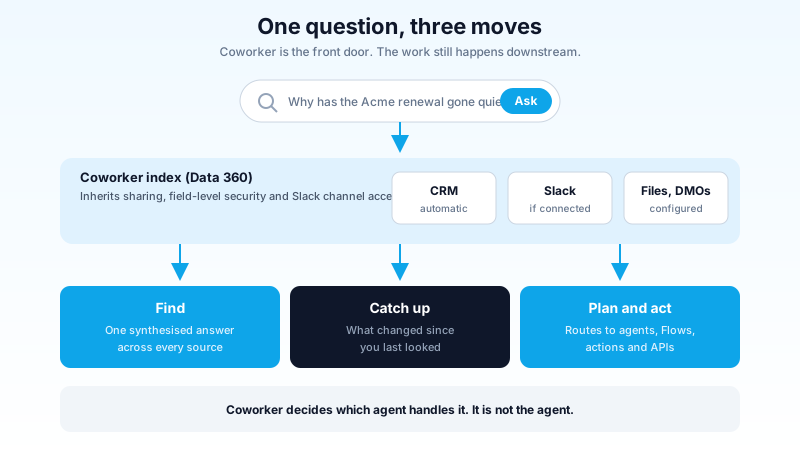
A sales rep types "why has the Acme renewal gone quiet" into the Salesforce search bar. A year ago that returned a list of every record with Acme in the name. Now it returns a paragraph: the last three activities, a Slack thread where someone flagged a pricing objection in July, the open case that has been reassigned twice, and an offer to draft the follow-up.
The answer is usually good. That is not the interesting part. The interesting part is what had to become true inside your org for that paragraph to exist, and which line of your bill it lands on.
What Coworker is, said plainly
Salesforce announced Agentforce Coworker on 21 May 2026 and put it in beta for all Agentforce customers on the Salesforce surface, with web, Microsoft Teams, ChatGPT, Claude and a desktop app slated for later in the year. The marketing line is "AI in every search bar." That line is more accurate than most marketing lines, because the product really is a front door rather than a new agent.
Salesforce describes three moves. Find pulls a contextualised answer out of CRM records, files, Slack conversations and whatever else you have connected. Catch up surfaces what changed since you last looked and keeps the thread of the conversation so follow-up questions work. Plan and act routes the request onward: to a specialised agent, a custom agent, a CRM action, a Flow, or an external API.
That third one is the distinction that matters. An Agentforce agent is scoped to a job. Coworker is the thing that decides which job this is and hands it off. If you already run three or four agents and your users cannot remember which tab any of them live in, Coworker is the answer to that problem before it is an answer to anything else.
It does not replace Einstein Search. Both sit in the header. The Ask button appears next to global search for users who have permission, and record lookups keep working the way they always did. That coexistence is deliberate, and given how the September 2025 help-portal search replacement landed with the community, it is the right call.
Where it sits next to what you already run
Most orgs turning this on already have two or three things that answer questions, and the first support ticket will be somebody asking which one they were meant to use. The split is cleaner than it looks.
Einstein Search finds records. You know the account exists, you want to open it, you type four letters. Deterministic, instant, no credits, no reasoning. It stays the right tool for the ninety percent of searches that are navigation rather than questions.
A specialised or custom agent does a scoped job end to end. It has topics, actions, guardrails and a tested set of things it is allowed to do. You built it, you own its behaviour, and you can point at exactly which action ran.
Coworker answers open questions and then decides which of the above should do the work. It is the layer that did not exist before, and it is the reason your agents stop being three separate tabs nobody opens.
The failure mode is treating Coworker as a replacement for the second category. It is not an agent you configure with a topic and a set of instructions. Ask it to run a compliance-sensitive workflow and it will route to whatever it judges closest, which is fine for a summary and wrong for a process that has to run the same way every time. Keep the deterministic work in agents and Flows. Let Coworker be the front door that finds them.
The permission that decides whether every question bills you
Coworker supports two pricing models, and the gap between them is where the money goes.
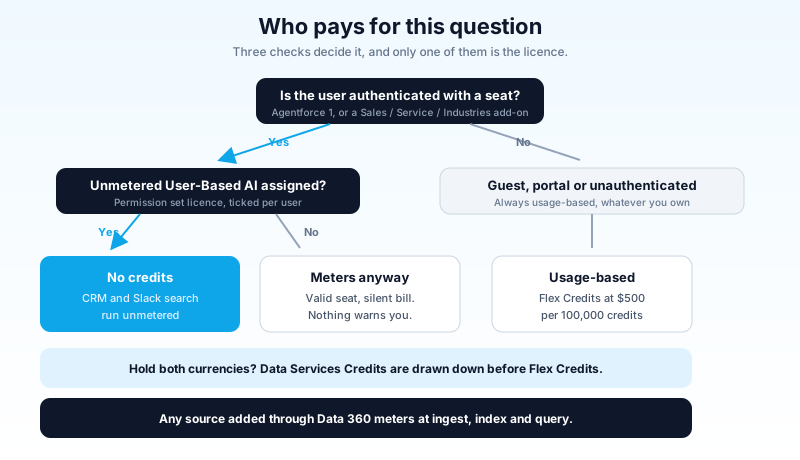
Seat-based. If your users hold Agentforce 1 Edition, or an Agentforce add-on for Sales, Service or Industries, then searching Salesforce CRM and Slack through Coworker consumes no Flex Credits and no Data Services Credits. Unmetered. This is the model Salesforce demos.
Consumption-based. Everything else meters against Flex Credits or Data Services Credits. Flex Credits list at $500 per 100,000 credits. Where an org holds both currencies, Coworker draws down Data Services Credits first.
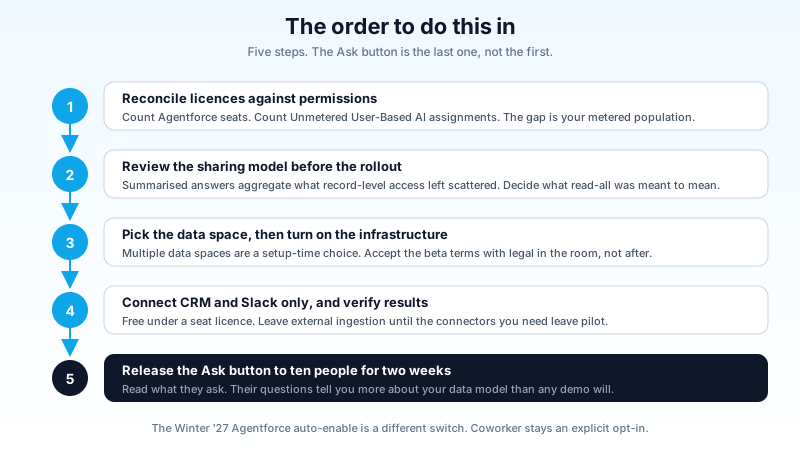
Here is the part that catches people. Unmetered access does not arrive automatically with the seat licence. It is gated by a permission set licence called Unmetered User-Based AI, assigned per user. A user who holds a perfectly valid Agentforce seat but does not have that checkbox ticked keeps working, keeps getting answers, and quietly meters every one of them.
Nothing errors. No banner appears. The only place it shows up is Digital Wallet, some weeks later, as consumption nobody budgeted.
Three more billing facts that belong in your notes before anyone signs anything:
Guest, unauthenticated and portal users always meter. Seat-based pricing applies only to authenticated users holding an eligible licence. If Coworker ever reaches an Experience Cloud site, every question from that site is consumption billing regardless of what you own.
Adding a source through Data 360 costs money twice. Data 360 consumes credits to process the content, build the semantic index, and then again to query it. That is separate from whatever the answer itself costs. A 200,000-document SharePoint site is an ingestion project with a price tag, not a checkbox.
Prompt class changes the rate. Consumption meters differently for standard, basic and advanced prompts, plus agent actions and Data 360 queries on top. If you want the mechanics of how that consumption model behaves under load, the Agentforce pricing and consumption breakdown covers the estimation work.
The practical version: seat licences plus the unmetered permission plus CRM and Slack only is a fixed cost. Anything past that boundary is a meter, and the meter runs on questions your users ask without knowing a meter exists.
What "300 connected sources" actually means today
Salesforce quotes 270-plus connected sources in one place and 300-plus in another. Both numbers describe the Data 360 connector catalogue. Neither describes what your org has indexed on the day you turn this on.
What connects automatically:
- Salesforce CRM objects, standard and custom. On by default and you cannot remove them.
- Slack, if Slack is connected to your org. Users see only the channels and conversations they could already see in Slack.
- Data 360 data model objects, once you assign them as a source.
Everything else goes through Data 360 as an explicit configuration step, and several of the ones people actually want are still pilot rather than generally available. Jira is pilot. Google Drive and SharePoint carry real ingestion ceilings: roughly 5,000 files per shared Drive, a 100 MB limit on PDFs and 4 MB on other file types, and 10 to 15 GB per SharePoint site with 5,000 files per ingestion run.
Read those numbers against your actual estate. A mature SharePoint knowledge base is usually tens of thousands of files. It does not fit, which means somebody has to decide which corner of it gets indexed, and that decision is a content-governance conversation your team has probably been avoiding for four years.
There are throughput limits too: Slack search runs at 180 queries per minute per user sustained with burst capacity around 1,000, and AI answer generation caps near 100 requests per minute. Those are not limits a person hits. They are limits a badly built integration hits at 9am on a Monday.
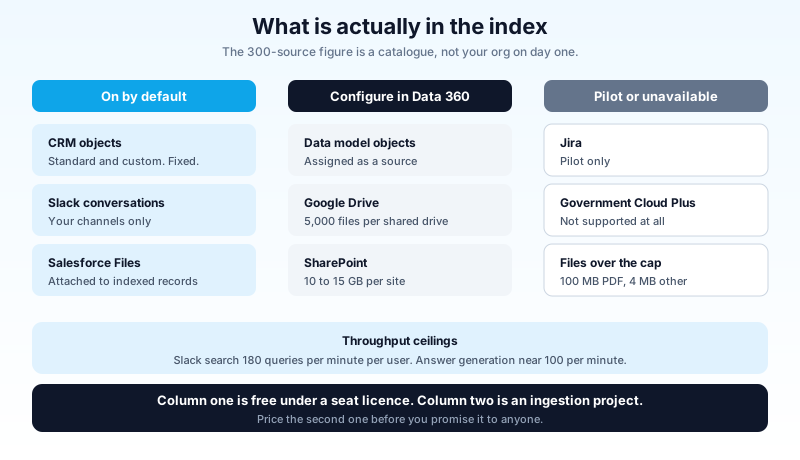
The honest summary is that Coworker's day-one value comes from CRM and Slack. Those two are free under a seat licence, they need no ingestion project, and they are where the pilot stories come from. The 300-source figure is a roadmap, priced separately.
The security model holds. The timing does not.
Coworker inherits the platform's permission model rather than sitting beside it. Record access, field-level security, sharing rules and Slack channel membership all apply to what a user gets back. That is genuinely better than most enterprise search products, which historically solved this by indexing everything as a service account and hoping.
Two things still need your attention.
Permission changes take up to an hour to propagate for external sources. Revoke someone's Google Drive or SharePoint access at 09:00 and Coworker can still answer from that document at 09:30. For routine role changes this does not matter. For an offboarding or an active insider-risk case it matters a great deal, and the fix is procedural: cut the Salesforce user first, not the file share.
Synthesis is not the same shape as record-level access. A rep with access to 400 opportunities was never realistically going to read 400 opportunities. Now one question returns the pattern across all of them: which deals slipped, what the common objection was, which competitor keeps appearing. No control was bypassed. Every record was one they could open. But a control that was doing real work through sheer friction has stopped doing it.
There is no setting for that, because it is not a defect. It is what happens when you put a summariser on top of a permission model designed for record-at-a-time reading. The answer lives in your sharing model, not in Coworker's setup page. If your org has been quietly over-provisioned for years because nobody had time to read that much anyway, this is the feature that ends the arrangement.
A concrete version, because this argument tends to stay abstract until it does not. A mid-market org gives its whole sales team read access to all opportunities, on the reasonable theory that reps should be able to look up a deal in another territory. Territory-level reporting is locked down properly, so nobody outside leadership sees rolled-up numbers. Coworker arrives, and a rep asks what the average discount was on closed-won deals last quarter. The answer comes back. Every record in it was one they were allowed to open. The report they were never allowed to run just got rebuilt in a sentence.
The fix is not clever prompt filtering. It is going back to the sharing model and deciding, honestly, whether "read access to everything" was ever the intent or just the path of least resistance in 2019. Do that review before the rollout, not after somebody in finance asks how a rep knew that number.
Two more constraints to log. Coworker in beta means you are accepting Salesforce's Beta Services terms, with the liability and refund posture that implies, and your legal team should see that before your admin clicks Turn On. And it is not supported in Government Cloud Plus. Salesforce says plainly: do not turn it on there.
Turning it on, and the three places it goes sideways
The enablement itself is short. Setup, search Agentforce Coworker, Get Started, Turn On, confirm the disclaimer, watch the provisioning steps tick over. Eligible editions are Enterprise, Unlimited and Agentforce 1.
Admins need the Agentforce Coworker Admin permission set and the AI Search Setup permission set licence. Users need the AI Search permission set licence and the Access_Ai_Search permission set group, though Salesforce recommends granting access through the Manage Users section inside Coworker Setup rather than assigning the group by hand.
Three things go wrong reliably.
The data space choice is made before you enable, not after. Orgs running multiple Data 360 data spaces have to select the right one in the setup menu first. Getting this wrong is not a toggle you flip back over lunch.
The end-user experience is a separate opt-in. Turning on Coworker provisions the infrastructure. The Ask button and the new search results are a second switch with their own terms checkbox. That two-step design is useful: enable the infrastructure, connect and verify your sources, and only then let the button appear. Treat it as a staging gate rather than an annoyance.
People assume the Winter '27 auto-enable already handled this. Salesforce began auto-enabling Agentforce for existing orgs the first week of September 2026. That is a different switch. Coworker remains an explicit opt-in, and "I think it turned itself on" is not a finding. Go and look.
Turn it on now, or wait
Now, if you hold Agentforce 1 or an Agentforce role add-on, Slack is where your deal and case conversation actually happens, and your sharing model is one you would defend in an audit. Under those three conditions the marginal cost is close to zero and the value shows up in a fortnight. This is also the cheapest way to find out whether your users will talk to an agent action at all, which is a question worth answering before you fund a bigger agent programme.
Wait, if your knowledge lives in SharePoint or Drive and you were counting on those connectors, if you are on consumption pricing with no credit line for it, if you already suspect your sharing model is over-provisioned, or if you are on Government Cloud Plus, where it is unsupported.
The lane nobody should pick is the one where an executive saw the Dreamforce demo, an admin enables it org-wide on a Friday, and the first person to understand the cost model is whoever opens Digital Wallet in October. Coworker is a good product with a sharp edge, and the edge is entirely about who has which permission.
Do this next
Open Setup, go to Permission Set Licenses, and compare two numbers: how many users hold an Agentforce seat licence, and how many have Unmetered User-Based AI assigned. If the second number is smaller than the first, that gap is your metered population, and it is the single highest-value thing to fix before anyone sees an Ask button. Then enable Coworker's infrastructure without the end-user experience, connect CRM and Slack only, and give the Ask button to one team of ten for two weeks. Read their queries. If the questions coming back are ones your sharing model was never meant to answer in aggregate, you have learned something more useful than any demo. If you want the wider platform context first, the Agentforce 360 guide and the Data 360 implementation guide cover the layers Coworker is sitting on top of.
About the Author
Dipojjal Chakrabarti is a B2C Solution Architect with 29 Salesforce certifications and over 13 years in the Salesforce ecosystem. He writes and edits salesforcedictionary.com, published by KineticBit Inc., to help admins, developers, architects, and cert/interview candidates sharpen their fundamentals. More about Dipojjal.
Share this article
Sources
Related dictionary terms
Practise it
Five questions on Agentforce Specialist
Exam-style questions with an explanation after each one. No account needed, and your answers build a weak-topic map once you have one.
Keep reading

Agentforce Digital Labor Units Explained: What You're Actually Buying in 2026
Agentforce switched from per-conversation pricing to Digital Labor Units. Here is how DLU consumption works, what counts as a billable interaction, and how to estimate costs before you commit.

Salesforce Data 360: The Complete 2026 Implementation Guide
Data 360 is Salesforce's unified data platform for the agent era. This 2026 implementation guide walks data streams, identity resolution, segmentation, activations, and zero-copy federation.

What Is Agentforce 360? The Complete 2026 Guide for Salesforce Admins, Developers & Architects
Agentforce 360 is Salesforce's 2025 rebrand of its agentic-AI platform - built on the Atlas Reasoning Engine, Einstein Trust Layer, and Data 360. Here's the complete admin + dev + architect guide.
Comments
No comments yet. Start the conversation.
Sign in to join the discussion. Your account works across every page.