
Related List Hover Links
Related List Hover Links are a Salesforce Classic display setting.
Definition
Related List Hover Links are a Salesforce Classic display setting. It puts a strip of shortcut links near the top of a record detail page, one link per related list on the page layout. Hover a link to open that related list in an overlay. Click it to scroll down to the full list.
The setting is org-wide and on by default. Salesforce documents it in the current Metadata API reference as enableRelatedListHovers. The same switch also drives the link strip on custom object detail pages inside Setup.
For record pages this is the older option. Lightning Experience gets the same shortcuts from the Related List Quick Links component, added through the Lightning App Builder. Hover links are now mostly a Classic and migration topic.
In plain English
“Picture a long form with extra sections stacked underneath it. Instead of scrolling to find the section you want, a row of small labels sits at the top. Point at one and a little window shows it to you. Click it and the page slides down.”
Worked example
A support team at a 400-seat logistics company still runs one Classic queue for warranty claims. Their Case layout carries nine related lists, including Open Activities, Case Comments, Attachments, Case History and Related Cases. With the setting on, an agent opening Case 00042318 sees all nine as links under the detail section. Pointing at Case Comments opens an overlay with the two most recent comments and a New button. The agent logs a callback note without scrolling, and the Description field stays where they left it.
How the hover strip behaves, and what replaced it
What the strip shows, and what controls it
The links mirror the related lists on the page layout, in layout order. Hide a related list and its link disappears with it. There is no separate hover-link screen, so page layouts are the only lever. That also means two users can see different strips on the same record. Page layouts are assigned by profile and record type, so a sales profile and a support profile land on different link sets. The overlay inherits the columns and buttons from that layout's related list section, so a list trimmed to two columns opens thin.
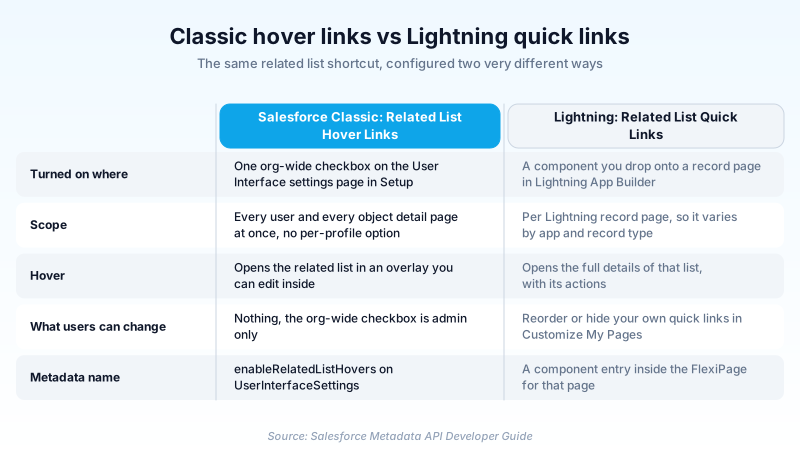
One org-wide checkbox, and an API name that hides it
There is no per-profile version of the switch. It lives on the User Interface settings page in Setup and applies to every user and every object at once. The default is true, so plenty of orgs have the strip without anyone choosing it. The metadata name is where admins lose time. The field is enableRelatedListHovers, not enableRelatedListHoverLinks. If you are diffing UserInterfaceSettings between sandbox and production, searching for the Setup label returns nothing.
Hover Links and Hover Details are different settings
They sit next to each other, which is most of the problem. Enable Related List Hover Links controls the strip of shortcuts. Enable Hover Details controls the small record preview shown when a user points at a record name or a lookup field. They also read from different places. Columns in a related list overlay come from the page layout's related list section. Fields in a single-record preview come from the object's mini page layout. The Layout metadata type describes that as the mini view used in the Console tab, hover details and event overlays. A user also needs sharing access and field-level security on those mini layout fields, so an empty-looking preview is usually a permissions problem.
What replaced it on Lightning record pages
On Lightning record pages the equivalent is the Related List Quick Links component, placed through the Lightning App Builder. Point at a quick link and you get the full details of that list, with its actions available without leaving the record. Admins set it per record page rather than once for the org. Users then reorder or hide their own quick links under Customize My Pages in personal settings. A February 2020 Salesforce developer post on Lightning page performance recommends moving quick links into their own tab in high-concurrency orgs. The component fetches record counts and fires extra server calls on accidental hover. One test in that post cut seven server round trips and 0.4 seconds from page load by relocating it. The advice is six years old, so read those figures as a shape rather than a current benchmark.
How organizations use Related List Hover Links
Leaves the setting on so service reps can log a call from the Open Activities overlay without scrolling past a long policy detail section.
Adds a Related List Quick Links component to the new Account record page so users recognize the layout after cutover.
Trust & references
Cross-checked against the following references.
- UserInterfaceSettings | Metadata API Developer Guide (opens in new tab)Salesforce
- Layout | Metadata API Developer Guide (opens in new tab)Salesforce
- Designing Lightning Pages for Scale (February 2020) (opens in new tab)Salesforce
- Work with Your Data | Lightning Experience for Salesforce Classic Users (opens in new tab)Salesforce
Straight from the source - Salesforce's reference material on Related List Hover Links.
Hands-on resources to go deeper on Related List Hover Links.
About the Author
Dipojjal Chakrabarti is a B2C Solution Architect with 29 Salesforce certifications and over 13 years in the Salesforce ecosystem. He writes and edits salesforcedictionary.com, published by KineticBit Inc., to help admins, developers, architects, and cert/interview candidates sharpen their fundamentals. More about Dipojjal.
Test your knowledge
+5 pts / dayQ1. An admin removes the Attachments related list from a Case page layout in Salesforce Classic. What happens to the hover link strip on Case records using that layout?
Q2. Which UserInterfaceSettings field in the Metadata API controls Related List Hover Links?
Q3. An admin wants Classic-style related list shortcuts on a Lightning record page. What should they do?
Discussion
Loading discussion…