
Overlay
An overlay is a layer of interface that Salesforce draws on top of the page you are already on, so you can read or edit something extra without leaving that page.
Definition
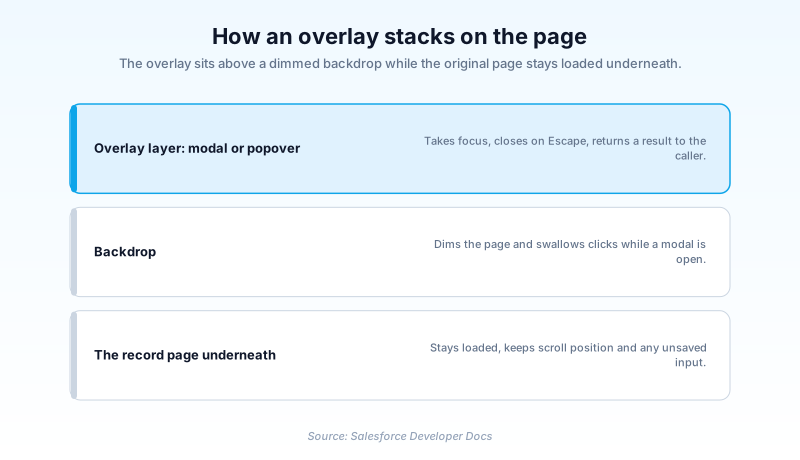
An overlay is a layer of interface that Salesforce draws on top of the page you are already on, so you can read or edit something extra without leaving that page. The page underneath stays loaded and holds its state, and the overlay closes to put you right back where you were.
In Lightning, the overlay you meet most often is a modal built with the lightning/modal module. Salesforce documents it as a component that overlays the current window and blocks interaction with everything else until the user acts on it or dismisses it. Quick actions, lookup pickers and confirmation dialogs all render this way.
Overlay carries a second, unrelated meaning in Sales Cloud. An overlay split is a type of opportunity split that credits a supporting rep, and unlike a revenue split it is allowed to push total credit past 100 percent.
In plain English
“Think of a sticky note placed over the page of a book you are reading. You can read the note, then peel it off, and the page underneath is exactly as you left it. That is what an overlay does on a screen. Nothing behind it moves or reloads.”
Worked example
A support agent at a 400-seat logistics operator is working Case 00042319, a delayed-shipment complaint, and needs the account's credit terms before she promises a refund. Rather than clicking through to the Account record and losing her half-written case comment, she fires a quick action that opens an overlay: a medium modal showing Payment_Terms__c of Net 45 and Credit_Hold__c unchecked. She reads both values, presses Escape, and the case page is still sitting there with her draft comment intact. Total detour, about eight seconds.
Where overlays show up and how each one behaves
LightningModal is the current overlay surface
For Lightning Web Components, overlays come from the lightning/modal module. You import LightningModal, extend it in your own component class, and call open() on that class. Salesforce describes the result as a modal window that overlays the current window and blocks interaction with everything else on the page until the user acts upon or dismisses it. The API has a few sharp edges worth knowing before you build. open() returns a promise that resolves with the result of the user's interaction, so the usual way to read an outcome is after the dialog closes. Events work too, with a constraint attached: a modal can only fire events captured by the component that opened it, and the handlers have to be attached in the .open() call made by that opening component, which needs Lightning Web Security turned on. Every call creates a fresh instance, so anything captured inside is lost unless you pass it out before closing. The size attribute takes small, medium, large or full, defaults to medium, and cannot be changed once the modal is open.
The Aura overlay library is the legacy one
Older orgs will have the Aura version instead: lightning:overlayLibrary. It exposes showCustomModal() and showCustomPopover(), which build a dialog or a popover on demand and hand back a reference you can close later. It still works, and Salesforce has not marked it deprecated. Salesforce has, though, filed it under Legacy Components, and its documentation opens with a plain instruction: for Aura components only, and for LWC development use lightning/modal. Read that as a fork in the road rather than a warning. If you are maintaining an Aura bundle that already calls showCustomModal, leave it alone. If you are writing anything new, there is no argument for reaching back to the Aura helper, and a component built on LightningModal will outlive one that is not.
Modals block, popovers do not
Not every overlay demands an answer. A modal is deliberately blocking: nothing behind it responds to a click until it closes, which is exactly right for a destructive confirmation or a required value the user has to supply. A popover does not block. It floats beside the element that opened it and disappears when you click away. Picking the wrong one is a common design mistake. Wrapping a read-only detail in a modal forces someone to acknowledge information they only wanted to glance at. Putting a delete confirmation in a popover invites a stray click straight past it. Ask whether the user must respond before anything else can happen. If the honest answer is no, do not reach for a modal.
Overlay splits are a different feature wearing the same word
Search an org for overlay and you may land somewhere with no connection to the interface at all. In Sales Cloud, opportunity splits ship with two default types. Revenue splits divide credit for the deal and must total 100 percent, which stops commission being paid twice on the same money. Overlay splits sit on top of that arithmetic and are allowed to exceed 100 percent. The reason is organizational rather than technical. A solution engineer, a technical account manager or a product specialist can be decisive on a deal without owning a share of its revenue. An overlay split records that contribution so the person can be measured and paid on it, while the revenue numbers underneath stay untouched. Salesforce catalogues both types under OpportunitySplitType in the Object Reference, and Trailhead's team-selling unit walks through granting that kind of credit.
Where overlays go wrong
Two failure modes come up again and again. The first is disableClose, which prevents a modal being dismissed by the Escape key, the close button, or a close() call. That is useful for the two seconds a save is in flight and hostile after that. Salesforce puts a number on it and tells you to use disableClose for less than five seconds, because a dialog a keyboard user cannot get out of is an accessibility defect. Salesforce also asks you to disable any button inside the modal that would trigger a close while the flag is on, so nobody is left pressing a control that does nothing. The second is sheer volume. Overlays work precisely because they interrupt. Fire one for every minor confirmation and people learn to dismiss them unread, which defeats the point of having them.
How organizations use Overlay
Reviewers read an applicant's test scores in a popover rather than a modal, so the assessment queue behind it stays clickable.
Solution engineers receive overlay splits on closed deals, crediting their pre-sales work without disturbing the rep's 100 percent revenue split.
A custom Lightning Web Component replaces a four-screen renewal form with one large LightningModal, so brokers finish the update without leaving the policy record.
Trust & references
Cross-checked against the following references.
- Modal | Lightning Component Reference (opens in new tab)Salesforce
- Modal Windows | Lightning Web Components Developer Guide (opens in new tab)Salesforce
- lightning:overlayLibrary | Component Library (opens in new tab)Salesforce
- OpportunitySplitType | Object Reference for the Salesforce Platform (opens in new tab)Salesforce
- Sell as a Team and Split the Credit (opens in new tab)Salesforce
Straight from the source - Salesforce's reference material on Overlay.
Hands-on resources to go deeper on Overlay.
About the Author
Dipojjal Chakrabarti is a B2C Solution Architect with 29 Salesforce certifications and over 13 years in the Salesforce ecosystem. He writes and edits salesforcedictionary.com, published by KineticBit Inc., to help admins, developers, architects, and cert/interview candidates sharpen their fundamentals. More about Dipojjal.
Test your knowledge
+5 pts / dayQ1. What distinguishes an overlay from an ordinary link on a record page?
Q2. Which module should a developer use to build a modal in a new Lightning Web Component?
Q3. On an opportunity, how does an overlay split differ from a revenue split?
Discussion
Loading discussion…