
Quote Line Item
A Quote Line Item is a record on the standard Salesforce QuoteLineItem object.
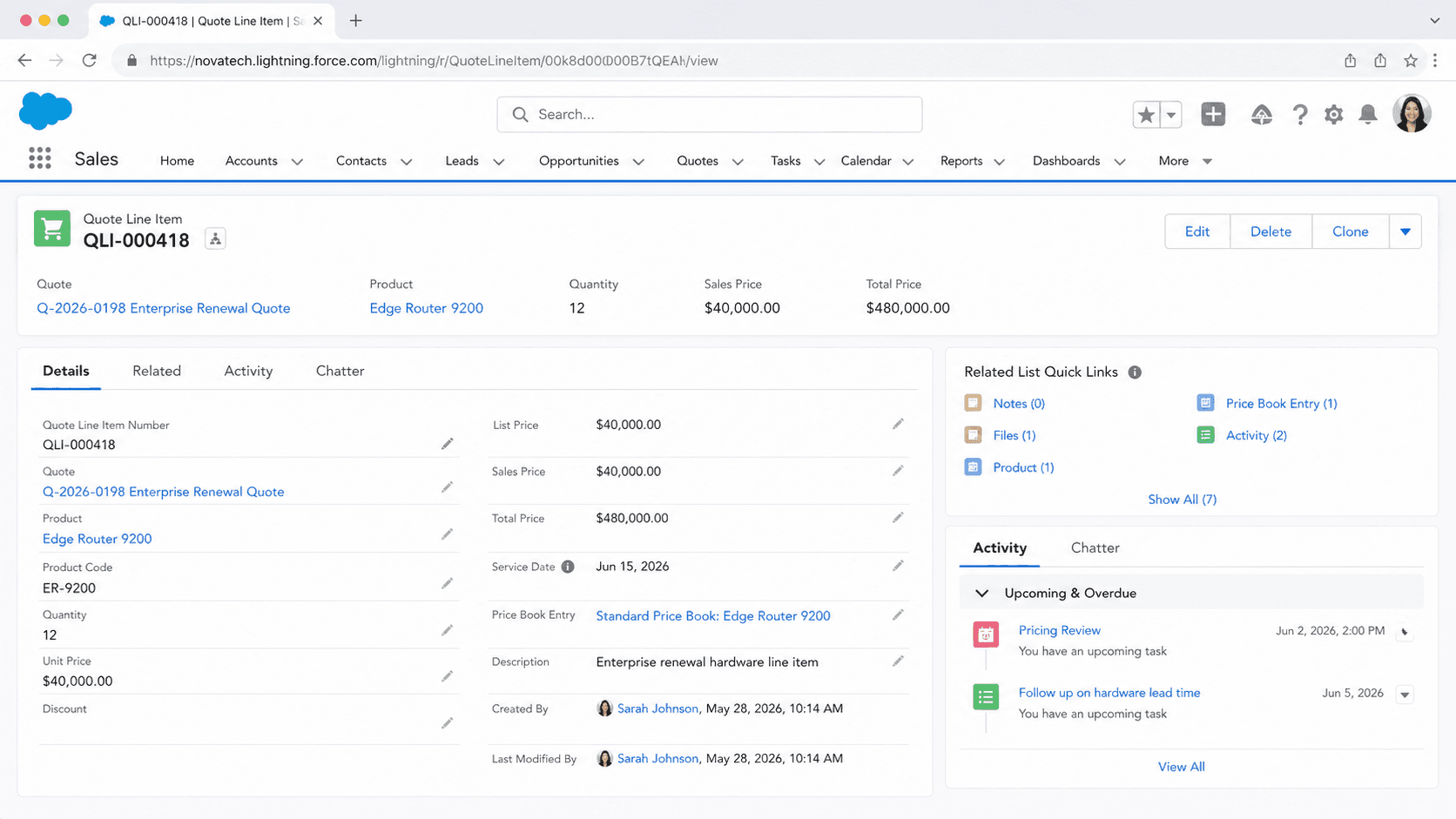
Definition
A Quote Line Item is a record on the standard Salesforce QuoteLineItem object. It represents one product on a quote, along with the quantity, unit price, discount, and the calculated totals for that single line. Each quote can hold many line items, and together they make up the priced proposal a sales rep sends to a customer.
A Quote Line Item links a quote to a specific product through a price book entry. It stores how much of that product the customer is buying and at what price. The object has been part of the platform since API version 18.0, and it powers the line-level detail behind every quote total, every quote PDF, and the sync between a quote and its opportunity.
How a Quote Line Item fits the quoting model
Where it sits in the data model
The QuoteLineItem object connects three other records. The QuoteId field points to the parent Quote. The Product2Id field names the product being sold. The PricebookEntryId field ties the line to a specific product-and-price combination inside the quote's price book. That last link matters. A quote must have a price book before you can add line items, and the product you add has to exist in that price book. If it is missing, Salesforce has no price to pull and the line cannot be created. Because the line item references a price book entry rather than the bare product, the same product can carry different prices in different price books. A line item on a quote built from the standard price book may show one unit price, while the same product on a partner price book shows another. The line item also keeps an optional OpportunityLineItemId, which records where the line came from when a quote is generated from an opportunity. That back-reference is what makes quote-to-opportunity sync possible later on.
The fields that carry the pricing
A handful of fields do the real work. Quantity holds how many units the customer wants. UnitPrice is the price for a single unit on this line. ListPrice reflects the catalog price from the price book entry, so a rep can see the original price next to the negotiated one. Discount is a percentage taken off the unit price for this line only. Two more fields are calculated and read-only. Subtotal equals Quantity times UnitPrice, the line value before any discount. TotalPrice equals Quantity times UnitPrice times (1 minus Discount), the final amount the customer pays for that line. You do not type these in. Salesforce derives them whenever the inputs change, which keeps the math consistent across the record and the PDF. Supporting fields round out the line. ServiceDate marks when the product or service is delivered. Description carries free text that can flow onto the quote document. SortOrder and LineNumber control the order in which lines appear, so the printed quote reads the way the rep arranged it.
How line items reach a quote
There are two common paths. The first starts on the opportunity. When a rep has already added products to an opportunity and then creates a quote from it, Salesforce copies those opportunity products into quote line items. Quantity, price, and discount come across so the rep does not retype anything. This is the fastest route and the one most teams use, because the opportunity is usually where products land first. The second path adds products straight to the quote. From the Quote Line Items related list a rep clicks to add products, picks them from the quote's price book, and sets quantity and discount per line. This is handy when the quote needs an item the opportunity never had, or when the rep is building a quote that is not tied to opportunity products yet. Either way, the result is the same kind of QuoteLineItem record. Records can also be created in bulk through Data Loader or the API, which teams use to migrate quotes or to push lines from an external pricing system into Salesforce.
Line items, quote totals, and the PDF
A quote does not store its own price out of thin air. The quote's total is the sum of its line items. Salesforce adds up the Subtotal of every line to produce the quote Subtotal, then applies any quote-level discount, shipping, and tax to reach the Grand Total. Change one line, and the quote total changes with it. This roll-up is why line item accuracy is not a detail. An error in a single quantity or discount flows straight into the number the customer sees. The same line items feed the quote PDF. When a rep generates a quote document, the template pulls each line and prints the product, quantity, unit price, discount, and line total in a table. Whatever is on the line items at generation time is what the customer reads. That is the practical reason mature teams review line items, totals, and the price book before they click Create PDF. Once the document is emailed, the line-level numbers are the offer on the table.
Syncing line items back to the opportunity
Quote syncing links a quote to the opportunity it came from and keeps the two in step. While a quote is synced, adding or removing a line item on the quote updates the opportunity's Products related list, and the reverse is true as well. The Amount field on the opportunity tracks the quote's TotalPrice, which is the subtotal of all the quote's lines. So the line items a rep edits on the synced quote drive the opportunity amount that feeds the pipeline and the forecast. A few rules shape this. Only one quote can be synced to an opportunity at a time. If a quote is built from a bundle, the opportunity stores each bundle component as a separate product, because opportunities do not model bundles. And when you clone a quote to a new opportunity, that opportunity needs a price book defined before the quote lines can sync to opportunity products. Knowing these behaviors keeps reps from chasing amounts that look wrong when they are really just unsynced.
When standard line items are not enough
Standard quote line items handle straightforward deals well. One product, one quantity, one discount per line, summed into a quote total. They start to strain when pricing gets complex. Product bundles, tiered discount schedules, percent-of-total pricing, subscription terms, and rules that change one line based on another are beyond what the base object does on its own. That is the gap Salesforce CPQ and Revenue Cloud fill. CPQ introduces its own Quote Line object and a Quote Line Editor built for guided selling, configuration, and advanced pricing. Those quote lines are richer than standard quote line items and carry many more fields. Teams on plain Sales Cloud quoting can still go a long way with standard line items, custom fields, and validation rules. The decision usually comes down to deal complexity. Simple catalog quotes live happily on standard QuoteLineItem records. Configurable products and layered discounting are the signal that a CPQ tool will save more time than it costs.
How to add a quote line item
Quote line items are usually created by adding products to a quote in Lightning Experience. The quote must already have a price book, and each product you add must belong to that price book. These steps cover adding a line directly from the quote.
- Open the quote and choose its price book
From the opportunity, create or open a quote. If the quote has no price book yet, select one. Salesforce uses that price book to find prices for every product you add as a line item.
- Add products to the Quote Line Items related list
On the quote record, find the Quote Line Items related list and click to add products. Search the price book and select one or more products to put on the quote.
- Set quantity, price, and discount per line
For each product, enter the Quantity and adjust the Sales Price if you are not using the list price. Add a Discount percentage where the customer earns one. Salesforce calculates the line Subtotal and Total Price for you.
- Save and review the quote total
Save the lines and check the quote totals. The quote Subtotal is the sum of the line subtotals, with quote-level discount, shipping, and tax applied to reach the Grand Total. Confirm the numbers before generating a PDF.
The Product2 record being sold on this line. It must exist in the quote's price book so Salesforce can find a price.
The product-and-price combination from the quote's price book. Selecting the product on the quote sets this link for you.
How many units of the product the customer is buying on this line. Drives the Subtotal and Total Price.
The price per unit for this line. Defaults from the list price and can be overridden for a negotiated price.
- You cannot add a line item until the quote has a price book, and the product must be in that price book or it will not appear.
- Subtotal and Total Price are calculated and read-only. Change Quantity, Unit Price, or Discount to move them, not the totals directly.
- Editing line items on a synced quote changes the opportunity's products and amount. Stop the sync first if you do not want that.
- Deleting a quote line item removes it from the quote total and, on a synced quote, from the opportunity's Products related list too.
Prefer this walkthrough as its own page? How to Quote Line Item in Salesforce, step by step
Trust & references
Cross-checked against the following references.
Straight from the source - Salesforce's reference material on Quote Line Item.
Hands-on resources to go deeper on Quote Line Item.
About the Author
Dipojjal Chakrabarti is a B2C Solution Architect with 29 Salesforce certifications and over 13 years in the Salesforce ecosystem. He writes and edits salesforcedictionary.com, published by KineticBit Inc., to help admins, developers, architects, and cert/interview candidates sharpen their fundamentals. More about Dipojjal.
Test your knowledge
+5 pts / dayQ1. What does a single Quote Line Item represent on a Salesforce Quote?
Q2. What information does a Quote Line Item carry?
Q3. How do Quote Line Items typically originate when a Quote is built from an Opportunity?
Discussion
Loading discussion…