
Preparation Recipe
A Preparation Recipe is a Data Prep workflow in CRM Analytics that reads source data, reshapes it through a chain of nodes, and writes the result to a dataset.
Definition
A Preparation Recipe is a Data Prep workflow in CRM Analytics that reads source data, reshapes it through a chain of nodes, and writes the result to a dataset. Salesforce's own documentation calls it a Data Prep recipe, or just a recipe.
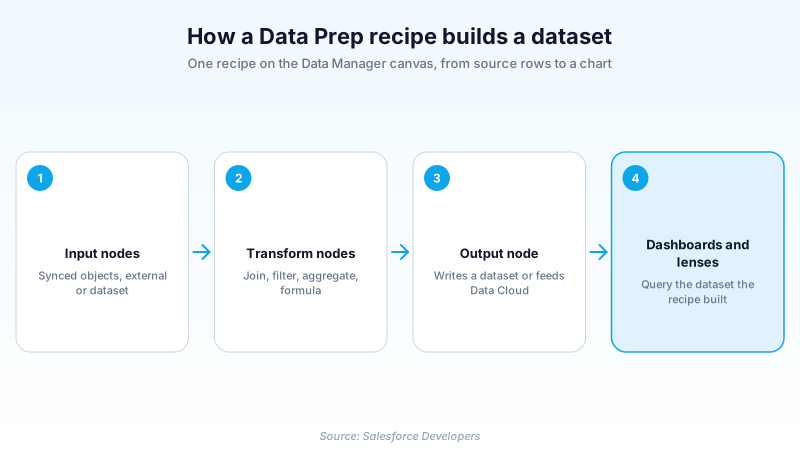
You build one on a visual canvas instead of writing transformation code. An Input node pulls in a synced Salesforce object, connected external data, or an existing dataset. Nodes in the middle join, filter, aggregate and calculate. An Output node writes the finished rows out.
That output is usually a CRM Analytics dataset which dashboards and lenses then query. Each saved recipe lives in your org as a WaveRecipe metadata component with a .wdpr file suffix.
In plain English
“Think of it the way you think of a cooking recipe. You start with raw ingredients, follow steps that chop and combine them, and end up with one finished dish. Here the ingredients are rows of business data, the steps clean and merge them, and the dish is a tidy table that charts can read.”
Worked example
A regional HVAC distributor wants one dataset behind its quarterly win-rate dashboard. In Data Manager the team builds a recipe with three Input nodes: Opportunity, Account and User. A Join node matches Opportunity.AccountId to Account.Id, and a second uses Opportunity.OwnerId to pick up each rep's region. A Filter node keeps rows where StageName is Closed Won or Closed Lost and CloseDate falls in the last eight quarters. A Formula node adds Won_Flag, set to 1 for Closed Won. The Output node writes a dataset named Quarterly_Win_Rate, and the recipe is scheduled for 5 AM, after the nightly data sync.
How a recipe gets from synced objects to a queryable dataset
The preview loop, and getting more than one dataset out
Select any node and CRM Analytics shows you the rows leaving it. That is the build loop: change something, then look at what the count did. A join that quietly doubled every row shows up at the node that caused it. Not six weeks later in a dashboard. One recipe is also not limited to one result. Several Output nodes can hang off the same graph, so the expensive joins run once and feed both a detail dataset and a summary dataset. Results chain too. A dataset one recipe writes can be the Input node of the next. That keeps a shared cleaned base in one place, rather than copied into every recipe that needs it.
R2, R3, and the format field that decides what you are editing
The WaveRecipe metadata type has been available since API version 41.0, and its format field records which generation of Data Prep built the recipe. R2 means a recipe created with Data Prep. R3 means one created with Data Prep at API version 49.0. This matters when you inherit an org that has been running analytics for years. The two generations do not offer identical node options, so a colleague can describe a control you genuinely cannot find. Check the format before assuming your permissions are wrong.
The output does not have to be a CRM Analytics dataset
Salesforce's REST documentation describes recipes as preparing data for use in Analytics and in the Customer Data Platform, the product now sold as Data Cloud. A recipe is therefore not locked to feeding dashboards. That second target changes ownership. If a recipe produces data another team consumes downstream, a casual filter edit becomes someone else's incident. The practical tell is the Output node, so read where it points before you touch anything upstream.
What actually kicks off a run
A recipe does not run because you saved it. You run it by hand, put it on a schedule, or start it from outside the UI. The scheduled path is where most orgs live, and the trap is ordering against data sync. A recipe that fires before its sync finishes will transform the previous set of rows and write a valid dataset from stale input. Nothing errors. The numbers are simply old. From the command line, sf analytics recipe start takes a target org and a recipe ID, and sf analytics recipe list returns those IDs. The older sfdx analytics:recipe forms are marked deprecated.
Moving a recipe between orgs without breaking it
WaveRecipe extends MetadataWithContent, so the recipe definition travels as file content rather than as XML fields. The suffix is .wdpr and it sits in the wave folder. Two required pieces catch people out. The component needs a masterLabel, the name users see in the interface, and the dataflow ID of the Analytics recipe it belongs to. A recipe that deploys but arrives nameless lost its masterLabel in the pipeline. Deletion has a side effect. Salesforce's guidance is to declare only the WaveRecipe component in destructiveChanges.xml, because that removes the recipe and any related WaveDataflow components with it.
Where CRM Analytics stands in 2026
The product is still shipping. The CRM Analytics REST API Developer Guide carries a Summer '26 version at API 67.0, and recipe resources are documented there. WaveRecipe is still in the current Metadata API reference. Those two pages are the check worth repeating. If the REST guide stops publishing a current release version, or WaveRecipe leaves the metadata reference, the picture has changed. Neither has happened yet. No retirement notice for recipes appears in Salesforce's developer documentation today. Build what you need, and keep the transformation logic written down somewhere that is not only a canvas inside one org.
Build a Data Prep recipe in Data Manager
A recipe is quick to start and easy to leave half-finished in a way that quietly produces wrong numbers. Get the inputs and the schedule right first.
- Open Data Manager
From Analytics Studio, open Data Manager. Synced data, recipes and datasets all live here, including recipes a templated app created for you.
- Add your Input nodes
Add an Input node per source: a synced Salesforce object, connected external data, or a dataset an earlier recipe produced.
- Chain the transforms
Drop join, filter, aggregate and formula nodes between input and output. Watch the preview row count after each one. A join that silently multiplies rows shows up here first.
- Point the Output node somewhere
Choose a new or existing dataset, or send the result on to Data Cloud. Name it something a dashboard builder will recognize in six months.
- Run once, then schedule
Run it manually and check the row count against the source. Then schedule it to start after data sync finishes.
One Input node per source: synced object, connected data, or an existing dataset.
A new or existing CRM Analytics dataset, or Data Cloud.
Manual, a recurring schedule, or a start from the Salesforce CLI.
Templated apps only. CreateOnly, CreateExecute, or CreateSyncExecute (the default).
- Nothing in the product is labeled Preparation Recipe. Data Manager and the docs say recipe, and the metadata type is WaveRecipe. Search for those instead.
- Deleting a WaveRecipe through destructiveChanges.xml also removes the related WaveDataflow components, so do not declare both.
- R2 and R3 are not the same editing experience. If a documented node option is missing, check the format field before opening a support case.
Prefer this walkthrough as its own page? How to Preparation Recipe in Salesforce, step by step
How organizations use Preparation Recipe
Joins Opportunity, Account and User into one win-rate dataset so regional dashboards stop disagreeing with each other.
Filters eight years of donation history down to active donors, then aggregates by campaign for a single board dashboard.
Brings work order data in as connected data, cleans technician IDs against User records, and outputs one dataset ops trusts.
Trust & references
Cross-checked against the following references.
- WaveRecipe | Metadata API Developer Guide (opens in new tab)Salesforce
- Recipe Resources | CRM Analytics REST API Developer Guide (opens in new tab)Salesforce
- analytics recipe Commands | Salesforce Analytics Plugin CLI Command Reference (opens in new tab)Salesforce
- Configure Recipe Execution | Analytics Templates Developer Guide (opens in new tab)Salesforce
Straight from the source - Salesforce's reference material on Preparation Recipe.
Hands-on resources to go deeper on Preparation Recipe.
About the Author
Dipojjal Chakrabarti is a B2C Solution Architect with 29 Salesforce certifications and over 13 years in the Salesforce ecosystem. He writes and edits salesforcedictionary.com, published by KineticBit Inc., to help admins, developers, architects, and cert/interview candidates sharpen their fundamentals. More about Dipojjal.
Test your knowledge
+5 pts / dayQ1. In CRM Analytics, what does the Output node of a Data Prep recipe do?
Q2. A recipe's format field reports R3 rather than R2. What does that tell you?
Q3. A templated app creates a recipe but never runs it. Which executeCondition value produces that?
Discussion
Loading discussion…