
Knowledge Article Version
Knowledge Article Version is the actual content record in Salesforce Knowledge.
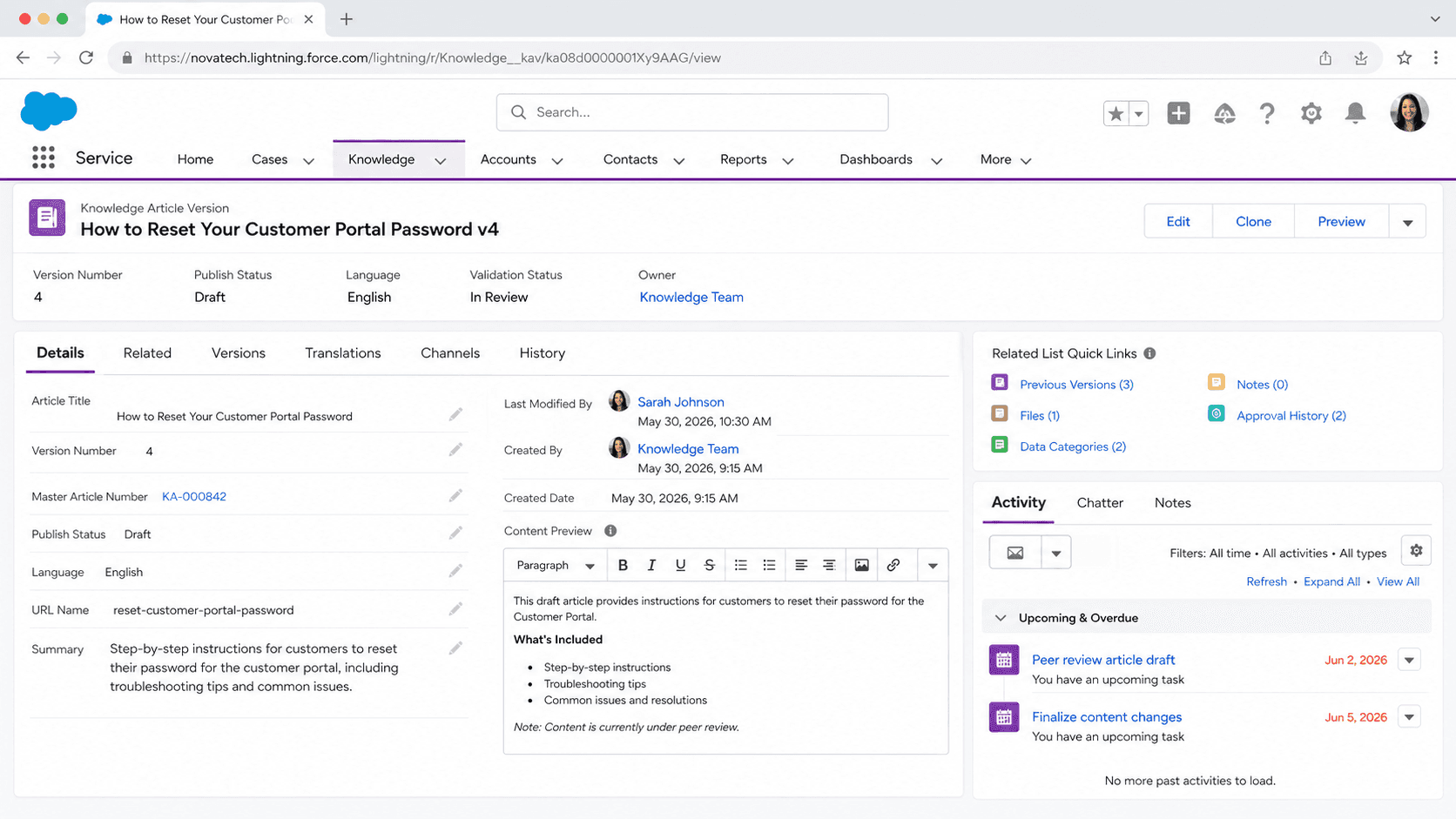
Definition
Knowledge Article Version is the actual content record in Salesforce Knowledge. Each Knowledge Article is a container that holds multiple versions: draft versions in progress, the one Online published version visible to users, and archived versions from past publish cycles. The Version record carries the title, body, fields, channel availability, and translation linkage; the parent Article record is just an ID and metadata wrapper.
The version model is what lets Salesforce Knowledge separate the "what is published right now" from "what is being edited" without breaking links or search indexes. A Version moves through three states: Draft (editable), Online (published, read-only), Archived (no longer published). At any moment one Version is Online and any number can be Draft or Archived. Republishing creates a new Version, demotes the previous Online version to Archived, and updates the parent Article's pointer.
How Knowledge Article Version separates editable drafts from the live published content
The Article-Version data model
Every Knowledge article in Salesforce has two layers. The parent record is on the Knowledge__kav object (kav stands for Knowledge Article Version, slightly confusing naming). The KnowledgeArticle parent record holds the unique article number, the article type, and a pointer to the current Online version. The Knowledge__kav records are the actual versions, with full content. Most reports, searches, and field-level customizations work on Knowledge__kav, not on the parent. When a developer says "the Knowledge object" they almost always mean Knowledge__kav.
Draft, Online, Archived: the three publication states
Three states. Draft versions are editable, do not show up in agent search, and do not deliver to customers. Online versions are the published state, read-only, indexed by search, and visible on the configured channels. Archived versions are historical, not searchable in standard agent UI, but retained for reference and audit. At any moment, an article has exactly one Online version. Publishing a new Version moves the prior Online to Archived and elevates the Draft. Reverting to a prior version is a copy-back operation, not an in-place rollback.
Channels and where each Version surfaces
Each Version has Channel flags: Internal App (Salesforce internal users), Customer (Experience Cloud sites for customers), Partner (Experience Cloud partner portals), Public Knowledge Base. A version published to Internal App but not Customer is visible to agents but not to the customer searching the help site. Channel flags are the lever for managing internal-only knowledge versus customer-facing content. Channel changes do not require a new version; they can be edited on the Online version directly.
Translations and Master-Translation Versions
Multilingual Knowledge layers an additional dimension on Versions. The master-language Version (typically English) drives the translated versions. Creating a translation creates a separate Knowledge__kav record linked to the master. Translated versions have their own Draft, Online, Archived lifecycle, but they reference the master for structural alignment. Republishing the master automatically marks translated versions as outdated, prompting the translation team to refresh them.
Data Categories and access control
Data Categories are the access control mechanism on Knowledge Articles. Categories are hierarchical tags (Product > Cloud Storage > Pricing) assigned per Version. Profiles and Permission Sets define which categories each user role can see, so an article tagged Confidential is invisible to customers regardless of channel flag. Categories assign on the Version, not the parent Article, which means different versions of the same article can technically have different category assignments; in practice this is brittle and confusing, so set categories on the first draft and treat them as immutable.
Article numbers and stable URLs
Every Article has a stable Article Number (000001234) that does not change across versions or republishes. This is the canonical identifier for linking. The Version Number increments on each publish (1, 2, 3). URLs to Knowledge articles use the Article Number, not the Version ID, so external links survive republishes. Search indexes also key on Article Number for ranking signals, which is why republishing does not reset article performance metrics.
The Lightning Knowledge migration
Salesforce Classic Knowledge used a different data model with multiple article types (How-To, FAQ, Reference) as separate objects. Lightning Knowledge unified all article types into one Knowledge__kav object with a Record Type. The migration from Classic to Lightning Knowledge is a one-way, irreversible operation on the org level. Many orgs are still on Classic Knowledge; the migration is required for any future Knowledge features (Einstein Article Recommendations, Knowledge GPT) so Salesforce strongly nudges customers toward it.
Creating, editing, and publishing a Knowledge Article Version
Authoring a Knowledge article means creating a Version, drafting content, validating it, and publishing it Online. The lifecycle is built into the UI; most authors never touch the underlying Knowledge__kav object directly.
- Create a new Article
Knowledge tab, New Article. Pick the Record Type (How-To, FAQ, Reference, depending on the article types defined in Setup). The system creates a new parent KnowledgeArticle record and the first Draft Knowledge__kav Version. The Article Number is assigned automatically.
- Fill in the Version fields
Title, URL Name (the slug for public URLs), body content via the rich-text editor, summary, validation status, and any custom fields. Assign Data Categories that scope visibility. Save as Draft.
- Set channel flags
Edit the Version, toggle the Internal App, Customer, Partner, and Public Knowledge Base channel flags. Each flag controls a different audience. Internal-only articles for agent reference are common; customer-facing knowledge usually flips Customer and Public Knowledge Base together.
- Publish the Version
Click Publish on the Draft. Salesforce moves the prior Online Version to Archived, elevates this Draft to Online, and triggers reindex. Optionally schedule a future publish date for time-boxed launches.
- Track translations
For multilingual Knowledge, click Submit for Translation on the Online Version. Translated drafts are created automatically and assigned to the translation queue. Republish each translated Version after review.
The article headline. Appears in search results and as the page title. Limited to 255 characters but stays under 70 for SEO.
The slug used in the public article URL. Auto-generated from the title; can be edited but should be set before first publish.
Determines which article type (How-To, FAQ, etc) and which custom fields apply. Set at creation, cannot be changed without recreating the article.
Picklist value driving the review workflow (Not Reviewed, In Review, Approved). Required when the org enables Validation Workflow.
- Each article has exactly one Online Version at any time. Publishing a Draft demotes the previous Online to Archived; in-place rollback requires a clone-back-and-publish operation.
- Data Category assignments live on the Version, not the parent. Different versions could in theory have different categories; treat them as immutable in practice.
- Channel flag changes do not require a new Version. Edit channels on the Online Version to retire it from a channel without republishing.
- Lightning Knowledge migration is one-way. Plan it as a major project; once flipped, Classic Knowledge views are gone forever.
- Article Number stays stable across republishes. Use it as the canonical link; URL Name changes break inbound links and SEO.
Prefer this walkthrough as its own page? How to Knowledge Article Version in Salesforce, step by step
Trust & references
Cross-checked against the following references.
- Article Versions in Salesforce Knowledge (opens in new tab)Salesforce Help
- Knowledge__kav Object Reference (opens in new tab)Salesforce Developer Docs
Straight from the source - Salesforce's reference material on Knowledge Article Version.
- Publish a Knowledge Article (opens in new tab)Salesforce Help
- Translate a Knowledge Article (opens in new tab)Salesforce Help
About the Author
Dipojjal Chakrabarti is a B2C Solution Architect with 29 Salesforce certifications and over 13 years in the Salesforce ecosystem. He writes and edits salesforcedictionary.com, published by KineticBit Inc., to help admins, developers, architects, and cert/interview candidates sharpen their fundamentals. More about Dipojjal.
Test your knowledge
+5 pts / dayQ1. What is a Knowledge Article Version in the Salesforce Knowledge content model?
Q2. Why does Salesforce Knowledge keep multiple versions instead of one record per article?
Q3. What keeps an external link to a Knowledge article working across republishes?
Discussion
Loading discussion…