
High Velocity Sales
High Velocity Sales (HVS) is the retired Salesforce product name for what is now called Sales Engagement.
Definition
High Velocity Sales (HVS) is the retired Salesforce product name for what is now called Sales Engagement. It is the Sales Cloud add-on that runs cadences for inside sales teams. Reps work a prioritized queue, and the emails and calls they make get logged against the record. Salesforce first flagged the rename in the Spring '22 release notes, and by Winter '23 was writing about it in the past tense.
Nothing was switched off. The rename swapped labels, not architecture. Existing cadences kept running, their tracker records were untouched, and orgs using HVS on the day of the change needed no migration.
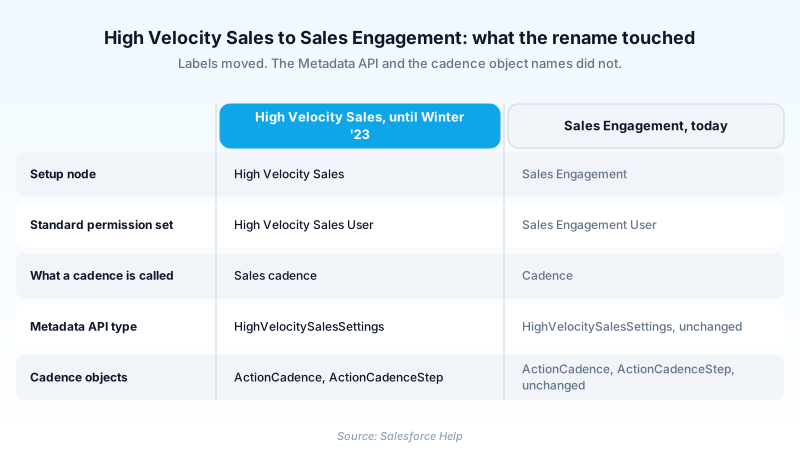
What makes the old name stubborn is the API. The Metadata API type is still HighVelocitySalesSettings, the settings file is still HighVelocitySales.settings, and the master switch is still enableHighVelocitySales. The brand is retired in the product and permanently alive in the code.
In plain English
“A company changed the name of one of its products and kept the product itself exactly the same. High Velocity Sales was the old name. Sales Engagement is the current one. If an old document mentions High Velocity Sales, it is describing something that is still running today under a different label.”
Worked example
A regional insurance brokerage bought HVS in 2019 for its 30 SDRs. In 2026 a new admin retrieves the org's metadata and finds HighVelocitySales.settings with enableHighVelocitySales set to true, plus a folder of ActionCadence records including one named Broker Outbound Q1. She types High Velocity Sales into Setup and gets nothing back, because the node reads Sales Engagement. She searches Permission Sets for HighVelocitySalesUser and gets nothing there either, because the standard sets are Sales Engagement User and Sales Engagement Cadence Creator. Everything is working; only the vocabulary moved. She assigns Sales Engagement User to a new rep, and that rep's cadence targets appear in the work queue at next login.
What the rename actually touched, and what it left alone
The rename, release by release
The Spring '22 release notes carried the first warning, titled High Velocity Sales Will Soon Be Sales Engagement. Summer '22 repeated it, still in the future tense, as High Velocity Sales to Be Renamed Sales Engagement. Winter '23 is where it landed, under a section header reading Sales Engagement (formerly High Velocity Sales). Three releases of overlap, Spring '22 through Winter '23, is how Salesforce handles a pure branding change. Warn twice, then ship it with the old name still printed in brackets.
The API kept the old name and still has it
Salesforce does not rename metadata types. Doing so would break every deployment package and every source-tracked repo that already references the old name. So HighVelocitySalesSettings, which arrived in API version 47.0, is still what you retrieve in Summer '26 under API 67.0. The giveaway is what came afterward. Fields added to that same type years after the rebrand, like enableMultipleCadencesPref in 57.0 and enableBusinessHours in 58.0, carry no HVS branding whatsoever. Old shell, new furniture. The cadence objects behave the same way: ActionCadence, ActionCadenceStep and ActionCadenceTracker were never HVS-prefixed and were never touched.
Where the labels genuinely did change
The Setup node reads Sales Engagement. So do the standard permission sets: Sales Engagement User, Sales Engagement Cadence Creator, Sales Engagement Quick Cadence Creator and Sales Engagement Basic in Enterprise, with Included variants for Unlimited and Performance. The same Winter '23 note carried a smaller rename that people forget: sales cadences became simply cadences. Documentation titles moved too, but the URLs underneath them did not. The Trailhead badge is now called Sales Engagement Basics and still sits at /modules/high-velocity-sales. Help articles still use IDs like hvs_setup and hvs_setup_enable.
Why the old term still earns a page in 2026
Orgs bought before 2022 carry the string in retrieved metadata, deployment manifests and runbooks written by people who have since left. AppExchange listings and consultancy write-ups from the 2018 to 2022 window use HVS throughout, and most of that guidance is still correct. The product is also far from dormant. Cadence Builder 2.0 landed in Spring '24, and cadences now carry a Version field naming the builder that created them. Agentforce Lead Nurturing (the agent template previously called Agentforce SDR) drops prospects into a dedicated Sales Engagement cadence.
Trust & references
This term has been renamed to Sales Engagement.
View current pageCross-checked against the following references.
- HighVelocitySalesSettings | Metadata API Developer Guide (opens in new tab)Salesforce
- Sales Engagement Actions | Actions Developer Guide (opens in new tab)Salesforce
- Cadence Overview | Sales Engagement Developer Guide (opens in new tab)Salesforce
- High Velocity Sales Will Soon Be Sales Engagement (Spring '22 Release Notes) (opens in new tab)Salesforce
- Sales Engagement (formerly High Velocity Sales) (Winter '23 Release Notes) (opens in new tab)Salesforce
Straight from the source - Salesforce's reference material on High Velocity Sales.
Hands-on resources to go deeper on High Velocity Sales.
About the Author
Dipojjal Chakrabarti is a B2C Solution Architect with 29 Salesforce certifications and over 13 years in the Salesforce ecosystem. He writes and edits salesforcedictionary.com, published by KineticBit Inc., to help admins, developers, architects, and cert/interview candidates sharpen their fundamentals. More about Dipojjal.
Test your knowledge
+5 pts / dayQ1. High Velocity Sales was renamed to Sales Engagement. When did Salesforce carry out the rename?
Q2. An admin retrieves org settings metadata from a 2026 org running Sales Engagement. Which metadata type holds the feature's org-level switches?
Q3. You inherit an org along with a 2020 runbook that says to grant users the HighVelocitySalesUser permission set. What do you actually find in Setup?
Discussion
Loading discussion…