
Salesforce Security Overhaul, May 27
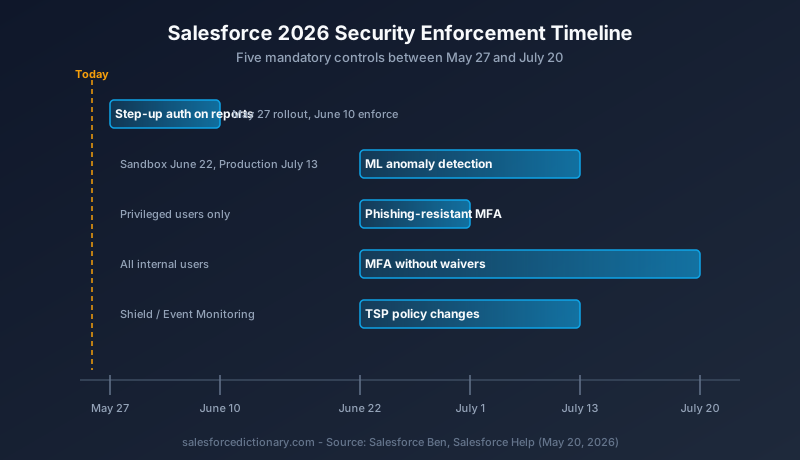
Step-up auth on reports lands in orgs May 27, with enforcement starting June 3. Plus four other mandatory controls landing by mid-July. Here is the timeline and what admins need to do this week.

Step-up authentication for reports lands in every Salesforce org on May 27, 2026. Enforcement starts June 3 in sandboxes and June 10 in production. That is one week away. Four more mandatory controls follow, with the last enforcement date falling on July 20. If you have not started the admin work, this week is the one to do it.
This is the most aggressive Salesforce security push since the MFA mandate of 2022. The difference: this time there is no waiver, no exemption permission, and no opt-out for IP-restricted networks. Salesforce's own framing, as one community write-up put it, is that the company is "done asking" (Arkus). Here is the timeline, the five controls, and the work that needs to land in your org before May 27.
What is rolling out, in one paragraph
Salesforce is enforcing five new platform controls between May 27 and July 20, 2026: time-based step-up authentication on reports, machine-learning-based anomalous report detection, MFA for all internal users without exemption, phishing-resistant MFA for privileged users, and new Transaction Security Policy defaults including step-up auth on report exports over 10,000 records. The Salesforce Ben roadmap (source) covers each in detail. None of these are opt-in. All of them apply regardless of network location, trusted IP range, or company VPN.
Control 1: Step-up authentication on reports (May 27)
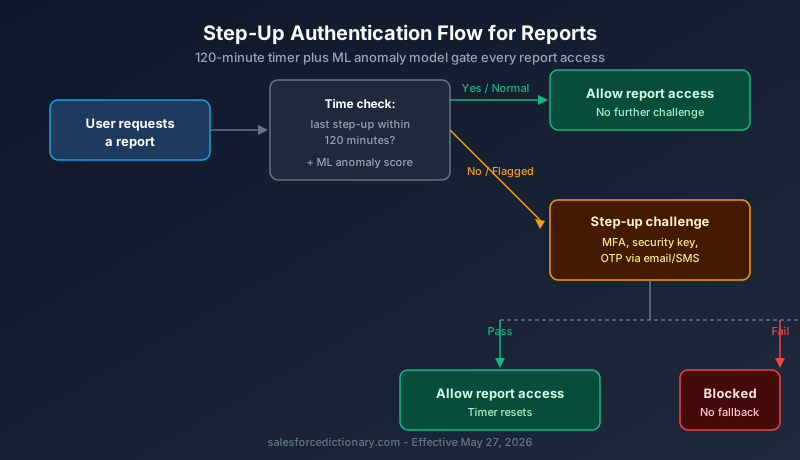
This is the one that hits first and hits hardest. Starting May 27, every user who runs or views a report must complete a step-up authentication challenge. The default refresh interval is 120 minutes. Admins can configure between 2 and 120 minutes (Salesforce Break).
The fallback chain matters. If a user has not enrolled in MFA, the system attempts a one-time password via email or SMS. If neither is on file, the report action is blocked. Salesforce will not fail open. As Salesforce Break summarized the design choice: "Reports are blocked rather than allowed through if verification services go down; data protection prioritized over access convenience." That is a direct change in posture.
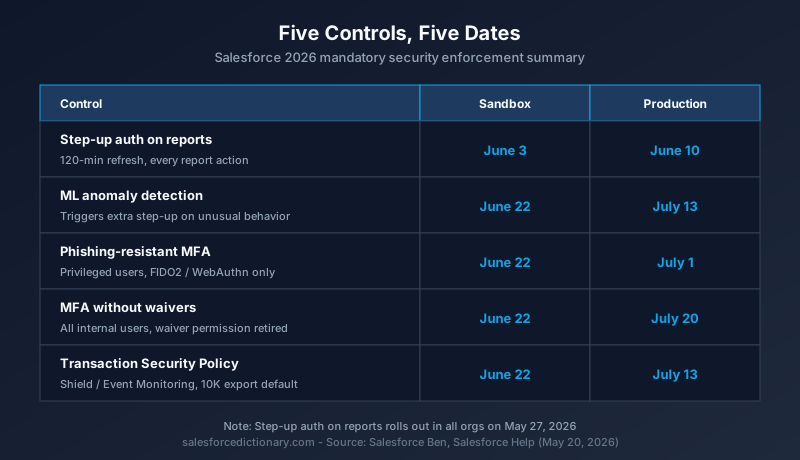
The enforcement schedule is staggered. Sandboxes get the feature on May 27 and enforcement on June 3. Production orgs get the feature the same day and enforcement on June 10. You have one week of soft rollout in sandboxes to test before users start hitting prompts in production.
Two scenarios admins should walk through this week:
- A sales rep who runs a forecast report at 9:00 a.m. and again at 11:30 a.m. will be prompted on the second view. That is by design. Communicate it before users start filing tickets.
- A service agent who exports a case-volume report to CSV will be prompted before the export executes, not after. If the agent fails the challenge, the export is canceled.
The admin work: confirm every report user has at least one Salesforce-side verification method on file. Authenticator app, security key, registered phone, or registered email. SSO and IP allowlisting do not exempt anyone.
Control 2: ML-based anomalous report detection (June 22 / July 13)
This one sits behind the time-based step-up. Salesforce is shipping a continuously trained machine learning model that learns each user's normal report behavior. Pattern dimensions include which reports a user runs, when they run them, how often, how many records they pull, and whether they export.
If the model flags a deviation, the next report action that user attempts triggers a step-up challenge regardless of whether their 120-minute window has reset. If they fail the challenge, the action is blocked.
Sandbox rollout is June 22. Production is July 13. This is the control that catches the credential-theft scenario where an attacker logs in with valid credentials and immediately starts exporting customer lists. The behavior does not match the user's history, the model flags it, the step-up fails, and the export is blocked.
There is no admin configuration for the model itself. It runs on Salesforce-side telemetry. The admin work is downstream: define the runbook for what happens when a legitimate user hits a false-positive flag, and make sure the user's verification methods are current so they can actually complete the step-up.
Control 3: MFA for all internal users, no waivers (June 22 / July 20)
Salesforce mandated MFA in 2022, but the "Waive Multi-Factor Authentication for Exemptions" permission has been the escape hatch for four years. That permission is being eliminated. The Salesforce Ben writeup confirms: "The waiver option no longer applies to standard UI access" (source).
Enforcement lands in sandboxes on June 22 and in production on July 20. After those dates, internal users without a registered MFA method are blocked at the login screen. SSO users are validated through AMR and ACR signals returned by the identity provider. If the IdP does not return the right signal, Salesforce falls back to its own MFA enrollment.
This is the control that catches consulting partners and managed-service teams that have been operating with waivers granted years ago and never reviewed. Audit Setup > Identity Verification > Waive Multi-Factor Authentication for Exemptions and identify every user with that permission. Enroll them before June 22.
A separate technical detail worth flagging: for SSO users, the AMR/ACR signal validation means that an IdP misconfiguration translates directly into a Salesforce-side MFA prompt. Test SSO flows in a sandbox the week of June 1 and confirm the right signals are being passed. Okta, Azure AD, Ping, and OneLogin all need separate verification. Don't assume.
Control 4: Phishing-resistant MFA for privileged users (June 22 / July 1)
This one is the sharpest break with the past. Authenticator apps, push notifications including Salesforce Authenticator, and TOTP codes from any source do not qualify after enforcement (Salesforce Help).
What does qualify: physical security keys supporting FIDO2 or WebAuthn (YubiKey, Google Titan), and built-in authenticators (Touch ID, Face ID, Windows Hello, passkeys). That is it. The Salesforce Authenticator app, the one Salesforce shipped, does not meet the standard for privileged users.
Who counts as privileged: anyone with the System Administrator profile or with the Modify All Data, View All Data, Customize Application, or Author Apex permissions. In most orgs that is more people than the admin team realizes. Run a permission set audit this week. Identify every user with any of those four permissions, and budget for hardware keys or biometric devices.
Cost guidance from the community: $25 to $50 per physical key, and the recommendation is to register two methods per privileged user as backup (Salesforce Ben). If you have 40 admins and partners with elevated permissions, that is a $2,000 to $4,000 hardware bill. Procurement lead times for YubiKeys can stretch past two weeks. Order today.
Sandbox enforcement is June 22. Production enforcement is July 1. The setting locks after enforcement, meaning admins cannot disable phishing-resistant MFA even temporarily. A privileged user who has not registered a qualifying method on July 1 cannot log in.
Control 5: Transaction Security Policy changes (June 22 / July 13)
This control applies only to orgs licensed for Salesforce Shield or Event Monitoring. Two changes ship.
First, a new default Transaction Security Policy fires step-up authentication for report exports of 10,000 or more records through the UI. This is a default policy, not optional. Orgs with custom policies in the same space should review for conflicts.
Second, a new "Modify Transaction Security" permission is required to edit, enable, or disable any TSP. Customize Application alone is no longer enough. Any TSP modification will itself trigger a step-up challenge. The audit trail is the point. Salesforce wants every policy change to be visibly authenticated.
The admin work splits into two tracks. Track one: review every existing TSP for the report-export space and confirm the new default policy does not conflict. Track two: identify who in the org should hold "Modify Transaction Security" and assign it before June 22.
What is not exempted
The list of things that do not get you out of step-up authentication is the most important paragraph in the whole rollout. Trusted IP ranges do not exempt. Login IP restrictions do not exempt. Company VPN does not exempt. Salesforce Authenticator push notifications do not satisfy phishing-resistant MFA for privileged users. Session timeout settings do not override the 120-minute step-up window.
The Spot for Pardot writeup is direct about the change in posture: the network-perimeter model is being deprecated inside Salesforce's identity layer, in favor of a per-action authentication model that does not trust the network (source). That is a meaningful architectural shift. Orgs that have relied on IP allowlisting as a primary control should plan for a different model.
Why now
The community-side framing is consistent across writeups. Salesforce Break attributes the urgency to a shift in attack patterns: "early 2025 featured social engineering, late 2025 saw attackers bypassing MFA through malicious app approvals, and 2026 introduces AI-accelerated attacks including automated phishing and deepfakes." The quote from Salesforce's security team referenced in the same writeup: "Attacks that previously took days, weeks, or even months to accomplish can now happen in minutes."
Read alongside the May 9 Connected App deadline that already required revalidation of every connected app in every org, the pattern is clear. Salesforce is closing the gap between the way customers actually configure their orgs and the way Salesforce wants those orgs configured. The Connected App work, the MFA-without-waivers push, the phishing-resistant requirement for admins, and the report step-up are not independent initiatives. They are one coordinated security posture reset.
The admin checklist for this week
The work that needs to happen before May 27, in order:
- Audit users without an MFA method on file. The Multi-Factor Authentication Dashboard in Salesforce Labs is the right tool. Enroll the gaps.
- Audit users with the "Waive Multi-Factor Authentication for Exemptions" permission. That permission is being retired. Enroll them on real MFA.
- Audit users with System Administrator, Modify All Data, View All Data, Customize Application, or Author Apex. Order hardware keys or confirm biometric availability for every one.
- Confirm SSO configurations are passing AMR/ACR signals correctly. Test in a sandbox the week of June 1.
- Identify the org's "Modify Transaction Security" permission holders if you are on Shield or Event Monitoring. Assign before June 22.
- Review existing Transaction Security Policies for conflict with the new default report-export policy.
- Write the user communication. The first time a sales rep gets prompted to step up for a forecast report at 11:30 a.m., the help desk will get a ticket. Get ahead of it.
- Document the runbook for ML-based anomaly false positives. Decide who triages and how.
What to watch
Three things, in order of likelihood. First, ticket volume the week of June 3 in sandboxes and June 10 in production. Step-up prompts will produce noise. Second, partner-side outages: consulting partners with old waivers and shared accounts will hit the wall on June 22. Third, hardware key supply. YubiKey lead times can stretch when enterprise procurement spikes. Order before the rest of the ecosystem does the same math.
The enforcement clock starts in seven days. Use them.
About the Author
Dipojjal Chakrabarti is a B2C Solution Architect with 29 Salesforce certifications and over 13 years in the Salesforce ecosystem. He writes and edits salesforcedictionary.com, published by KineticBit Inc., to help admins, developers, architects, and cert/interview candidates sharpen their fundamentals. More about Dipojjal.
Share this article
Sources
- Salesforce Security Roadmap 2026: What's Changing and How to Prepare (Salesforce Ben)
- Salesforce Is Tightening Security Across Every Org (Salesforce Break)
- Upcoming Salesforce Platform Security Changes and How to Prepare (The Spot for Pardot)
- Prepare for Phishing-Resistant MFA Enforcement (Salesforce Help)
- Security-Related Product Updates to the Salesforce Platform (Salesforce Help)
Related dictionary terms
Practise it
Five questions on Administrator
Exam-style questions with an explanation after each one. No account needed, and your answers build a weak-topic map once you have one.
Comments
No comments yet. Start the conversation.
Sign in to share your take on this article. Your account works across every page.