
Marketing Cloud MCP Server Goes GA
Salesforce's hosted MCP server for Marketing Cloud Engagement is now GA. Any MCP-compatible AI agent (Claude, ChatGPT, Cursor, Gemini) can now manage data extensions, journeys, and automations in plain English.

A marketing ops person opens Claude and types: "Find all contacts who opened our last email but did not click, then build a re-engagement journey that sends a follow-up after 30 days of inactivity." Thirty seconds later the data extension exists and the journey is drafted. No AMPscript. No SQL. No clicking through Journey Builder. That workflow is now Generally Available.
Salesforce shipped the MCP Server for Marketing Cloud Engagement to GA this month as part of the Summer '26 wave, per the Salesforce Developers Blog. It is the first first-party, enterprise-hosted MCP server for MCE, and it changes who can operate the platform.
What an MCP server actually is
Model Context Protocol is an open standard. It defines how an LLM-powered agent connects to and controls an external system through a consistent set of tools, so the agent does not need custom glue code for every platform it touches. Think of it as a universal adapter between an AI client and a backend.
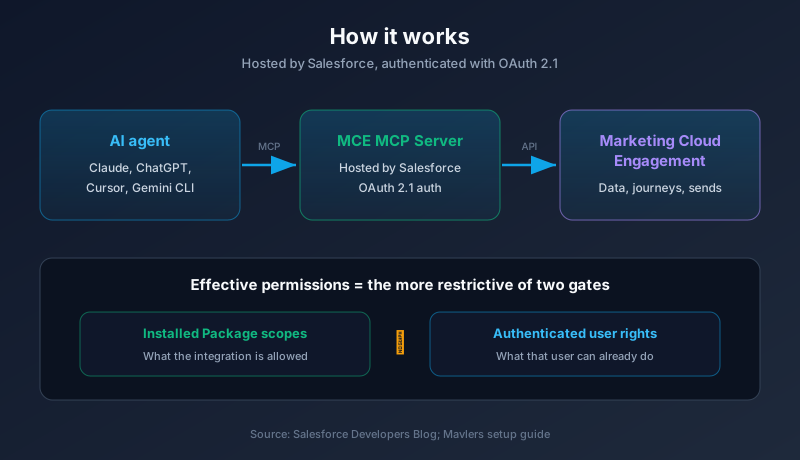
The MCE MCP Server is Salesforce's hosted implementation of that standard for Marketing Cloud Engagement. Any MCP-compatible client can connect to it: Claude (Code and Desktop), ChatGPT, Cursor, Gemini CLI, and others. Once connected, the agent can read and write Marketing Cloud objects directly, translating your plain-English request into the API calls MCE understands.
That last part is the whole point. Marketing Cloud has always demanded either developer skills or deep UI fluency. Data extensions, AMPscript, SQL queries against subscriber data, Journey Builder mechanics. The MCP server moves that work behind a conversation.
What you can actually do with it
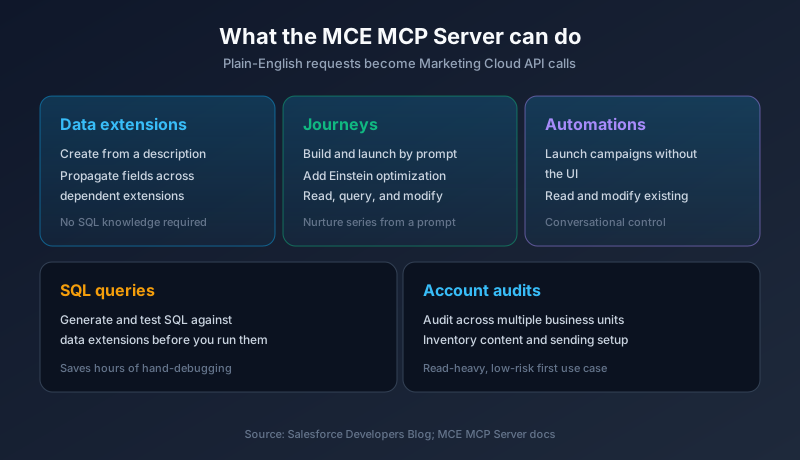
This is not a demo with three toy commands. The GA feature set covers real operational work, according to the release blog and the Salesforce developer docs.
You can create data extensions from a plain-English description, then propagate new fields across dependent extensions instead of editing each one by hand. You can build and launch journeys conversationally, add Einstein optimization to journey steps, and stand up a nurture email series from a prompt. You can read, query, and modify existing journeys and automations.
On the analysis side, the agent can audit accounts across multiple business units, inventory content and sending infrastructure, and generate and test SQL queries against data extensions before you run them. For anyone who has hand-written and debugged SFMC SQL, that last one alone saves hours.
The pattern is consistent. The agent does the translation, you describe the outcome. "Build a welcome series for new subscribers with three emails over ten days" becomes an actual automation, not a ticket for a developer.
How you connect it
Setup is configuration, not coding. The server is fully hosted by Salesforce, so there is no infrastructure to stand up or maintain.
The steps, per the Mavlers setup guide and Salesforce docs: install an Installed Package in Marketing Cloud Setup, create an API Integration component of the Public App type, configure your permission scopes, retrieve the Client ID and Tenant ID, and update the Redirect URI. Authentication runs on OAuth 2.1. Then you point your MCP client at the server with those credentials.
That is it. The hard parts (hosting, protocol handling, token exchange) are Salesforce's problem now.
The security model is the part marketers will skip and shouldn't
Giving an AI agent write access to your production marketing platform should make you nervous. Salesforce built guardrails for exactly that nerve, and you need to understand them before you grant access.
The server uses Installed Package OAuth. The agent's effective permissions are the intersection of two things: the scopes you granted the Installed Package, and the permissions of the user who authenticated. Whichever is more restrictive wins. An agent acting as a read-only user cannot delete a journey even if the package allows deletion, and a package without delete scope blocks deletion even for an admin. Both gates have to open.
Existing Marketing Cloud API limits still apply. The MCP server does not get a special lane around your rate limits or allocations, which means its calls count against the same account allocation everything else uses. Destructive operations are not on by default. Deletion and similar high-blast-radius actions require permissions to be granted explicitly.
There is also a human-in-the-loop expectation for anything production-sensitive. Journey updates, deletions, and large data writes are meant to route through human approval rather than firing autonomously. Treat the agent like a fast junior employee with a manager who signs off on anything risky, because that is the model the design assumes.
Practical advice: scope the Installed Package tight, authenticate the agent as a purpose-built integration user with only the permissions the use case needs, and start in a sandbox or non-production business unit. Do not point a fully-privileged admin session at your live sending account on day one.
The limitations are real, so set expectations
This is a GA product with a clearly bounded scope, and pretending otherwise will burn you.
Right now it is limited to MCE APIs. Expansion to other Marketing Cloud APIs is on the roadmap, but today the surface is Marketing Cloud Engagement, and support is scoped to those same APIs. It cannot create folders yet, which is a small but annoying gap if your org leans on folder structure for organization. And again, every call the agent makes consumes your API allocation, so a chatty automation session is not free.
None of these are dealbreakers. They are the difference between "this replaces my whole team" and "this is a genuinely useful tool with edges." Know the edges.
Where this sits in Salesforce's MCP push
The MCE server is one piece of a wider expansion, and the pattern tells you where Salesforce is headed.
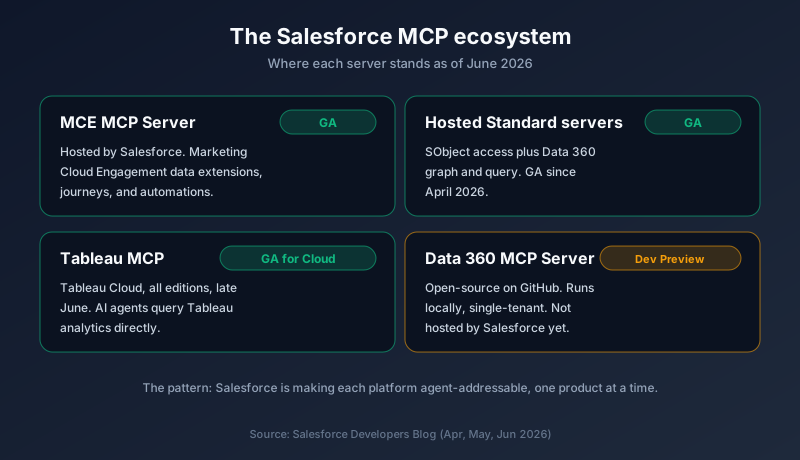
Salesforce Hosted Standard MCP Servers covering SObject access and Data 360 graph and query went GA back in April, per the hosted MCP servers announcement. The Data 360 MCP Server is in Developer Preview, open-source on GitHub, running locally and single-tenant rather than hosted. And Tableau MCP reached GA for Tableau Cloud across all editions in late June, letting AI agents query Tableau analytics directly.
Read together, this is Salesforce making its platforms agent-addressable one product at a time. Core CRM data, Data 360, analytics, and now marketing. The MCE server is the marketing chapter of a strategy that is clearly going wide.
This is a different release from the June 6 AMPscript news
Worth a clarification, because the names blur. The June 6 story was Marketing Cloud Next gaining AMPscript support for email scripting. This is Marketing Cloud Engagement, the classic platform, getting an MCP server. Different product, different capability. One is a scripting language landing in the new platform. The other is a protocol that lets AI agents drive the established one. They are not the same announcement, and they do not replace each other.
What to do this week
Pick one low-risk use case and prove it before you scale. Account auditing across business units is a good first job, because it is read-heavy and hard to break anything with.
Then move in this order. Spin up a non-production business unit or sandbox and install the package there first. Create a dedicated integration user and grant it only the permissions your test case needs, nothing more. Scope the Installed Package to match, and leave destructive scopes off until you have a reason to turn them on. Connect your MCP client (Claude Code, ChatGPT, Cursor, or Gemini CLI) and run the audit. Watch what API calls it generates and confirm they stay inside your allocation.
Once that works and you trust the permission boundaries, expand to journey and data-extension creation in a controlled unit, keeping a human approval step on anything that writes to production. Do not hand a privileged agent your live sending account on faith. Earn the trust one scope at a time.
The MCP server moves Marketing Cloud operations from "needs a developer" to "needs a sentence." That is a big shift in who can do the work. Just make sure the permission model is locked down before the convenience tempts someone into pointing it at production.
About the Author
Dipojjal Chakrabarti is a B2C Solution Architect with 29 Salesforce certifications and over 13 years in the Salesforce ecosystem. He writes and edits salesforcedictionary.com, published by KineticBit Inc., to help admins, developers, architects, and cert/interview candidates sharpen their fundamentals. More about Dipojjal.
Share this article
Sources
- The MCP Server for Marketing Cloud Engagement is Now GA (Salesforce Developers Blog)
- Salesforce Hosted MCP Servers Are Now Generally Available (Salesforce Developers Blog)
- Introducing the Data 360 MCP Server (Developer Preview) (Salesforce Developers Blog)
- The Salesforce Developer's Guide to the Summer '26 Release (Salesforce Developers Blog)
- Marketing Cloud MCP Server Is Here. What It Means for Your Team (Mavlers)
- MCP Server for Marketing Cloud Engagement (Salesforce Developer Docs)
Related dictionary terms
Practise it
Five questions on Marketing Cloud Specialist
Exam-style questions with an explanation after each one. No account needed, and your answers build a weak-topic map once you have one.
More news

Marketing Cloud Next Gets AMPscript
Salesforce's Summer '26 release adds AMPscript and native RCS to Marketing Cloud Next, and the June 5 production wave started rolling both out. Here is what email and SMS teams get, what is missing, and what to test first.

CNX26: Agentforce Marketing Ships
Salesforce Connections 2026 wrapped with Piper (SDR Agent) and Hunter (Prospecting Agent) hitting GA, Content Agent and Goals Agent entering pilot, Marketing Cloud Next rebranding under Agentforce Marketing, and GEO replacing SEO.
Comments
No comments yet. Start the conversation.
Sign in to share your take on this article. Your account works across every page.