
Marketing Cloud Next Gets AMPscript
The Summer '26 release brings AMPscript and native RCS to Marketing Cloud Next, and the June 5 production wave started pushing both to live orgs. The migration math just changed.

Marketing Cloud Next Gets AMPscript and Native RCS
Salesforce just removed the single biggest reason marketers refused to move off classic Marketing Cloud. The Summer '26 release brings AMPscript to Marketing Cloud Next, and the June 5 production rollout wave started pushing it to live orgs this weekend. Native RCS messaging shipped alongside it. If you parked an SFMC-to-MCN migration last year because the new platform could not run your email scripts, that blocker is gone. Mostly.
Here is what landed, what is still missing, and what to test before you trust it with a real send.
The AMPscript gap was the whole problem
Marketing Cloud Next launched without AMPscript. That was not a small omission. AMPscript is the proprietary scripting language that classic Marketing Cloud Engagement runs on, and serious marketing teams have years of it baked into their email templates, dynamic content blocks, and SMS logic. Personalization, conditional content, data extension lookups, formatting. All of it written in AMPscript.
When MCN shipped with only Handlebars, the message to existing customers was blunt: rewrite everything before you migrate. For a team with hundreds of templates, that is not a migration. That is a rebuild. So most of them waited.
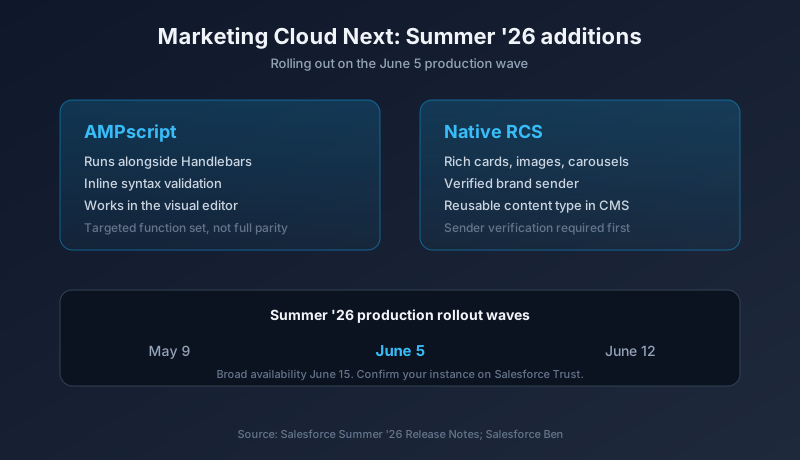
Summer '26 changes the calculus. Marketers can now use AMPscript alongside Handlebars to retrieve, transform, and format CRM and profile data directly in email content. You no longer have to re-engineer scripts into Flow or Data 360 before they will run. You write AMPscript in the message, the same way you always have.
What you actually get
Three things matter in the AMPscript update, and they are practical.
First, AMPscript and Handlebars now coexist in the same content. You can combine HTML, Handlebars, and AMPscript in one message. That means a partial migration is now viable. Lift a template across, keep the AMPscript blocks that work, and rewrite only the pieces that do not.
Second, the editor validates scripting directly in the message interface. Classic Marketing Cloud taught a generation of email developers to catch syntax errors with test sends, because that was the only feedback loop available. MCN now flags syntax problems in the editor before you send. Inline validation in an email builder is overdue, and it is here.
Third, AMPscript works inside the visual editor, not just in code view. You can drop scripting into the traditional drag-and-drop builder, which keeps it usable for people who do not live in raw HTML.
That combination lowers the migration cost in a real way. The job shifts from "rewrite the entire library" to "port the library and fix the gaps." Different size of project entirely.
Read this part before you celebrate
AMPscript support in MCN is a targeted set of functions, not full parity. Salesforce is clear that not every classic function is available on day one, and the reason is architectural. MCN is not classic Marketing Cloud with a new coat of paint. The data layer underneath is different, so some functions cannot port one to one.
Expect gaps in three areas.
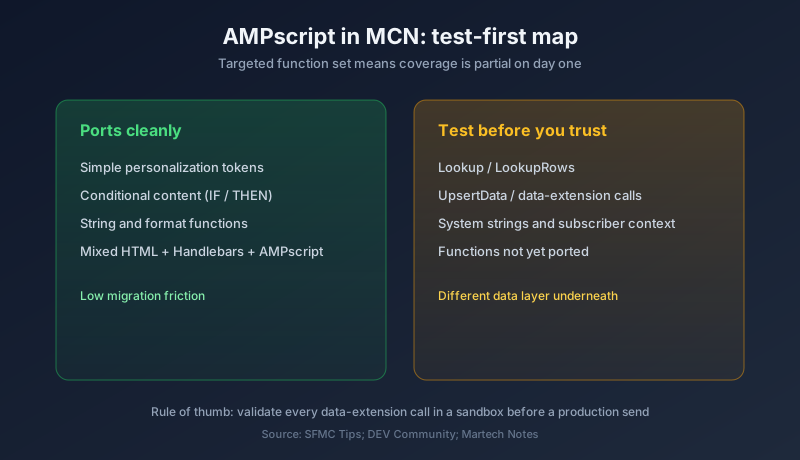
Data extension mechanics work differently because the backend storage model differs from classic SFMC. Functions like Lookup, LookupRows, and UpsertData lean on the old data extension architecture, and MCN sits on a different foundation. Test every data-extension call before you assume it behaves the same.
System strings and personalization tokens may resolve differently across the two platforms. The subscriber context that classic AMPscript takes for granted is not guaranteed to map cleanly.
Function coverage is partial. The community guidance is direct: do not expect a 100% one-to-one recreation of classic functionality. Some functions ship now, some come later, some may never arrive in their old form.
So treat this as a strong step forward, not a finished bridge. If your templates are light on data-extension gymnastics and heavy on simple personalization and conditionals, you are in good shape. If your email logic is a tangle of nested lookups against a dozen data extensions, budget time to test and rewrite.
RCS arrives natively, and it changes mobile
The second piece of this release is Rich Communication Services. RCS is now natively supported in Marketing Cloud Next, and it is a genuine upgrade over SMS rather than a cosmetic one.
SMS is 160 characters of plain text. RCS lets you send branded, interactive experiences inside the native messaging app. Rich cards, images, carousels, and suggested reply buttons. The brand name and logo show up verified, so the recipient sees who is messaging them instead of a random short code. For a retailer or a service brand, that is the difference between a message that reads as spam and one that reads as the company.
The setup has a gate worth knowing about. RCS requires sender verification before you can send. Once that verification clears, RCS becomes a reusable content type in Salesforce CMS, so you build the asset once and reuse it across campaigns. The verification step is not instant, so if RCS is on your summer roadmap, start the sender registration now rather than the week before launch.
One practical caveat: RCS delivery depends on the recipient's device and carrier supporting it. When it is not available, you need an SMS fallback. Plan the fallback into your journey, because not every contact will receive the rich version.
Where this fits in the bigger Summer '26 picture
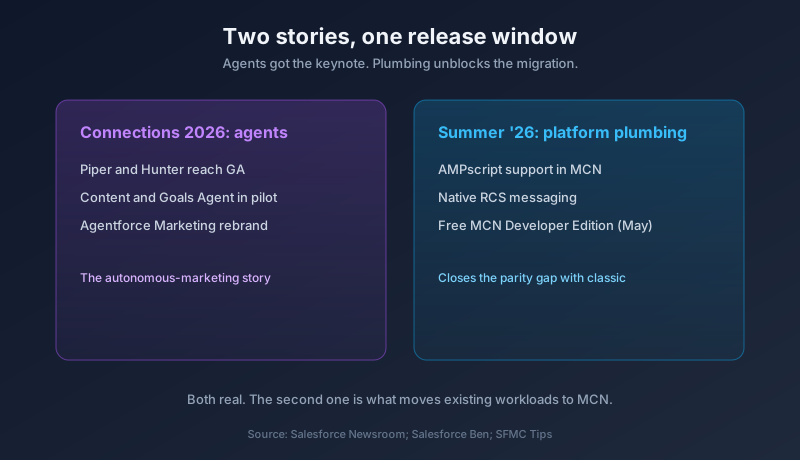
This landed in the same release window as the Connections 2026 marketing-agent announcements, and it is worth separating the two. Connections was about agents. Piper and Hunter reaching GA, Content Agent and Goals Agent in pilot, the rebrand of Marketing Cloud Next under the Agentforce Marketing banner. That is the autonomous-marketing story.
AMPscript and RCS are the opposite kind of news. This is plumbing. It is the unglamorous platform work that decides whether a team can actually move to the new product without throwing away years of build. Agents get the keynote slides. Scripting support gets the migration unblocked. Both matter, and the second one is the one that moves real workloads.
There is a pattern here. Marketing Cloud Next launched ahead of feature parity, and Salesforce has spent the last several releases backfilling the gaps that kept enterprise customers on classic. A free MCN Developer Edition landed in May. AMPscript and RCS land now. The platform is closing the distance between "the future product" and "the product you can run today."
The rollout timing matters for go-live
Summer '26 reaches production across three weekends: May 9, June 5, and June 12, 2026. The June 5 wave that just completed expanded availability to a large set of instances. The final wave lands June 12. The broad Summer '26 availability date Salesforce has pointed to is June 15.
Check your instance. Your org's production rollout depends on which instance it sits on, and you can confirm your exact date on Salesforce Trust by looking up your instance. Do not assume you have these features yet just because the date has passed. Assume nothing about your instance until you have verified it.
If your org is already on the June 5 wave, AMPscript and RCS may be live in your MCN environment right now. That is reason enough to log in and test before someone schedules a send against capabilities that have not been validated in your specific org.
What to do this week
Move in this order.
Confirm your instance rollout date on Salesforce Trust so you know whether these features are live for you yet. If you are on June 5, they likely are. If you are on June 12, you are waiting one more weekend.
Inventory your AMPscript. Pull your most-used templates and categorize them. Simple personalization and conditional logic will port with little friction. Anything that hits data extensions through Lookup or LookupRows goes on the test-first list.
Run a parity test in a sandbox or Developer Edition before touching production templates. Send to seed addresses and verify that data-extension calls and system strings resolve the way they did in classic. Find the gaps now, not in a live campaign.
If RCS is on your roadmap, start sender verification immediately. The verification gate is the long pole, and you cannot send rich messages until it clears. Build the SMS fallback into the same journey.
Do not bulk-migrate your full template library this week. Port a small, representative set first, confirm the functions you depend on actually work in MCN, then scale the migration once you know exactly which scripts need a rewrite.
The blocker is gone. The work is not. Plan accordingly.
About the Author
Dipojjal Chakrabarti is a B2C Solution Architect with 29 Salesforce certifications and over 13 years in the Salesforce ecosystem. He writes and edits salesforcedictionary.com, published by KineticBit Inc., to help admins, developers, architects, and cert/interview candidates sharpen their fundamentals. More about Dipojjal.
Share this article
Sources
- Top 9 Summer '26 Updates for Salesforce Marketers (Salesforce Ben)
- Salesforce Summer '26 Release: Everything You Need to Know Before Go-Live (Salesforce Ben)
- Marketing Cloud Next: Summer '26 AMPscript Support Has Arrived (SFMC Tips / Medium)
- AMPscript Is Coming To Marketing Cloud Next (DEV Community)
- Salesforce Summer 2026 Product Release Announcement (Salesforce Newsroom)
- Does Salesforce Marketing Cloud Next Support AMPscript? (Martech Notes)
Related dictionary terms
Practise it
Five questions on Marketing Cloud Specialist
Exam-style questions with an explanation after each one. No account needed, and your answers build a weak-topic map once you have one.
Comments
No comments yet. Start the conversation.
Sign in to share your take on this article. Your account works across every page.