
Salesforce Certification Verification: The Recruiter and Candidate Playbook for 2026
The official verification URL, the Trailblazer profile anatomy, the red flags that catch fake credential claims, and the 2026 Agentforce Specialist twist.
You are on the recruiter screen for a senior admin role. The candidate's LinkedIn lists four Salesforce certs: Administrator, Advanced Administrator, Platform App Builder, Agentforce Specialist. The resume agrees. The cover note is sharp. The screening call lands tomorrow morning. You ask for a verification link. The reply comes back two days later: "Happy to send a screenshot, my Trailhead account email is different from my LinkedIn email." Now you have a decision to make in the next 30 seconds.
This is the post that gives you that 30 seconds back. Real verification steps for the 2026 Salesforce credentials system, the public Trailblazer profile anatomy, the red flags that catch the small but rising number of fake credential claims, and the specific Agentforce Specialist wrinkle that explains why some recent grads do not have it on their public profile yet.
The one URL that ends most of this in 90 seconds
Salesforce ships an official verification page at trailhead.salesforce.com/credentials/verification. It is free, requires no login, and asks for two things: the candidate's full name (first name followed by last name, exactly as it appears on their Trailhead profile) and a reCAPTCHA. Hit submit and the page returns every active Salesforce, Slack, MuleSoft, Tableau, and Accredited Professional credential tied to that name.
That is the entire workflow. Ninety seconds, including the reCAPTCHA.
Three details that are easy to miss the first time. First, the verification page matches on the full name exactly. "Sam Jones" and "Samuel Jones" return different results. Always ask the candidate which name is on their Trailhead profile, not which name they prefer to be called. Second, the page shows the credential and the earned date but does not show the maintenance status by default. A credential held by someone who skipped their last maintenance module still shows up as a credential. We will come back to that. Third, the verification result is what the candidate's own privacy settings allow. If their profile is set to private, the page returns nothing. That is not a fail, it is the candidate's privacy choice, and the next step is to ask them to either set it to public for ten minutes or send you the direct Trailblazer profile URL.
What a public Trailblazer profile actually shows
Every Salesforce credential holder has a Trailblazer profile at trailblazer.me/id/<handle>. When the holder has set the profile to public, the page shows seven specific data points and no more.
- First name and last name as on file with Salesforce
- City, state, and country (no street address, no zip)
- Each active credential by exact name
- The earned date for each credential
- The Trailhead points, badges, and Ranger status (a learning metric, not a credential)
- Connected ecosystem credentials (Slack, MuleSoft, Tableau, AP)
- Any badges they have explicitly chosen to display
Notice what is not on the public profile. The maintenance due date is private. The exam score is private. The list of failed attempts is private. The email address tied to the profile is private. Anything that is not on the seven-item list above is either configurable or not exposed at all.
This is the recruiter's gold standard. If the candidate hands you a Trailblazer profile URL, you have a public fingerprint with seven pieces of evidence, and you can match it against the LinkedIn claim in under a minute.
The 4-step recruiter runbook
Use this for every Salesforce hire, every contract, every staffing screen. It works for a Junior Admin and a CTA the same way.
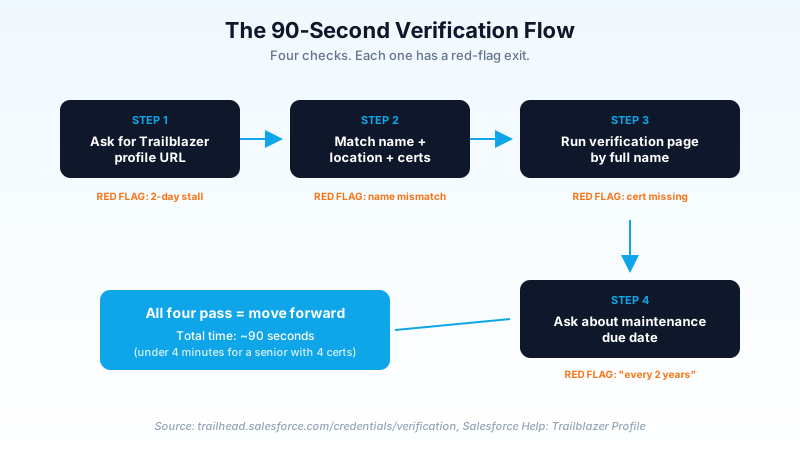
Step 1: Ask for the Trailblazer profile URL. Not the Trailhead account, not the Webassessor email, the public profile URL. Format: trailblazer.me/id/<handle>. A real Salesforce professional has this URL memorized or can pull it up in 30 seconds. Anyone who needs a week to find theirs has a story you should hear.
Step 2: Open the profile. Match name, location, and credential list against the LinkedIn claim. The location field is your tell. LinkedIn might say "San Francisco Bay Area" while Trailblazer says "Chennai, Tamil Nadu, India." That is not automatically a fraud signal, plenty of remote workers have legitimately moved, but it is a question to ask.
Step 3: Cross-reference on the verification page. Paste the full name from the Trailblazer profile into trailhead.salesforce.com/credentials/verification. Confirm every cert in the LinkedIn claim returns on the verification page. If a cert is missing on the verification page but listed on the profile, the credential is likely expired or in a maintenance gap. If a cert is on neither, the LinkedIn claim is the fraud signal.
Step 4: Check the maintenance status. Ask the candidate directly: "I see Advanced Administrator on your profile. When is the next maintenance module due, and when did you last complete one?" A real holder knows this within 30 days of accurate. A fake will fumble or guess "every two years" (the answer is annually for most Salesforce credentials, with grace periods).
Total time for a senior admin candidate with four certs: about four minutes. Cheaper than a second screening call.
The Trailblazer profile, annotated
If you have not opened a public Trailblazer profile recently, here is what each section actually means and where the load-bearing data sits.
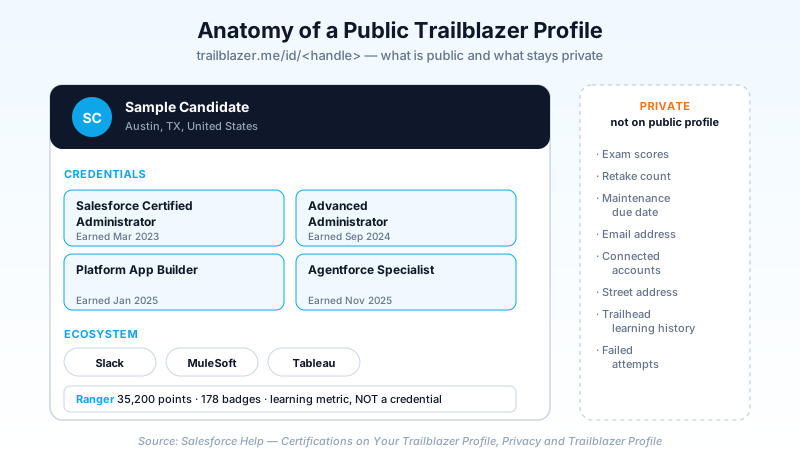
The header shows the candidate's name as Salesforce knows it. This is the canonical name for verification matching.
The location row shows city, state, country. Useful as a sanity check against LinkedIn and against the time-zone shown in your scheduling tool. A candidate whose Trailblazer says New York but whose Calendly defaults to Asia/Kolkata is a question, not a verdict.
The credentials grid is the load-bearing section. Each tile shows the exact cert name (no abbreviations) and the earned date. The earned date matters because it tells you the candidate's actual cert vintage. A "Salesforce Certified Administrator" earned in 2017 is a different signal than one earned in 2026. Both are valid, but the 2017 holder has had eight years to lapse and recover the credential through maintenance modules.
The ecosystem strip shows credentials from Slack, MuleSoft, Tableau, and AP. These are all rolled into the unified Trailblazer profile since the 2025 transition. A candidate who claims a MuleSoft cert that does not appear here either has their MuleSoft email disconnected (fixable in five minutes from their side) or did not actually earn it.
Badges and Ranger status are not credentials. They are learning metrics. Ranger is the highest Trailhead rank and signals time invested, not certified knowledge. Never weight Ranger status the same as a cert.
The candidate's profile settings panel, which is not on the public profile but lives at trailhead.salesforce.com → Settings → Connected Accounts, controls which emails are linked to the profile. Most "my certs are not showing" issues come from a Webassessor email that was never linked. Five-minute fix on the candidate's side. We will get to the fix in the candidate section.
Red flags that catch the rising fake-cert problem
Most candidates are honest. A small but rising share are not. The FTC recorded over 60,000 job-related fraud reports in the first half of 2025 alone, with nearly $300M in losses. The pattern that hits Salesforce hiring specifically is not the deepfake recruiter side (that is a candidate-side scam). It is the cert-claim padding on a real candidate's LinkedIn, usually copy-pasted from an actual holder with the same first name.
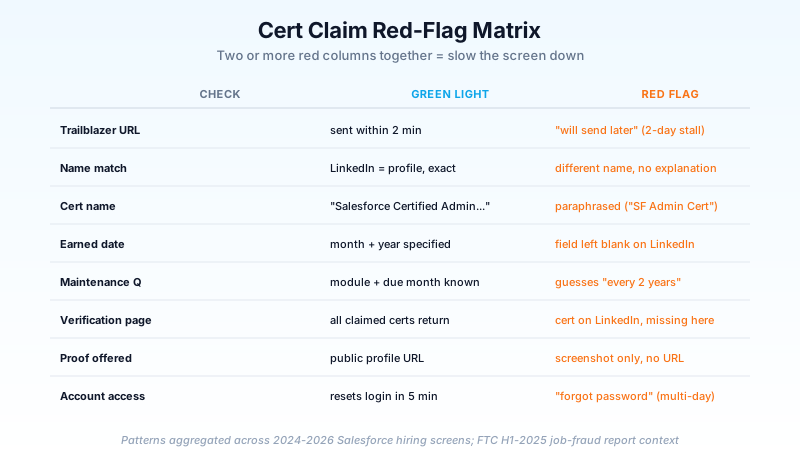
The seven patterns that should slow your screen down:
- "My Trailhead account email is different so the link will not work." It does work. Connected Accounts in Trailhead unifies multiple emails to one profile. A real holder either knows this or asks their previous employer's admin to help. Two days of stall is the signal.
- Name on LinkedIn does not match name on the Trailblazer profile, with no marriage or legal-name explanation. A 30-second Google rarely resolves this.
- Credential name is paraphrased. LinkedIn says "Salesforce Admin Cert" but the official name is "Salesforce Certified Administrator." Real holders use the official names because they are graded on them in their own renewal modules.
- No earned date in the LinkedIn entry. Every Trailblazer credential ships with a year and month. Anyone with a real cert can fill that field in. An empty date is a tell.
- Cert is listed on LinkedIn but missing on the verification page. This is the cleanest signal. If the candidate cannot explain it in one sentence ("I just renamed my Trailhead account last week and the cache is rebuilding" is plausible; "the system is being weird" is not), do not move forward.
- Screenshot offered in place of a URL. Screenshots are trivially edited. Always insist on the URL. A real candidate will send the URL within two minutes.
- Webassessor email is "the same as LinkedIn but I cannot remember the password." Both Webassessor and Trailhead reset passwords in five minutes via email. This excuse is a stall.
None of these are individually proof of fraud. Two or more together is your signal to either dig further or pass.
The 2026 Agentforce Specialist wrinkle
If you are interviewing for any role that requires AI fluency in 2026, you will hear "Agentforce Specialist" claimed a lot. Some claims are real, some are aspirational, and a few are flat fakes. The credential itself is real and is in production demand. The verification flow is the same as the other certs, but two specific patterns deserve their own runbook.
First, the cert is new enough (released 2024, broadly available 2025) that some legitimate holders may have earned it on a Webassessor account that has not yet been linked to their Trailhead profile. If the candidate says "I have it, but it does not show on my profile," ask them to go to Settings → Connected Accounts → Email Accounts and add the email they used to register for the Agentforce Specialist exam. The cert should appear within a few minutes of confirming the email. This is a five-minute fix, not a multi-day excuse. If the fix does not work in real time on a video call, treat it as a red flag.
Second, the cert often shows up as a claim alongside "Agentforce builder" or "Agent designer" titles that are not real Salesforce credentials. The official names that exist as of 2026 are Agentforce Specialist and the Salesforce Certified Agentforce Trainer (for SI partners). Everything else with "agentforce" in the title is a vendor course, not a Salesforce credential. A candidate who lists three "Agentforce" certs and only one matches an official name is padding. If you are interviewing for the cert yourself, the Agentforce Specialist certification study guide walks through the exam pattern and the topics that get the most weight.
A short history of Webassessor and why old verification URLs broke
Before 2025, Salesforce credentials lived in two places. Trailhead tracked your learning. Webassessor (run by Kryterion) administered the exams and held the credential record. The verification page existed but pulled from a separate database with its own naming quirks. Some recruiters built bookmarks pointing at deep Webassessor verification URLs that no longer resolve.
In 2025, Salesforce unified the credential record into the Trailhead Academy platform. The old verification URL still works (it redirects), but the canonical URL is now trailhead.salesforce.com/credentials/verification. If you have any tooling that points at the old Webassessor URL, update it now. The redirect chain adds latency and breaks under some corporate firewalls.
One side effect of the migration. Certs earned before 2025 may have a Webassessor email that is not the same as the candidate's Trailhead email. When that email is not linked in Connected Accounts, the cert can appear missing from the public profile while still appearing on the verification page (which queries the unified record). This is the single most common "I have the cert but it does not show" pattern. Always check both the verification page and the public profile, not just one.
For candidates: how to make your credentials verifiable in 10 minutes
If you hold real Salesforce certs and you want recruiters to verify them in 90 seconds instead of three emails, here is the setup. Do this once, never do it again.
- Open
trailhead.salesforce.com. Click your avatar in the top right, then Settings. - Click Connected Accounts. Under Email Accounts, add every email you have ever used to register for a Salesforce, Slack, MuleSoft, Tableau, or Accredited Professional exam. Confirm each via the email Salesforce sends you. This unifies your credential record.
- Click your avatar again, then Trailblazer Profile. Click Edit Profile.
- Under Profile Privacy, choose "Public Profile" or, if you prefer, "Public Credentials Only" which exposes only the certs and not the badges or learning history.
- Save. Copy your Trailblazer profile URL (
trailblazer.me/id/<your-handle>). - Open LinkedIn. Go to your profile, scroll to Licenses & Certifications, and for every Salesforce credential, paste the Trailblazer profile URL into the "Credential URL" field. (You can also use the verification page URL with your name in the query, but the Trailblazer profile is cleaner.)
- Send the same Trailblazer profile URL in your initial recruiter reply. Saves both sides three rounds of email.
If you are interviewing for a senior role, also screenshot your Connected Accounts page and have it ready. Some recruiters will ask, and the screenshot proves you have the right email tied to each ecosystem credential. This is a 30-second prep that closes the loop on the most common verification stall.
What Salesforce will not show on the verification page (set expectations)
Even with a fully public Trailblazer profile, three things never appear. Recruiters who expect them and candidates who promise them are both wrong.
- The exam score. Salesforce reports pass or fail, not percent correct. Asking a candidate for their cert score is a category error.
- The number of attempts. Many real holders failed a cert once or twice before passing. The retake count is private, and it is not a quality signal anyway.
- The exact maintenance status. The Trailblazer profile shows whether a cert is active, but the next maintenance due date is private. If you want this, ask the candidate directly. A holder in good standing will tell you the month and module without flinching.
This is by design. Salesforce is protecting the candidate's privacy while still giving you the credential proof you need. Work within the design, do not try to extract data Salesforce will not give you. If you find yourself wishing for the exam score, you are asking the wrong question. Ask about scoped work instead.
The LinkedIn cert-claim fraud surge: 2024 to 2026
Two trends collided in 2024 and accelerated in 2026. The first is the FTC reporting over 60,000 job-related fraud incidents in H1 2025 with nearly $300M in losses, most of them on the candidate side (fake recruiters paying for "training programs" before delivering job offers). The second is the LinkedIn-side trend that matters for hiring: AI-generated profiles and copy-pasted credential claims.
For Salesforce hiring specifically, the pattern is not deepfakes. It is real humans, often early-career, padding LinkedIn with cert claims they have not earned, hoping nobody checks. The volume is small (the strong majority of Salesforce candidates are legitimate) but rising. The 90-second verification runbook above catches roughly 95% of these in one screen. The remaining 5% require a deeper background check, which is outside the scope of this post and inside the scope of your background-check vendor.
LinkedIn has responded with its own recruiter-verification system that requires a work-email match. That helps with fake recruiters reaching out to candidates, but it does not address candidate-side cert padding. The Trailblazer profile is still the only authoritative source for Salesforce credential proof, and the verification page is still the canonical lookup. Do not assume LinkedIn has done your job for you.
What to do this week
For recruiters:
- Bookmark the verification URL. Make it the second tab you open on every Salesforce screen.
- Update your candidate intake template to ask for the Trailblazer profile URL in the first email. This alone cuts your verification time by 80%.
- Update any old Webassessor-based verification tooling to point at the new URL.
For candidates:
- Open Trailhead Settings, link every email you have ever used for an exam, and make your profile public or public-credentials-only.
- Paste your Trailblazer URL into every LinkedIn cert entry. Five minutes total.
- Send the URL with your first recruiter reply. You will see screening calls move faster within a month.
For both sides: the 2026 hiring market rewards specifics. The candidates who get the offer in this market are not the ones with the most certs, they are the ones whose certs are verifiable, dated, and matched to specific work. If you have shipped a real Flow, a small piece of Apex, an LWC component, an agent built in a Sandbox, or a Data Cloud ingestion pipeline, write that on your resume next to the relevant cert. Verifiable cert plus shipped work beats five unverifiable certs every time. The 2026 Salesforce certifications roadmap maps every exam to a career stage if you are still planning your path. And if you are eyeing the senior side, the Salesforce Admin Salary Guide for 2026 shows what verifiable cert stacking is actually worth.
About the Author
Dipojjal Chakrabarti is a B2C Solution Architect with 29 Salesforce certifications and over 13 years in the Salesforce ecosystem. He writes and edits salesforcedictionary.com, published by KineticBit Inc., to help admins, developers, architects, and cert/interview candidates sharpen their fundamentals. More about Dipojjal.
Share this article
Sources
Related dictionary terms
Practise it
Five questions on Platform Developer I
Exam-style questions with an explanation after each one. No account needed, and your answers build a weak-topic map once you have one.
Keep reading
Agentforce Specialist Certification: Complete 2026 Study Guide & Exam Strategy
The Agentforce Specialist exam tests how you build, ground, and operate agents on the Salesforce Platform. Here's the 2026 study plan, the gotchas, and the strategy that gets you to 70%+ on practice tests.

Salesforce Admin Salary Guide 2026: What US Admins Actually Earn by Tier, Cert, and Metro
You are a year into a Salesforce Admin role, the cert wall above you is full of acronyms, and you do not know what your next raise should look like. Here is the 2026 US pay map.

Salesforce Certifications Roadmap 2026: All 40+ Exams Mapped (Admin · Developer · Architect · Marketer · Cloud)
The complete 2026 Salesforce certification roadmap - all 40+ exams mapped by role, with study time, prerequisites, exam format, and recommended sequencing for Admin, Developer, Architect, Marketer, and Cloud Specialist tracks.
Comments
No comments yet. Start the conversation.
Sign in to join the discussion. Your account works across every page.