
Salesforce BYOLLM: Bring Your Own LLM in Einstein Studio (2026 Guide)
Connect OpenAI, Azure, Gemini, or your own model to Salesforce through the LLM Open Connector, keep the Trust Layer, and decide when BYOLLM actually beats the Salesforce-managed models.

Your security team blocks the deal. The AI features look great in the demo, but legal will not sign off on customer health records leaving the building for a vendor-hosted model, and your data residency clause says inference has to stay inside your own AWS account in Frankfurt. So the project stalls. The Salesforce-managed models cannot run where you need them to run, and a year of AI roadmap turns into a slide nobody can ship.
This is the exact wall that BYOLLM exists to break. BYOLLM, short for Bring Your Own Large Language Model, lets you connect an external or self-hosted model to Salesforce and use it inside Prompt Builder, Agentforce, and the Models API. You keep your model. You keep your data path. And you still get the Einstein Trust Layer on top. This guide covers what BYOLLM is, how the LLM Open Connector works, how to wire one up, what it costs, and the honest question most teams skip: do you actually need it?
What BYOLLM actually is
Salesforce ships two ways to get a model behind your prompts.
The first is Salesforce-managed models. Salesforce has commercial agreements with OpenAI, Azure OpenAI, Anthropic, and Google, hosts the plumbing, and gives you a dropdown of ready models in Prompt Builder. Zero setup. You pick GPT, Claude, or Gemini and go. For most orgs this is the right starting point and stays the right answer for a long time.
The second is BYOLLM. Instead of using the model Salesforce manages for you, you register a model endpoint you control. That endpoint can be a model you provision in your own cloud account, a fine-tuned model you trained on your own data, or a model from a provider Salesforce does not offer out of the box. Salesforce sends the prompt to your endpoint, your endpoint runs inference, and the response comes back through the same governance layer every other Salesforce prompt uses.
The point worth holding onto: BYOLLM changes where the model lives and who runs it. It does not change the Salesforce experience around it. Prompt Builder, grounding from Data Cloud, and the Trust Layer all behave the same whether the model is Salesforce-managed or yours.
The two flavors of BYOLLM
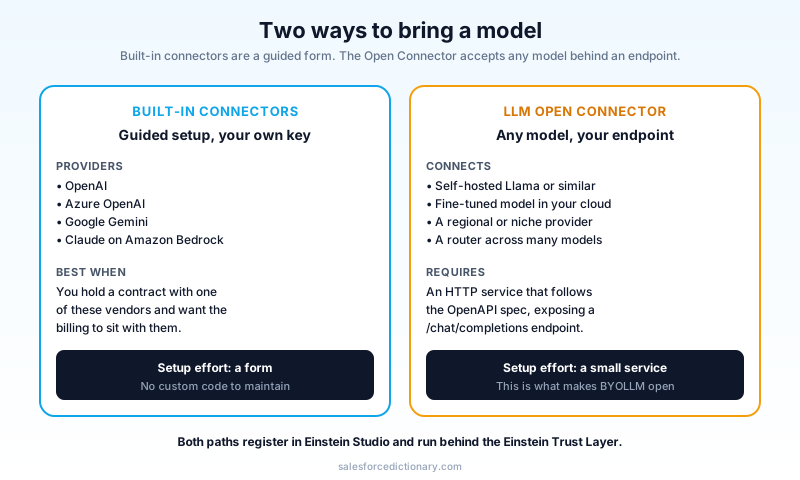
There are two ways to bring a model, and people mix them up constantly.
Built-in connectors. Salesforce gives you first-class setup for a short list of provider-hosted endpoints: OpenAI, Azure OpenAI, Google Gemini, and Anthropic Claude on Amazon Bedrock. You supply your own API key and endpoint. The traffic runs on your account with that provider, billed by that provider, but the registration is a guided form rather than custom code. Use this when you already have an enterprise contract with one of those vendors and want the billing and data agreement to sit with them, not Salesforce.
The LLM Open Connector. This is the real power feature. The Open Connector is an open API specification that lets you connect any model to Salesforce, as long as you put a compatible HTTP endpoint in front of it. Self-hosted Llama, a fine-tuned model in SageMaker, a model behind your own gateway, a regional provider Salesforce has never heard of: if you can expose it as a /chat/completions endpoint that follows the spec, Salesforce can call it.
The Open Connector is what makes BYOLLM open rather than a four-vendor menu. The spec and example code live in the public salesforce/einstein-platform repository, and the contract is deliberately close to the OpenAI chat-completions shape so existing tooling maps over with little effort.
How the request actually flows
Understanding the path matters, because the path is the reason BYOLLM is safe to use and the reason it can be slow if you build it badly.
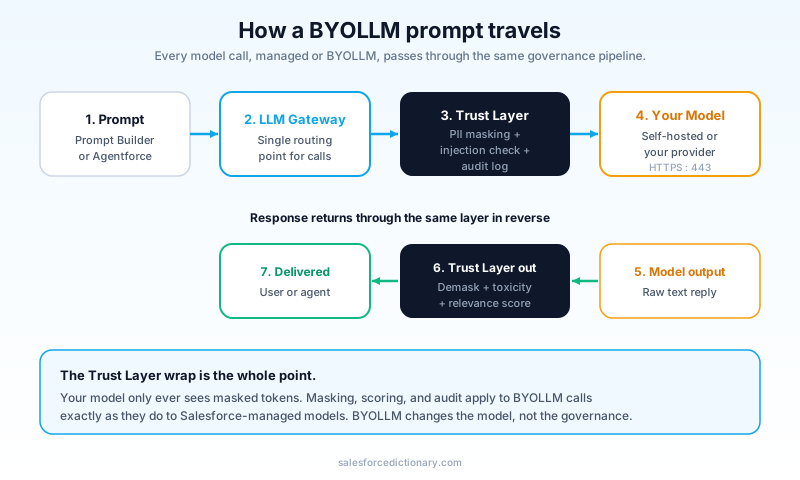
A BYOLLM prompt does not jump straight from a Salesforce record to your model. It travels through a fixed pipeline:
- Prompt assembly. Prompt Builder or Agentforce builds the prompt, including any grounding data pulled from records or Data Cloud.
- LLM Gateway. Salesforce routes every model call, managed or BYOLLM, through a single internal gateway. The gateway knows how to reach your registered endpoint.
- Einstein Trust Layer, inbound. Before the prompt leaves Salesforce, the Trust Layer masks personally identifiable information, checks for prompt-injection patterns, and records the interaction for audit.
- Your model. The masked prompt hits your endpoint over HTTPS on port 443. Your model runs inference and returns text.
- Einstein Trust Layer, outbound. The response comes back, gets demasking applied so the masked tokens become real values again, runs through toxicity and relevance scoring, and lands in the audit trail.
- Delivery. The cleaned response reaches the user or the agent action.
That inbound and outbound Trust Layer wrap is the whole reason BYOLLM is more than a raw API callout. You could call OpenAI from Apex yourself in twenty lines. What you could not easily build yourself is the PII masking, the zero-retention posture, the toxicity scoring, and the audit log applied consistently across every prompt in the org. BYOLLM gives you the open model choice without giving up that governance.
When BYOLLM is the right call
Be honest about this, because BYOLLM is operational overhead. You are taking on a model endpoint, its uptime, its scaling, and its bill. There are four situations where that trade is clearly worth it.
Data residency and sovereignty. Your contract or regulator says inference must happen inside a specific region or inside infrastructure you control. A model you provision in your own cloud account in that region satisfies it. A Salesforce-managed model in a shared region may not.
A fine-tuned or domain-specific model. You trained a model on your own claims data, your own legal language, or your own product catalog, and it beats a general model on your task. BYOLLM is the only way to put that model behind a Salesforce prompt.
An existing enterprise model contract. You already pay a vendor for capacity, you have negotiated data terms with them, and you want Salesforce inference to draw on that committed spend rather than open a second relationship through Salesforce.
A provider Salesforce does not offer. You standardized on a model that is not on the managed list. The Open Connector is your route in.
If none of those four apply, use the Salesforce-managed models. The managed path is faster to ship, has no endpoint for you to babysit, and gets the same Trust Layer. Reaching for BYOLLM because it sounds more advanced is how teams sign up for a pager rotation they did not need.
Setting up a built-in connector
The built-in path is the quicker of the two. Walking the OpenAI case:
- Open Setup, then Einstein Studio (Model Builder).
- Choose Add Foundation Model and pick the provider, for example OpenAI.
- Supply the endpoint URL and your API key. Salesforce stores the credential securely; treat it like any other secret and rotate it on a schedule.
- Select the specific model name your contract allows, for example a current GPT model.
- Configure default parameters: temperature, max tokens, and any provider-specific options.
- Save and run the built-in connection test. It sends a trivial prompt and confirms the round trip works end to end.
Once the model is registered, it shows up as a selectable model in Prompt Builder exactly like a managed model. Point a prompt template at it, and you are live.
A practical note on credentials: keep BYOLLM provider keys in their own secret with least-privilege scope, and prefer the connector's credential storage over hand-rolling anything. If you are wiring a model through a custom gateway, Named Credentials are the right tool for the auth and endpoint config rather than hardcoding a token.
Setting up the LLM Open Connector
The Open Connector is more work because you are building a small service. The shape is consistent.
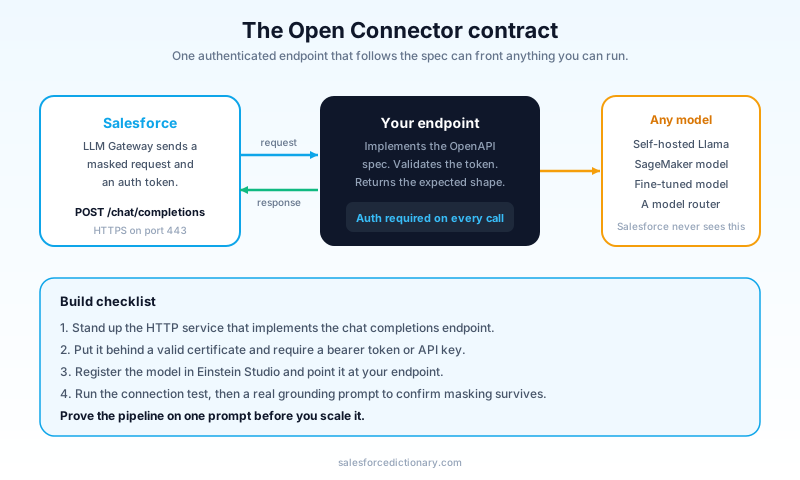
Build the endpoint. Stand up an HTTP REST service that implements the LLM Open Connector OpenAPI specification. At minimum it exposes a /chat/completions endpoint that accepts the request shape Salesforce sends and returns the response shape it expects. The contract mirrors the OpenAI chat-completions format closely, so if you have built against that API before, this is familiar ground. Behind that endpoint you can call anything: a self-hosted model, a managed model in your cloud, a router that load-balances across several models.
Expose it securely. Salesforce reaches your service over HTTPS on port 443. The endpoint needs a valid certificate and an auth mechanism, typically a bearer token or API key that Salesforce sends on each call. Do not expose an open endpoint to the internet without auth, because a BYOLLM endpoint is a direct line into model spend and, depending on grounding, into context about your data.
Register it. In Einstein Studio, add the model and point it at your endpoint, supplying the auth credential. Salesforce treats it like any other foundation model from that point on.
Test the round trip. Run the connection test, then build a throwaway prompt template that exercises a real grounding scenario. Confirm the masked prompt arrives at your endpoint and the response survives the demasking and scoring on the way back. This is where most setup bugs surface: a response field named slightly wrong, a timeout that is too tight, a token limit that truncates.
What it costs
BYOLLM shifts the cost model in a way teams underestimate.
With Salesforce-managed models, model usage is metered through Salesforce, commonly as Einstein Requests or a similar consumption unit, and the model provider relationship is Salesforce's problem. One bill, one throat to choke.
With BYOLLM, you pay the model provider or your own infrastructure directly. If you self-host, you pay for the compute that runs the model, whether it is busy or idle. If you use a built-in connector with your own key, the provider bills you per token on your account. Salesforce still meters the platform side, but the inference cost moves to you.
That split has consequences. A self-hosted model has a floor cost you pay even at 3 a.m. with zero traffic, which makes it cheap at high steady volume and expensive at low spiky volume. A pay-per-token provider scales to zero but can surprise you when an agent loops or a prompt template balloons its context. Before you commit, estimate tokens per interaction times interactions per day times your provider rate, and compare it honestly against the managed pricing. The advanced option is not automatically the cheaper one.
Common mistakes
- Choosing BYOLLM for prestige, not requirement. If you cannot name which of the four reasons applies, you do not need it. Use managed.
- Assuming BYOLLM skips the Trust Layer. It does not. Every BYOLLM call still passes through masking, scoring, and audit. That is a feature, not a limitation to route around.
- An unauthenticated Open Connector endpoint. A public
/chat/completionswith no auth is a billing and data incident waiting to happen. Require a token on every call. - Tight timeouts. Self-hosted models under load can be slower than a managed endpoint. Set timeouts that match real inference latency, and load-test before launch.
- Ignoring the idle cost of self-hosting. A reserved GPU you pay for around the clock is only cheap if it is busy around the clock. Match the hosting model to the traffic shape.
- Forgetting model version drift. When your provider deprecates a model version, your prompts can degrade or break. Pin versions and watch deprecation notices the same way you watch a Salesforce release.
Frequently asked questions
Does BYOLLM work with Agentforce, or only Prompt Builder? Both. A BYOLLM model registered in Einstein Studio is selectable for prompt templates and for the reasoning behind agent actions. The Atlas Reasoning Engine can plan against a BYOLLM model the same way it plans against a managed one.
Do I lose PII masking if I bring my own model? No. Masking happens inside Salesforce before the prompt ever leaves for your endpoint. Your model sees masked tokens, and Salesforce demasks on the way back. That is the core safety guarantee, and BYOLLM keeps it.
Can I connect a model I fine-tuned myself? Yes. That is one of the main reasons BYOLLM exists. Put your fine-tuned model behind an Open Connector endpoint and register it.
Which providers have built-in connectors today? OpenAI, Azure OpenAI, Google Gemini, and Anthropic Claude on Amazon Bedrock have first-class setup. Anything else goes through the LLM Open Connector.
Is BYOLLM more expensive than managed models? It depends entirely on your traffic shape and provider. Self-hosting is cheap at high steady volume, expensive at low spiky volume. Pay-per-token scales to zero but can spike. Model the math before deciding.
Does the Open Connector require me to write code? Yes, some. You implement an HTTP service that follows the OpenAPI spec. The spec is close to the OpenAI chat-completions shape, and Salesforce publishes example code, so the lift is moderate rather than large.
Can I run more than one BYOLLM model at once? Yes. Register several models and select the right one per prompt template or per agent action. Many teams keep a managed model as the default and use BYOLLM only for the prompts that need it.
What to do next
Start with the question, not the technology. Write down which of the four reasons applies to you: data residency, a fine-tuned model, an existing model contract, or an unsupported provider. If none of them do, build your first prompts on the Salesforce-managed models and move on, because you will ship faster and maintain less.
If one of them does apply, open a scratch or sandbox org and register a built-in connector first, even if your end goal is the Open Connector. The built-in path teaches you how registration, the Trust Layer wrap, and Prompt Builder selection behave with far less setup. Once that round trip is solid, stand up an Open Connector endpoint behind a single test prompt, confirm masking and demasking survive the trip, then expand. Prove the pipeline on one prompt before you bet a roadmap on it.
About the Author
Dipojjal Chakrabarti is a B2C Solution Architect with 29 Salesforce certifications and over 13 years in the Salesforce ecosystem. He writes and edits salesforcedictionary.com, published by KineticBit Inc., to help admins, developers, architects, and cert/interview candidates sharpen their fundamentals. More about Dipojjal.
Share this article
Sources
Related dictionary terms
Practise it
Five questions on Agentforce Specialist
Exam-style questions with an explanation after each one. No account needed, and your answers build a weak-topic map once you have one.
Keep reading

Salesforce Einstein Trust Layer: The Complete 2026 Guide to Secure AI
Your security team asks where the customer data goes when Agentforce processes it. Here is the full answer: how the Einstein Trust Layer's prompt journey, data masking, zero-data retention, and toxicity detection actually work.

Salesforce Prompt Builder: The Complete 2026 Guide for Admins & Developers
Prompt Builder is the no-code studio that connects your Salesforce data to any LLM — and in 2026, it's the foundation of every Agentforce Agent Action. Here's the complete guide for admins and developers.

What Is Agentforce 360? The Complete 2026 Guide for Salesforce Admins, Developers & Architects
Agentforce 360 is Salesforce's 2025 rebrand of its agentic-AI platform - built on the Atlas Reasoning Engine, Einstein Trust Layer, and Data 360. Here's the complete admin + dev + architect guide.
Comments
No comments yet. Start the conversation.
Sign in to join the discussion. Your account works across every page.