
Salesforce MCP: The Complete 2026 Guide
How Model Context Protocol lets Agentforce, Claude, and Cursor connect to your org without custom integration code

You type "What fields does Account have in this sandbox, and which ones are required on the [page layout](/terms/page-layout) for Direct Sales?" into Claude Desktop. Two seconds later you get a clean table back: field labels, API names, types, required flags, all pulled live from your org. No Workbench tab. No describe call you wrote yourself. No screenshot pasted into the chat. The model called a tool, the tool hit your org, the result came back as structured JSON, and Claude formatted it for you.
That is Model Context Protocol doing its job. And in 2026, every serious Salesforce developer needs to know how it works.
What MCP actually is
Model Context Protocol is an open standard that Anthropic published in late 2024 to solve a specific problem: every AI app was reinventing the wheel for tool calling. Each vendor had a slightly different shape for "let the model read a file" or "let the model query a database." If you built a connector for ChatGPT, it did not work in Claude. If you built it for Claude, it did not work in Cursor.
MCP fixes that by defining a single wire format. The model host speaks MCP, the data source speaks MCP, and anything in the middle is interchangeable. The cleanest analogy is USB-C. Before USB-C, every device had its own port. After USB-C, one cable plugs into a laptop, a monitor, a phone, a drive. MCP is the USB-C of AI tool calling.
The standard has moved fast. Salesforce, Microsoft, OpenAI, GitHub, and most of the major data platforms have shipped MCP support in some form. The Salesforce admin blog has a good primer on why this matters for non-developers, but the short version is this: MCP is now the default integration surface for AI inside enterprise software.
The three components
Every MCP conversation has three pieces.
Host is the AI application the user actually opens. Claude Desktop. Cursor. ChatGPT Desktop. Agentforce. The Slackbot your team uses. The host is what holds the model, the conversation, and the user's intent.
Client is the MCP protocol handler that lives inside the host. You never interact with it directly. It is the piece that knows how to discover tools on a server, format requests, and parse responses. Every compliant host ships with an MCP client built in.
Server is the thing that owns the data or the capability. A filesystem server exposes read-file and list-directory tools. A GitHub server exposes search-issues and create-pr tools. A Salesforce MCP server exposes query, create-record, run-flow, and describe-object tools. The server advertises a catalog, and the client calls whichever tool the model picks.
The messages between client and server are JSON-RPC 2.0 over either stdio (for local servers) or HTTP with Server-Sent Events (for remote servers). It is a simple request/response protocol with a few extras for streaming and capability discovery. If you have ever written against the REST API, the mental model transfers cleanly.
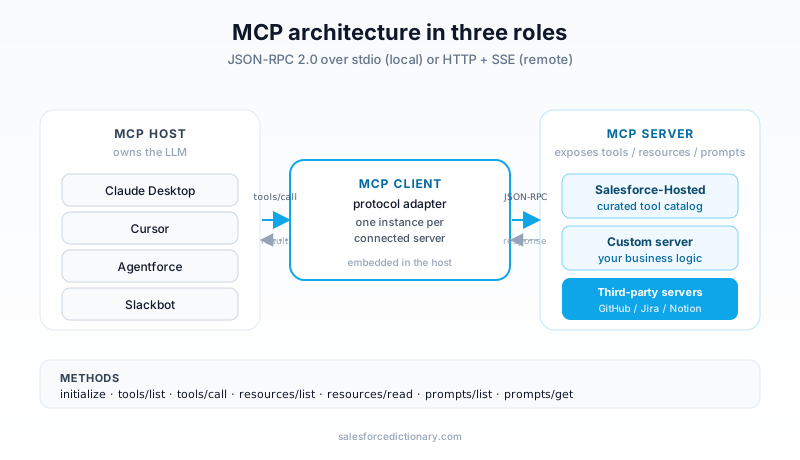
The flow is always the same. The user asks a question. The host sends the question plus the available tool catalog to the model. The model decides "I need to call query_records with this SOQL." The client packages that as a JSON-RPC call. The server runs the query against the underlying system. The result comes back. The model writes a natural-language answer using the result.
Salesforce's hosted MCP server
Salesforce went GA with its hosted MCP server in 2026. It lives inside your org, you turn it on in Setup, and it exposes a stable set of tools to any compliant client.
Per the Agentforce Developer Guide, the hosted server currently exposes six tool families:
- Records: CRUD on standard and custom objects, including bulk operations
- SOQL: query and queryAll, with the usual relationship-traversal support
- Metadata: describe global, describe sObject, retrieve layouts, read field metadata
- Flow: list and invoke autolaunched Flows
- Reporting: run reports and dashboards, return the result rows
- Files: read and write ContentVersion records
Critically, the server runs as the connected user. Not as a service account. Not as an integration user with View All on everything. As you. That means sharing rules, field-level security, profile permissions, and permission sets all apply exactly as they would if you were clicking around the UI. If you cannot see the Opportunity, neither can the model.
In front of all of that sits the Einstein Trust Layer. Every prompt and every response passes through PII masking, toxicity scoring, and audit logging. The model never sees raw customer data it should not see, and the org keeps an immutable record of what was asked and answered.
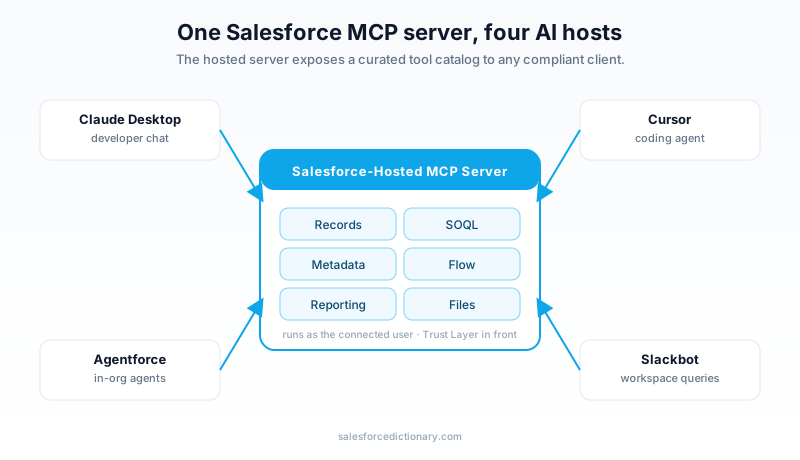
The big win from the diagram above is that you stand up the server once and four (or forty) different hosts can use it. A developer on Cursor doing schema exploration. An admin on Claude Desktop pulling field-level reports. An Agentforce agent answering customer questions. A Slackbot triggering a Flow. All four hit the same server, all four respect the same trust layer, all four run as the user who initiated the conversation.
The Data 360 MCP server
Separate from the hosted server, Salesforce released a Data 360 MCP server in Developer Preview in May 2026. Per the announcement on the Salesforce Developer blog, this one is open source, lives on GitHub, and ships as a stdio-transport server you run locally next to your IDE.
It exposes the Data Cloud and Data 360 APIs to any MCP client that speaks stdio: Claude Code, Cursor, Codex, and others. The use case is specifically unified profile queries, calculated insights, and segment activation. You point it at your Data 360 org, it negotiates OAuth, and now your IDE assistant can query a unified customer profile while you are writing the code that consumes it.
Two things to keep straight:
- The hosted MCP server is for general Salesforce data and metadata, runs inside your org, and is what you use from Claude Desktop or Agentforce.
- The Data 360 MCP server is for unified profiles, runs locally, and is what you use when you are building against Data Cloud from an IDE.
They are not competitors. You will likely end up running both.
Six patterns you will see in production
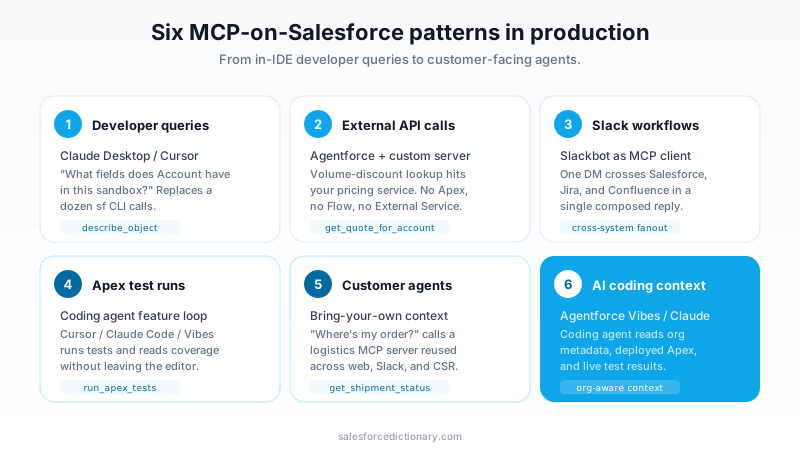
The patterns above are not theoretical. They are what teams are actually shipping in 2026.
Developer schema exploration. A developer in Cursor asks "show me every custom field on Quote that references Opportunity." The MCP client calls describe_sobject, filters in the prompt, and pastes a markdown table back into the chat. This single use case has probably saved more developer-hours than any other MCP pattern.
External API calls via Agentforce. Your Agentforce agent needs to check inventory in SAP. You wrap SAP's REST surface in a custom MCP server, register it with the agent, and now Agentforce can call SAP without you writing a single line of Apex glue code.
Slack workflows. A Slackbot acts as the MCP client. A user types "@bot create a case for Acme about the login bug." The bot calls the Salesforce MCP server's create_record tool. The case lands in the right queue.
Apex test runs from chat. Developers ask Claude Desktop "run all tests in the BillingService class and tell me which ones failed." The hosted server exposes tooling-API access for this.
Customer-facing agents. The Agentforce service agent on your website uses MCP to read knowledge articles, look up the customer's record, and invoke a Flow that issues a refund.
AI coding assistants. This is the one most developers feel first. Your IDE assistant can now read your org's metadata while you write LWC, so it suggests field API names that actually exist instead of hallucinating them.
Connecting Claude Desktop to your org
The walkthrough is short, which is the point.
- In Setup, search for Agentforce > MCP. Toggle the server on. Copy the server URL.
- Open
claude_desktop_config.json(on macOS, that is~/Library/Application Support/Claude/claude_desktop_config.json). - Add an entry under
mcpServers:
{
  "mcpServers": {
    "salesforce": {
      "url": "https://your-org.my.salesforce.com/services/mcp/v1",
      "transport": "http"
    }
  }
}
- Restart Claude Desktop. The first message that touches the server triggers an OAuth flow. Approve it.
- Type "What objects are in my org?" If you get a list back, you are done.
You need MCP enabled at the org level, and the connected user needs the Use MCP Server permission. If either is missing, the OAuth handshake will fail with a permission error rather than a network error, which is at least an honest error message.
Building a custom MCP server
The hosted server covers Salesforce data. It does not cover SAP, NetSuite, your billing platform, or that internal microservice your team owns. For those, you build a custom MCP server.
Two paths:
MuleSoft-backed. Use MuleSoft Anypoint to build an MCP server that wraps any backend you already have a connector for. This is the right answer when the data lives behind a system MuleSoft already integrates with. You get the MCP surface for free and inherit MuleSoft's auth, retry, and observability stack.
SDK-based. The MCP organization publishes SDKs for TypeScript, Python, and a few other runtimes. Stand up a Node.js or Python server, define your tools as functions, and host it wherever you host services. This is the right answer when you need full control or the backend has no MuleSoft connector.
A useful pattern: build the custom server to handle the non-Salesforce systems, register it with Agentforce alongside the hosted Salesforce server, and let the agent compose calls across both. That is the architecture Salesforce themselves walk through in the TDX 2026 session on agentic integration with MCP servers.
Security: Trust Layer, OAuth, and scopes
There is a common misreading of MCP that goes "this is a new way for AI to bypass our security model." That is wrong, at least for the hosted server.
Every request runs as the connected user. The OAuth token issued during the Claude Desktop handshake carries that user's identity. When the server runs a SOQL query, it runs with that user's sharing rules and FLS. When the server tries to update a record, the user's profile must permit it. There is no escalation, no service-account back door, no new escape path for data.
Every prompt and every response also passes through the Einstein Trust Layer. PII is masked before it reaches the model. Outputs are scored for toxicity. Audit logs capture what was asked and what was returned. If your compliance team needs to know who asked what about which customer last Tuesday, the logs exist.
Contrast this with the alternative most teams used in 2024: copy customer data into ChatGPT and ask a question. That bypassed every control you had. MCP closes that gap by giving the model a sanctioned channel and forcing every byte through your existing permission model.
MCP vs. External Services vs. Named Credentials
Salesforce has shipped a lot of integration patterns. MCP does not replace them. It joins them.
Use MCP when an AI host needs to call your system, especially when multiple hosts (Claude, Cursor, Agentforce, a Slackbot) need the same integration. You build it once, every host gets it.
Use External Services with Named Credentials when Apex or Flow needs to call an external REST API and there is no AI host in the picture. Lower overhead, native to the platform, no model in the loop.
Use MuleSoft or a custom integration layer when you have orchestration, transformation, or multi-system composition that does not fit cleanly in either box.
A good rule of thumb: if a human or an agent is going to ask a question and want an answer, MCP is the right surface. If a record save needs to trigger a downstream system synchronously, External Services is the right surface. The two coexist in most mature orgs.
What to do this week
Three concrete steps, in order:
- Enable the MCP server in your sandbox. Setup > Agentforce > MCP. Turn it on. Grant your user the Use MCP Server permission.
- Connect Claude Desktop. Paste the URL into
claude_desktop_config.json, finish the OAuth flow, and verify with one question about your org's schema. - Run one real query. Ask the model to pull the ten largest open Opportunities by amount and summarize the stage breakdown. If that works, you have proof the whole stack is wired up correctly.
Once those three steps are done, the rest of the patterns in this post become natural extensions. Custom servers, Agentforce integrations, Data 360 lookups, Slack workflows. You add them one at a time, each one slotting into the same protocol you already trust.
The 2026 version of being a strong Salesforce developer includes knowing how MCP fits into your org. Start with one connection. Build from there.
About the Author
Dipojjal Chakrabarti is a B2C Solution Architect with 29 Salesforce certifications and over 13 years in the Salesforce ecosystem. He writes and edits salesforcedictionary.com, published by KineticBit Inc., to help admins, developers, architects, and cert/interview candidates sharpen their fundamentals. More about Dipojjal.
Share this article
Sources
Related dictionary terms
Practise it
Five questions on Platform Developer I
Exam-style questions with an explanation after each one. No account needed, and your answers build a weak-topic map once you have one.
Keep reading

Salesforce Einstein Trust Layer: The Complete 2026 Guide to Secure AI
Your security team asks where the customer data goes when Agentforce processes it. Here is the full answer: how the Einstein Trust Layer's prompt journey, data masking, zero-data retention, and toxicity detection actually work.

Salesforce Integration Patterns: REST vs SOAP vs Bulk vs Composite vs GraphQL (2026 Reference)
The complete 2026 reference for Salesforce APIs - REST, SOAP, Bulk 2.0, Composite, GraphQL, Pub/Sub, Streaming, Metadata, Tooling. When to use each, rate limits, OAuth flows, and patterns.

What Is Agentforce 360? The Complete 2026 Guide for Salesforce Admins, Developers & Architects
Agentforce 360 is Salesforce's 2025 rebrand of its agentic-AI platform - built on the Atlas Reasoning Engine, Einstein Trust Layer, and Data 360. Here's the complete admin + dev + architect guide.
Comments
No comments yet. Start the conversation.
Sign in to join the discussion. Your account works across every page.