
Skeleton Template
A Skeleton Template is a Visualforce page that holds the shared structure for a group of pages and marks the gaps each one fills in.
Definition
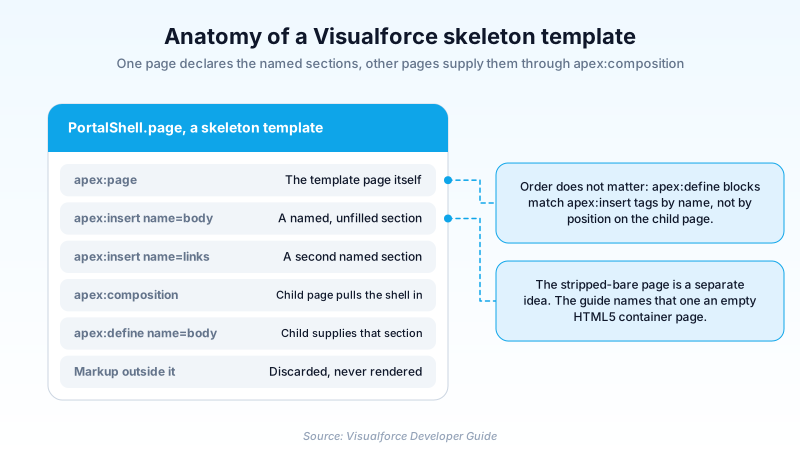
A Skeleton Template is a Visualforce page that holds the shared structure for a group of pages and marks the gaps each one fills in. Every gap is a named apex:insert tag. Another page pulls the shell in with apex:composition and supplies a matching apex:define for each name.
That is the meaning the Visualforce Developer Guide attaches to the phrase, and it draws a boundary around it. Templates built from apex:insert and apex:composition are for referencing a page that already exists. If you only need a set of components duplicated, write a custom component instead.
Developers also use the name loosely for an apex:page with the platform chrome and stylesheets switched off. The guide itself calls that one an empty HTML5 container page. Six attributes on that tag do the switching. Both patterns are the older option now. New interface work goes to Lightning Web Components, and branded site shells come from Experience Builder theme layouts.
In plain English
“Picture one page that draws the frame: a header, a footer, a side menu, and two empty boxes in the middle. Other pages borrow that frame and only say what goes in the boxes. Change the frame once and every borrower changes with it.”
Worked example
A regional insurance brokerage runs six Visualforce pages for policy self-service, all sharing one masthead, footer and menu. A developer builds PortalShell, a page holding those three pieces plus apex:insert tags named body and sideLinks. Each of the six opens with apex:composition pointing at PortalShell and defines both names. When the footer changes, only PortalShell gets edited. One of the six, a public claim status lookup, also sheds Salesforce styling. It sets docType to html-5.0 and switches showHeader, sidebar, standardStylesheets, applyHtmlTag and applyBodyTag off. Its CSS lives in a static resource called BrokerBrand.
How one page supplies the structure for several others
The template page and the pages that fill it
A template page is mostly apex:insert tags, each declaring a named section and saying nothing else about it. A page that wants the shell opens apex:composition, points at the template, and supplies an apex:define per name. Two things catch people out. Anything outside the apex:composition tag on the child page is thrown away, so the shell owns the whole output. And the order of your apex:define blocks means nothing: the template decides where each section lands. The guide fences the technique in before it explains it. Templates made this way are for pulling in a Visualforce page you already built. Need a set of components duplicated and nothing more? Write a custom component. Worth heeding, because composition buys you a second page to maintain. Point apex:composition at a controller method returning a PageReference and the shell becomes a runtime choice.
The other meaning: an apex:page stripped bare
Six attributes on the apex:page tag decide how much Salesforce shows through. showHeader drops the tab header, sidebar drops the standard side panel, and both default to true. standardStylesheets controls whether platform CSS lands in the document head, and it also defaults to true. The catch is the wiring between the two. The reference ties standardStylesheets to showHeader, so it only takes effect once the header is already off. Switch off the header alone and you still ship Salesforce CSS. applyHtmlTag and applyBodyTag stop Visualforce generating the outer document tags. docType sets the document type declaration and defaults to html-4.01-transitional. Set all six and you have what the guide calls an empty HTML5 container page, not a skeleton template.
Lightning Experience already did half the job
Much of the original reason for the stripped-page technique has gone away. The apex:page reference notes that showHeader and sidebar are overridden to false in Lightning Experience and the mobile app. The tab header and side panel are already absent there, whatever you typed. What survives is styling and document structure. Platform CSS and the shell around your own markup are still yours to decide.
Where this sits today
Visualforce is not retired and its component reference is still maintained, so an existing template page keeps serving. It is the older option though. Salesforce points new interface work at Lightning Web Components, and the LWC guide is blunt about preferring it over Aura. An Experience Builder theme layout gives the same control over the outer shell on a supported path. Site.com carried the same near empty template idea and is legacy now. Use either technique to maintain what already exists, not to start something new.
How organizations use Skeleton Template
Runs six policy self-service pages off one apex:composition template, so a masthead change lands in a single Visualforce page instead of six.
Keeps printable order documents on a bare page with its own doctype and print stylesheet, because the standard platform CSS kept breaking the layout.
Trust & references
Cross-checked against the following references.
- apex:page (opens in new tab)Salesforce
- Defining Templates with apex:composition (opens in new tab)Salesforce
- apex:insert (opens in new tab)Salesforce
- What Are Lightning Web Components? (opens in new tab)Salesforce
- Visualforce Developer Guide (Creating an Empty HTML5 Container Page) (opens in new tab)Salesforce
Straight from the source - Salesforce's reference material on Skeleton Template.
Hands-on resources to go deeper on Skeleton Template.
About the Author
Dipojjal Chakrabarti is a B2C Solution Architect with 29 Salesforce certifications and over 13 years in the Salesforce ecosystem. He writes and edits salesforcedictionary.com, published by KineticBit Inc., to help admins, developers, architects, and cert/interview candidates sharpen their fundamentals. More about Dipojjal.
Test your knowledge
+5 pts / dayQ1. A child page uses apex:composition to pull in a template page. What happens to markup placed outside the apex:composition tag on that child page?
Q2. You need the same three input fields repeated across four unrelated Visualforce pages that share no structure. What does the Visualforce Developer Guide point you at?
Q3. Which pair of attributes do you set to false when you need to write your own doctype and control the document head?
Discussion
Loading discussion…