
Site.com
Site.com is Salesforce's original drag-and-drop site builder, used to assemble branded public web pages and bind them to Salesforce records without writing markup. Its authoring tool was called Sit…
Definition
Site.com is Salesforce's original drag-and-drop site builder, used to assemble branded public web pages and bind them to Salesforce records without writing markup. Its authoring tool was called Site.com Studio.
It is the older option. Experience Builder replaced it for everything new, and Salesforce keeps the two generations apart in metadata rather than folding one into the other.
Sites already built on it keep serving traffic. So you meet the name in metadata, in feature licenses and in inherited runbooks, rather than in anything you are asked to build today.
In plain English
“Salesforce used to have one tool for making web pages by dragging boxes around a canvas. Later it built a better one and moved everyone across. The old tool still runs the pages people made years ago, but nobody starts anything new in it.”
Worked example
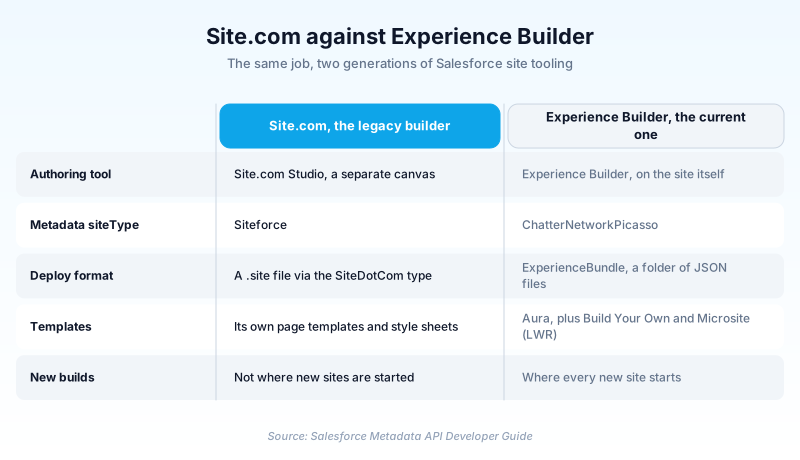
A regional insurance broker inherits an org with a public rate-card site built in Site.com years earlier. Retrieving it returns a SiteDotCom component whose siteType is Siteforce, packaged as a .site file. The partner portal in the same org retrieves as ChatterNetworkPicasso with an ExperienceBundle, because someone built it in Experience Builder. The admin tries to ship both in one package. Salesforce's guidance is to keep them apart: when you deploy an Experience Builder site with ExperienceBundle, the SiteDotCom type must not be included in that manifest file.
Reading Site.com in an org you inherited
What Site.com actually was
Site.com Studio gave you a canvas, a page template system, style sheets, and data repeaters that pulled records onto public pages. A marketing team could ship a microsite without booking developer time. It ran beside the CRM interface rather than inside it, which was the selling point and also the flaw.
Siteforce, the identifier that outlived the brand
In metadata, Salesforce identifies a Site.com site as Siteforce. The SiteDotCom component's siteType field marks it that way, against ChatterNetworkPicasso for an Experience Cloud site. When you audit an inherited org for leftovers, that one string is what finds them. Grep the retrieve rather than clicking through Setup.
What you build on instead
Experience Builder starts you from a template, in one of two families. Aura templates such as Customer Service and Partner Central came first. LWR templates arrived later and run on Lightning Web Runtime. Build Your Own (LWR) is the minimal starting point. Microsite (LWR) ships a responsive layout with preconfigured pages for a landing page or event site.
Getting off it without breaking your URLs
Plan a rebuild, not a conversion. Inventory the pages, the data bindings and the live URLs first. Reconstruct them in a template. Then keep every old URL answering before you move the domain. The page count is usually small. The redirect map and the search rankings attached to those addresses are what actually consume the quarter.
Trust & references
Cross-checked against the following references.
- SiteDotCom (opens in new tab)Salesforce
- ExperienceBundle (opens in new tab)Salesforce
- LWR Templates for Experience Cloud (opens in new tab)Salesforce
Straight from the source - Salesforce's reference material on Site.com.
- Experience Cloud Developer Guide (opens in new tab)Salesforce
- Network (opens in new tab)Salesforce
Hands-on resources to go deeper on Site.com.
About the Author
Dipojjal Chakrabarti is a B2C Solution Architect with 29 Salesforce certifications and over 13 years in the Salesforce ecosystem. He writes and edits salesforcedictionary.com, published by KineticBit Inc., to help admins, developers, architects, and cert/interview candidates sharpen their fundamentals. More about Dipojjal.
Test your knowledge
+5 pts / dayQ1. You pull a .site file out of a 2018 archive to restore a Site.com site. What happens?
Q2. You are deploying an Experience Builder site using ExperienceBundle. What must you keep out of the manifest?
Q3. A new public marketing microsite is requested in a modern org. What should you build it with?
Discussion
Loading discussion…