
Care Plan
A Care Plan is a Salesforce Health Cloud record that organizes the work of treating one patient or member around three connected parts: the problems being addressed, the goals the patient should reach, and the interventions that move them there.
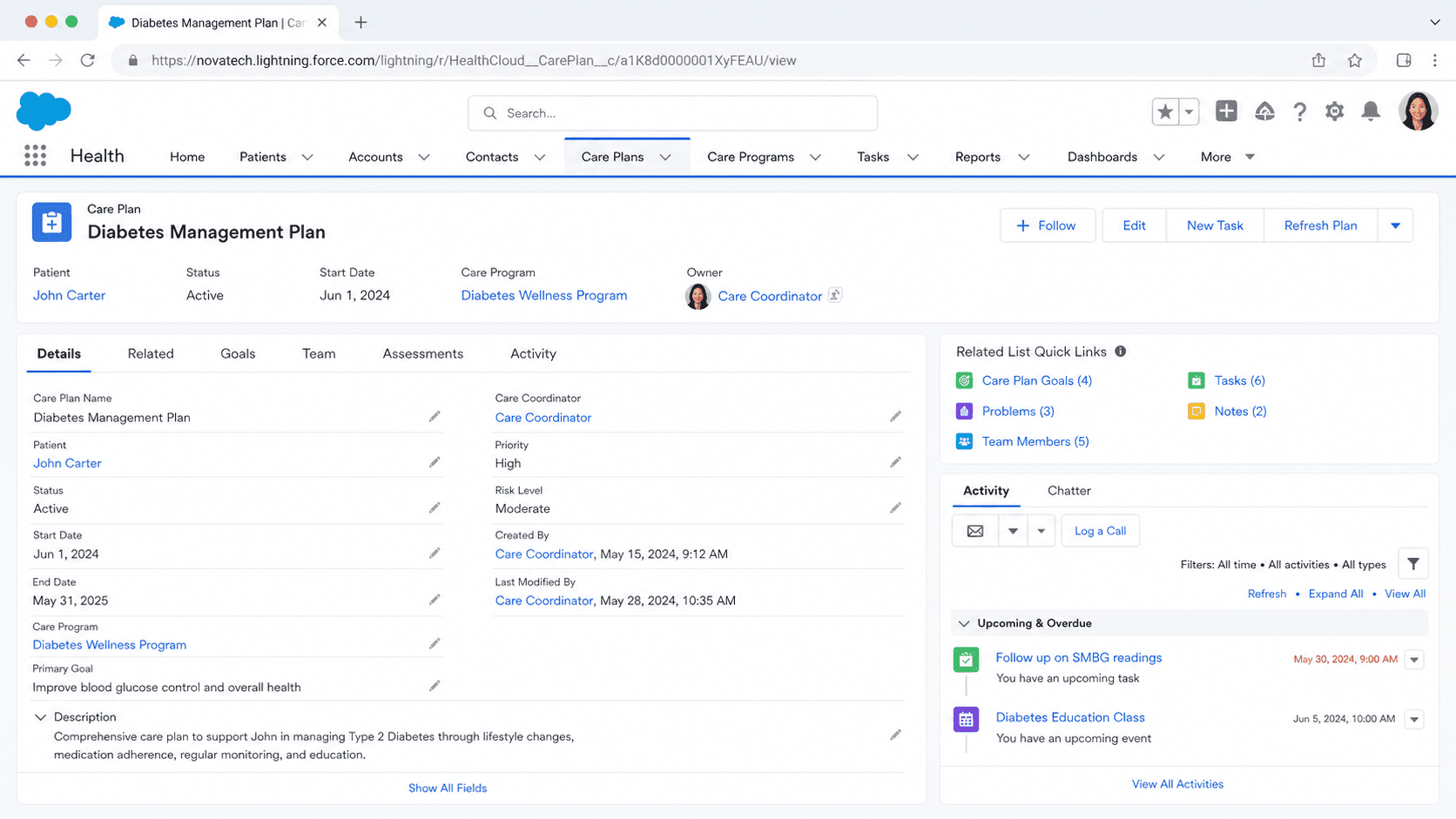
Definition
A Care Plan is a Salesforce Health Cloud record that organizes the work of treating one patient or member around three connected parts: the problems being addressed, the goals the patient should reach, and the interventions that move them there. It sits on the person's record and gives a care coordinator, clinician, or case manager a single place to see what is wrong, what success looks like, and who is doing what about it.
In current Health Cloud, Care Plans are part of the Integrated Care Management feature. They are built from standard objects such as CarePlan, Care Plan Problem, Care Plan Goal, and Care Plan Intervention, with CareBarrier capturing obstacles like social or environmental factors. A care manager can build a plan from scratch, apply a Care Plan Template, or generate one from assessment recommendations or a care gap. The same structure shows up in public sector and nonprofit settings, where it tracks a participant's needs and a plan to meet them.
How a Care Plan holds a patient together
Problems, goals, and interventions
Every Care Plan is built on the same chain. A Problem is the reason the plan exists, a condition or need such as Type 2 Diabetes or an unmet housing requirement. A Goal is what good looks like for that problem, for example getting an A1c reading under seven by a target date. An Intervention is the concrete action that helps reach the goal, like a weekly coaching call or a medication adjustment. The three link directly, so a reader can trace any intervention back to the goal it serves and the problem behind it. This is the difference between a Care Plan and a loose pile of tasks. Without the chain, a patient record is a flat list of activities with no shared purpose. With it, the same activities resolve into a plan a whole care team can read at a glance. Health Cloud also supports goals that are added without a specific problem, which suits wellness and prevention work where the aim is general rather than tied to one diagnosis. Care managers can mark interventions complete and update the plan as the patient changes.
The Integrated Care Management data model
Current Care Plans run on the Integrated Care Management data model rather than the older Case-based approach. The core objects are CarePlan as the container, plus Care Plan Problem, Care Plan Goal, and Care Plan Intervention as its children. CareBarrier records the things that get in the way of care, including social determinants such as transport or food access, so the team can plan around them instead of being surprised later. Around these sit supporting structures. Problem and Goal definitions act as reusable building blocks, Action Plan Templates supply standard intervention sets, and Care Team Member records attach the people working the plan. Access is governed by Health Cloud permission sets, so an org grants care managers the rights to read and edit plan objects without opening up the whole platform. Knowing which object holds which piece matters when you build reports, because goal progress, open problems, and overdue interventions each live on a different object and roll up differently.
Care Plan Templates
Templates are how care programs scale. A Care Plan Template is a prebuilt frame that bundles standard Problems, Goals, and Interventions for a recognizable situation, such as post-surgical recovery or chronic-disease coaching. When a care manager applies a template to a person, Health Cloud instantiates those standard elements on a real plan, and the team then tailors them to the individual. The alternative, designing every plan by hand, does not hold up once a program serves hundreds of people. Admins build templates in setup and decide which problems, goals, and intervention tasks belong in each. You can also add goals to a template without attaching them to a problem, which is useful for general wellness items that apply to everyone in a program. The trap is abstraction. A template that reflects a textbook rather than the org's real programs produces plans that look complete but do not match how the team actually works. Templates earn their value when they mirror real operating procedure, not generic best practice.
Care Team and assignment
A Care Plan only works if the right people are attached to it. The Care Team for a patient is the set of people contributing to their care, which can include a primary care physician, a nurse, a social worker, a case manager, and sometimes a family member or caregiver. Interventions and tasks within the plan assign to specific Care Team members, so responsibility is explicit rather than assumed. The Care Team view shows everyone working the plan in one place, which is the point of coordinated, multi-disciplinary care. It is also where a common silent failure starts. When someone leaves a role or goes inactive but stays attached to the plan, the tasks routed to them quietly stall, and nobody notices until a goal slips. Because Care Plans are meant for long-running, complex cases, the membership needs routine review. Assigning work to the team is easy, keeping the team current is the discipline that actually keeps the plan alive.
Creating plans from assessments, gaps, and recommendations
Current Health Cloud leans toward generating plans from data rather than blank entry. A care manager can start a new plan from the care plan component on a person account, case, or clinical service request, often the IndustriesHCCarePlanManager FlexCard. From there they can apply a template, or let the system suggest content. Two data-driven paths stand out. Assessments, including MCG and Discovery Framework assessments, can recommend a personalized plan based on how the patient answered, mapping responses through decision logic to suggested problems, goals, and interventions. Separately, care gap evaluation can flag where a measure has not been met and prompt a plan to close that gap. Both reduce manual setup and make the resulting plan reflect the patient's actual situation. The care manager still reviews and adjusts what gets created, since a recommendation is a starting point, not a final decision. This blend of templates, assessments, and gap detection is what makes plan creation repeatable across a large population.
Public sector and nonprofit care plans
The Care Plan idea is not limited to clinical healthcare. Nonprofit Cloud for programs uses care plans to track a participant through a social service, with the same shape of needs, goals, and planned actions, plus the ability to manage and close a plan when the work is done. Public sector teams use a comparable structure to follow a participant's needs and the plan to meet them across a benefits or services program. The vocabulary shifts with the audience. A clinical problem becomes an identified need, a clinical intervention becomes a service or referral, and a patient becomes a participant or client. The underlying logic stays the same: name the problem, set a measurable goal, plan the actions, assign the people, and track progress over time. For an admin moving between Health Cloud, Nonprofit Cloud, and Public Sector Solutions, recognizing that one mental model covers all three makes the configuration far less daunting than the differing labels suggest.
Configure Care Plans in Health Cloud
Care Plans are a configured Health Cloud capability, not a single checkbox. Most of the admin effort goes into enabling the feature, granting access, and building templates so care managers can create consistent plans. These are the main configuration touch points.
- Enable Integrated Care Management
Turn on the Health Cloud feature that powers current Care Plans. This provisions the CarePlan, Care Plan Problem, Care Plan Goal, Care Plan Intervention, and CareBarrier objects your care managers will use.
- Assign Health Cloud permission sets
Give care coordinators and clinicians the permission sets that grant read and edit access to the care plan objects. Without the right permissions, the care plan component renders empty or read-only.
- Build Care Plan Templates
In setup, create templates that bundle the standard problems, goals, and intervention tasks for your real programs. Add goals without problems where you need general wellness items that apply to everyone.
- Place the care plan component on the record page
Add the IndustriesHCCarePlanManager FlexCard to the person account, case, or clinical service request page so care managers can click New Care Plan and manage problems, goals, and interventions in context.
Reusable frames of standard problems, goals, and interventions that a care manager applies to a person to create a plan quickly.
Reusable building blocks for goals and problems so templates and plans draw from a consistent, governed library.
MCG or Discovery Framework assessments that map a patient's answers to a suggested plan, reducing manual setup.
Measure evaluation that flags an unmet care gap and prompts a plan to close it.
- Generic templates that mirror a textbook rather than your real programs create plans that look complete but nobody actually uses.
- Goals without a measurement schedule or target date become aspirational and the plan loses its operational value.
- Interventions assigned to an inactive Care Team member stall silently, so audit team membership on a regular cadence.
Prefer this walkthrough as its own page? How to Care Plan in Salesforce, step by step
Trust & references
Cross-checked against the following references.
Straight from the source - Salesforce's reference material on Care Plan.
Hands-on resources to go deeper on Care Plan.
About the Author
Dipojjal Chakrabarti is a B2C Solution Architect with 29 Salesforce certifications and over 13 years in the Salesforce ecosystem. He writes and edits salesforcedictionary.com, published by KineticBit Inc., to help admins, developers, architects, and cert/interview candidates sharpen their fundamentals. More about Dipojjal.
Test your knowledge
+5 pts / dayQ1. What does a Care Plan in Health Cloud organize around a single patient?
Q2. What does applying a Care Plan Template to a patient do?
Q3. In which Salesforce product does a Care Plan primarily exist?
Discussion
Loading discussion…