
Care Program
A Care Program in Salesforce Health Cloud is a record that represents a set of activities offered to participants by an employer, insurer, provider, or life sciences company.
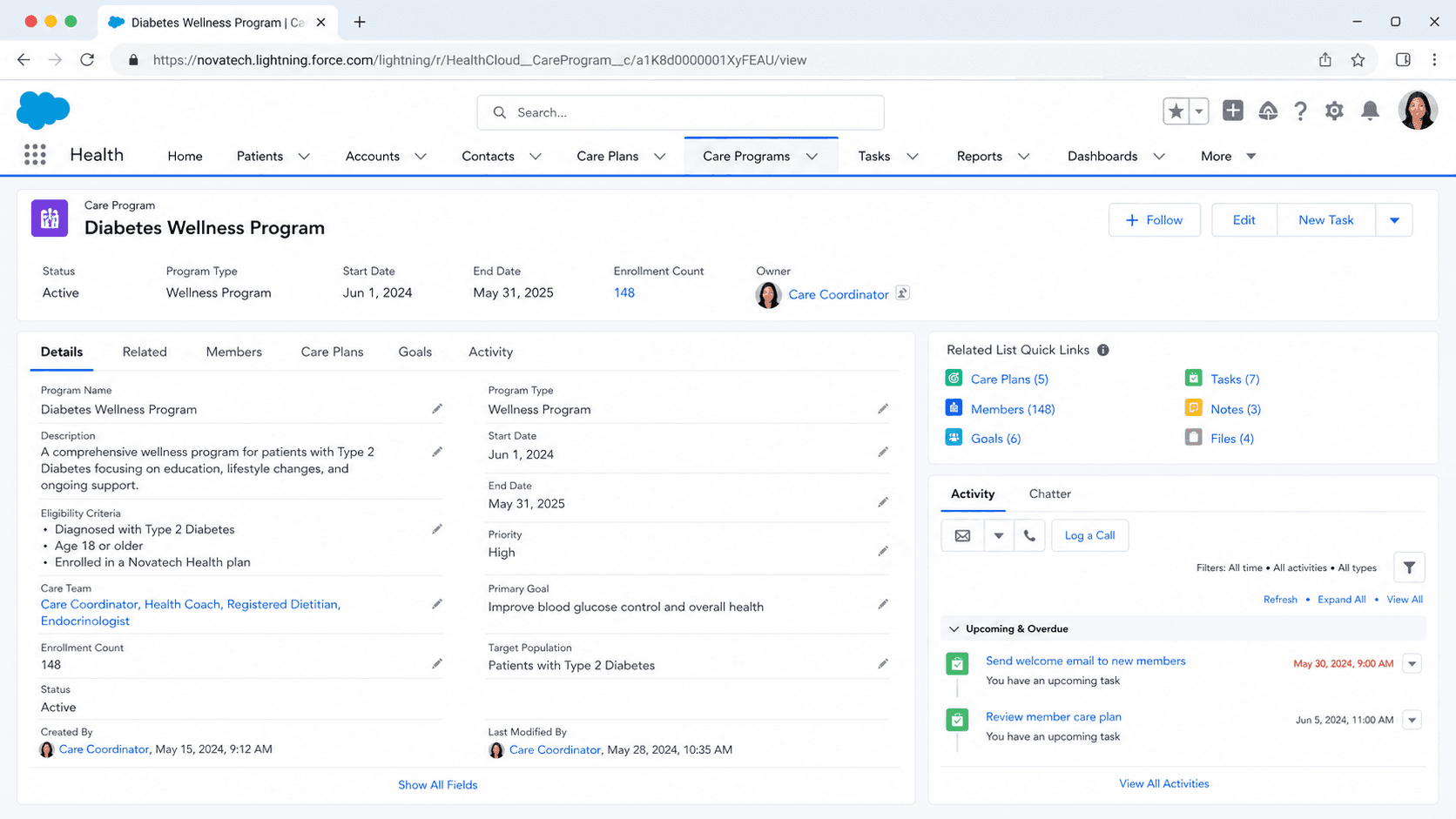
Definition
A Care Program in Salesforce Health Cloud is a record that represents a set of activities offered to participants by an employer, insurer, provider, or life sciences company. Those activities can be a patient therapy, a financial assistance program, patient education, a wellness plan, or a fitness plan. The Care Program record holds the program name, the parent program, the program sponsor, the approved budget, and the start and end dates. It is the top-level container for everything the program does.
Patients join through a Care Program Enrollee record, which links a Person Account to one program. A single Care Program serves many enrollees, and one patient can be enrolled in several programs at once. Care Programs sit above Care Plans. A Care Plan organizes work for one patient, while a Care Program organizes a whole population pursuing a shared goal such as managing diabetes, adhering to a medication, or recovering after surgery.
How Care Programs structure population health in Health Cloud
The Care Program record and what it holds
The Care Program object is the parent of the whole data model. Each record names the program and stores the fields that define its scope: the parent care program, the program sponsor, the approved budget, and the program start and end dates. Salesforce describes a Care Program as a set of activities offered to participants by an employer or insurer, so the record is deliberately broad. The same object backs a diabetes coaching cohort, a copay assistance program, and a post-discharge follow-up program. Because the budget and dates live on the record, the Care Program also carries the business framing for the program, not just the clinical one. Leadership can see what was funded, over what window, and against which sponsor. Child records hang off this parent: enrollees, products, providers, team members, goals, and campaigns. Reporting rolls those child records back up to the program. That parent-to-child shape is what lets a single program manage hundreds or thousands of patients without losing track of who belongs to what, what each person receives, and how the population as a whole is trending.
Care Program Enrollee: the link to the patient
A patient does not attach to a Care Program directly. They join through a Care Program Enrollee record, which connects a Person Account to one program. The Enrollee is where participation lives: who the patient is, which program they joined, and the status of that enrollment. One Care Program owns many Enrollee records, and one patient can hold Enrollee records across several programs at the same time. By default a patient cannot enroll in the same Care Program twice. When an admin turns on Multiple Enrollments in the Same Care Program, a patient can be enrolled in one program more than once, which suits programs that run in repeated cycles. The Enrollee record is also the anchor for the patient's program-specific data. Care Program Enrollee Product records reference the enrollee, the product, and the provider, so you can see exactly which medication or service a given patient receives under the program. This keeps each patient's program participation auditable and separate from their other clinical records.
Products, providers, and the enrollment flow
A Care Program rarely offers just attention. It usually offers things: medications, devices, services, financial assistance. Care Program Product records connect the program to the products it offers, such as a specific therapy. Care Program Provider records identify the business accounts that supply those products or services. When a patient enrolls, Care Program Enrollee Product records capture which product that individual gets and from which provider. Salesforce ships a program enrollment flow built in Flow Builder to tie this together. A care coordinator selects the care program, adds the relevant products and services, chooses the providers, reviews the selections, and captures the patient's consent. The flow is customizable, so teams adapt the steps to their program. You can also expose a version that lets patients pick a program and choose products, services, and providers themselves. The result of running the flow is a complete set of records: the Enrollee, the products tied to that enrollee, and the providers, all created in one guided pass instead of by hand.
Goals, team members, and campaigns
Three more child objects round out the model. Care Program Goal records capture the objectives tied to a program, whether clinical (improve medication adherence) or behavioral (adopt alternative pain management strategies). Goals give the program something measurable to aim at across the population, separate from any one patient's Care Plan goals. Care Program Team Member records represent the staff who deliver the program: care coordinators, program managers, nurse coaches, social workers. Each team member references either a User or a Person Account, so the model handles both internal staff and external participants. Assigning the right team members is how caseloads get distributed across a program. Care Program Campaign records connect a program to marketing campaigns, which matters for patient education and outreach. A program that wants enrollees to learn about a new pain management approach can link the relevant campaign and track engagement. Together, goals, team members, and campaigns let a Care Program describe not only who is enrolled and what they receive, but what the program is trying to achieve and who is doing the work.
Care Program versus Care Plan
These two records are easy to confuse, and Health Cloud uses both. A Care Plan is patient-centric. It organizes one person's Goals, Problems, and Tasks, and it tracks the day-to-day work of moving that single patient toward better health. A Care Program is population-centric. It defines a program that many patients enroll in, with shared structure, budget, products, and outcomes. The two connect through enrollment. A patient enrolled in a Care Program typically gets a Care Plan that drives their individual activity inside the program. The Care Program supplies the standardized framework; the Care Plan applies it to one person. Picture a maternity support program. The Care Program holds the budget, the participating providers, the educational campaigns, and the program-wide adherence goal. Each expectant patient enrolled in it has a Care Plan with their own appointments, screenings, and tasks. Get this distinction right early. Modeling individual work on the Care Program, or trying to run a population from a single Care Plan, both fight the data model and create rework later.
Where Care Programs fit across Salesforce clouds
Care Programs originate in Health Cloud, but the pattern is wider. Life Sciences Cloud uses the same care program structures for patient services programs run by pharmaceutical and medtech companies, covering enrollment, onboarding, and ongoing support such as copay assistance and adherence coaching. The objects and the enrollment flow carry over, so skills built in one transfer to the other. The same enrollment-based shape appears in Public Sector Solutions, where the vocabulary changes to Benefit, Benefit Assignment, and program participants, but the idea is identical: define a program, enroll people, track what each person receives, and report on the population. Knowing this helps when you size an implementation. A care program is not a standalone feature bolted onto an org. It is a population management pattern that Salesforce reuses across industries. Treat it as data architecture, plan the parent-child relationships and the enrollment flow up front, and the program scales. Treat it as a single object and the cracks show as soon as real enrollee volume and real outcomes reporting arrive.
Integration and reporting at scale
Real programs do not live alone in the org. Eligibility usually depends on data that sits elsewhere: claims that identify who qualifies, clinical history from an electronic health record, and billing systems for program-funded services. Health Cloud teams commonly bring that data in through Data Cloud or integration tooling, so eligibility and enrollment run on real information rather than manual entry. Without integration, a Care Program turns into a data-entry burden that stops scaling once enrollee counts grow. Reporting is the other half. Because enrollees, products, goals, and team members all hang off the Care Program, you can roll them up into program-level dashboards. Those dashboards show enrollment counts, goal progress, product utilization, and outcome trends across the population. This is what proves a program is working when budget reviews arrive. A Care Program without aggregate outcomes reporting cannot defend its funding, no matter how good the individual patient care is. Plan the metrics, even rough proxy metrics, from the start, because real outcomes take months to accumulate and budget cycles do not wait.
Set up Care Program Management in Health Cloud
Care Programs are part of Health Cloud and run on the Care Program Management data model. An admin enables the feature, lays out the program record, and sets up the program enrollment flow so care coordinators can enroll patients with their products and providers in one guided pass. The steps below cover the configuration path, not Apex.
- Enable Health Cloud and Care Program Management
Confirm the Health Cloud licenses and permission set licenses are assigned. The Care Program object and its related objects come with Health Cloud, so the data model is available once the product is provisioned and users have the right permission sets.
- Create the Care Program record
In the Care Programs tab, create the program. Set the name, the program sponsor, the approved budget, and the start and end dates. Link a parent care program if this program rolls up under a larger one.
- Add products and providers
Create Care Program Product records for the medications, devices, or services the program offers. Create Care Program Provider records for the business accounts that supply them. These become the choices a coordinator picks during enrollment.
- Set up the program enrollment flow
Use the Flow Builder enrollment flow to let coordinators select the program, add products and services, choose providers, review, and capture consent. Customize the screens to match your program, then surface the flow on the right pages.
- Define goals and add team members
Create Care Program Goal records for the outcomes the program targets. Add Care Program Team Member records for coordinators and other staff, each tied to a User or Person Account, so caseloads are assigned.
The employer, insurer, or organization funding the care program; stored on the Care Program record alongside the budget.
The funding allotted to the program; gives leadership the financial framing and supports return-on-investment reporting.
The active window for the program; bounds enrollment and reporting to a defined period.
An option that lets a single patient enroll in the same program more than once, useful for programs that run in repeated cycles.
- By default a patient cannot be enrolled in the same Care Program twice; enable Multiple Enrollments in the Same Care Program first if repeat enrollment is needed.
- Care Program Team Member records can reference either a User or a Person Account, so pick the right one for internal staff versus external participants.
- Building enrollee, product, and provider records by hand does not scale; lean on the Flow Builder enrollment flow so one pass creates the full set of records.
- Plan program-level outcomes reporting from day one; without aggregate dashboards a Care Program cannot defend its budget at review time.
Prefer this walkthrough as its own page? How to Care Program in Salesforce, step by step
Trust & references
Cross-checked against the following references.
Straight from the source - Salesforce's reference material on Care Program.
Hands-on resources to go deeper on Care Program.
About the Author
Dipojjal Chakrabarti is a B2C Solution Architect with 29 Salesforce certifications and over 13 years in the Salesforce ecosystem. He writes and edits salesforcedictionary.com, published by KineticBit Inc., to help admins, developers, architects, and cert/interview candidates sharpen their fundamentals. More about Dipojjal.
Test your knowledge
+5 pts / dayQ1. How does a patient become part of a Care Program in Health Cloud?
Q2. How do a Care Program and a Care Plan relate in Health Cloud?
Q3. What does a Care Program's eligibility criteria control?
Discussion
Loading discussion…