
What Is a Salesforce Developer (and How to Become One in 2026)
The three developer specializations, the PD1 to PD2 cert path, dev sandbox vs scratch org, and how Agentforce changed what a Salesforce developer ships.
You built a Flow that does almost everything the business asked for. Almost. The last 10% needs a callout to an external pricing API, a loop over 5,000 records that the Flow times out on, and a bit of logic that is genuinely too gnarly for a decision element. You have hit the wall where clicks stop and code starts. Somebody on Slack says "that's a developer job now." And you start wondering what it would take to be the person who writes that code instead of filing a ticket for it.
This post is the map. What a Salesforce Developer actually is in 2026, the three specializations the title hides, the Platform Developer cert path, the dev sandbox versus scratch org decision that trips up every new developer, and what the first 90 days in a real developer seat look like. If you are an admin reading this to decide whether to cross over, the What Is a Salesforce Administrator primer is the mirror image of this post; read both and pick your side.
What a Salesforce Developer actually is
A Salesforce Developer builds the things the platform cannot do declaratively. That is the one-sentence definition, and the load-bearing word is "cannot."
Salesforce ships a huge amount of point-and-click capability. Flow handles most automation. Reports handle most analytics. The admin handles most configuration. The developer's job starts where those tools run out of road: custom business logic too complex for Flow, bulk operations that blow past Flow's limits, integrations with systems Salesforce does not natively connect to, custom user interfaces that standard components cannot render, and AI agent actions that need real code behind them.
A developer writes in two primary languages. Apex is the server-side language, a Java-like language that runs on Salesforce's multi-tenant infrastructure. Lightning Web Components (LWC) is the client-side framework, modern JavaScript that renders custom UI. A developer also writes SOQL and SOSL (the query languages), test classes (mandatory, not optional, on Salesforce), and increasingly, agent actions that wire Apex into Agentforce.
The distinction from an admin is sharper than people think. An admin owns the platform's configuration and stability. A developer owns the custom code that extends it. In a small org, one person does both. In a large org, they are separate roles with separate skill sets, separate release lanes, and separate on-call rotations. The 2026 reality is that the line between them blurred at the bottom (every admin now designs Flows, every developer reviews them) but stayed sharp at the top (no admin writes a Queueable Apex chain, no developer owns the sharing model).
The three specializations the title hides
"Salesforce Developer" is one title covering three jobs that share a language and diverge from there. Knowing which one you are aiming at changes what you study, which certs you chase, and which jobs you apply to.
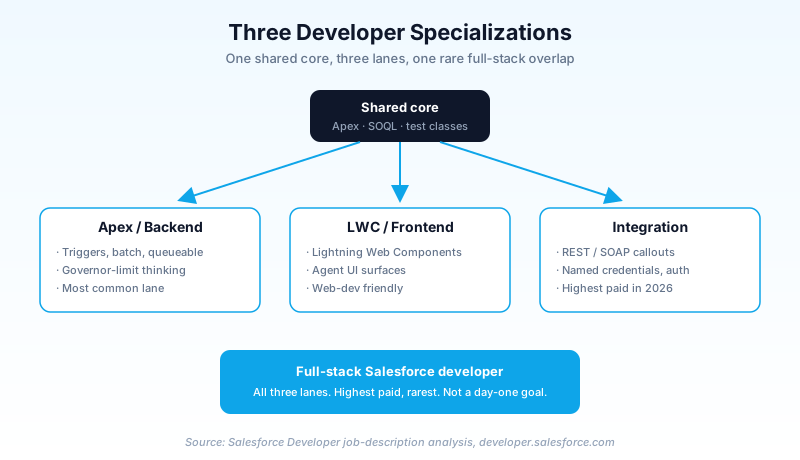
The Apex / backend developer. Lives in server-side logic. Writes triggers, Apex classes, batch jobs, Queueable chains, scheduled jobs, and the test classes that cover them. Thinks in governor limits and bulkification. This is the most common specialization and the one the Platform Developer certs target most directly. If you like data, logic, and performance puzzles, this is your lane.
The LWC / frontend developer. Lives in the UI layer. Builds Lightning Web Components, custom pages, custom record views, and increasingly, the rich UI surfaces that Agentforce agents render. Writes modern JavaScript, knows the Lightning Design System, and cares about render performance and accessibility. If you came from web development, this is the lane that feels most familiar.
The integration developer. Lives at the boundary. Connects Salesforce to other systems: ERP, data warehouses, payment processors, marketing platforms. Writes REST and SOAP callouts, manages named credentials, handles authentication flows, and designs the middleware patterns that keep data in sync. This is the highest-paid specialization in 2026 because it is the hardest to fake and the most in demand.
Most developers start in one lane and pick up a second over time. The "full-stack Salesforce developer" who can do all three is the highest-paid archetype in the ecosystem, and the rarest. You do not need to be that person on day one. You need to pick one lane, get good, and let the others come.
What changed in 2026: every developer touches AI now
Three shifts in the last 24 months changed the job materially.
Agentforce moved into the developer's scope. When Agentforce shipped, the first wave of agents were built declaratively by admins. By 2026, the interesting agents need code. Developers now write custom agent actions in Apex, build LWC surfaces for agent interactions, and wire external data into agent context. "Extend Agentforce with Apex and LWC" is now a line item in Salesforce developer job descriptions that did not exist 18 months ago. A developer who can build a custom agent action is worth more than one who cannot, by a margin that is still widening.
Flow literacy became mandatory for developers. The old world had a clean split: admins built Flows, developers wrote Apex. That split is gone. In 2026, a developer who cannot read a Flow cannot do code review, because half the automation in a modern org is declarative. The best developers know exactly when a problem belongs in Flow and when it belongs in Apex (the Flow vs Apex decision matrix covers this in depth). Reaching for Apex when Flow would do is now a code-smell, not a flex.
AI-assisted development became normal. Salesforce shipped Agentforce Vibes into the Developer Edition with Claude as the default model, plus MCP support. Developers in 2026 write Apex and LWC faster because the IDE understands the org's metadata and schema. This does not replace knowing the language; it raises the floor on output. A developer who refuses to use AI tooling in 2026 is choosing to ship slower than their peers for no good reason.
The developer toolkit
Before the cert path, here is what a working Salesforce developer actually uses day to day in 2026. If you have never seen this stack, this is what you are signing up to learn.
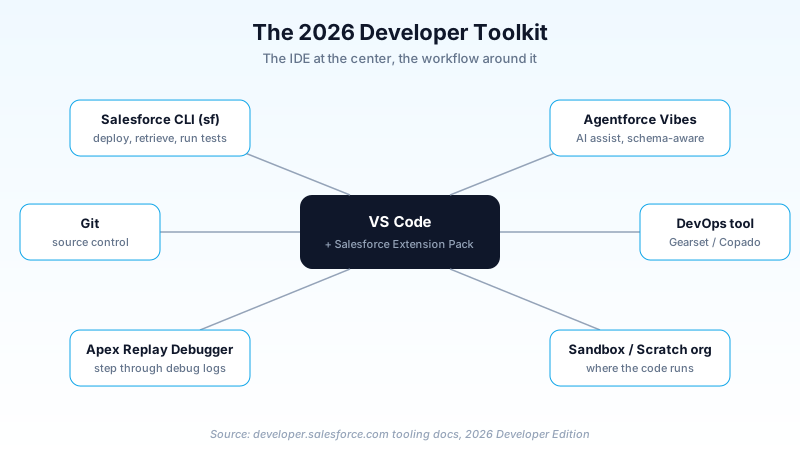
- VS Code with the Salesforce Extension Pack. The standard developer IDE. The Developer Console still exists in-browser, but no serious developer lives there.
- Salesforce CLI (sf). The command-line tool for deploying, retrieving metadata, running tests, and managing orgs. Non-negotiable in 2026.
- Git and source control. Every professional Salesforce shop uses Git. If your current org pushes changes by hand through change sets with no version control, that is the tech debt you will be hired to fix.
- A DevOps tool. Gearset, Copado, or the native DevOps Center. This is how code moves from sandbox to production safely.
- The Apex Replay Debugger. Steps through Apex execution after the fact using debug logs. The closest thing Salesforce has to a real debugger.
- Agentforce Vibes. The 2026 AI coding assistant inside Developer Edition. Understands your org's schema and code patterns.
If you come from traditional software development, most of this is familiar with a Salesforce accent. If you come from the admin side, this stack is the actual learning curve, more than the Apex syntax itself. The language is learnable in weeks. The tooling and the workflow take a few months to internalize.
Dev sandbox vs scratch org: the decision every new developer gets wrong
This is the question that separates someone who has read about Salesforce development from someone who has done it. Both are places to write and test code. They are not interchangeable.
A Sandbox is a copy of your production org. It has your real metadata, your config, optionally your data, and it persists. You refresh it on a schedule. Developer sandboxes are small (no production data by default), Developer Pro sandboxes hold more, Partial Copy and Full sandboxes hold sample or complete data. You use a sandbox when you need to develop against the real org's existing complexity.
A Scratch Org is a disposable, source-driven org you spin up from a config file, use for a few days, and throw away. It starts empty and is defined entirely by your source code and a definition file. You use a scratch org for package development, for feature branches, and for CI pipelines where every build needs a clean org.
The rule of thumb: sandboxes are for working against the existing org, scratch orgs are for building something new in isolation. A new developer who tries to do package development in a sandbox fights the tooling the whole way. A new developer who tries to debug a production issue in a scratch org cannot reproduce it because the scratch org does not have the org's real config. Pick the right one and the work flows; pick the wrong one and you spend a day confused about why nothing matches.
Most enterprise Salesforce development in 2026 still happens in sandboxes, because most work is extending an existing org rather than building net-new packages. Scratch orgs dominate ISV and package development. Know both; expect to live in sandboxes for your first job.
The Platform Developer cert path
The cert ladder for developers is shorter and deeper than the admin ladder. Here is the path.
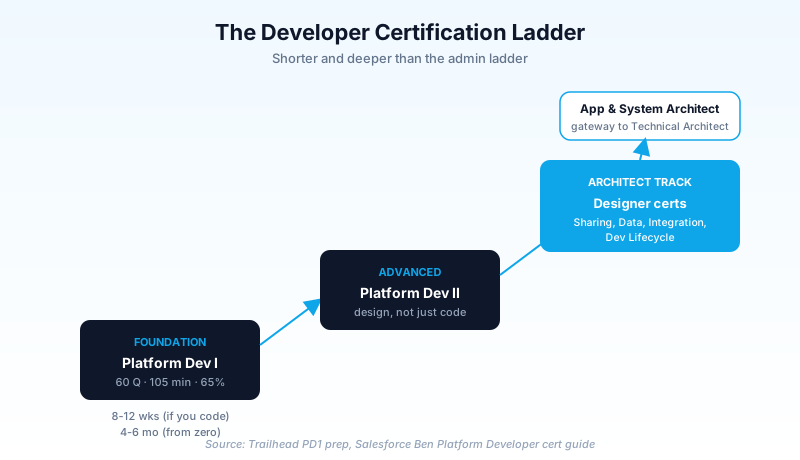
Platform Developer I (PD1). The foundation cert. 60 questions, 105 minutes, 65% to pass, $200. The blueprint covers Salesforce fundamentals, process automation and logic (the heaviest section at around 30%, including the Order of Execution and the Flow-versus-Apex decision), user interface development (LWC and Visualforce), and testing, debugging, and deployment. If you can write a bulkified trigger, a test class that hits 75% coverage, and a basic LWC, you are most of the way to PD1.
Platform Developer II (PD2). The advanced cert. Historically a multi-part credential (a proctored exam plus programming assignments), recently streamlined. PD2 tests advanced Apex, advanced LWC, integration patterns, and performance. This is where you prove you can design, not just code.
The Architect designer certs. Beyond PD2, the path forks into the architect track: Sharing and Visibility Architect, Data Architect, Integration Architect, Development Lifecycle and Deployment Architect. Stack enough of these and you reach Application Architect and System Architect, which are the gateways to the Technical Architect track and the top of the technical ladder.
PD1 is reachable in 8 to 12 weeks for someone who already codes a little. For a true beginner with no programming background, budget 4 to 6 months, because you are learning to program and learning Salesforce at the same time. That is a real undertaking, not a weekend. But it is the single highest-return skill in the ecosystem for the money.
The first 90 days as a Salesforce Developer
Job descriptions tell you the skills. They do not tell you what the first three months actually feel like. Here is the honest arc.
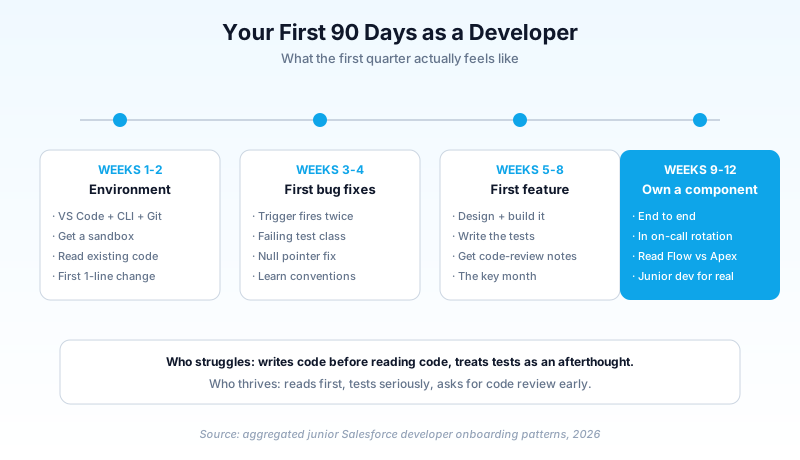
Weeks 1 to 2: Environment and orientation. You set up VS Code, the Salesforce CLI, and your Git access. You get a developer sandbox. You read the org's existing code, which is always messier than the textbooks. You make your first tiny change (a label, a field, a one-line Apex fix) and push it through the real deployment pipeline so you learn the release process before you learn the codebase.
Weeks 3 to 4: First bug fixes. You pick up small, well-scoped bugs. A trigger that fires twice (the Apex trigger framework guide covers the recursion guard that prevents exactly this). A test class that fails after a field change. A null pointer in a controller. These teach you the codebase faster than any documentation, because you have to read the surrounding code to fix the bug. You learn the org's conventions, its naming, its governor limit pressure points.
Weeks 5 to 8: First real feature. You get a feature with real scope. You design it, write the Apex or LWC, write the tests, and submit it for code review. You will get notes. Everybody gets notes on their first feature. The senior developer will flag the SOQL inside a loop you did not notice, the missing bulkification, the test that asserts nothing. This is the most important month; this is where you become a developer instead of someone who writes code.
Weeks 9 to 12: Owning a component. By the end of the first quarter, you own a component end to end: design, code, tests, deployment, and the production support when it breaks. You are in the on-call rotation. You can read a Flow and decide whether a bug belongs in the Flow or the Apex it calls. You are a junior developer in fact, not just in title.
The developers who struggle in the first 90 days are the ones who try to write code before reading the existing code, and the ones who treat test classes as an afterthought. The ones who thrive read first, test seriously, and ask for code review early and often.
Developer vs Admin: which should you pick?
If you are standing at the fork, here is the honest comparison. Developers earn more at the same experience level (the integration specialization especially), but the ramp is steeper and the work is less forgiving; a broken Flow is an admin annoyance, a broken trigger in production is an incident. Admins have a gentler on-ramp, broader business exposure, and a clearer path into consulting and solution architecture. Developers have a deeper technical ceiling and a more direct path into technical architecture.
The tell: if you enjoyed the part of building a Flow where you were solving the logic puzzle, and you got frustrated when Flow could not express what you wanted, you will probably enjoy development. If you enjoyed the part where you talked to the business, mapped their process, and rolled out a solution people used, you will probably enjoy the admin-to-consultant path. Neither is better. They pay similarly at the senior level. Pick the daily work you would do for free.
You do not have to decide forever. Plenty of strong architects started as admins, learned to code at year three, and became developers who understood the business better than their peers. Plenty of developers learned the admin side later and became better architects for it. The cross-training compounds. But pick a primary lane first, because trying to be both at once in your first two years means being mediocre at both.
What to do this week
Five concrete actions if you have decided to head toward development:
- Sign up for a free Developer Edition org at developer.salesforce.com. The 2026 edition includes Agentforce Vibes, so you get AI-assisted coding from day one.
- Install VS Code and the Salesforce Extension Pack. Connect it to your Developer Edition org with the Salesforce CLI. This setup is the real first milestone.
- Write your first Apex trigger on the Account object that updates a field when a record is created. Then write the test class for it and hit 75% coverage. Trailhead has the guided version; do it once with the guide, then once without.
- Start the "Prepare for Your Platform Developer I Credential" trailmix on Trailhead. Schedule PD1 for 10 to 12 weeks out if you already code, 4 to 6 months out if you are starting from zero.
- Read your own org's Apex if you have access. Real code teaches faster than tutorials. Find one trigger, read it top to bottom, and figure out what it does and why.
The Salesforce developer path is the deepest technical track the platform offers, and in 2026 it is more interesting than it has ever been because every developer now touches AI. The pay is strong, the ceiling is the Technical Architect role, and the work is genuinely satisfying for people who like solving the problem the clicks could not. The hard part is the first 90 days. Set up your environment this week and start writing the code you used to file tickets for.
About the Author
Dipojjal Chakrabarti is a B2C Solution Architect with 29 Salesforce certifications and over 13 years in the Salesforce ecosystem. He writes and edits salesforcedictionary.com, published by KineticBit Inc., to help admins, developers, architects, and cert/interview candidates sharpen their fundamentals. More about Dipojjal.
Share this article
Sources
Related dictionary terms
Practise it
Five questions on Platform Developer I
Exam-style questions with an explanation after each one. No account needed, and your answers build a weak-topic map once you have one.
Keep reading

The Apex Trigger Framework: Best Practices for Bulk-Safe, Scalable Triggers (2026)
The complete 2026 trigger framework guide. Logic-less triggers, bulk safety, recursion control, framework comparison (Kevin O'Hara vs interface vs virtual), and CRUD/FLS enforcement.
Salesforce Flow vs Apex in 2026: A Decision Matrix for Admins, Developers & Consultants
Flow vs Apex is not a religious war anymore. Here is the 2026 decision matrix. Capability gaps, governor limits, the 70/30 rule, and 12 worked scenarios with the right answer for each.
What Is a Salesforce Administrator (and How to Become One in 2026)
You hear "Salesforce Admin" thrown around in three different rooms and you are not sure what the role actually owns. This is the 2026 primer: day-to-day work, the cert path, and how to break in.
Comments
No comments yet. Start the conversation.
Sign in to join the discussion. Your account works across every page.