
Salesforce Flow Orchestration in 2026: Now Free, Now Standard
Spring '26 removed the paywall on Flow Orchestrator. Here is what changed, when to use it instead of a record-triggered flow, and how to build your first multi-stage process.

A new Account record lands in your org on Tuesday morning. Legal needs to approve the contract terms, Finance needs to set up a billing record, IT needs to provision a portal user, and Sales needs a kickoff call scheduled, all before the customer is "live." You built five record-triggered flows last quarter to do this, and three of them already fire out of order on bulk inserts because the Account team kicked off a backfill on Monday. The thing you actually wanted was a process. A single artifact that says "first these two run in parallel, then this approval, then this background step, and you cannot reach step four until step three is done." That artifact is Flow Orchestration, and as of Spring '26 it stopped costing extra and stopped being a curiosity.
Salesforce flipped Flow Orchestration to a standard flow type on February 18, 2026, available in Enterprise, Performance, Unlimited, Einstein 1, and Developer editions with no usage-based caps and no add-on SKU. The previous license fence, including the 600-runs-free cap and the per-bundle pricing, is gone. If you write automation on the Salesforce platform, this changes the menu of patterns you should be considering for any multi-step, multi-user process.
This is the working tutorial. What Flow Orchestration is, what changed in Spring '26, when to reach for it instead of a regular record-triggered flow or an approval process, the three concepts you need to understand (stages, steps, the Work Guide), and a walk-through of building your first orchestration.
What changed in Spring '26
Three things, in order of how much they matter to you.
First, the paywall came down. Flow Orchestration used to be a paid add-on. Orgs got 600 orchestration runs per year free, and after that you bought bundles of runs from your Account Executive at non-trivial prices. As of the Spring '26 release, orchestration runs are included in the same way regular flow runs are, with no per-run metering and no usage-based caps separate from the editions' standard flow allowances.
Second, it is now a standard flow type in the picker. When you open Flow Builder and click New, you used to see Screen Flow, Record-Triggered Flow, Schedule-Triggered Flow, Platform Event-Triggered Flow, and Autolaunched Flow. Now you also see Record-Triggered Orchestration and Autolaunched Orchestration. Same UX surface, same metadata story, same versioning model as regular flows. The implication: any admin or developer who can build a flow can now build an orchestration without filing a license ticket first.
Third, the on-record Work Guide is included. The Orchestration Work Guide is the Lightning component that shows a user the orchestration step assigned to them, on the record itself, with a "Start" button. Previously, you had to enable it and the on-record experience was paywalled along with the rest. It now ships standard. Users see their next task on the Account, Case, or Opportunity record without hunting through inboxes.
The practical effect: if you have been daisy-chaining record-triggered flows to fake a multi-user process, you can stop. The native primitive is here, it is free, and it works.
Orchestration vs record-triggered flow vs approval process
Three different automation primitives, three different jobs.
| Aspect | Record-triggered flow | Approval process | Flow Orchestration |
|---|---|---|---|
| Best for | Single-transaction reactions | Single decision point with approver chain | Multi-step, multi-user processes with parallel and sequential branches |
| Time horizon | Seconds (with scheduled paths for delays) | Hours to days | Hours to weeks |
| User interaction | None, or a single screen flow | One approver at a time, fixed schema | Multiple assigned screen flows across users and queues |
| State tracking | Implicit in record fields | Built-in (Approved, Pending, Rejected) | First-class. Each step has a status, the orchestration has a status |
| Visibility for end users | None native | Approver email and approval history | On-record Work Guide showing the next step |
| When to reach for it | "When X happens to a record, do Y" | "Manager must approve discounts above 20 percent" | "Customer onboarding: Legal, Finance, IT, Sales, with handoffs and waits" |
The clearest test: if your process needs more than one human, in more than one role, doing more than one thing, with order and visibility mattering, it is an orchestration. If it is a single decision with a single approver chain, it is an approval process. If it is one record changing and triggering downstream actions, it is a record-triggered flow.
The mistake to avoid is using a record-triggered flow with five scheduled paths to simulate an orchestration. That works for two or three steps and falls apart at five, because there is no native concept of "step three is in progress, step four is waiting, step five has not started." All of that state lives in custom fields you maintain by hand. Orchestration gives you that state for free.
The three concepts: stages, steps, the Work Guide
Orchestration has a small vocabulary. Three terms cover most of what you need.
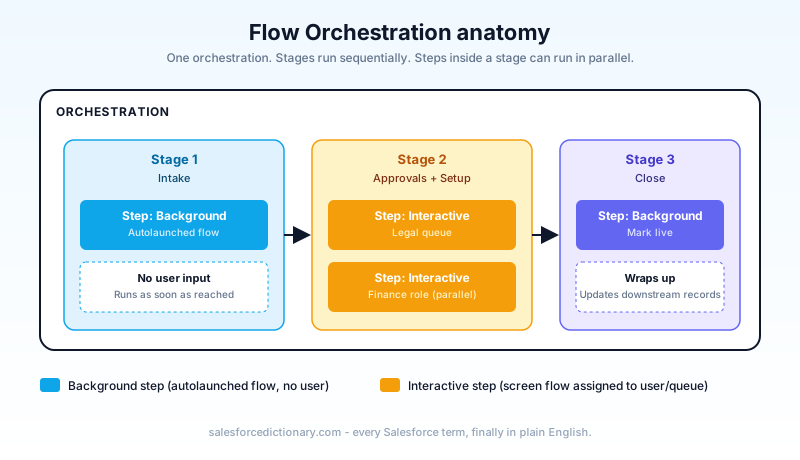
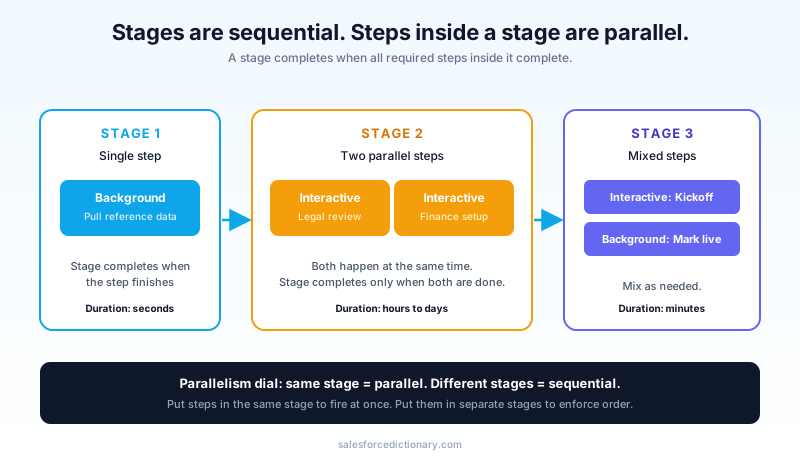
Stages run sequentially. A stage is a phase of the process. Stages execute one at a time, in order. You move to stage two only after every required step in stage one finishes. Think of stages as the chapters of the process: Intake, Approval, Provisioning, Close.
Steps within a stage can run in parallel. Inside a stage, you have one or more steps. Steps in the same stage can fire at the same time, and the stage completes when all of them are done. This is the parallelism dial. Put Legal review and Finance setup in the same stage and they happen at the same time. Put Legal review in stage one and Provisioning in stage two and provisioning waits for legal.
Steps come in two flavors: interactive and background. An interactive step assigns a screen flow to a user or a queue. The assigned user sees the step on the record's Work Guide and clicks Start to launch it. A background step runs an autolaunched flow with no user input; the orchestration runs it as soon as the step is reached and moves on when it finishes. Most real orchestrations mix both: a background step that pulls reference data, an interactive step for a human decision, another background step that updates downstream records.
The Work Guide closes the loop. When an interactive step is assigned to a user and the orchestration is "on" a record (most commonly via a record-triggered orchestration), the Work Guide component on that record's page shows the user the step, with context, and a button. They click it. The assigned screen flow runs in a flyout. When it completes, the orchestration advances. The user never has to open Salesforce Inbox, hunt in a queue, or click through to a different object.
Build your first orchestration: a customer onboarding example
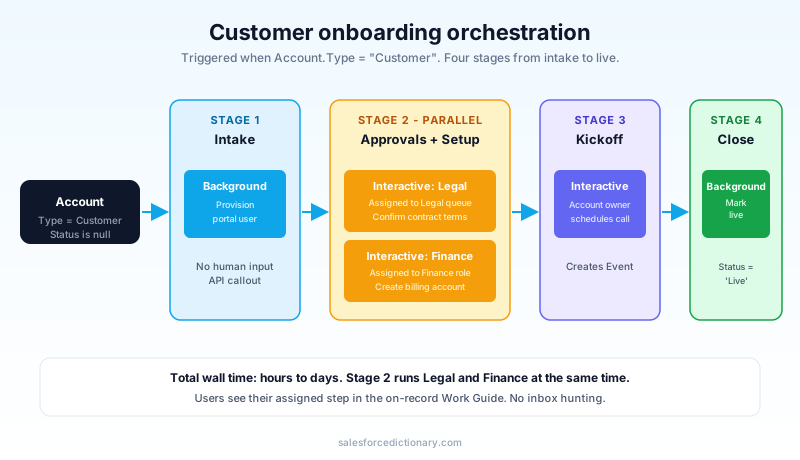
The scenario from the opening: a new Account is created with Type = 'Customer', and four teams have to act before the Account is considered "live."
Step zero: the screen flows the orchestration will call. Orchestration steps point at existing flows, so build those first. For this example, four screen flows and one autolaunched flow:
Onboarding_LegalReview(screen flow): assigned to the Legal queue. Confirms contract terms and writes a checkboxLegal_Approved__con the Account.Onboarding_FinanceSetup(screen flow): assigned to a specific Finance user role. Creates a Billing Account record.Onboarding_ProvisionPortal(autolaunched flow): calls an invocable Apex action that POSTs to the provisioning API.Onboarding_ScheduleKickoff(screen flow): assigned to the Account Owner. Creates an Event for the kickoff call.Onboarding_MarkLive(autolaunched flow): setsOnboarding_Status__c = 'Live'on the Account.
Step one: create the orchestration. Setup, Flows, New Flow, Record-Triggered Orchestration. Object: Account. Trigger: a record is updated. Entry conditions: Type = 'Customer' and Onboarding_Status__c is null. Optimize for: actions and related records.
Step two: build the stages.
- Stage 1, "Intake": one background step running
Onboarding_ProvisionPortal. - Stage 2, "Approvals and Setup": two interactive steps running in parallel. One assigned to the Legal queue running
Onboarding_LegalReview, the other assigned to the user holding theFinance Onboarding Leadrole runningOnboarding_FinanceSetup. - Stage 3, "Kickoff": one interactive step assigned to the Account Owner running
Onboarding_ScheduleKickoff. - Stage 4, "Close": one background step running
Onboarding_MarkLive.
Step three: add the Work Guide to the Account Lightning page. Edit the Account record page, drag the Orchestration Work Guide component onto it, save and activate. From this point, any user assigned a step sees it on the Account record itself.
Step four: test. Activate the orchestration. Create or update an Account to meet the entry condition. Watch the Work Guide light up for the assigned users. Walk through the steps. Confirm Stage 4 sets Onboarding_Status__c = 'Live'. Confirm the orchestration completes.
That is the entire shape of a real orchestration. A handful of focused screen flows, an orchestration that wires them into stages and steps, and the Work Guide as the user interface. Total build time for someone who already knows Flow Builder: about an hour, most of which is building the underlying screen flows.
What orchestration does not do
Set expectations correctly. There are real limits.
It is not a workflow engine for the whole company. Orchestration runs on the Salesforce platform, against Salesforce data, with Salesforce users. If your process touches a third system as the source of truth (Jira tickets, ServiceNow incidents, a homegrown PLM), the orchestration is one participant in the larger workflow. It is not a substitute for MuleSoft, an external workflow engine, or a Slack-based process bot.
It does not replace approval processes for simple approval chains. Approval processes have a richer schema for "approve, reject, recall, reassign," approval history, email templates tied to outcomes, and entry criteria evaluation. If your process is "manager approves this discount," an approval process is still the right tool. Orchestration shines when the approval is one step among many.
It is not a substitute for Apex state machines when ordering and rollback matter at the millisecond level. Orchestration is asynchronous and human-paced. If you need transactional all-or-nothing semantics across DML operations, you are still writing Apex.
It has governor limits. Each step's underlying flow runs under the same governor limits as any other flow. Long-running orchestrations are common and fine, but a single step that tries to update 50,000 records in one DML still blows up. Bulkify inside each step just like you would in any flow.
Patterns that justify reaching for orchestration
Five concrete patterns where orchestration is clearly the right choice in 2026.
- Customer or partner onboarding. Multi-team handoffs, mixed sync and async work, the Work Guide as the user interface. The canonical example.
- Loan or claim processing. Intake, document review, underwriting, approval, funding. Each stage has its own queue, its own SLAs, and its own visibility. Orchestration gives you all three.
- Employee or vendor offboarding. IT revokes access, HR collects equipment, Finance closes accounts, Manager signs off. Linear with one or two parallel branches.
- High-touch deal closing. Legal contract redlines, Finance discount approval, CPQ quote regeneration, signature collection, contract activation. The kind of process where "which step are we on" is the question a sales leader asks every Monday.
- Field service complex jobs. Site survey, equipment provisioning, scheduled installation, customer acceptance, warranty registration. Each step happens on a different day with a different role, and the Work Guide on the Work Order keeps the technician oriented.
If your current implementation of any of these is "a record-triggered flow plus three custom checkbox fields plus a report and two scheduled paths," it is worth rebuilding as an orchestration. The state is explicit instead of inferred, the visibility is built in, and the next maintainer can read the orchestration definition instead of reverse-engineering your checkbox semantics.
Migration playbook for orgs already on the paid add-on
If your org was paying for Flow Orchestration before Spring '26, three things to do.
Confirm the SKU is no longer billed. The licensing change should auto-apply, but check the next renewal to make sure the orchestration runs line item is removed or zeroed out. If your AE has not surfaced this, ask.
Lift the run-count rationing. Teams that had been told "we only get 600 runs per year, so do not put orchestration on high-volume processes" can stop self-rationing. The cap is gone. Audit the processes that were built as record-triggered flow chains specifically to avoid orchestration billing, and consider promoting them.
Move the Work Guide onto the pages where it actually belongs. With the on-record component included, put it on every Lightning record page that hosts an orchestration. Users seeing the step on the record itself is the single biggest UX improvement available to most orgs running orchestration today.
What to read next
- Record-Triggered Flows: complete 2026 guide, the primitive most orchestrations call out to.
- Flow vs Apex 2026, for when an individual orchestration step has to drop down to code.
- Governor Limits 2026, because each step still operates inside the same governor model.
Pick one process in your org that is currently held together with three record-triggered flows and two checkbox fields. Rebuild it as a Flow Orchestration this week. Stand it up in a sandbox, add the Work Guide to the record page, walk a colleague through a test run, and watch them ask "why didn't we have this six months ago." Then take the same approach to the next four processes on your backlog.
About the Author
Dipojjal Chakrabarti is a B2C Solution Architect with 29 Salesforce certifications and over 13 years in the Salesforce ecosystem. He writes and edits salesforcedictionary.com, published by KineticBit Inc., to help admins, developers, architects, and cert/interview candidates sharpen their fundamentals. More about Dipojjal.
Share this article
Sources
Related dictionary terms
Practise it
Five questions on Administrator
Exam-style questions with an explanation after each one. No account needed, and your answers build a weak-topic map once you have one.
Keep reading

The Complete 2026 Guide to Record-Triggered Flows in Salesforce
Record-triggered flows are the Salesforce automation default in 2026. This is the complete tutorial: before-save, after-save, scheduled paths, gotchas, and 5 worked examples.

Salesforce Flow vs Apex in 2026: A Decision Matrix for Admins, Developers & Consultants
Flow vs Apex is not a religious war anymore. Here is the 2026 decision matrix. Capability gaps, governor limits, the 70/30 rule, and 12 worked scenarios with the right answer for each.

Salesforce Governor Limits Explained: The 2026 Cheat Sheet (with Examples)
The canonical 2026 cheat sheet: SOQL/DML/CPU/heap limits, sync vs async, the most-hit limits in production, and 10 patterns to keep your org out of the red.
Comments
No comments yet. Start the conversation.
Sign in to join the discussion. Your account works across every page.