
Apex Enterprise Patterns: Service, Selector, Domain & Unit of Work (2026)
The four-layer architecture that keeps large Salesforce orgs maintainable. What each layer does, the fflib library, mocking, and when these patterns are overkill.
You open a class called AccountService. It is 3,400 lines long. It queries Accounts in four different places with four slightly different field lists, runs three nested DML statements, and has a test class that inserts 12 records and asserts nothing. The author left the company two years ago. You have a one-line bug fix to make, and you are afraid to touch it.
That class is what happens when business logic, queries, and DML all live in the same place with no walls between them. Apex Enterprise Patterns are the walls. They split your code into four layers with clear jobs, so the next person (often future you) can find the logic, test it in isolation, and change it without holding their breath. This guide covers all four: Service, Selector, Domain, and Unit of Work. What each one does, when to reach for them, and when they are overkill.
Why layers, and why now
Salesforce gives you a powerful runtime and almost no opinion about how to structure code. That freedom is fine on a 50-line trigger. It becomes a liability the moment your org grows past a handful of objects and a couple of developers. Logic gets duplicated. Queries drift apart. Tests slow to a crawl because every method hits the database.
Apex Enterprise Patterns are a Salesforce-flavored take on Martin Fowler's enterprise application patterns, popularized by Andrew Fawcett and maintained today as the open-source fflib-apex-common library (Apex Enterprise Patterns on GitHub). The core idea is separation of concerns: each layer has one responsibility and talks to its neighbors through clean contracts.
The reason this matters more in 2026 than it did five years ago: Agentforce and external integrations now invoke your Apex from many entry points at once. A trigger, an invocable action, a REST endpoint, and an agent action might all need the same "create an order and adjust inventory" logic. If that logic lives inside a trigger handler, you cannot reuse it cleanly. If it lives in a service method, every entry point calls the same code.
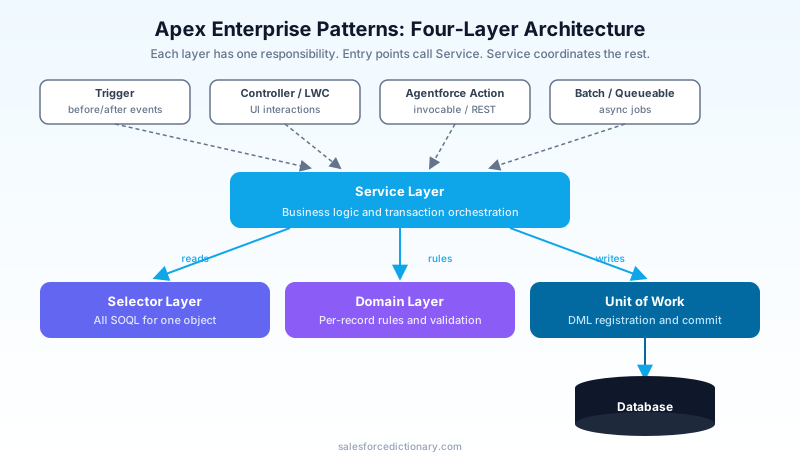
The four layers at a glance
| Layer | Responsibility | Owns | Calls |
|---|---|---|---|
| Service | Business logic, transaction orchestration | Use cases, workflows | Selector, Domain, Unit of Work |
| Selector | All SOQL for one object | Queries, field lists | Nothing (returns records) |
| Domain | sObject behavior and validation | Per-record rules, trigger logic | Selector, Service |
| Unit of Work | DML registration and commit | Insert/update/delete ordering | Database |
Read it top to bottom as a call stack. An entry point (trigger, controller, agent action) calls a Service method. The service uses a Selector to load data, a Domain class to apply per-record rules, and a Unit of Work to batch up all the DML and commit it once at the end. Each layer stays in its lane.
The Service Layer
The service layer is where your business logic lives. Not "set a default field," but the real use cases: "convert this lead and create an opportunity," "process these returns and restock inventory," "renew these contracts." If a product manager can describe it in a sentence, it probably belongs in a service method.
A service method is the unit of reuse. It does not care whether it was called from a trigger, a Lightning controller, a batch job, or an Agentforce action. That is the whole point.
public with sharing class OpportunityService {

  public static void closeWonAndCreateRenewals(Set<Id> oppIds) {
    fflib_ISObjectUnitOfWork uow = Application.unitOfWork.newInstance();

    List<Opportunity> opps = OpportunitiesSelector.newInstance()
      .selectByIdWithLineItems(oppIds);

    Opportunities domain = Opportunities.newInstance(opps);
    domain.markClosedWon(uow);
    domain.spawnRenewals(uow);

    uow.commitWork();
  }
}
Notice what the service method does not do. It does not write SOQL. It does not call insert or update. It coordinates. It asks the selector for data, hands records to the domain, and lets the unit of work handle the database. Every line reads like a step in the use case.
Rules for service methods worth enforcing in code review:
- Static, bulkified, and transaction-scoped. Always accept collections (a
Set<Id>, aList<sObject>), never a single record. - No SOQL or DML inline. Delegate to selectors and the unit of work.
- Marked
with sharingby default. Run in the user's context unless you have a documented reason not to. As of API v67.0, classes without an explicit sharing declaration default towith sharinganyway, so be deliberate.
The Selector Layer
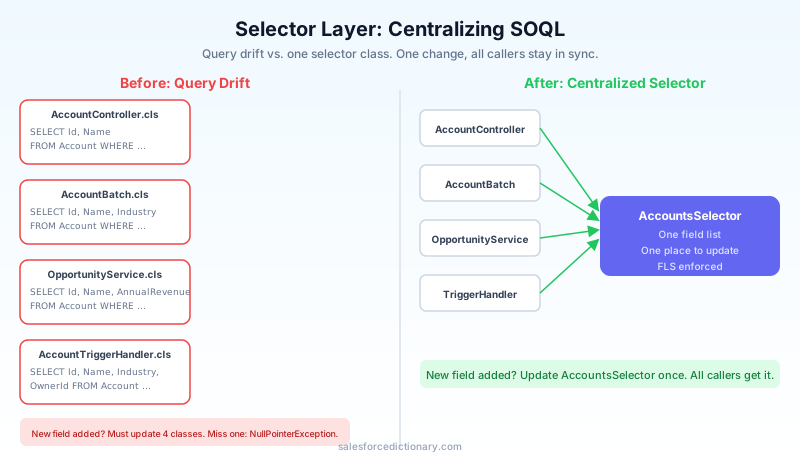
The selector layer is home to every query for a given object. One selector class per sObject. If you need Accounts anywhere, you go through AccountsSelector. Nobody writes [SELECT ... FROM Account] scattered across ten classes.
This solves a problem you have felt even if you never named it: query drift. Class A selects Account with five fields. Class B selects the same Account with seven fields. A new field gets added to a Dynamic Form, and only one of them gets updated. Now you have a NullPointerException in production that only fires for records edited through one screen.
public with sharing class AccountsSelector extends fflib_SObjectSelector {

  public static AccountsSelector newInstance() {
    return (AccountsSelector) Application.selector.newInstance(Account.SObjectType);
  }

  public List<Schema.SObjectField> getSObjectFieldList() {
    return new List<Schema.SObjectField>{
      Account.Id, Account.Name, Account.Industry, Account.AnnualRevenue
    };
  }

  public Schema.SObjectType getSObjectType() {
    return Account.SObjectType;
  }

  public List<Account> selectById(Set<Id> idSet) {
    return (List<Account>) selectSObjectsById(idSet);
  }

  public List<Account> selectByIndustry(String industry) {
    return (List<Account>) Database.query(
      newQueryFactory().setCondition('Industry = :industry').toSOQL()
    );
  }
}
The base class fflib_SObjectSelector gives you a query factory, automatic field-level security enforcement, and a consistent field list. The benefit compounds over time. When you add a field, you add it in one place. When you need to audit which fields a query touches for a Shield encryption review, you look in one file per object.
A practical note: do not put cross-object aggregate reporting queries in a selector if they span six objects. Selectors are organized by primary object. A genuinely multi-object analytical query can live in its own dedicated selector or a reporting service, but keep the per-object selectors clean.
The Domain Layer
The domain layer is where sObject-specific behavior lives. Validation rules expressed in Apex, defaulting logic, the small per-record decisions that belong to the object itself rather than to a larger workflow. If the service layer answers "what use case are we running," the domain layer answers "what does it mean for an Account to be valid."
The domain class is also the natural home for trigger logic. Instead of a fat trigger handler with onBeforeInsert and onAfterUpdate stuffed full of code, your trigger delegates to a domain class whose methods (validate, onApplyDefaults, onAfterInsert) carry the per-record rules.
public with sharing class Accounts extends fflib_SObjectDomain {

  public static Accounts newInstance(List<Account> records) {
    return (Accounts) Application.domain.newInstance(records);
  }

  public override void onApplyDefaults() {
    for (Account a : (List<Account>) Records) {
      if (String.isBlank(a.Industry)) a.Industry = 'Unknown';
    }
  }

  public override void onValidate() {
    for (Account a : (List<Account>) Records) {
      if (a.AnnualRevenue != null && a.AnnualRevenue < 0) {
        a.AnnualRevenue.addError('Annual revenue cannot be negative');
      }
    }
  }

  public class Constructor implements fflib_SObjectDomain.IConstructable {
    public fflib_SObjectDomain construct(List<SObject> records) {
      return new Accounts(records);
    }
  }
}
The domain layer is the one developers skip most often, and it is the one that pays off when an org gets big. It keeps the "rules of being an Account" in a single class instead of smeared across triggers, flows, and validation rules that nobody can reconcile. When a rule changes, you know where it lives.
There is a real trade-off here. The domain layer overlaps with declarative tools. Required fields, simple validation rules, and field defaults are often better as point-and-click config than as Apex. Use the domain layer for logic that is genuinely procedural: rules that loop, branch, or depend on related records in ways a formula cannot express cleanly.
The Unit of Work
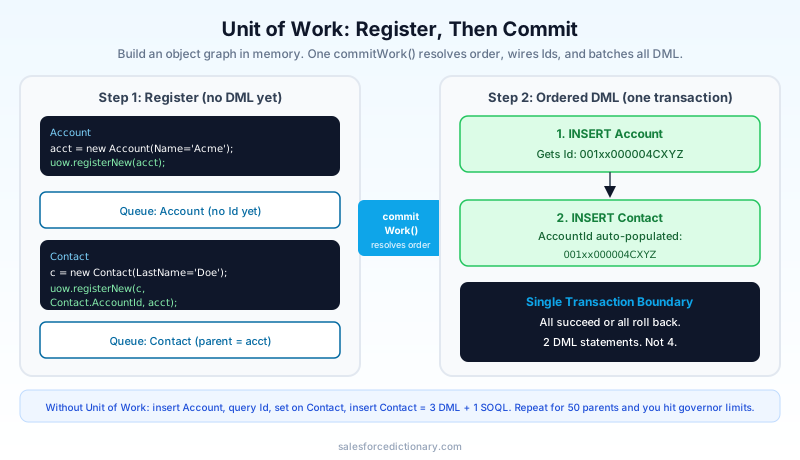
The Unit of Work pattern manages your DML. Instead of scattering insert, update, and delete calls across your service and domain code, you register changes with the unit of work, and it commits them all at once in the correct order.
This solves two problems. First, governor limits: one commitWork() call performs the minimum number of DML statements, batched by object, instead of a dozen separate DML operations chewing through your 150-statement limit. Second, ordering and integrity: the unit of work understands parent-child relationships, so it inserts parents before children and wires up the foreign keys for you. If anything in the batch fails, the whole transaction rolls back together.
fflib_ISObjectUnitOfWork uow = Application.unitOfWork.newInstance();

Account acct = new Account(Name = 'Acme');
uow.registerNew(acct);

Contact c = new Contact(LastName = 'Wile E.');
// The unit of work resolves the AccountId after insert, no intermediate DML needed.
uow.registerNew(c, Contact.AccountId, acct);

uow.commitWork(); // Inserts Account, then Contact, with AccountId populated
That registerRelationship style call is the part people fall in love with. You build an object graph in memory without a single intermediate DML statement, and the unit of work resolves the dependency order at commit time. No more "insert the parent, query the Id back, set it on the children, insert the children" boilerplate.
The unit of work registers registerNew, registerDirty (for updates), registerDeleted, and registerRelationship. You can even register email sends and publish platform events so they fire as part of the same atomic commit.
The factory that ties it together
You may have noticed Application.unitOfWork.newInstance(), Application.selector.newInstance(...), and Application.domain.newInstance(...) throughout the examples. That Application class is the fflib_Application factory. You configure it once, mapping each sObject type to its selector and domain class, and the rest of your code asks the factory for instances rather than calling new directly.
public class Application {
  public static final fflib_Application.UnitOfWorkFactory unitOfWork =
    new fflib_Application.UnitOfWorkFactory(
      new List<SObjectType>{ Account.SObjectType, Contact.SObjectType });

  public static final fflib_Application.SelectorFactory selector =
    new fflib_Application.SelectorFactory(
      new Map<SObjectType, Type>{
        Account.SObjectType => AccountsSelector.class });

  public static final fflib_Application.DomainFactory domain =
    new fflib_Application.DomainFactory(
      selector,
      new Map<SObjectType, Type>{
        Account.SObjectType => Accounts.Constructor.class });
}
This indirection looks like ceremony until you write a unit test. Because everything comes from the factory, your tests can call Application.selector.setMock(...) to swap in a fake selector that returns hand-built records, no database required. That is the payoff in the next section.
Testing: the real reason to bother
Here is the argument that wins over skeptics. With these patterns and the ApexMocks library (a dependency of fflib-apex-common), you can unit-test your service logic without inserting a single record.
A traditional Salesforce test inserts data, runs the method, and queries the result. It is slow, and it tests the database as much as your logic. With mocking, you tell a fake selector "when asked for these Ids, return these in-memory records," run your service, and verify it registered the right DML against a mock unit of work. No SOQL, no DML, milliseconds instead of seconds.
@isTest
static void closeWon_registersUpdate() {
  fflib_ApexMocks mocks = new fflib_ApexMocks();
  fflib_ISObjectUnitOfWork uowMock =
    (fflib_ISObjectUnitOfWork) mocks.mock(fflib_ISObjectUnitOfWork.class);

  Application.unitOfWork.setMock(uowMock);
  // Stub the selector to return an in-memory Opportunity, no database hit.

  OpportunityService.closeWonAndCreateRenewals(new Set<Id>{ fakeId });

  // Verify the service committed work.
  ((fflib_ISObjectUnitOfWork) mocks.verify(uowMock, 1)).commitWork();
}
On a large codebase this is the difference between a test suite that runs in 90 seconds and one that runs in 25 minutes. Fast tests get run. Slow tests get skipped, and skipped tests are how regressions reach production.
When NOT to use these patterns
I will be blunt: these patterns are over-engineering for a small org. If you have three custom objects, two triggers, and one developer, fflib-apex-common adds more abstraction than your problem deserves. You will spend more time wiring up the Application factory than you save.
Reach for the full pattern set when:
- You have multiple developers who keep stepping on each other.
- The same logic needs to run from triggers, controllers, batch jobs, and Agentforce actions.
- Your test suite is slow enough that people avoid running it.
- Query drift and duplicated DML are causing real bugs.
For everything below that bar, a clean trigger handler plus a few well-named service classes is plenty. You can adopt the ideas (centralize queries, keep logic out of triggers, batch your DML) without installing the whole library. The patterns are a spectrum, not an on-off switch.
How to adopt incrementally
You do not rewrite the org in a weekend. Start with the selector layer on your busiest object, because it gives the fastest payoff and the lowest risk. Move every Account query into AccountsSelector over a few sprints. Next, pull the fattest trigger handler's logic into a service method so it becomes reusable. Add the unit of work the next time you write code that inserts a parent-child graph. The domain layer comes last, when validation logic starts duplicating.
| Maturity stage | What to adopt | Signal you are ready |
|---|---|---|
| Starting out | Clean trigger handler | More than one trigger per object |
| Growing | Service + Selector | Duplicated queries and logic |
| Scaling | Unit of Work | DML governor limits, ordering bugs |
| Enterprise | Domain + ApexMocks | Slow tests, multiple developers |
Frequently asked questions
Do I have to use the fflib library? No. You can hand-roll a service and selector layer with plain Apex. The library saves you from reinventing the query factory, the unit of work commit ordering, and the mocking plumbing. For a serious enterprise org, installing it is usually worth it. For a small org, the patterns-as-principles approach is fine.
Is this the same as a trigger framework? They are complementary. A trigger framework (covered in our Apex Trigger Framework guide) handles trigger dispatch and recursion. Enterprise patterns handle what the logic does once dispatched. The domain layer is where the two meet.
Does this replace Flow? No. Declarative tools still own simple automation. These patterns are for procedural Apex logic that is too complex or too performance-sensitive for Flow. See Flow vs Apex for the dividing line.
What about CRUD and FLS enforcement?
The selector base class enforces field-level security when you opt in, and you should run services with sharing. Do not treat the patterns as a substitute for explicit security review, especially for code exposed to Agentforce actions.
Will this help with certification? Yes. Service, Selector, Domain, and Unit of Work appear on the Platform Developer II and Application Architect tracks, and they show up in senior developer interviews. See the certification roadmap for where they fit.
What to read next
- Apex Trigger Framework Best Practices: the dispatch layer these patterns plug into.
- Async Apex Complete Guide: where service methods often run at scale.
- Governor Limits Cheat Sheet: the constraints the unit of work helps you respect.
Pick your busiest object today. Create one selector class and move every query for that object into it. That single change reduces query drift immediately, it is low risk, and it is the gateway to the rest of the pattern set.
About the Author
Dipojjal Chakrabarti is a B2C Solution Architect with 29 Salesforce certifications and over 13 years in the Salesforce ecosystem. He writes and edits salesforcedictionary.com, published by KineticBit Inc., to help admins, developers, architects, and cert/interview candidates sharpen their fundamentals. More about Dipojjal.
Share this article
Sources
Related dictionary terms
Practise it
Five questions on Platform Developer I
Exam-style questions with an explanation after each one. No account needed, and your answers build a weak-topic map once you have one.
Keep reading

The Apex Trigger Framework: Best Practices for Bulk-Safe, Scalable Triggers (2026)
The complete 2026 trigger framework guide. Logic-less triggers, bulk safety, recursion control, framework comparison (Kevin O'Hara vs interface vs virtual), and CRUD/FLS enforcement.

Async Apex: The Complete 2026 Guide to Batch, Queueable, Schedulable & Future Methods
The complete 2026 guide to async Apex - Future, Queueable, Batch, and Schedulable. When to pick each, the Flex Queue, chaining, monitoring, and the production patterns that scale.

Salesforce Flow vs Apex in 2026: A Decision Matrix for Admins, Developers & Consultants
Flow vs Apex is not a religious war anymore. Here is the 2026 decision matrix. Capability gaps, governor limits, the 70/30 rule, and 12 worked scenarios with the right answer for each.
Comments
No comments yet. Start the conversation.
Sign in to join the discussion. Your account works across every page.