
Tenant Secret
A Tenant Secret is the org-specific half of a Shield Platform Encryption key.
Definition
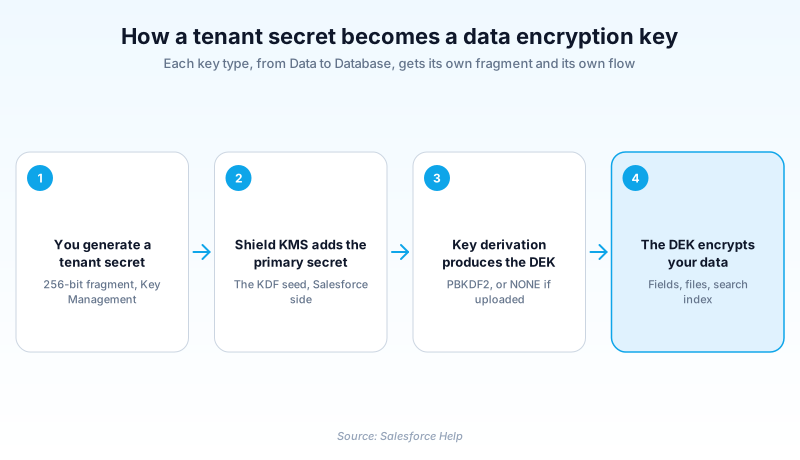
A Tenant Secret is the org-specific half of a Shield Platform Encryption key. It is an encrypted 256-bit fragment. Salesforce combines it with its own primary secret, the KDF seed, to derive the data encryption keys your org actually uses.
Neither fragment is useful alone. Salesforce holds the primary secret and never hands it over. You hold the tenant secret and can rotate or destroy it. The derived key exists only while the Shield Key Management Service holds both halves.
Tenant secrets are versioned rather than edited. Generating a new one archives the previous version, which keeps older data readable while new writes move onto the new key.
In plain English
“Think of a safe that needs two halves of a key to open. Salesforce keeps one half and you keep the other, and the working key only exists when the two are put together. You can swap your half whenever you want, and the old half is kept so anything locked earlier can still be opened. If you throw your half away instead, whatever it locked stays locked for good.”
Worked example
Brookwell Mutual rotates data keys every quarter. An admin holding Manage Encryption Keys opens the Key Management page in Setup and generates a new tenant secret of Type Data. Salesforce creates Version 5 with Source HSM and Status Active, and flips Version 4 to Archived. New claim records encrypt under the key derived from Version 5, while claims written last quarter still decrypt under Version 4. A developer confirms the state with SOQL: SELECT Id, Version, Status, Source FROM TenantSecret WHERE Type = 'Data'. The team checks the rotation throttle for the Data type before scheduling the next one.
How the split-key model actually behaves in an org
Two fragments, one derived key
Salesforce stores your tenant secret as an encrypted 256-bit value and keeps its own primary secret, the KDF seed, on its own side. The Shield Key Management Service runs a key derivation function over both to produce the data encryption key that touches your records. The KeyDerivationMode field records which path was taken. PBKDF2 means Salesforce derived a key from the material it was given. NONE means the Shield KMS uses your material directly as the final data encryption key. That is the mode for controlling the key itself rather than a fragment of it.
Versions, not edits
You never change a tenant secret in place. Each carries a Version number unique within your org, and generating a replacement creates the next version instead of overwriting the last. Status tracks where each version sits. Active can encrypt and decrypt. Archived can no longer encrypt new data but still decrypts anything written while it was active. Destroyed can do neither. Data encrypted under it can no longer be decrypted. Files and attachments encrypted under it can no longer be downloaded. Since API version 44.0 you can move a secret between those states through the API, which makes destruction something a script can do by accident.
Type decides what the key protects
A tenant secret is scoped by its Type. Data covers encrypted fields, files and attachments, and is the default for secrets created in API version 34.0 and later. DeterministicData covers the same surface for deterministic encryption. SearchIndex covers search index files. EventBus is for Change Data Capture event data, Analytics for CRM Analytics data. Database, added in API version 62.0, reaches the transactional database: standard and custom fields, metadata and Apex. One wrinkle: on Hyperforce orgs running API version 63.0 or later, SearchIndex secrets are created with the DataEncryptionKey object instead of TenantSecret.
Rotation is throttled, and it does not rewrite old data
The rotation limits are enforced, not advisory. A Data tenant secret rotates once every 24 hours in production and once every four hours in a sandbox. SearchIndex secrets wait seven days. Plan around that before promising an auditor a same-day rotation. Rotation also only looks forward. Generating a new secret changes what encrypts new writes, and it leaves records already on disk encrypted under the archived version. Those records move onto the current key only when something rewrites them. If your compliance story requires every record under the newest key, rotation on its own will not get you there.
Source: who made the key material
The Source field says where the material came from, and it separates a stock Shield setup from Bring Your Own Key. HSM is a Salesforce-generated secret, made in its own hardware security modules. With Uploaded, you supplied the material yourself, wrapped with a certificate named in SecretValueCertificate and checked against SecretValueHash. Salesforce fetched the Remote kind from an outside key service, through the named credential in RemoteKeyServiceID. Watch the naming here. A secret whose Source is Remote is listed as Fetched on the Key Management page, so the API value and the screen label disagree.
Driving it from the API
TenantSecret has been available since API version 34.0. Its Supported Calls list is create, query, retrieve and update, with no delete. That fits the versioning model: you retire a secret by moving its Status rather than removing the row. SecretValue holds the encrypted 256-bit value in base64, so a query hands back ciphertext rather than anything usable. Scheduled rotation is a common pattern, and it is where teams get hurt. A Schedulable class that generates a secret on a cadence will hit the rotation throttle. Worse, it can pair with a status update that destroys a version still holding readable production data.
Rotate a tenant secret without locking yourself out
Rotating means generating a new tenant secret for a given key type. The throttle applies per type, and the destructive option sits on the same page.
- Confirm you hold Manage Encryption Keys
Key Management is gated by the Manage Encryption Keys user permission, which Salesforce groups with high-risk permissions like Modify All Data. Grant it through a permission set you can audit.
- Open Key Management in Setup
From Setup, go to the Key Management page. It lists the tenant secrets in the org with their version, type, status and source, so check what is Active before you add to it.
- Generate a new secret for the type you need
Pick the key type that matches what you are protecting and generate a new tenant secret for it. The new version becomes Active and the one it replaces becomes Archived.
- Leave the archived version alone
Do not destroy the version you just archived. It is what decrypts everything written before the rotation.
Covers encrypted fields, files and attachments, but not the search index. New secrets default to this type.
Covers search index files. On Hyperforce orgs from API version 63.0, create these with the DataEncryptionKey object instead.
Replaces Salesforce key generation with your own material, uploaded under a certificate or fetched from an outside key service.
- You get one shot per window. If the new secret is wrong, you cannot rotate again until the throttle for that type clears.
- Rotation does not re-encrypt existing records, so the archived version stays load-bearing until that data is rewritten.
- Destroying a tenant secret is permanent: encrypted data cannot be decrypted afterwards, and encrypted files cannot be downloaded.
Prefer this walkthrough as its own page? How to Tenant Secret in Salesforce, step by step
How organizations use Tenant Secret
Rotates Data tenant secrets quarterly and keeps every archived version, so claim records written years earlier still decrypt during an audit.
Uploads its own key material so Source reads Uploaded, keeping key generation off Salesforce infrastructure.
Points Salesforce at an external key service through a named credential, so secrets are fetched on demand and show as Fetched in Setup.
Trust & references
Cross-checked against the following references.
Straight from the source - Salesforce's reference material on Tenant Secret.
Hands-on resources to go deeper on Tenant Secret.
About the Author
Dipojjal Chakrabarti is a B2C Solution Architect with 29 Salesforce certifications and over 13 years in the Salesforce ecosystem. He writes and edits salesforcedictionary.com, published by KineticBit Inc., to help admins, developers, architects, and cert/interview candidates sharpen their fundamentals. More about Dipojjal.
Test your knowledge
+5 pts / dayQ1. What does a tenant secret contribute to Shield Platform Encryption?
Q2. A tenant secret is moved to Destroyed. What happens to data that was encrypted under it?
Q3. How often can a Data tenant secret be rotated in a production org?
Discussion
Loading discussion…