
Solution
A Solution is a standard Salesforce object that stores a detailed description of a customer issue along with the resolution for that issue.
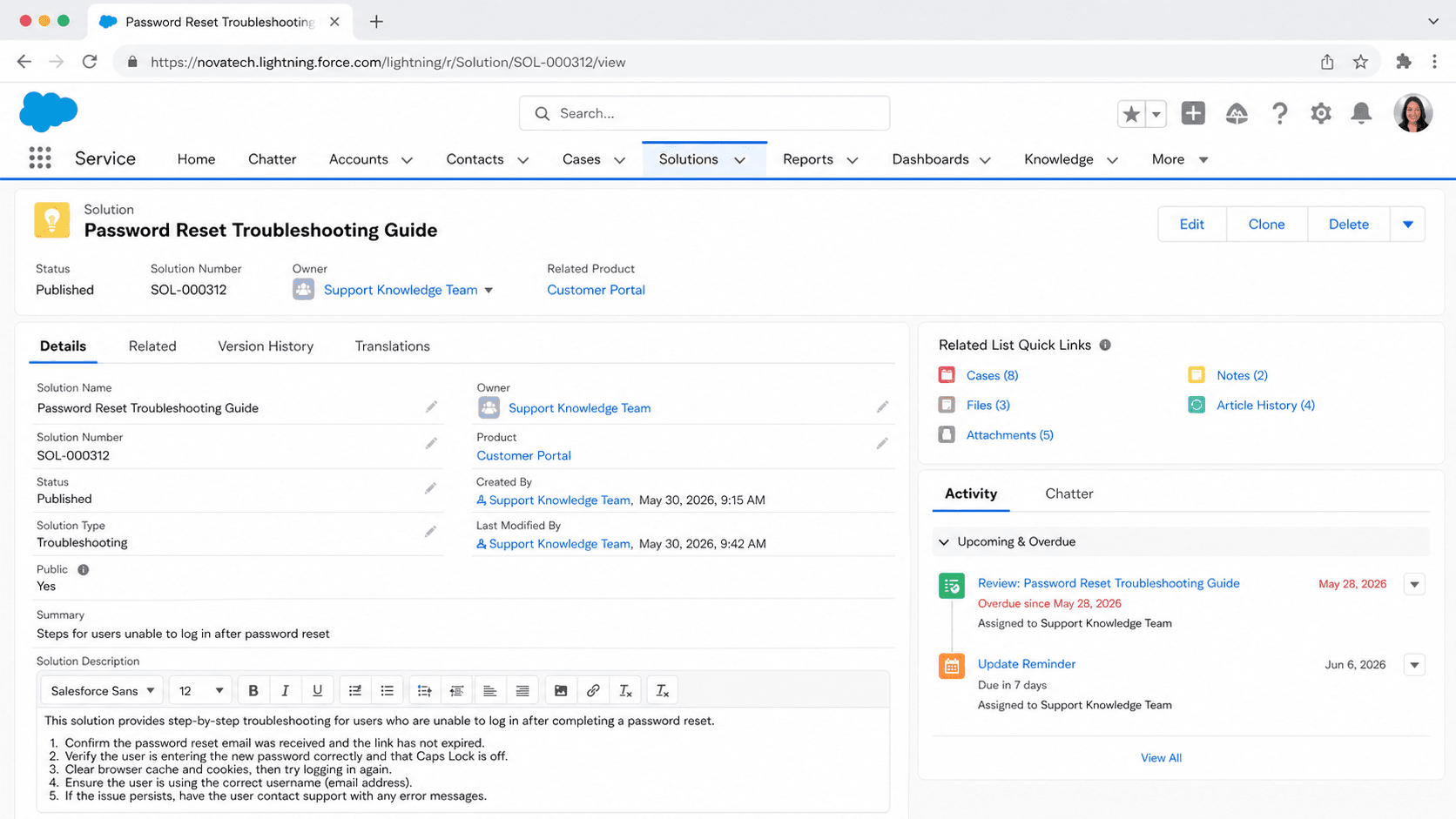
Definition
A Solution is a standard Salesforce object that stores a detailed description of a customer issue along with the resolution for that issue. Support agents attach solutions to cases so the same fix can be reused across many similar problems, and the records are searchable from the Solutions tab.
Solutions are a legacy feature. They were the original knowledge layer in Salesforce Classic, and Salesforce now steers new work toward Salesforce Knowledge (Lightning Knowledge), which offers richer articles, versioning, and multi-channel publishing. Solutions still function in orgs that have the feature, but they are not the recommended path for new builds.
How Solutions actually work in a service org
The anatomy of a Solution record
Every Solution has two parts that matter most. The Solution Title is a short summary of the problem, and the Solution Details field holds the full answer. Agents read the title to decide if a record is relevant, then open the details for the step by step fix. A Status field tracks where the record sits in its review cycle, with values such as Draft, Reviewed, and Duplicate. Solutions can be plain text by default, or HTML when you enable HTML Solutions, which lets authors add paragraphs, images, and links for clearer formatting. Each record also tracks how many cases it has been attached to, which is a quick signal of how useful it has been. A solution manager or an admin owns the lifecycle: writing the record, marking it Reviewed once it is accurate, and retiring records that no longer apply. Because Solutions are standard objects, you can build list views, reports, and validation rules on them the same way you would for any other object. That familiarity is part of why the feature lasted so long in Classic orgs before Knowledge took over.
Solutions and cases work as a pair
Solutions exist to close cases faster. When an agent works a case, they can search existing solutions and attach one that resolves the issue. The link is stored through the CaseSolution junction object, so a single case can carry several solutions and a solution can be reused across many cases. That reuse is the whole point: write the answer once, apply it everywhere. The same record can be sent to a customer, published to a portal, or quoted in a reply, which keeps the wording consistent across the team. Agents do not have to reinvent a fix every time a familiar problem lands in the queue. Over time the most attached solutions surface the issues that hit customers most often, which helps a support lead spot patterns and decide what to document next. The structure also keeps tribal knowledge out of individual inboxes and inside a shared, searchable record. New hires can ramp faster because the resolutions sit in one place instead of living in the heads of senior agents who happen to remember the workaround.
Suggested Solutions and relevancy scoring
Searching by hand is slow, so Salesforce built Suggested Solutions to push likely answers to the agent automatically. From a case detail page, an agent clicks View Suggested Solutions and sees up to ten records ranked by relevance, not by simple keyword match. The relevancy formula weighs several signals: how often words appear across all solutions, how often they appear in similar cases that already have solutions attached, how close keywords sit to each other inside a record, and how many other cases a solution is linked to. It also looks at words shared with cases that customers self closed and with solutions that Self-Service users rated as helpful. Customers can get the same suggestions inside a portal when they log or view a case, and they can self close the case if a suggested record solves their problem. One important constraint: Suggested Solutions and Suggested Articles cannot run at the same time, because they are two different knowledge engines. Suggested Solutions also does not surface Salesforce Knowledge articles, which is one more reason the feature is treated as legacy today.
Solution categories for browsing
Search is one way to find a record, but browsing by topic is another, and that is what solution categories provide. Categories group related solutions into a hierarchy so agents and customers can drill down by subject instead of guessing keywords. Salesforce creates an All Solutions category at the top automatically, and an admin builds subcategories beneath it. A single solution can sit in more than one category, which is handy when a fix spans two topics. You can sort categories alphabetically or apply a custom numbered order so the most common topics appear first. Setting it up takes a few steps: define the categories in Setup, categorize your existing solutions, then turn on category browsing for the Solutions tab and for any portal that needs it. Users with the Manage Categories permission can assign solutions to categories. One gotcha worth noting: a category that is in use by a Customer Portal cannot be deleted until you remove that dependency. Categories make a large solution library feel organized rather than like a flat pile of records.
Publishing to portals and the public
Solutions were not only for internal agents. A record marked as published could appear in the Self-Service portal or the Customer Portal so customers could read the fix without opening a case at all. That early form of case deflection cut volume by letting people help themselves. Authors controlled visibility with publish flags, so a draft stayed internal until it was reviewed and ready for customer eyes. Teams could also drop suggested solution links straight into auto-response emails using a merge field, so a customer who submitted a case received possible answers in the confirmation message. Multilingual support let an org maintain translated versions of the same answer, and search could return results across languages, although cross language matching was never perfectly reliable. The thread running through all of this is consistency: the same vetted answer reached the agent, the email, and the portal, which kept the customer experience uniform. Modern orgs achieve the same outcome with Salesforce Knowledge published to Experience Cloud sites, which is why the Solutions publishing model now feels dated even though the goals behind it still hold.
Why Knowledge replaced Solutions
Solutions did one job, storing a title and an answer, and they did it adequately for years. Salesforce Knowledge does far more. Knowledge articles support multiple article types with custom fields, full versioning so you can track edits and roll back, draft and publish workflows, data categories for fine grained access, and publishing across many channels including internal, partner, and public sites. Knowledge also plugs into Einstein features and modern Lightning components that Solutions never touched. Because of that gap, Salesforce positions Solutions as legacy and recommends building any new knowledge program on Lightning Knowledge. Orgs that still run Solutions should plan a migration, which means recreating solution content as Knowledge articles and reconfiguring search and access to use the Knowledge framework. The move is not just a like for like copy, since you usually rethink article types and categories at the same time. Salesforce provides migration tooling to help shift Classic Knowledge to Lightning, and the broader direction of travel is clear. If you are starting fresh, skip Solutions entirely and stand up Knowledge from day one.
How to create a Solution record
In an org that still has Solutions enabled, a solution manager or admin can create a record from the Solutions tab. This works in Salesforce Classic. For any new knowledge program, create a Salesforce Knowledge article instead.
- Open the Solutions tab
In Salesforce Classic, click the Solutions tab, then click New. If you do not see the tab, confirm the feature is enabled and that your profile has Create access on Solutions.
- Write the title and details
Enter a short, specific Solution Title that names the problem. In Solution Details, write the full resolution. If HTML Solutions is enabled, format with paragraphs, images, and links so the steps are easy to follow.
- Set the status and review
Choose a Status such as Draft while you write. A solution manager marks the record Reviewed once the content is verified, which signals to agents that the answer is trusted.
- Categorize and publish
Assign the record to one or more solution categories so it is easy to browse. If customers should see it, set the publish flags so it appears in the Customer Portal or Self-Service portal.
A short summary of the customer issue the record resolves. This is the main label agents scan, so keep it specific.
The full resolution text. Plain text by default, or rich HTML when HTML Solutions is enabled for the org.
The review state of the record, such as Draft or Reviewed, used to indicate whether the answer is trusted.
- Solutions are legacy. Prefer Salesforce Knowledge for any new knowledge base work.
- Suggested Solutions and Suggested Articles cannot both be enabled in the same org.
- Suggested Solutions never surfaces Salesforce Knowledge articles, only Solution records.
- A solution category that a Customer Portal uses cannot be deleted until the dependency is removed.
Prefer this walkthrough as its own page? How to Solution in Salesforce, step by step
Trust & references
Cross-checked against the following references.
Straight from the source - Salesforce's reference material on Solution.
Hands-on resources to go deeper on Solution.
About the Author
Dipojjal Chakrabarti is a B2C Solution Architect with 29 Salesforce certifications and over 13 years in the Salesforce ecosystem. He writes and edits salesforcedictionary.com, published by KineticBit Inc., to help admins, developers, architects, and cert/interview candidates sharpen their fundamentals. More about Dipojjal.
Test your knowledge
+5 pts / dayQ1. What was a Solution record used for in Salesforce Classic before Knowledge arrived?
Q2. Which modern feature replaced the legacy Solution object for new knowledge work?
Q3. Should an org build new Solution records today instead of Knowledge articles?
Discussion
Loading discussion…