
Price Book
A price book is a Salesforce object that holds a list of products together with the prices you charge for them.
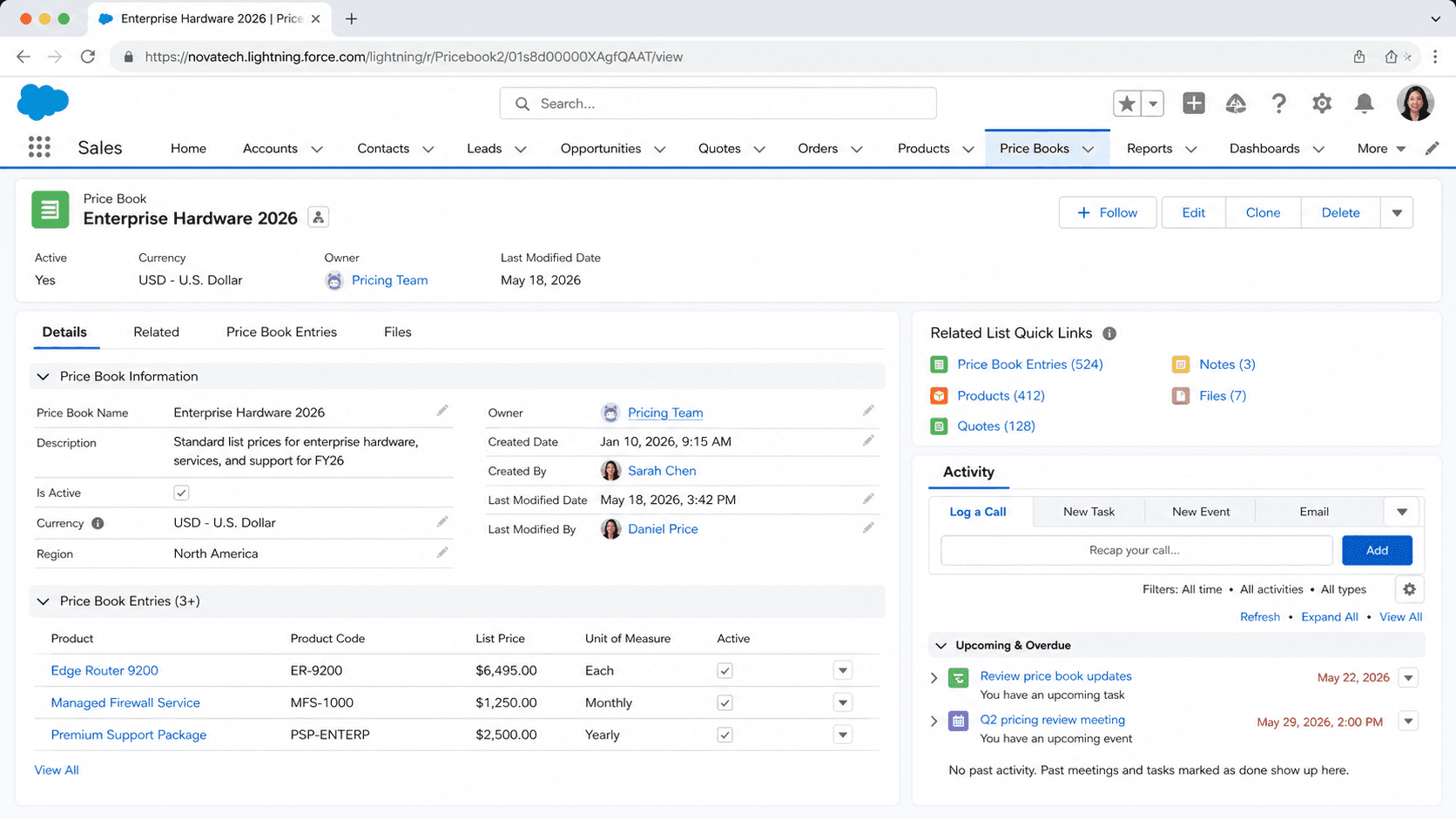
Definition
A price book is a Salesforce object that holds a list of products together with the prices you charge for them. Every Salesforce org that uses products has one Standard Price Book, which Salesforce creates automatically and treats as the master list of products and their default prices. You can also build custom price books that hold different prices for the same products, so a single product record can sell at several prices depending on the book a rep chooses.
The price itself does not live on the price book directly. It lives on a join record called a price book entry, which links one product to one price book at one price in one currency. That design lets the same product appear in the Standard Price Book at a baseline price and in custom price books at regional, segment, or promotional prices, all without cloning the product.
How price books, products, and price book entries fit together
The Standard Price Book is the baseline everything else builds on
Salesforce creates the Standard Price Book the first time you add a product record. It is the one price book that always exists, and it holds every product together with its standard price, the default amount you charge before any special pricing applies. You cannot delete it, and for sales features to work correctly it has to stay active. Think of it as the master catalog. Whenever you add a product to the Standard Price Book, you are setting that product's standard price. This matters because custom price books lean on it. Before you can add a product to any custom price book, that product needs an active standard price book entry. If the standard entry is missing or inactive, Salesforce blocks the custom entry. Many teams that sell at a single price never create a custom book at all. They keep all their products in the Standard Price Book, point opportunities and quotes at it, and that is enough. The Standard Price Book is also where the UseStandardPrice flag comes into play, letting a custom entry simply reuse the standard price instead of carrying its own number.
Custom price books hold different prices for different audiences
A custom price book is a separate list of products with their own prices, which Salesforce calls list prices. You create one whenever a group of customers should see different numbers from everyone else. Classic examples are a domestic book and an international book, a nonprofit book and an enterprise book, or a standing catalog plus a short-lived promotional book for a quarterly campaign. The same product can sit in several books at once, each with its own list price, so you never duplicate the product to change what it costs. When a rep adds products to an opportunity or a quote, they first pick the price book, and that choice decides which prices are available. A custom book does not have to contain every product. You add only the ones that audience can buy, which doubles as a way to control catalog visibility per segment. Custom price books also respect record-level sharing, so you can restrict a sensitive partner or wholesale book to the teams that should quote from it. Pair that with the active-standard-entry rule above and you get pricing that varies by audience while still tracing back to one product and one baseline price.
Price book entries are where the actual price lives
The price book itself stores almost no pricing. The number lives on the price book entry, the join record between a product and a price book. In the API this object is PricebookEntry, and each one carries a UnitPrice (the list price), a currency, an IsActive flag, and a UseStandardPrice flag. The rule to remember is one entry per product per currency per price book. So a product sold in three currencies inside one book needs three entries, each with its own UnitPrice in that currency. UseStandardPrice is a small but useful field. When it is true on a custom entry, that entry borrows the standard price instead of storing a separate amount, which keeps a custom book in step with the baseline automatically. Set it to false and you type an independent list price. IsActive controls whether sales users can pick that entry when building an opportunity or quote. Inactive entries stay on the record for history but drop out of the picker. When you load products in bulk through Data Loader, the standard entry must be active first, which is the same prerequisite enforced in the UI just expressed through the API.
How a rep uses a price book on an opportunity or quote
On the selling side the flow is short. A rep opens an opportunity, goes to the Products related list, and chooses a price book. If only the Standard Price Book exists, Salesforce may skip the prompt and use it. From there the rep adds products that belong to that book, and each line picks up its list price as the default sales price. The rep can still override the sales price on the line when a deal calls for a discount, but the list price is the starting point. An opportunity is tied to a single price book at a time, so all of its product lines come from that one book. Switching the price book after products are added clears the existing lines, since prices from a different book would no longer apply. Quotes inherit the opportunity's price book the same way, keeping the proposal consistent with the deal. This is why the price book choice is a real decision, not a formality. It sets the menu of products and the prices a rep starts from, and it keeps a domestic deal from accidentally pulling international pricing. A worked example: a laptop sits in the Standard Price Book at 1,000 USD and in an EMEA book at 900 GBP. A rep on a UK deal picks the EMEA book, the line defaults to 900 GBP, and they discount to 850 if needed.
Currencies, list price, and sales price are three separate ideas
Three price concepts travel together and people often blur them. The list price is the price on the price book entry, what the product costs in that book before any deal-specific change. The sales price is the price on an individual opportunity or quote line, which starts at the list price but a rep can edit per deal. The standard price is the list price held in the Standard Price Book, the baseline the whole catalog references. In an org with multiple currencies, each price book entry names the currency its price is in, so a single book can carry the same product at different amounts for USD, GBP, JPY, and so on. That is why you may see several entries for one product inside one book. Salesforce can also be configured to drop the list price straight onto the line as the sales price automatically, which saves reps re-typing it. Keeping the three terms straight helps when you debug pricing. If a line shows the wrong amount, you check whether the issue is the list price on the entry, an override on the sales price, or simply the wrong price book selected on the opportunity.
When standard price books stop being enough
Standard and custom price books handle a lot, but they assume a fairly flat model: a product has a price in a book, and a rep can discount a line. They do not natively calculate tiered volume discounts, bundle logic, percent-of-total rules, or subscription proration. Once pricing gets that intricate, teams reach for Salesforce CPQ, the Configure, Price, Quote application that sits on top of products and price books and adds price rules, discount schedules, and guided product selection. CPQ still uses price books underneath, so the concepts here carry forward rather than getting thrown away. It is worth knowing the boundary so you size the solution correctly. If your pricing is a handful of segments each paying a set list price, custom price books alone are the simpler, cheaper answer, and adding CPQ would be overkill. If reps routinely configure multi-product bundles with conditional discounts, plain price books force too much manual work and CPQ earns its place. A common path is to start with custom price books, let the business grow, and layer CPQ in later when the manual overrides and spreadsheet workarounds start to pile up.
How to create a custom price book
Create a custom price book when a group of customers should see different prices from everyone else, for example a regional or partner catalog. You build the book, activate it, then add products at their list prices. Each product you add must already have an active entry in the Standard Price Book.
- Confirm the standard prices exist
Open Products and make sure each product you plan to sell has an active standard price book entry. Custom price books cannot include a product that has no active standard price, so set those baselines first.
- Create the price book record
Go to the Price Books tab, click New, give the book a clear Price Book Name, add a description, and select the Active checkbox so reps can use it. Save the record.
- Add products and list prices
On the new price book, use Add Products (or Add to Price Book from a product), pick the products, and enter a List Price for each in the right currency. Leave Use Standard Price selected to reuse the baseline, or clear it to type a custom amount.
- Verify on a test opportunity
Open a sample opportunity, choose the new price book in the Products related list, and confirm the products and list prices appear as expected before the team starts quoting from it.
The label sales users see when choosing a book on an opportunity or quote. Make it describe the audience, such as EMEA Partners or Nonprofit.
A checkbox that decides whether reps can select the book. An inactive price book is hidden from the opportunity and quote pickers.
Set on each price book entry as you add products. This is the price for that product in this book, in the entry's currency, and it defaults onto the sales line.
- You cannot add a product to a custom price book unless it has an active Standard Price Book entry first.
- An opportunity uses one price book at a time. Changing the price book after products are added removes the existing product lines.
- With multiple currencies, each product needs a separate price book entry per currency, since one entry holds one price in one currency.
- Do not delete or deactivate the Standard Price Book. Sales features depend on it, and custom books reference its standard prices.
Prefer this walkthrough as its own page? How to Price Book in Salesforce, step by step
Trust & references
Cross-checked against the following references.
Straight from the source - Salesforce's reference material on Price Book.
Hands-on resources to go deeper on Price Book.
About the Author
Dipojjal Chakrabarti is a B2C Solution Architect with 29 Salesforce certifications and over 13 years in the Salesforce ecosystem. He writes and edits salesforcedictionary.com, published by KineticBit Inc., to help admins, developers, architects, and cert/interview candidates sharpen their fundamentals. More about Dipojjal.
Test your knowledge
+5 pts / dayQ1. What does a Salesforce Price Book contain?
Q2. What is true of the Standard Price Book in Salesforce?
Q3. Why would an org maintain multiple custom Price Books for the same products?
Discussion
Loading discussion…